
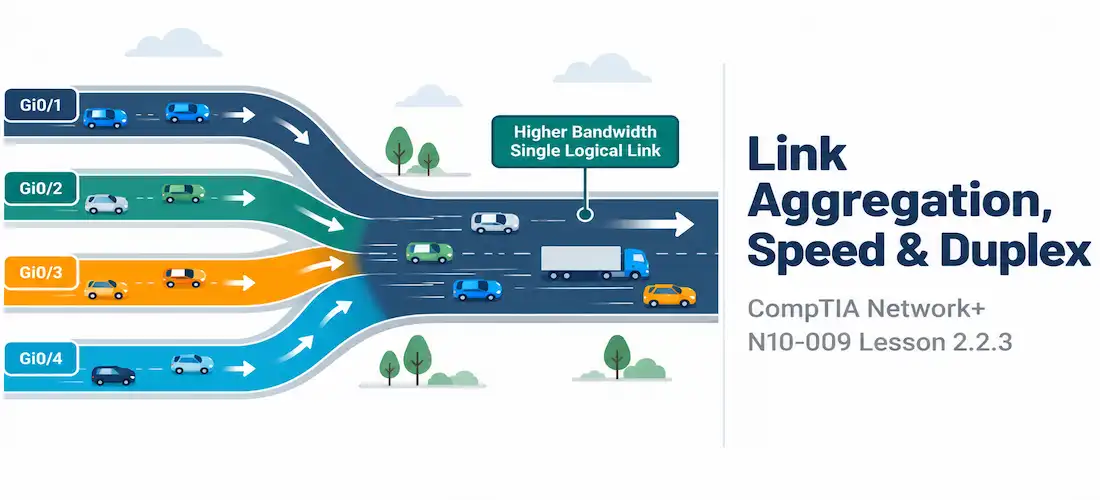
Domain 2.0 | Network Implementation — 20% of exam
Learning Objectives
By the end of this lesson, you will be able to:
- Explain the purpose of link aggregation and how it combines multiple physical links into one logical link
- Compare static link aggregation to dynamic negotiation via LACP
- Explain interface speed and duplex settings and how mismatches degrade or break connectivity
- Describe auto-negotiation and identify when manual configuration is the better choice
- Recognize common symptoms of link aggregation and speed/duplex misconfigurations
Key Terms
| Term | Definition |
|---|---|
| Link Aggregation (LAG) | Combining multiple physical links between two devices into a single logical link for added bandwidth and redundancy |
| LACP (Link Aggregation Control Protocol) | The IEEE 802.3ad standard that dynamically negotiates and forms a link aggregation group between two devices |
| Duplex | Whether a link can send and receive simultaneously (full duplex) or only one direction at a time (half duplex) |
| Auto-negotiation | The process by which two connected interfaces automatically agree on speed and duplex settings |
| Duplex Mismatch | A misconfiguration where one end of a link is set to full duplex and the other to half duplex, causing collisions and severe performance loss |
Explanation
Why Link Aggregation Exists
A single link between two switches, or between a switch and a server, is limited by that link’s rated speed — and it’s also a single point of failure. If a company’s two core switches are connected by one 10-gigabit link and traffic between them regularly needs more than that, adding a second physical cable doesn’t help on its own; without special configuration, switches won’t automatically load-balance traffic across two separate parallel links, and running Spanning Tree would actually block one of them to prevent a loop.Link aggregation solves both problems at once: it bundles multiple physical links into a single logical link, which switches (and Spanning Tree) treat as one interface. Traffic gets distributed across the physical member links for extra throughput, and if one physical link fails, the logical link keeps functioning over the remaining members — no Spanning Tree recalculation, no dropped connectivity, just reduced capacity until the failed link is restored.
How Link Aggregation Actually Works
On Cisco equipment, this bundled logical interface is often called an EtherChannel or port-channel; the general industry term is link aggregation group (LAG). Multiple physical interfaces — commonly two, four, or eight — are grouped together and presented to the rest of the network as one single, faster logical interface.
SW1(config)# interface range GigabitEthernet0/1-2
SW1(config-if-range)# channel-group 1 mode on
Traffic isn’t simply split evenly frame by frame across the member links — instead, the switch runs a hashing algorithm (typically based on some combination of source/destination MAC address, IP address, or port number) to consistently assign each individual conversation to one specific physical link within the bundle. This keeps frames from the same conversation arriving in order, while still spreading different conversations across different physical links for aggregate throughput.
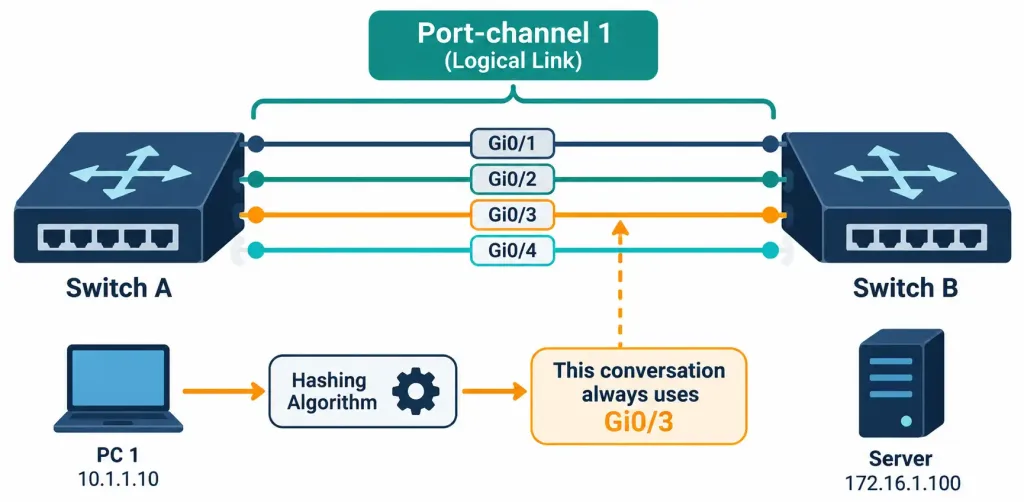
How Multiple Physical Links Are Bundled Into One Logical Interface
Because the whole point of a LAG is to be treated as one interface, it’s also a natural companion to trunking: two switches often bundle several physical links into one EtherChannel, and then configure that logical interface as a trunk carrying multiple VLANs — combining the throughput and redundancy of aggregation with the multi-VLAN capability from the previous lesson.Static vs. LACP (Dynamic) Aggregation
Link aggregation can be configured in two fundamentally different ways:
- Static (or “on” mode) simply forces the interfaces into the bundle with no negotiation at all. Both sides have to be manually configured identically, or the bundle won’t form correctly — there’s no verification step to catch a mismatch.
- LACP (Link Aggregation Control Protocol), defined in IEEE 802.3ad, actively negotiates the bundle between both connected devices, confirming that both sides genuinely agree to aggregate those specific links before traffic starts flowing across them as a bundle.
LACP itself supports two negotiation modes: active, where the interface proactively sends LACP negotiation packets, and passive, where the interface waits and only responds if the other side initiates. At least one side of the link must be active for LACP to actually form the bundle — two passive interfaces will simply sit there waiting for each other and never negotiate anything.
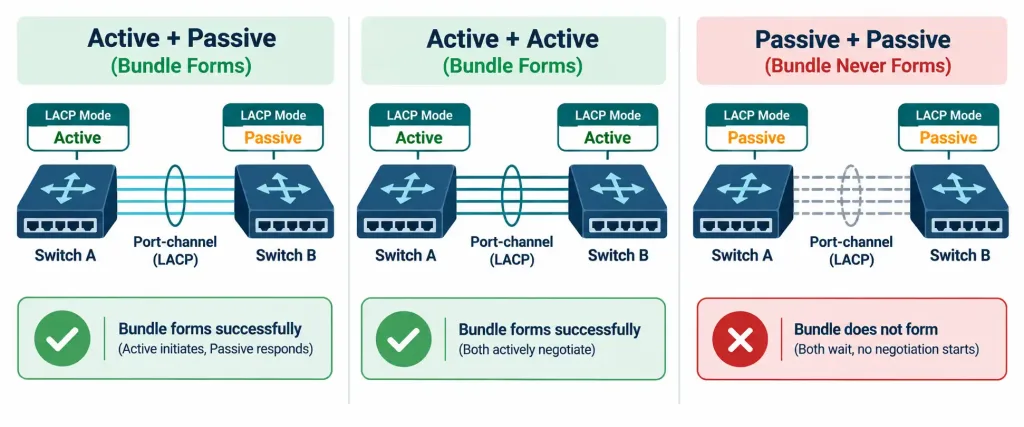
How Active And Passive LACP Modes Combine To Form Or Fail To Form A Bundle
Because LACP actively verifies agreement before bundling, it’s generally preferred over static aggregation in production environments — a static mismatch (one side expecting four links, the other only configuring two) can silently create a broken or inconsistent bundle, where LACP would simply refuse to form it and flag the problem instead.
Interface Speed and Duplex
Every Ethernet interface operates at a specific speed (10 Mbps, 100 Mbps, 1 Gbps, and so on) and a specific duplex setting:
- Full duplex allows an interface to send and receive simultaneously — the normal, expected mode on virtually all modern switched Ethernet links.
- Half duplex allows only one direction of traffic at a time, a holdover from the original shared-media Ethernet days when multiple devices contended for the same physical wire and needed a mechanism (CSMA/CD, collision detection) to avoid talking over each other.
Auto-Negotiation and Mismatches
Auto-negotiation lets two connected interfaces automatically agree on the fastest mutually supported speed and the correct duplex setting, without any manual configuration. In the vast majority of modern deployments, leaving auto-negotiation enabled on both ends is the right call — it removes an entire category of manual configuration error.
The trouble starts when one side is manually forced to a specific speed and duplex setting while the other side is left on auto-negotiation. Auto-negotiation depends on both sides actively participating in the negotiation process; if one side is hard-set, the auto-negotiating side often falls back to a default guess — commonly half duplex — while the other side is actually running full duplex. The result is a duplex mismatch: the link technically comes up and passes some traffic, but performance is severely degraded, littered with late collisions and retransmissions, in a way that looks confusing because the interface doesn’t report as fully “down.”
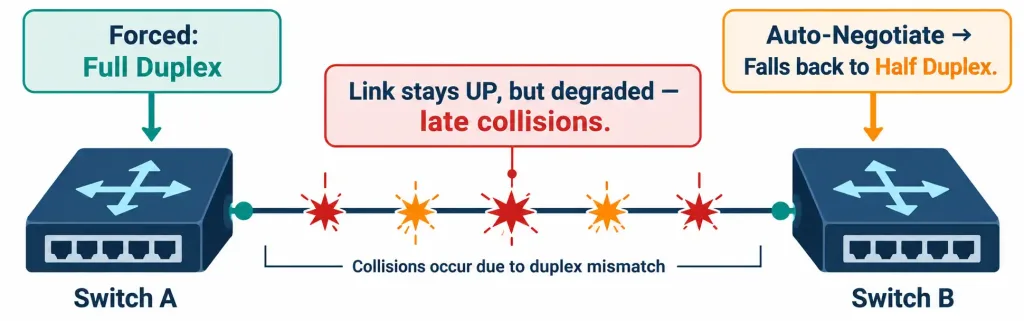
How A Duplex Mismatch Between A Forced Setting And Auto-Negotiation Degrades A Link Without Fully Failing It
The safest practice is consistency: either let both ends auto-negotiate, or manually hard-set both ends identically. Mixing one hard-set side with one auto-negotiating side is the single most common cause of this specific class of “the link is up but painfully slow” problem.
Recognition-Level Verification Concepts
A few patterns are worth recognizing on sight:
- Multiple physical interfaces reporting into a single “Port-channel” or “EtherChannel” logical interface indicates link aggregation is in effect.
- An LACP mode combination of active/passive (or active/active) will successfully negotiate a bundle; passive/passive will not.
- A link reporting “up” but showing a high count of late collisions or CRC errors, especially with inconsistent throughput, points toward a duplex mismatch rather than a hardware failure.
- One side of a link explicitly configured with a fixed speed/duplex while the other is left on “auto” is a duplex-mismatch risk waiting to happen, even if the link currently looks fine.
Common Exam Traps
- Static aggregation performs no negotiation or verification — a mismatched configuration on either side can silently create a broken bundle, unlike LACP, which actively confirms agreement first.
- LACP requires at least one side to be in active mode. Two passive interfaces will never form a bundle, since neither one initiates the negotiation.
- A duplex mismatch does not bring a link down. The link reports as up, and some traffic does pass — this is precisely what makes duplex mismatches deceptively hard to diagnose compared to a fully failed link.
- Half duplex is largely a legacy concept on modern switched networks. Don’t assume a link needs manual half-duplex configuration just because an older device is involved — auto-negotiation handles this correctly in nearly all cases.
- Mixing a hard-set interface with an auto-negotiating interface is the classic cause of duplex mismatches — the fix is making both sides consistent, either both auto or both manually matched.
Lesson 2.2.3 Practice Quiz — Link Aggregation, Interface Speed & Duplex
17 questions covering EtherChannel/LAG, static vs. LACP aggregation, speed and duplex, auto-negotiation, and duplex mismatches.
N10-009 · Domain 2.2Summary
Link aggregation bundles multiple physical links into one logical link, increasing throughput and adding redundancy without triggering Spanning Tree to block a redundant path.
Static aggregation forces a bundle with no negotiation; LACP actively negotiates and verifies agreement between both sides before forming the bundle.
LACP needs at least one side in active mode — two passive interfaces will never form a bundle on their own.
Full duplex allows simultaneous two-way traffic and is standard on virtually all modern switched links; half duplex is a legacy, one-direction-at-a-time mode from shared-media Ethernet.
Auto-negotiation lets both sides of a link agree on speed and duplex automatically, and mixing a hard-set side with an auto-negotiating side is the classic cause of a duplex mismatch.
A duplex mismatch degrades a link severely without taking it fully down, making it a distinctly tricky troubleshooting scenario compared to an outright link failure.



