Asad Ijaz
Lead Networking Architect and Editor at NetworkUstad. BS in Computer Networks and Security, CCNP and CCNA certified, with 11+ years of experience in enterprise network design, implementation, and troubleshooting. Writes practical tutorials on routing, IPv4 management, network automation, and security fundamentals.
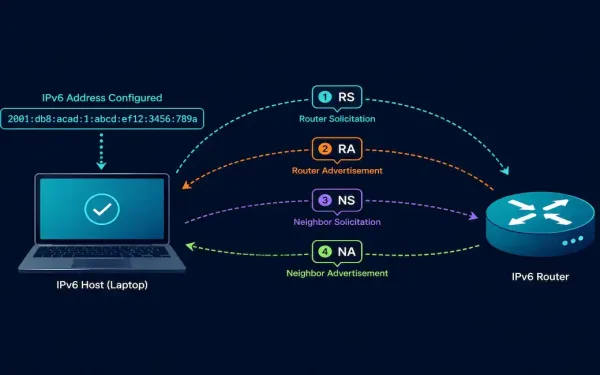
ICMPv6 Neighbor Discovery: RS, RA, NS, and NA Messages Explained
ICMPv6 does considerably more than its IPv4 counterpart. Beyond basic error reporting, it absorbs an entire protocol’s worth of functionality through the Neighbor Discovery Protocol (NDP), four distinct message types working together to replace ARP, handle address resolution, and drive SLAAC. This guide covers each of the four NDP message types, how they interact, and...
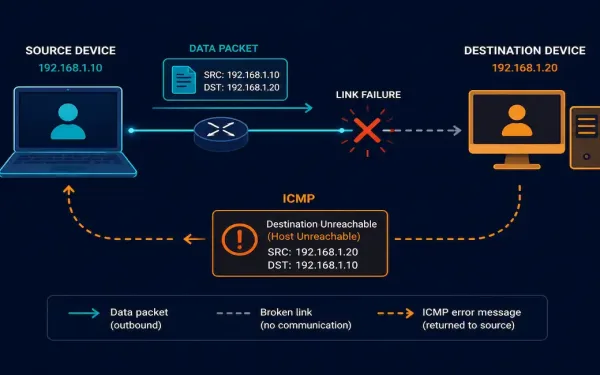
Internet Control Message Protocol (ICMP) Explained
IP is deliberately unreliable: it has no built-in mechanism to report when something goes wrong. That’s exactly the gap the Internet Control Message Protocol (ICMP) fills. It doesn’t make IP more reliable, it doesn’t retransmit or guarantee delivery, but it does report problems back to the source, which is what makes tools like ping and...
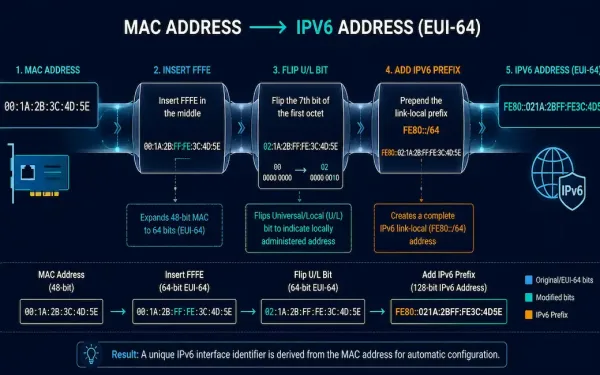
The EUI-64 Process: How IPv6 Interface IDs Are Generated
When a device configures an IPv6 address through Stateless Address Autoconfiguration (SLAAC), it gets the network prefix, typically a /64, from a Router Advertisement, but it has to generate its own 64-bit Interface ID independently. This guide covers exactly how that generation works: the EUI-64 process that derives an Interface ID from a MAC address,...
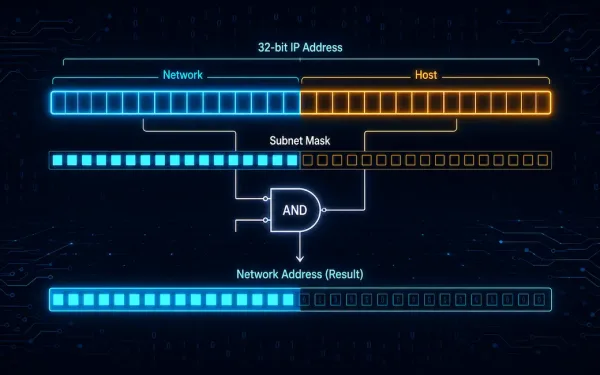
Network and Host Portion of an IPv4 Address
Every network needs a unique network number. Every host needs a unique IP address. The IPv4 address is a 32-bit number. It identifies both a network and a host on that network. This split is one of the very first things you learn in networking, and it stays useful for your entire career. We usually...
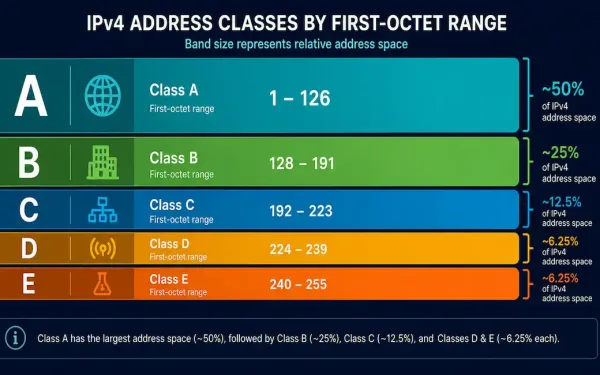
IPv4 Address Classes Explained: A, B, C, D, and E
An IPv4 address identifies a device on a network, similar to how a street address identifies a physical location. Every device on an IP-based network, including the internet, needs one to communicate. This guide covers the five IPv4 address classes, how to identify each one from its first octet, and the specific network and host...
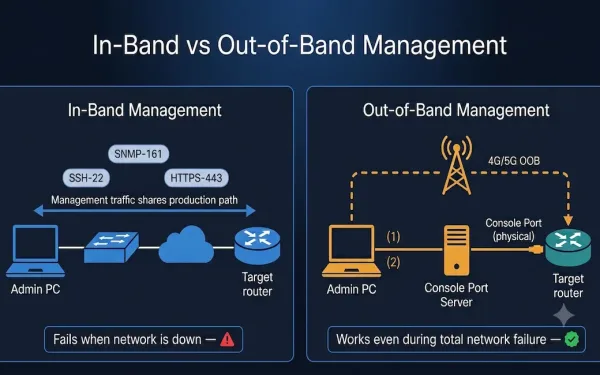
In-Band and Out-of-Band Network Management: A Complete Guide
Network management is critical for businesses, IT teams, and CCNA students learning the fundamentals of how networks are administered. Two fundamental approaches — in-band and out-of-band (OOB) management — determine how administrators monitor, configure, and troubleshoot devices. Understanding when to use each method, how to configure them on Cisco IOS, and how they relate to...
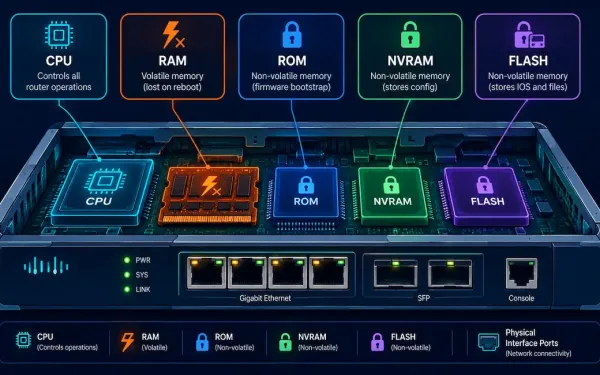
Cisco Router Components Explained: CPU, Memory Types, and IOS
A Cisco router is, at its core, a specialized computer. Regardless of its size, price, or role in a network, every router shares the same fundamental set of components: a CPU to execute instructions, an operating system to run, several distinct types of memory, physical interfaces to connect to the network, and a mechanism for...
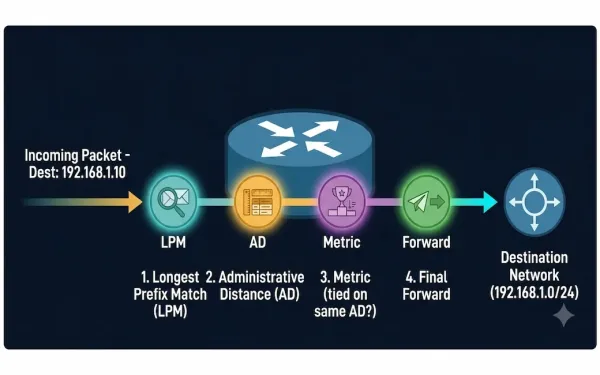
How a Router Makes a Packet Forwarding Decision: A Step-by-Step Guide
Routers are the traffic directors of the internet, guiding data packets to their destinations with precision. But how exactly do they decide where to send each packet? This guide breaks down the router packet forwarding process step by step, covers the Longest Prefix Match and Administrative Distance rules that actually determine route selection, and explains...
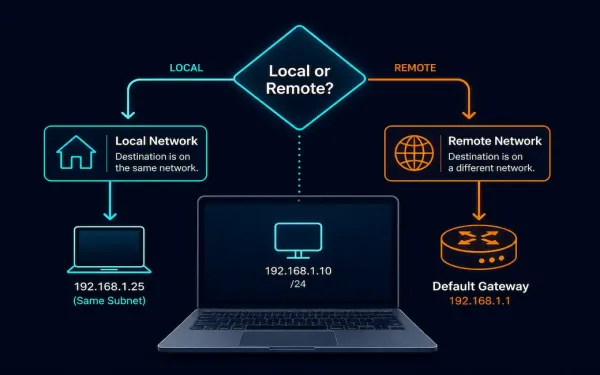
Host Forwarding Decisions: How Hosts Actually Route Their Own Traffic
Every networked device, whether it’s a dedicated router or an ordinary laptop, has to decide how to get a packet toward its destination. Routers specialize in this, but end hosts, PCs, servers, phones, make their own forwarding decisions too, using a much simpler process built on subnetting, a minimal routing table, and address resolution. This...
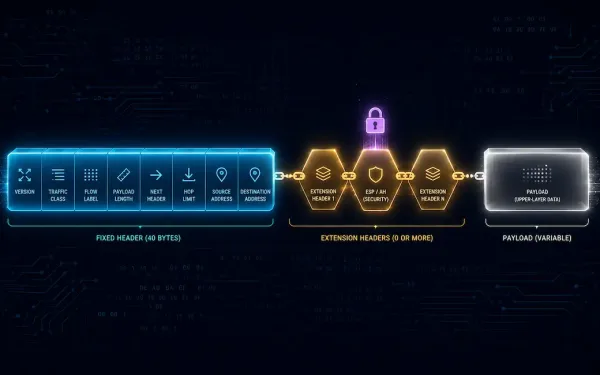
IPv6 Header and Fields Explained
IPv6 is the improved version of the Internet Protocol, and the IPv6 header is one of its most significant improvements over the IPv4 header. The header format has been dramatically simplified: some IPv4 header fields have been removed entirely, others have moved into optional IPv6 Extension Headers, and the fields that remain are streamlined for...