
Networking
CCNA tutorials, Cisco guides, and enterprise networking insights for IT professionals.
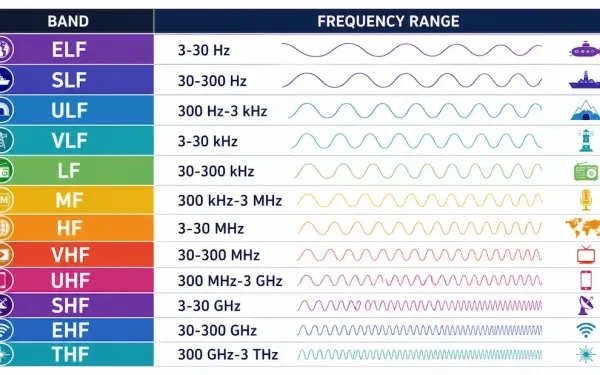
Radio Frequencies: The ITU Band Chart Explained
Radio frequencies are the range of electromagnetic wave oscillation used for wireless communication and broadcasting, spanning from 3 Hz up to 300 GHz. This band sits within the broader electromagnetic spectrum, alongside microwaves, infrared, visible light, ultraviolet, X-rays, and gamma rays — radio waves specifically have the longest wavelengths in that spectrum, ranging from a...
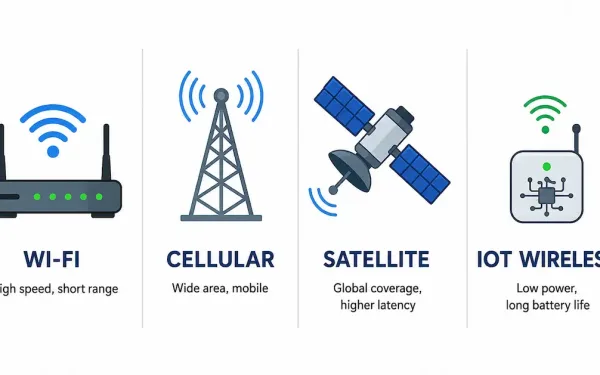
Wireless Technologies: Wi-Fi, Cellular, Satellite, and IoT Compared
Wireless communication covers a wide range of distinct technologies, each built for a different range, use case, and set of trade-offs. This article surveys the major categories — Wi-Fi, cellular, satellite, and short-range IoT wireless — with verified figures rather than speculative predictions. Wi-Fi: The Current Generations Three Wi-Fi generations are in active use today,...
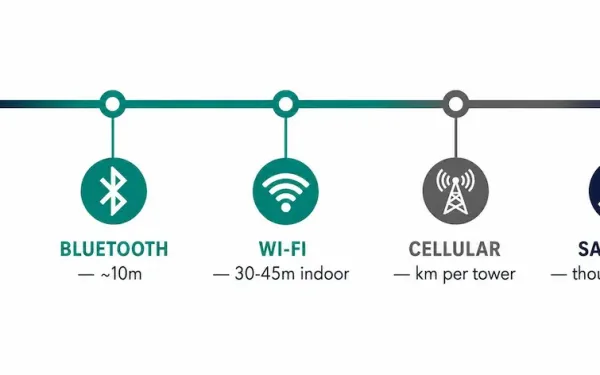
Introduction to Wireless Networking: WLAN Fundamentals
Wireless communication transmits information between devices using radio waves instead of a physical medium like copper cable or fiber. It’s one of the fastest-growing areas in networking specifically because it removes the one constraint wired networks can’t escape: a device has to stay tethered to wherever its cable ends. What a WLAN Actually Is A...
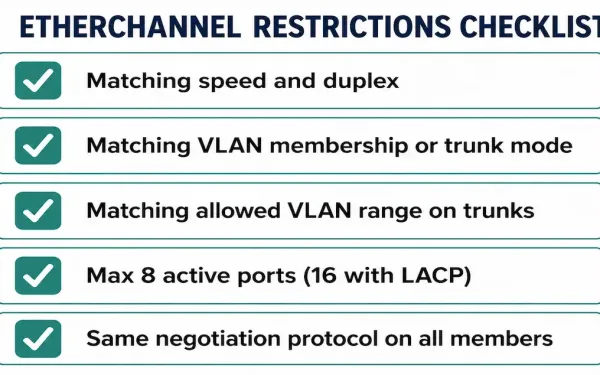
How to Configure EtherChannel: Restrictions and Step-by-Step Setup
Before building an EtherChannel bundle, it’s worth knowing the restrictions that determine whether it will actually form — most failed or partial bundles trace back to one of these being overlooked. This guide covers the restrictions, the exact configuration steps, and the verification commands to confirm it worked, building on the link aggregation, EtherChannel, and...
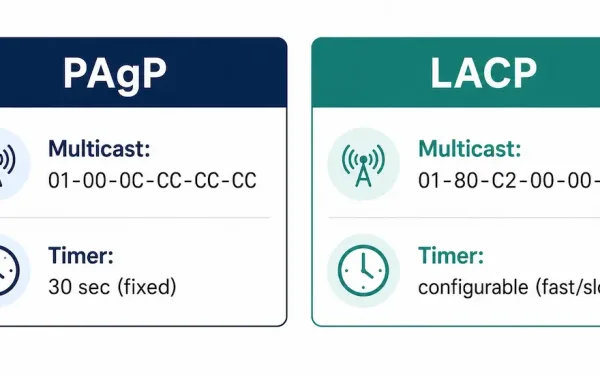
EtherChannel Protocols: PAgP and LACP Explained
EtherChannel bundles multiple physical links into a single logical link, and link aggregation is the general concept behind it. This article goes one level deeper: the actual negotiation protocols — PAgP and LACP — that bring a bundle up dynamically, including their multicast addresses, timers, and exact mode compatibility rules. Because Spanning Tree Protocol sees...
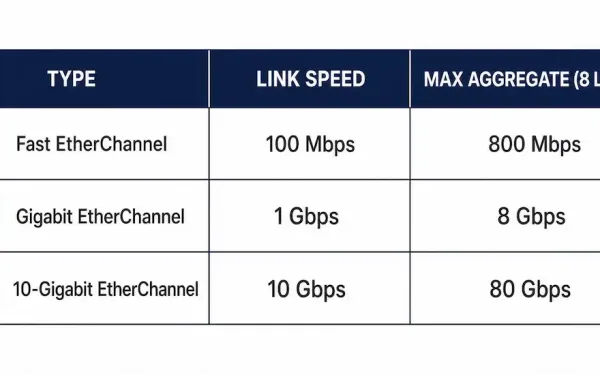
EtherChannel: Bandwidth, Limits, and How It Actually Bonds Links
EtherChannel is Cisco’s specific implementation of the link aggregation concept — bundling multiple physical Ethernet ports into a single logical channel. This article focuses on the bandwidth math, the point-to-point requirements, and the hard limits worth knowing; for PAgP and LACP negotiation modes, see the link aggregation article, which covers that side in full. How...
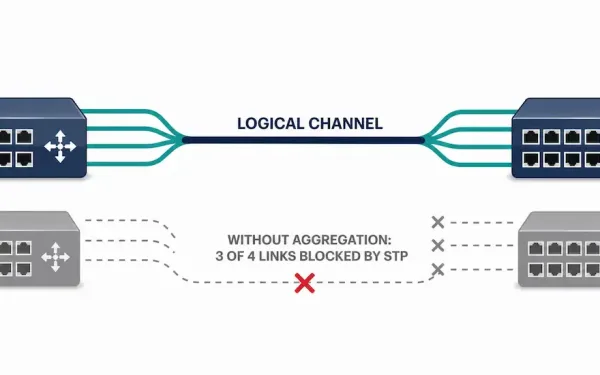
What Is Link Aggregation? A Complete Introduction
Link aggregation is the capability to produce one logical link using several physical links between two devices. Network devices and management functions treat this link aggregation group (LAG) of multiple Ethernet connections as a single, unified link — giving network engineers a way to scale bandwidth between switches without replacing existing cabling or hardware. Why...
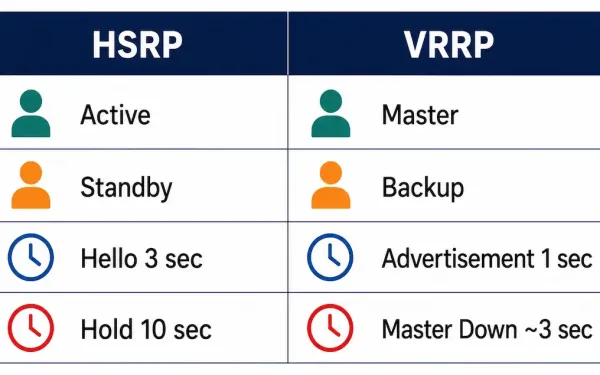
How to Configure VRRP: The Open-Standard Alternative to HSRP
VRRP (Virtual Router Redundancy Protocol) does the same job as HSRP — multiple routers sharing a virtual IP address so hosts never need to know which physical device is actually forwarding their traffic — but it’s an open IETF standard (RFC 3768) rather than a Cisco-proprietary protocol. If a network mixes equipment from different vendors,...
How to Configure GLBP: Active-Active Gateway Load Balancing
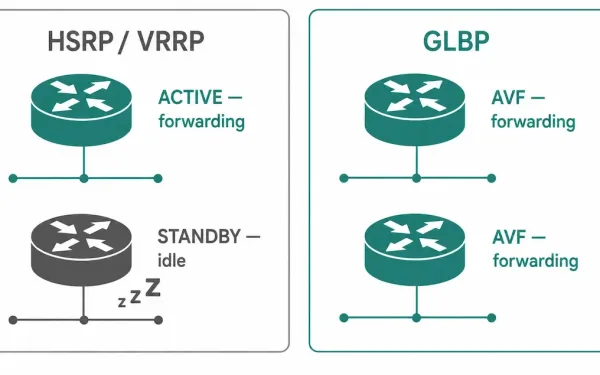
HSRP and VRRP both solve gateway failover the same way: one router is active, everything else sits idle until it fails. GLBP (Gateway Load Balancing Protocol), Cisco’s own extension, was built specifically to fix that waste — it lets every router in the group actively forward traffic simultaneously, not just the one that happens to...
How to Configure HSRP: Step-by-Step Guide
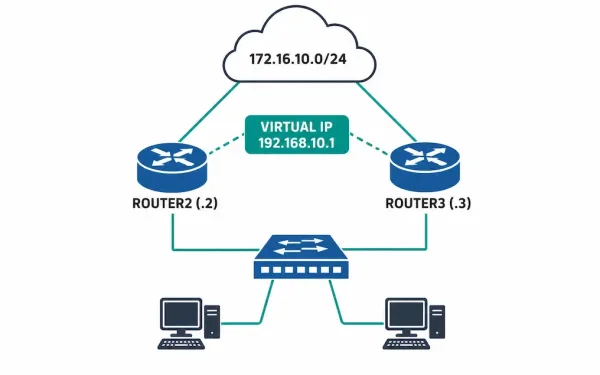
HSRP (Hot Standby Router Protocol) is Cisco’s proprietary First Hop Redundancy Protocol, designed for transparent failover of the first-hop device hosts use as their default gateway. It lets two or more routers share one virtual IP and virtual MAC address, as covered mechanically in the router redundancy article, with exactly one router actively forwarding traffic...