
Networking
CCNA tutorials, Cisco guides, and enterprise networking insights for IT professionals.
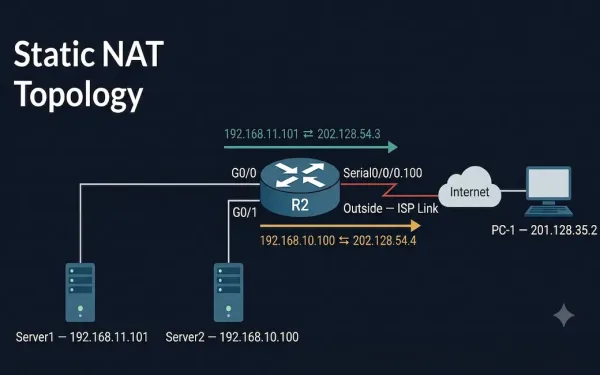
How to Configure Static NAT on Cisco Routers
Static NAT maps inside and outside addresses one-to-one. It allows external devices to establish a session with internal devices using a statically assigned public address. For example, an internal web server is mapped to a specific inside global address, letting outside clients reach it using a public IP while the server itself keeps its private...
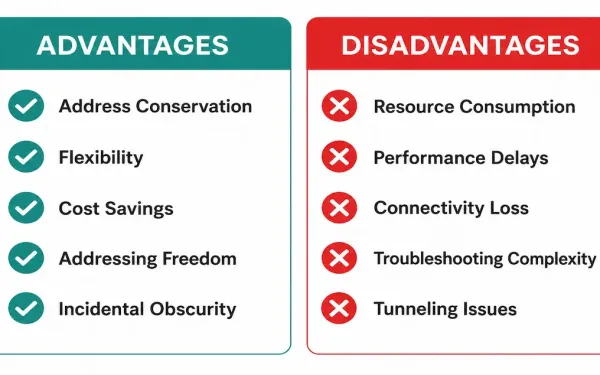
NAT Advantages and Disadvantages
NAT is a genuine trade-off, not a free win. It solved IPv4 exhaustion well enough that IPv6 adoption has taken decades longer than originally expected — but it does that by breaking assumptions a lot of other protocols were originally built on. Understanding both sides matters for CCNA and CCNP exams specifically, since questions routinely...
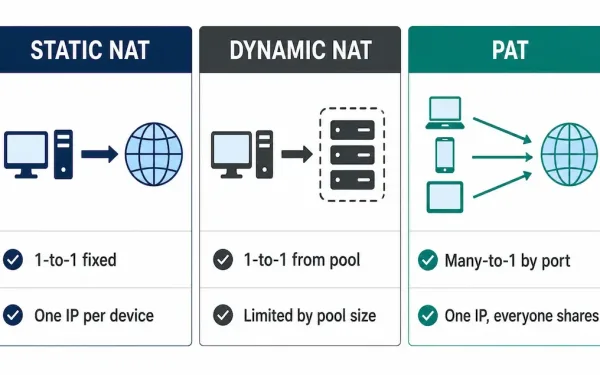
What Are the Types of NAT Translation?
There are three types of NAT: static NAT, dynamic NAT, and Port Address Translation (PAT), also called NAT overload. They all solve the same underlying problem — mapping private addresses to public ones — but they differ significantly in how permanent the mapping is and how many public addresses they actually require to function. This...
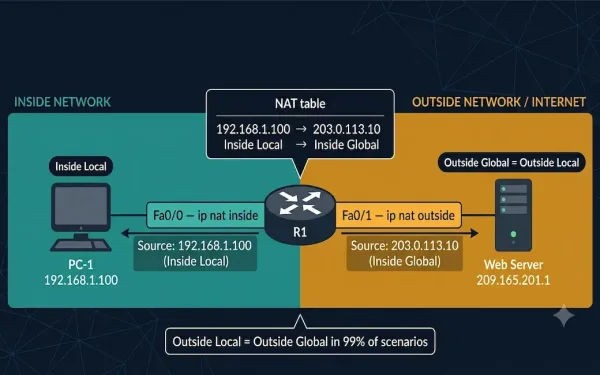
NAT Terminology Explained: CCNA 200-301 Must-Know Address Types
As discussed before, NAT translates private IP addresses into public IP addresses. In the process of translation, there are different operations involved, and understanding each of them requires understanding NAT terminology. Before understanding NAT in detail, it is important to understand the four NAT address types — inside local, inside global, outside local, and outside...
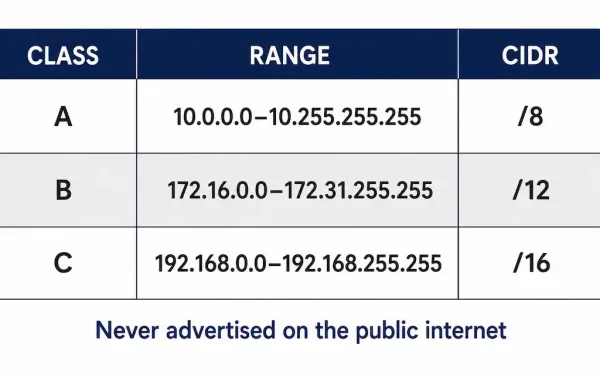
Network Address Translation (NAT) & RFC 1918 Private IPv4 Addresses
IPv4 only has about 4.3 billion addresses total — a number that looked enormous in the early 1980s and nowhere near enough once personal computing and the web took off. Network Address Translation, alongside RFC 1918 private addressing, is the pairing that kept IPv4 usable for decades past when it otherwise would have run out....
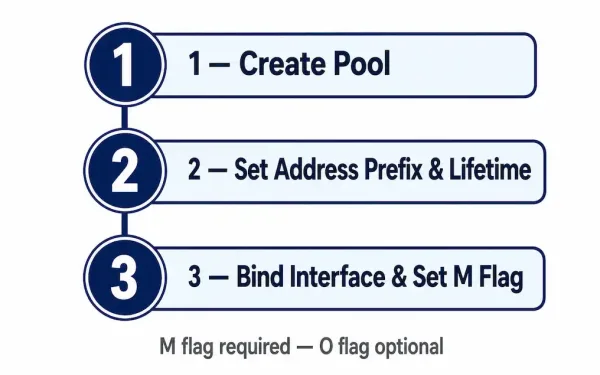
Configuring a Stateful DHCPv6 Server on a Cisco Router
Stateful DHCPv6 is the IPv6 mode that behaves the way DHCPv4 always has: the server assigns the address itself, tracks which client has which address, and hands out supplementary options alongside it — no SLAAC involved on the client side at any point. That’s the core distinction from stateless DHCPv6, and it changes almost every...
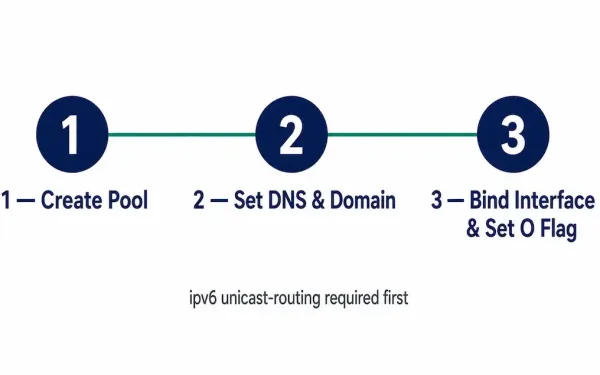
Configuring a Stateless DHCPv6 Server on a Cisco Router
Stateless DHCPv6 does one job and one job only: it hands out supplementary configuration — DNS servers, a domain name — to clients that have already generated their own IPv6 address through SLAAC entirely on their own. It never assigns an address itself, under any circumstances. That distinction shapes every command in this setup, and...
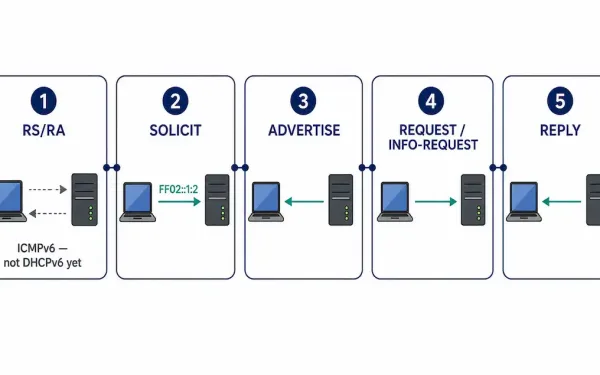
How DHCPv6 Operation Works
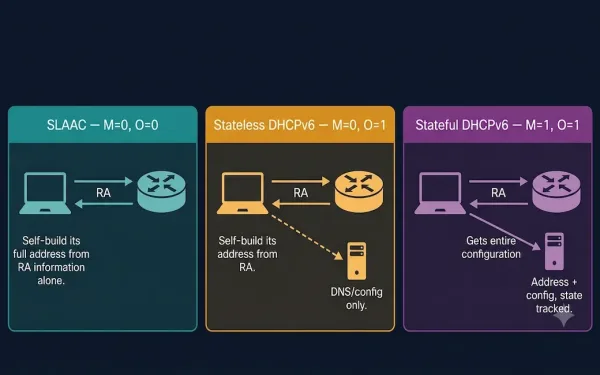
DHCPv6 doesn’t start the way DHCPv4 does. There’s no equivalent of a client blindly broadcasting into the dark hoping something answers — in IPv6, the very first thing that happens is an ICMPv6 Router Advertisement, and that message is what tells a client whether it should even bother starting a DHCPv6 conversation at all in...
SLAAC and DHCPv6
Recall that the router sends a Router Advertisement (RA) message, and the settings within that RA message decide whether a client can obtain its IPv6 address information automatically using SLAAC, DHCPv6, or a combination of both. This guide covers both methods, the three possible RA flag combinations, and how to configure and verify each on...
How to Troubleshoot DHCPv4 Problems
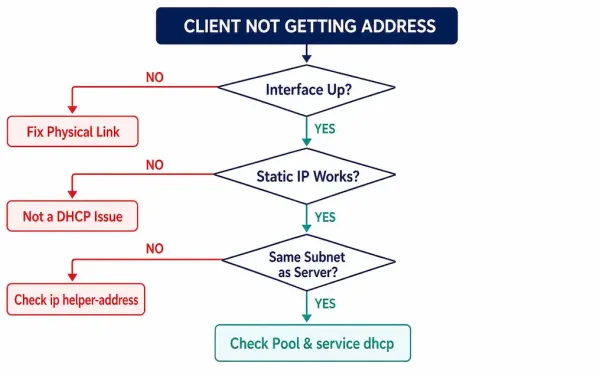
DHCP failures rarely announce their cause directly — a client just sits without an address, or ends up with the wrong one, and the actual reason could be anywhere from a bad cable to a missing relay command to a full address pool sitting quietly exhausted. What separates a fast fix from an hour of...