
Domain 5.5 | Security Fundamentals — 15% of exam
Learning Objectives
By the end of this lesson, you will be able to:
- Explain what a VPN fundamentally does, and why an encrypted tunnel over the public internet can substitute for a private, dedicated connection.
- Describe remote access VPN’s user-to-network model and the role of client software.
- Describe site-to-site VPN’s network-to-network model and how it differs in scope and endpoint from remote access VPN.
- Explain split tunneling versus full tunneling and the trade-offs each involves.
- Correctly classify a described VPN scenario as remote access or site-to-site based on its characteristics.
Key Terms Glossary
| Term | Definition |
|---|---|
| VPN (Virtual Private Network) | A technology creating an encrypted tunnel across an untrusted network, typically the public internet, so traffic travels privately despite crossing shared infrastructure. |
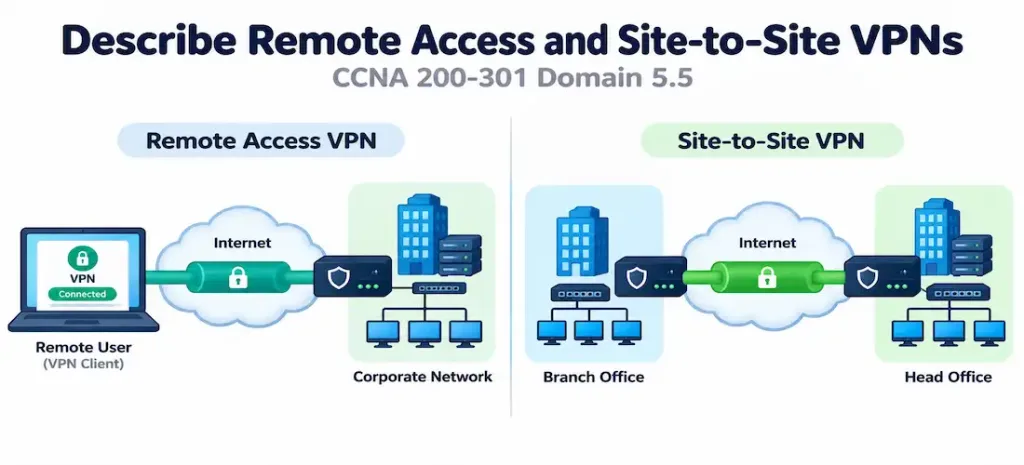
| Remote access VPN | A VPN model connecting an individual user’s device to a corporate network, typically using client software. |
| Site-to-site VPN | A VPN model connecting two entire networks to each other, typically terminated on a router or firewall at each end. |
| Tunnel | The logical encrypted path data travels through across the underlying public network. |
| Encapsulation | Wrapping one packet inside another so it can traverse a network it wasn’t originally addressed for. |
| Split tunneling | A remote access VPN configuration where only some of a client’s traffic routes through the tunnel, with the rest going directly to the internet. |
| Full tunneling | A remote access VPN configuration where all of a client’s traffic routes through the tunnel, with no direct internet path. |
| IPsec | A widely used protocol suite for encrypting and authenticating traffic, commonly used for both remote access and site-to-site VPNs. |
What a VPN Actually Does
The public internet is, by design, a shared, untrusted network — traffic can theoretically be observed, and any two points communicating across it have no inherent privacy guarantee. Before VPN technology existed at scale, organizations needing genuinely private connectivity between two sites had to lease dedicated physical circuits, an expensive and inflexible approach that scaled poorly as an organization’s connectivity needs grew or changed.
A VPN (Virtual Private Network) solves this by creating an encrypted tunnel across the existing public internet, making that shared, untrusted path function, from a security and connectivity standpoint, as if it were a private, dedicated link. Traffic inside the tunnel is encrypted, protecting confidentiality even though it’s physically traversing the same shared infrastructure everyone else’s internet traffic does — this directly reflects the confidentiality leg of the CIA triad from objective 5.1, using encryption as the specific mitigation protecting data crossing an inherently untrusted, public medium.
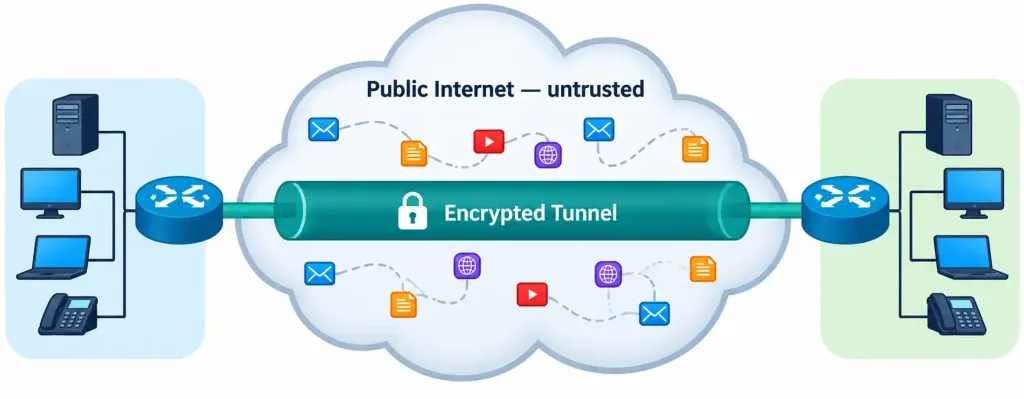
This is achieved through encapsulation — wrapping the original packet inside another packet formatted for the tunnel itself, allowing it to traverse the public internet using standard IP addressing at the outer layer, while the original, encrypted contents remain protected and hidden inside. Once the encapsulated packet reaches the other end of the tunnel, it’s de-encapsulated, revealing and delivering the original traffic exactly as if it had traveled across a private, dedicated connection the whole way.
A Closer Look at What Happens Inside the Tunnel
It’s worth grounding “encryption and encapsulation” in slightly more concrete terms rather than treating them as an unopened black box. IPsec, the protocol suite most commonly underlying both VPN types, actually accomplishes two related but distinct things: it encrypts the payload so its contents can’t be read by anyone observing the traffic in transit, and it authenticates the packet’s origin and integrity, confirming the traffic genuinely came from the expected source and wasn’t tampered with along the way.
This dual role connects directly back to two separate legs of the CIA triad simultaneously — encryption serving confidentiality, and authentication/integrity checking serving the integrity leg — meaning a single VPN technology is doing double duty across two of the triad’s three properties at once, not just one.
Before any actual data flows, the two endpoints (whether two client-to-gateway devices in a remote access scenario, or two routers/firewalls in a site-to-site scenario) first negotiate a security association — agreeing on encryption algorithms, exchanging keying material, and confirming each other’s identity — before the tunnel is considered established and ready to carry real traffic. This negotiation phase is precisely what commands like show crypto isakmp sa (mentioned later in this lesson’s FAQ) are designed to reveal the status of.
Remote Access VPN: One User, One Corporate Network
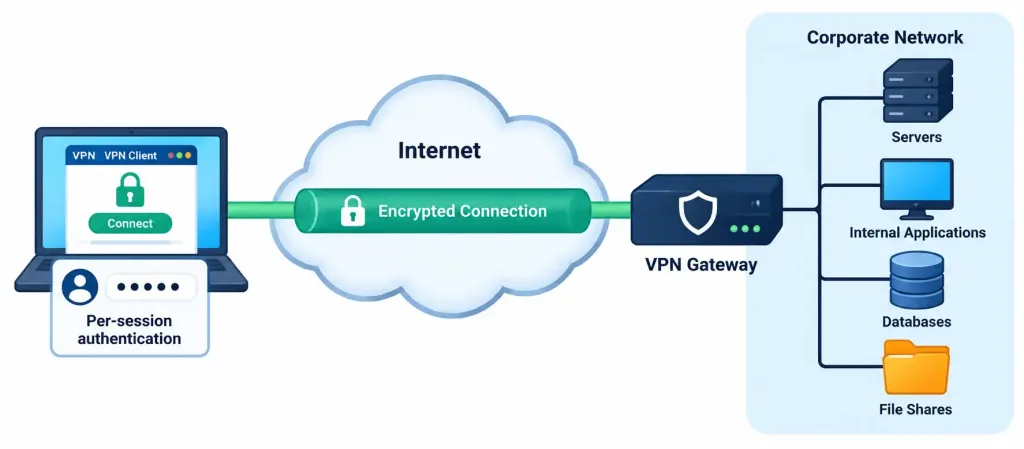
Remote access VPN connects an individual user’s device to a corporate network, establishing an encrypted tunnel over the public internet between that specific device and a VPN gateway at the organization’s edge. This is the standard model for remote or traveling employees who need to reach corporate resources — internal file shares, applications, or management interfaces — without being physically present on the corporate network itself.
Remote access VPN typically requires client software running on the end user’s device — commonly Cisco AnyConnect (now rebranded as Cisco Secure Client) in Cisco-centric environments, though many vendors offer comparable client software. This client establishes and maintains the encrypted tunnel, handling authentication against the corporate gateway (potentially incorporating the MFA concepts from objective 5.4 for stronger assurance) and routing the user’s traffic appropriately once a connection has been successfully and fully established.
Split Tunneling vs. Full Tunneling
Once a remote access VPN connection is established, an important configuration decision determines exactly which traffic actually flows through the tunnel:
- Full tunneling routes all of the client’s traffic through the VPN tunnel, including traffic destined for the general internet rather than just corporate resources. This means all traffic — corporate and personal internet browsing alike — passes through and can be inspected or filtered by the organization’s security infrastructure, at the cost of added latency for internet-bound traffic that didn’t strictly need to route through the corporate network at all.
- Split tunneling routes only traffic destined for corporate resources through the tunnel, while general internet traffic goes directly out the user’s own local connection, bypassing the tunnel entirely. This reduces latency and bandwidth consumption on the corporate side for traffic that never needed corporate routing in the first place, but it means that portion of traffic isn’t subject to the organization’s security inspection or filtering.
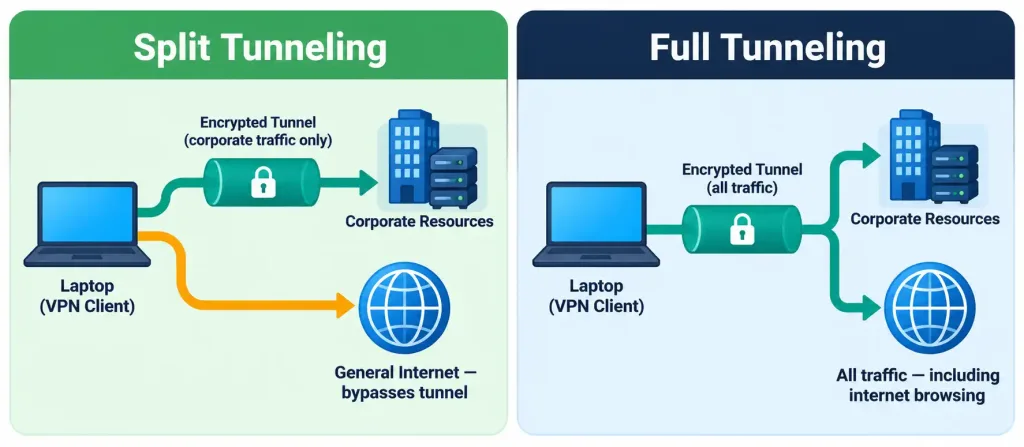
Neither approach is universally correct — full tunneling favors security visibility and control at the cost of performance and bandwidth; split tunneling favors performance and reduced corporate bandwidth consumption at the cost of reduced visibility into a portion of the user’s traffic. Organizations choose between them based on their specific security posture and performance priorities.
A Hybrid Approach Worth Recognizing
Some organizations don’t choose purely one extreme or the other. A common middle-ground configuration selectively tunnels only traffic to specific, sensitive internal destinations (an internal application server, a specific data center subnet) while allowing everything else — including traffic to well-known, already-trusted cloud services the organization has separately vetted — to bypass the tunnel. This is functionally a more granular form of split tunneling, and it reflects that “split” versus “full” isn’t strictly binary in real deployments; the actual configuration can be tuned to route very specific traffic categories through the tunnel while leaving broad categories of lower-risk traffic outside it, balancing the security-versus-performance trade-off more precisely than an all-or-nothing choice would allow.
Site-to-Site VPN: Network-to-Network, Not User-to-Network
Site-to-site VPN takes a fundamentally different shape. Rather than an individual user connecting to a network, two entire networks connect to each other via a persistent, encrypted tunnel over the public internet — typically connecting a branch office to a headquarters location, or connecting an on-premises network to a cloud provider’s network. Once established, devices on either network can reach devices on the other network as if directly, privately connected, with no traffic exposed on the public internet in between.
The critical distinction worth holding precisely: site-to-site VPN is typically terminated on a router or firewall at each end, not on individual client devices the way remote access VPN is. A user on the branch network doesn’t need any VPN client software installed at all — their device simply routes traffic normally, and the branch’s router or firewall transparently handles encrypting and encapsulating that traffic into the tunnel before it crosses the public internet toward headquarters. From an individual end user’s perspective, the VPN is entirely invisible; they’re simply using the network normally, unaware that traffic destined for the other site is being encrypted and tunneled behind the scenes.
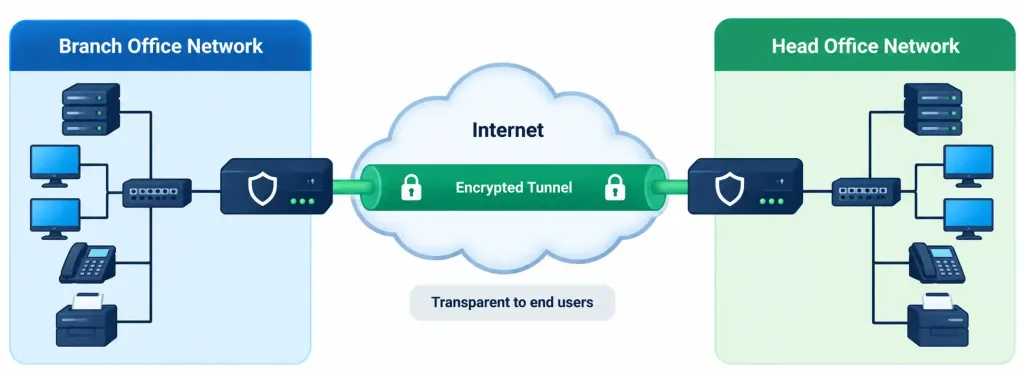
This has a direct, practical connection to routing concepts covered earlier in this course. Once a site-to-site VPN tunnel is established, the networks on either end typically need routes pointing traffic destined for the remote network through the tunnel interface — conceptually similar to any other route covered in objective 3.3, except the “next hop” in this case leads into an encrypted tunnel rather than a directly connected physical link. Some deployments even run a dynamic routing protocol across the tunnel itself, treating it much like any other logical link between two routers once the underlying encryption and encapsulation are established.
Beyond Branch-to-Headquarters: Cloud Connectivity
While branch-to-headquarters connectivity is the classic textbook example, site-to-site VPN is equally central to modern cloud adoption. An organization migrating workloads to a cloud provider commonly establishes a site-to-site VPN between its on-premises network and the cloud provider’s virtual network, allowing on-premises servers and cloud-hosted resources to communicate as though they sat on the same private network, without any of that traffic traversing the public internet in the clear.
This is functionally identical in concept to a branch-to-headquarters tunnel — two networks, connected via an encrypted, router/firewall-terminated link — even though one “site” in this case is a cloud provider’s infrastructure rather than a physical office location. Recognizing that site-to-site VPN isn’t limited to physical office connectivity is a useful, exam-relevant extension of the core concept.
Direct Comparison
| Characteristic | Remote Access VPN | Site-to-Site VPN |
|---|---|---|
| Connects | Individual user device to a network | Two entire networks to each other |
| Typical endpoint | VPN client software on the user’s device | Router or firewall at each site |
| Visibility to end users | Requires active client software and user awareness | Transparent — end users on either network are unaware it exists |
| Typical use case | Remote or traveling employees | Branch-to-headquarters, or on-premises-to-cloud connectivity |
| Connection nature | Established and torn down per user session | Persistent, always-on connection between sites |
Common Misconceptions
- “Remote access and site-to-site VPN are just different names for the same underlying technology.” They share underlying encryption and tunneling concepts, but they differ fundamentally in scope (individual user vs. entire network) and endpoint (client software vs. router/firewall) — the conceptual distinction genuinely matters, not just the terminology.
- “Site-to-site VPN requires client software on every device at each site.” It doesn’t — the VPN is terminated on a router or firewall at each end, making it entirely transparent to individual end users, who need no client software or awareness that it exists at all.
- “Full tunneling is always the more secure and therefore correct choice.” Full tunneling provides more security visibility but at a real performance and bandwidth cost; split tunneling is a legitimate, deliberate trade-off in many organizations rather than an inherently inferior or insecure configuration.
- “A VPN tunnel eliminates the need for routing configuration.” Traffic still needs to be routed toward the tunnel interface as the appropriate path to the remote network — a VPN provides the encrypted transport, but routing decisions covered in earlier objectives still apply on top of it.
- “VPNs are only relevant for connecting to a corporate office.” Site-to-site VPN is equally used for connecting to cloud provider networks, and remote access VPN can connect to any properly configured VPN gateway, not exclusively a traditional corporate headquarters.
Frequently Asked Questions
Can an organization use both remote access and site-to-site VPN simultaneously? Yes, and this is extremely common — a site-to-site VPN might connect headquarters to a branch office permanently, while remote access VPN separately serves individual traveling or remote employees connecting from wherever they happen to be, with both types of VPN gateway often running on the same edge device.
Does site-to-site VPN require the same authentication considerations as remote access VPN? The authentication model differs meaningfully — site-to-site VPN authenticates the two network devices (routers or firewalls) to each other, often using a pre-shared key or certificates, rather than authenticating individual human users the way remote access VPN’s client login process does. This connects back to the certificate-based authentication discussed as an MFA-adjacent mechanism earlier in this domain — a pre-shared key functions somewhat like a shared password between the two devices, while certificate-based site-to-site authentication uses the same asymmetric cryptography and trusted-third-party model covered previously, just applied to device-to-device rather than human-to-device authentication.
What protocol suite commonly underlies both VPN types? IPsec is widely used for both remote access and site-to-site VPN deployments, though SSL/TLS-based VPN (sometimes marketed as “SSL VPN” or “web VPN”) is also common for remote access specifically, often requiring only a web browser rather than dedicated client software for basic access scenarios. The choice between IPsec and SSL/TLS-based remote access often comes down to how much granular network-layer access a remote user needs versus how much convenience matters for occasional, lightweight access to a specific web-based application — IPsec typically provides fuller network-layer connectivity once connected, while browser-based SSL VPN access is often scoped more narrowly to specific published applications.
Is split tunneling ever a security risk worth specifically considering? Yes — since split-tunneled traffic bypasses corporate security inspection, a compromised or poorly secured home network could potentially expose a remote worker’s device to threats that wouldn’t be filtered the way they would under full tunneling, which is a genuine trade-off organizations weigh when choosing between the two approaches. Some organizations mitigate this specific risk by combining split tunneling with endpoint security software running directly on the remote device, providing a layer of protection independent of whichever traffic happens to route through the corporate tunnel at any given moment.
How would an administrator verify a site-to-site VPN tunnel is actually up and passing traffic? At a conceptual recognition level, commands like show crypto isakmp sa and show crypto ipsec sa on IPsec-based deployments reveal whether the underlying security associations have successfully formed — full configuration and verification detail for these commands sits beyond this particular objective’s descriptive scope, but recognizing that dedicated verification commands exist, and roughly what they’re checking for, is a useful baseline heading into more advanced coursework.
VPN Fundamentals and Tunneling Quiz
Test your knowledge of VPN purpose, remote access, site-to-site VPNs, split tunneling, encapsulation, and security.
Final Thoughts
Your body’s shape is influenced by far more than diet and exercise alone — genetics, hormones, and aging all play significant roles that lifestyle changes can’t always fully override. For people who have already put in consistent work toward a healthy weight but still struggle with specific stubborn areas, body contouring can be a reasonable option to explore, provided it’s approached as a complement to — not a replacement for — sustainable health habits.
As with any medical or cosmetic decision, the best first step is always a conversation with a qualified provider who can assess your individual health history and goals, and help you decide whether a procedure is the right fit for where you are in your health journey.



