
Domain 5.3 | Security Fundamentals — 15% of exam
Learning Objectives
By the end of this lesson, you will be able to:
- Configure password-based access control on console and VTY lines.
- Configure privileged EXEC (enable) mode access control, and explain why
enable secretshould always be preferred overenable password. - Explain the difference between
loginandlogin local, and how each interacts with locally configured user accounts. - Apply
service password-encryptionand explain its actual security limitations. - Verify line and password configuration using appropriate show commands.
Key Terms Glossary
| Term | Definition |
|---|---|
| Console line | The line used for direct, physical CLI access to a device, typically via a console cable. |
| VTY line | A virtual terminal line used for remote CLI access (Telnet or SSH) into a device. |
| Privileged EXEC mode | The elevated access level on a Cisco device allowing full configuration capability, entered via the enable command. |
| enable secret | A command storing the privileged EXEC password using a strong, one-way hash. |
| enable password | An older command storing the privileged EXEC password using weak, easily reversible obfuscation. |
| login | A line configuration command requiring a password (but not a username) before granting access. |
| login local | A line configuration command requiring authentication against the device’s local username/password database. |
| service password-encryption | A global command applying weak obfuscation to plaintext passwords stored in the configuration file. |
Access Control Before AAA: Three Access Points, One Consistent Pattern
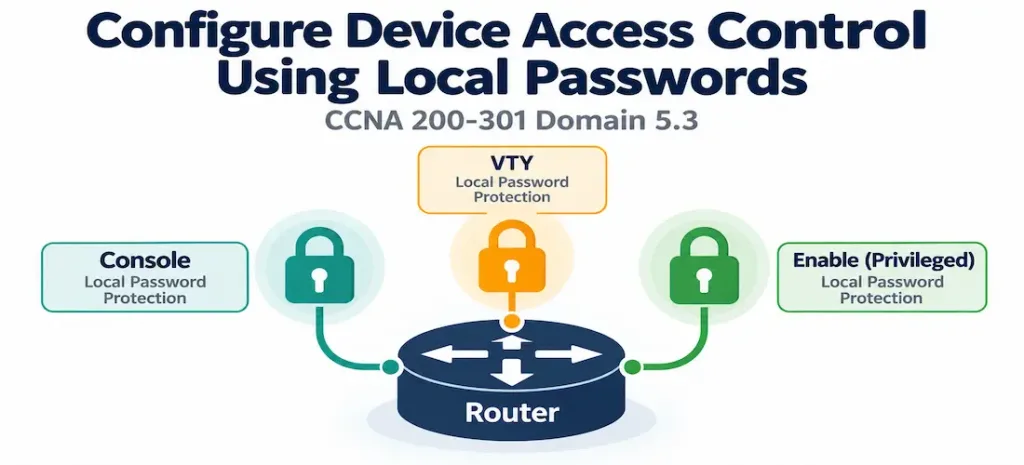
Before centralized AAA (covered later in this domain) enters the picture, Cisco devices rely on local password configuration across several distinct access points, and understanding which access point governs what is the foundation this entire objective builds on.
The console line provides direct, physical access to a device’s CLI — typically via a console cable connected directly to the device, bypassing the network entirely. The VTY lines provide remote CLI access over the network, via Telnet or SSH (covered in objective 4.8). Both of these control getting into the device’s CLI at all — reaching a basic user EXEC prompt. Separately, privileged EXEC mode — entered with the enable command — controls the elevated access level needed to actually view sensitive configuration details or make changes, layered on top of whichever line-level access already got an administrator to the basic CLI prompt in the first place.
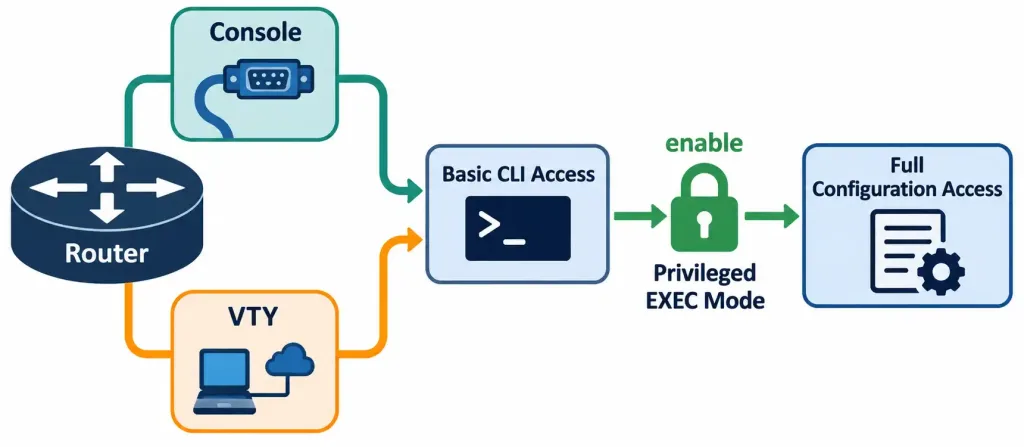
This layering matters: a device could theoretically allow console access with no password at all, while still requiring a strong enable secret before anything sensitive is visible or changeable — or the reverse, a password-protected line with a completely open privileged mode. Best practice, unsurprisingly, is defense in depth across both layers simultaneously, echoing the principle introduced in objective 5.1: don’t rely on a single control point when multiple independent layers are available.
Configuring Line-Level Password Access
Console and VTY line password configuration follows the same basic pattern:
line console 0
 password ConsolePass123
 login
!
line vty 0 4
 password VtyPass123
 login
Two commands work together here, and both are required — a password alone, without login, does nothing to actually enforce it. The password command sets the credential value; login tells the line to actually prompt for and check that password before granting access. Configuring a password without the corresponding login command leaves the line effectively unprotected, since nothing is telling the device to actually challenge incoming connections for it. Conversely, configuring login without a password set produces a line that’s misconfigured in the other direction — attempting to connect returns a "% Login disabled - no password set"-style message, denying access entirely rather than defaulting to open, which is at least a fail-safe outcome rather than a fail-open one.
login vs. login local: A Distinction Worth Getting Precise
This single-word difference changes the entire authentication model, and it’s worth being exact about it:
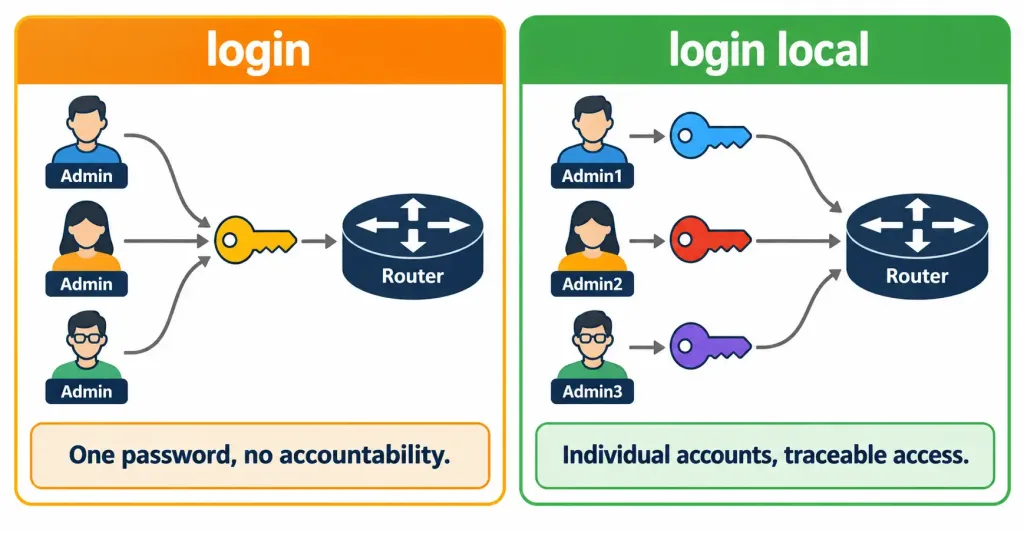
loginchecks the connection attempt against the single password configured directly on that line — no username is involved at all, just the one shared password.login localchecks the connection attempt against the device’s local username/password database (configured separately with theusernamecommand), requiring both a username and a password, and allowing different credentials per administrator rather than one shared line password for everyone.
This is the exact same distinction covered in objective 4.8’s SSH configuration, where login local paired with a username ... secret ... entry provided per-administrator authentication for SSH sessions. The pattern is identical here for basic line access — login is simpler to configure but offers no per-user accountability, while login local requires the extra step of creating user accounts but supports individual credentials and, by extension, the ability to trace specific actions back to a specific person rather than an anonymous shared password.
Privileged EXEC Access: enable secret vs. enable password
Reaching a basic CLI prompt via console or VTY access is only the first layer. Privileged EXEC mode — where actual configuration changes happen — has its own separate password:
enable secret PrivilegedPass123Cisco IOS also supports an older command, enable password, which sets the same conceptual credential but stores it in a fundamentally weaker way. enable secret stores the password using a strong, one-way hash (MD5-based historically, with stronger algorithms available on newer IOS versions), meaning the actual password cannot be recovered from the stored hash even if the configuration file itself is exposed. enable password, by contrast, stores the password using weak, easily reversible obfuscation — specifically, Cisco’s Type 7 encoding, which numerous widely available tools can reverse to the original plaintext password in seconds, offering barely more protection than storing the password in plaintext outright.
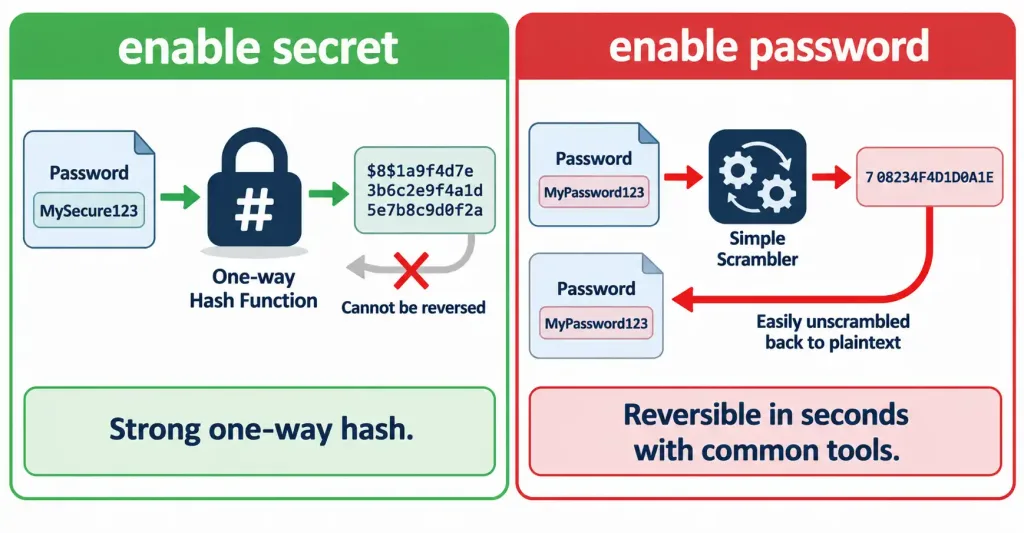
If both commands are configured simultaneously, enable secret always takes precedence automatically — IOS will use the enable secret value and effectively ignore the weaker enable password, regardless of the order the two commands were entered in the configuration. This is a deliberate design choice, ensuring that even a legacy configuration that still includes an old enable password line doesn’t accidentally weaken security if a proper enable secret has also been added since.
The practical exam guidance, worth internalizing directly: whenever a question offers a choice between enable password and enable secret, enable secret is essentially always the correct, more secure answer. There’s no scenario in modern practice where the weaker command is the better choice — enable password exists purely for legacy compatibility with very old IOS versions that might not support enable secret at all, a situation unlikely to arise in any current deployment.
service password-encryption: Better Than Nothing, Not a Real Fix
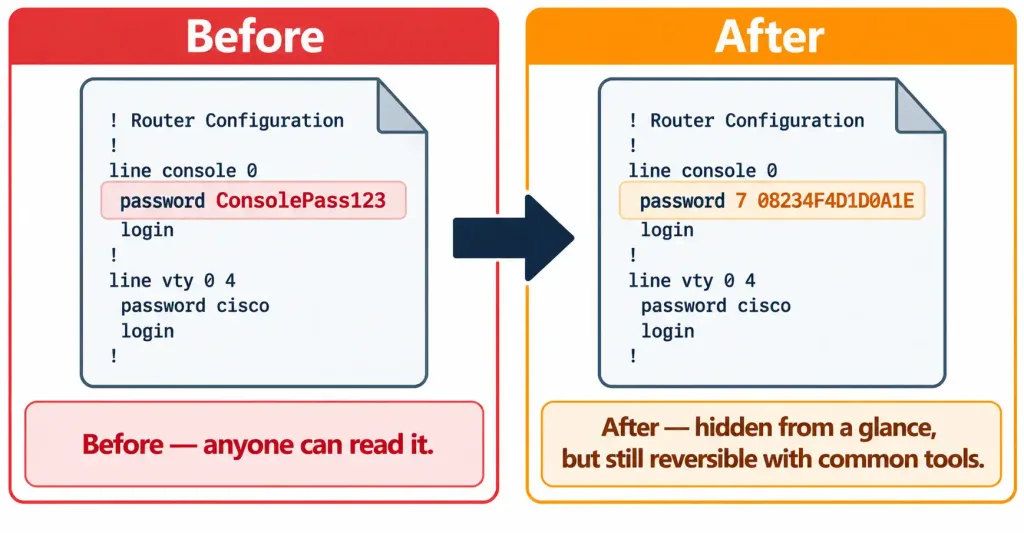
A related but distinct command addresses a different problem: by default, a line’s password command (console or VTY) stores its value as plain, readable text directly in the configuration file — anyone able to view the running or startup configuration can read it outright with no effort at all.
service password-encryptionThis global command applies the same weak Type 7 obfuscation used by the legacy enable password command to all plaintext passwords currently in the configuration, including console and VTY line passwords. It’s worth being precise about what this command actually accomplishes and what it doesn’t: it prevents a password from being trivially readable at a glance by someone casually viewing the configuration, but it does not provide genuine cryptographic protection — the same reversal tools that defeat enable password‘s Type 7 encoding work identically here, since it’s the exact same weak scheme. service password-encryption is a reasonable minimum baseline improvement over storing passwords in fully readable plaintext, but it should never be mistaken for the kind of strong protection enable secret‘s hash provides.
Common Misconceptions
- “Setting a
passwordon a line is sufficient to protect it.” Without the correspondinglogincommand, the password is configured but never actually checked — the line remains effectively unprotected. - “
enable passwordandenable secretprovide equivalent protection, just with different command names.”enable secretuses a strong, one-way hash;enable passworduses weak, easily reversible Type 7 obfuscation that numerous tools can crack in seconds. - “
service password-encryptionmakes line passwords genuinely secure.” It applies the same weak, reversible Type 7 obfuscation as the legacyenable passwordcommand — a modest improvement over plaintext, but not real cryptographic protection. - “
loginandlogin localare interchangeable settings for the same feature.”loginchecks a single shared line password with no username involved;login localchecks against individual username/password accounts in the local database, supporting per-user accountability thatloginalone cannot provide. - “If both
enable secretandenable passwordare configured, whichever was entered most recently takes effect.”enable secretalways takes precedence automatically, regardless of the order the two commands were configured in.
Configure and Verify: Full Lab Walkthrough
Topology: R1 needs console access protected with a line password, VTY access requiring individual administrator accounts for accountability, and a strong privileged EXEC password — with all locally stored passwords protected from casual plaintext viewing.
Step 1 — Configure the console line with a simple shared password:
R1(config)# line console 0
R1(config-line)# password ConsolePass123
R1(config-line)# login
Step 2 — Configure individual local user accounts for accountability on remote access:
R1(config)# username jsmith secret JSmithPass456
R1(config)# username agupta secret AGuptaPass789
Step 3 — Configure the VTY lines to require these individual accounts rather than a single shared password:
R1(config)# line vty 0 4
R1(config-line)# login local
Step 4 — Configure a strong privileged EXEC password:
R1(config)# enable secret PrivilegedPass123Step 5 — Apply weak obfuscation to any remaining plaintext-stored passwords, as a baseline improvement over full plaintext exposure:
R1(config)# service password-encryptionStep 6 — Verify the configuration:
R1# show running-config | section line
line console 0
 password 7 08234F4D1D0A1E
 login
line vty 0 4
 login local
Notice the 7 immediately before the encoded console password — this confirms Type 7 obfuscation is active, and that this value is not the plaintext password itself, though it remains reversible with widely available tools if the configuration is exposed.
R1# show running-config | include enable secret
enable secret 5 $1$mERr$hx5rVt7rPNoS4wqbXKX7m0
The 5 here (or a higher number on newer IOS versions using stronger hash algorithms) confirms enable secret is using genuine hashing rather than the reversible Type 7 scheme — a fundamentally different and stronger level of protection than the console line password shown above.
R1# show line
   Tty Line Typ     Tx/Rx    A Modem  Roty AccO AccI   Uses   Noise  Overruns
     0    0 CTY                                                0       0     0/0
     1    1 AUX   9600/9600                                     0       0     0/0
*    2    2 VTY                                                 0       0     0/0
show line confirms the current line types and states — useful for a quick overview of what’s configured and active across console, auxiliary, and VTY lines simultaneously.
Packet Tracer Practice Activity
Scenario: A newly deployed router needs baseline access control before being placed into production: a protected console line, individually accountable VTY access for two administrators, and a strong privileged EXEC password, with stored passwords protected from casual plaintext exposure.
Part 1: Configure the console line. Apply a password and login on line console 0.
Part 2: Create individual local accounts. Add two username ... secret ... entries representing two different administrators.
Part 3: Configure VTY lines for individual accountability. Apply login local on line vty 0 4.
Part 4: Configure privileged EXEC access. Apply enable secret with a strong password.
Part 5: Apply baseline password obfuscation. Apply service password-encryption globally.
Part 6: Verify. Confirm with show running-config that the console password shows Type 7 encoding (7 ...) and the enable secret shows genuine hash encoding (5 ... or higher). Attempt to log in via each of the two configured usernames on a simulated Telnet or SSH session and confirm both succeed independently.
Expected result: Both administrator accounts can independently authenticate via VTY access, the console requires its own separate password, privileged EXEC mode requires the enable secret value, and no plaintext password is visible anywhere in the running configuration output. If either administrator account fails to authenticate, confirm login local (not plain login) is applied on the VTY lines — a common configuration slip is leaving login in place after intending to switch to login local.
Troubleshooting Patterns
“A line password is configured, but the device grants access with no prompt at all.” Confirm login (or login local) is actually applied on that line — a password command with no corresponding login enforcement command does nothing to actually challenge incoming connections.
“Login is completely refused, even with what should be correct credentials.” If login (without local) is configured but no password has been set on that line, IOS denies access outright with a “login disabled” condition rather than allowing an unauthenticated connection through — check for a missing password command specifically.
“An administrator’s individual VTY login fails, though the account clearly exists in the configuration.” Confirm login local — not plain login — is configured on the VTY lines; login alone ignores locally configured usernames entirely and checks only the line’s own shared password, which won’t exist if the configuration was written expecting login local instead.
“A configuration audit flags a visible plaintext password.” Check whether service password-encryption has been applied — a missing instance of this command leaves any line passwords configured with the plain password command fully readable in the configuration file, a common and easily corrected finding.
“Both enable secret and enable password appear in the configuration, and there’s confusion about which one is actually in effect.” enable secret always takes precedence automatically when both are present — the enable password line becomes effectively dead configuration, worth removing entirely during cleanup to avoid confusion even though it isn’t actively causing a security problem once enable secret is present.
Frequently Asked Questions
Can different VTY lines have different authentication methods on the same device?
Generally, authentication settings are applied to a range of VTY lines together (such as line vty 0 4), though separate ranges can be configured with different settings if genuinely needed — splitting VTY lines into distinct groups for this purpose is possible but uncommon in typical deployments.
Does login local require every administrator to have their own separate account?
It checks against whatever accounts exist locally, which could technically be a single shared account, but individual accounts per administrator are the better practice specifically because they preserve the accountability advantage login local is meant to provide over a single shared line password.
Is the auxiliary (AUX) line configured the same way as console and VTY lines?
Yes, conceptually — line aux 0 accepts the same password/login or login local pattern, though the AUX line is far less commonly used in modern deployments and often left in its default unconfigured (and therefore effectively disabled for practical remote use) state.
Why doesn’t Cisco simply remove the weaker enable password and service password-encryption commands entirely, given their known weaknesses?
Legacy compatibility — some very old configurations and documentation still reference these commands, and removing them outright would break backward compatibility for environments that haven’t fully modernized, even though current best practice clearly favors enable secret and points toward AAA-based centralized authentication for anything beyond small-scale deployments.
Does configuring strong passwords alone make a device fully secure?
No — this objective addresses one specific layer (local password-based access control), and a genuinely secure device also depends on the SSH configuration from objective 4.8, appropriate ACLs restricting management access, and the broader security program elements from objective 5.2, among other layered controls covered throughout this domain.
Should the same password be reused across the console, VTY, and enable secret settings for simplicity?
No — using distinct passwords for each access point limits the damage if any single credential is compromised. If a console password were somehow exposed (written on a sticky note, observed during a support call), reusing that same value for enable secret would hand over privileged access as well, turning a single minor exposure into a complete compromise rather than a contained one.
Configure Device Access Control Using Local Passwords: Practice Quiz
Test your knowledge of login, login local, enable secret, and password security.
Summary
- Console, VTY, and privileged EXEC access are three distinct access points, each requiring its own password configuration and enforcement command — a password alone without
login(orlogin local) does nothing to actually enforce it. loginchecks a single shared line password;login localchecks against individual local username/password accounts, supporting per-administrator accountability, exactly as covered for SSH access in objective 4.8. Using distinct passwords across each access point, rather than reusing one value everywhere, further limits the damage if any single credential is ever exposed.enable secretstores the privileged EXEC password using a strong, one-way hash and should always be preferred over the legacyenable password, which uses weak, easily reversible Type 7 obfuscation —enable secrettakes precedence automatically if both are configured.service password-encryptionapplies that same weak Type 7 obfuscation to plaintext line passwords, offering a modest baseline improvement over full plaintext exposure without providing genuine cryptographic protection.show running-config,show line, and direct login testing together confirm that line-level and privileged EXEC access control are both correctly configured and actually functioning as intended.



