
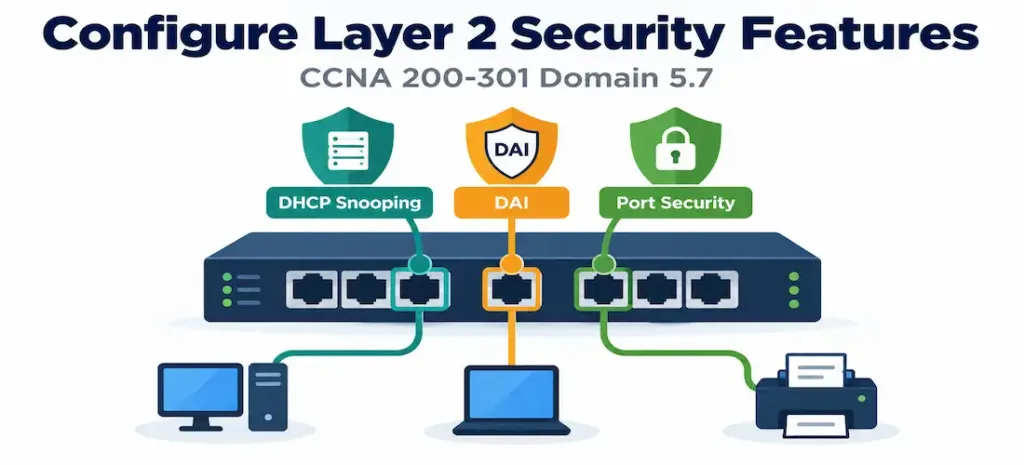
Domain 5.7 | Security Fundamentals — 15% of exam
Learning Objectives
By the end of this lesson, you will be able to:
- Configure DHCP snooping, designating trusted and untrusted ports, and explain the specific threat it mitigates.
- Explain how Dynamic ARP Inspection (DAI) builds on DHCP snooping’s binding table to prevent ARP spoofing.
- Configure port security, including MAC address limits, sticky learning, and violation actions.
- Distinguish between port security’s three violation modes and their differing consequences.
- Explain how DHCP snooping, DAI, and port security relate to and reinforce each other at the access edge.
Key Terms Glossary
| Term | Definition |
|---|---|
| DHCP snooping | A switch feature classifying ports as trusted or untrusted, permitting DHCP server responses only on trusted ports. |
| Trusted port | A DHCP snooping port designation for ports facing legitimate DHCP servers. |
| Untrusted port | A DHCP snooping port designation for ports facing end-user devices, where DHCP server responses are blocked. |
| DHCP snooping binding table | A table recording legitimate IP-to-MAC-to-port associations learned from valid DHCP transactions. |
| Dynamic ARP Inspection (DAI) | A feature validating incoming ARP packets against the DHCP snooping binding table, dropping mismatches. |
| ARP spoofing/poisoning | An attack where a device falsely associates its own MAC address with another device’s IP address to intercept traffic. |
| Port security | A switch feature restricting which or how many MAC addresses may connect on a given port. |
| Sticky MAC | A port security mode that dynamically learns MAC addresses and automatically adds them to the running configuration. |
DHCP Snooping: Trusting the Right Ports
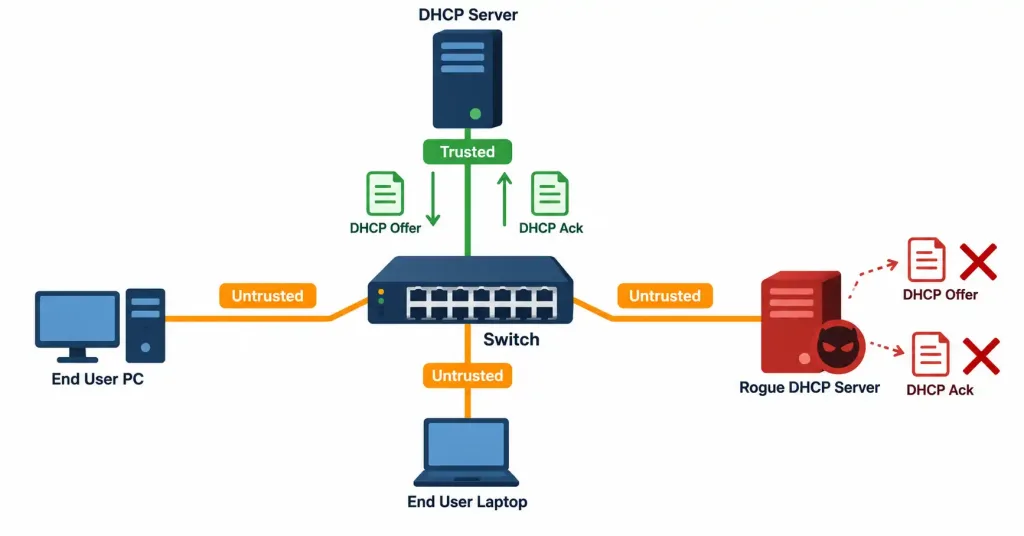
Objective 4.3 covered the DORA process, and objective 4.6 covered relaying that process across subnets — both assumed a legitimate DHCP server was doing the responding. DHCP snooping addresses what happens when that assumption fails: a rogue or misconfigured DHCP server connected somewhere on the network could respond to client Discover broadcasts with incorrect addressing information — a wrong default gateway redirecting traffic through an attacker’s device, or simply broken addressing causing widespread connectivity failures.
DHCP snooping solves this by classifying every switch port as either trusted or untrusted. A trusted port faces a legitimate DHCP server (or an uplink toward one); an untrusted port faces an end-user device with no business acting as a DHCP server. The rule is simple and effective: DHCP server responses — Offer and Acknowledge messages — are only permitted on trusted ports. If a rogue DHCP server connects to what’s configured as an untrusted port, its Offer and Acknowledge messages are blocked outright, preventing it from ever successfully handing out addressing information to clients, regardless of how convincing or fast its responses might otherwise be.
ip dhcp snooping
ip dhcp snooping vlan 10
!
interface GigabitEthernet0/1
 description Uplink to legitimate DHCP server
 ip dhcp snooping trust
Notice what’s not configured here: end-user-facing ports default to untrusted automatically once DHCP snooping is globally enabled for a VLAN — only the specific uplink port facing the legitimate server needs the explicit trust designation. This default-untrusted posture is a deliberate, safe default: an administrator has to consciously trust a port, rather than accidentally leaving a port trusted (and therefore vulnerable) by omission.
The DHCP Snooping Binding Table
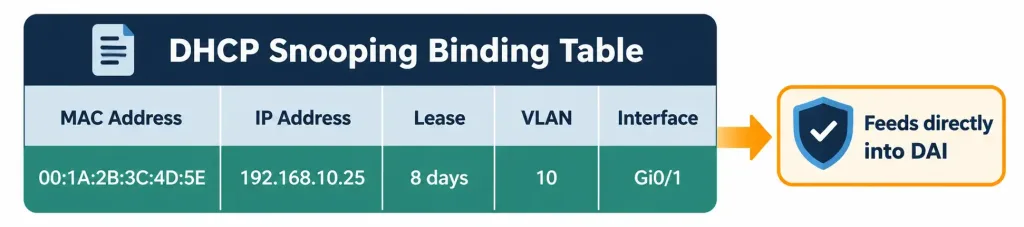
As legitimate DHCP transactions occur on trusted ports, the switch builds a DHCP snooping binding table, recording each client’s assigned IP address, its MAC address, the VLAN, the port it’s connected to, and the lease duration. This table isn’t just a passive log — it becomes the foundation the next feature in this lesson builds directly on top of.
Dynamic ARP Inspection: Validating Against the Binding Table
Dynamic ARP Inspection (DAI) addresses a different but related threat: ARP spoofing (or ARP poisoning), where an attacker sends falsified ARP messages claiming their own MAC address corresponds to another device’s IP address — commonly the default gateway’s IP — tricking other devices on the segment into sending traffic to the attacker instead of its intended destination. This is a classic technique for intercepting traffic on a local segment, and ARP itself has no built-in authentication to prevent it, since any device can broadcast an ARP reply claiming any IP-to-MAC mapping it wants.
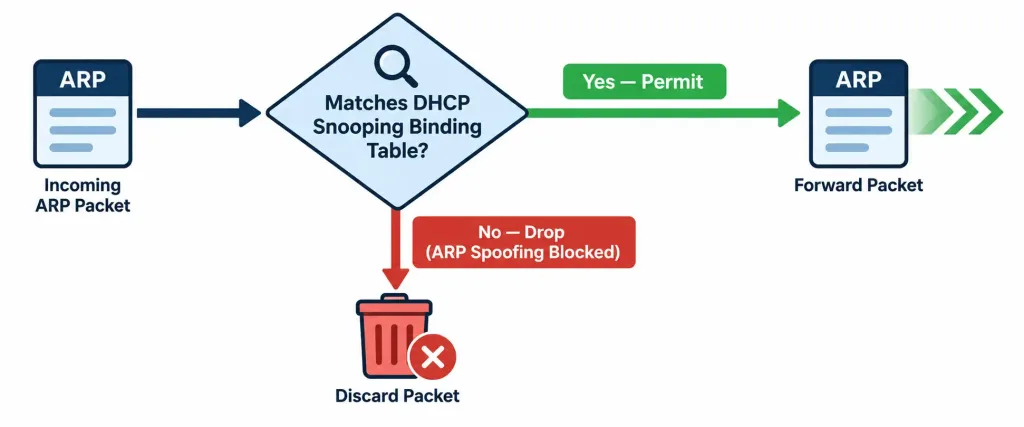
DAI closes this gap by validating incoming ARP packets against the DHCP snooping binding table — exactly the table built in the previous section. If an ARP packet’s claimed IP-to-MAC mapping doesn’t match a legitimate, recorded binding, DAI drops the packet outright, preventing the spoofed mapping from ever propagating and misleading other devices on the segment.
ip arp inspection vlan 10
!
interface GigabitEthernet0/1
 ip arp inspection trust
This is precisely why the relationship between these two features matters so much: DAI cannot function without DHCP snooping already having built a binding table to validate against. A network with DAI enabled but no functioning DHCP snooping binding table has nothing legitimate to compare incoming ARP packets to — DAI’s validation is only as good as the binding data it’s checking against. For devices with statically configured IP addresses (which never go through DHCP and therefore never appear in the binding table naturally), a manually configured ARP access list can supplement the binding table, explicitly permitting that specific static device’s known IP-to-MAC mapping.
Port Security: Controlling Who Can Connect at All
Port security addresses a more fundamental question than either of the previous two features: not “is this DHCP or ARP traffic legitimate,” but “should this device be allowed to connect to this port at all.” Port security restricts which, or how many, MAC addresses are permitted to communicate on a given switch port.
interface GigabitEthernet0/5
 switchport port-security
 switchport port-security maximum 1
 switchport port-security violation shutdown
 switchport port-security mac-address sticky
Reading this configuration: maximum 1 limits this port to exactly one allowed MAC address — appropriate for a single-device access port like an individual employee’s workstation connection. mac-address sticky tells the switch to dynamically learn whatever MAC address first connects and automatically add it to the running configuration as if it had been manually typed, avoiding the need for an administrator to look up and hand-enter every device’s MAC address individually. violation shutdown defines what happens if a second, unauthorized MAC address is detected attempting to use this port.
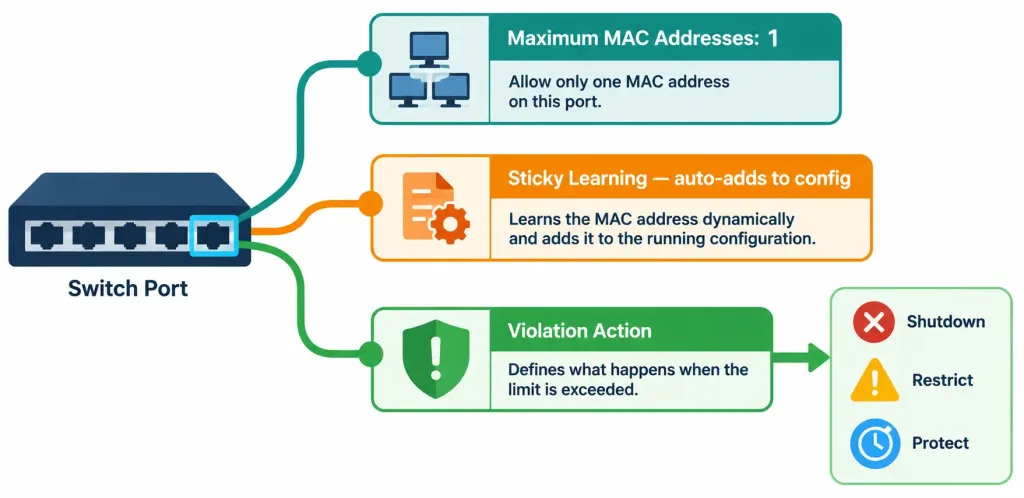
The Three Violation Modes: A Critical Distinction
Port security’s three violation actions differ significantly in severity, and confusing them is a common and consequential mistake:
- Protect — silently drops traffic from the unauthorized MAC address, with no log entry and no counter increment. The port itself remains up and continues functioning for the authorized MAC address. This is the quietest option, providing no visibility that a violation even occurred.
- Restrict — drops traffic from the unauthorized MAC address, exactly like protect, but additionally generates a log message and increments a violation counter, providing visibility into the fact that something happened, even though the port itself remains functional.
- Shutdown — the default and most severe action: the entire port is placed into an err-disabled state, shutting it down completely, blocking traffic from every device on that port, including the previously authorized one, until an administrator manually intervenes.
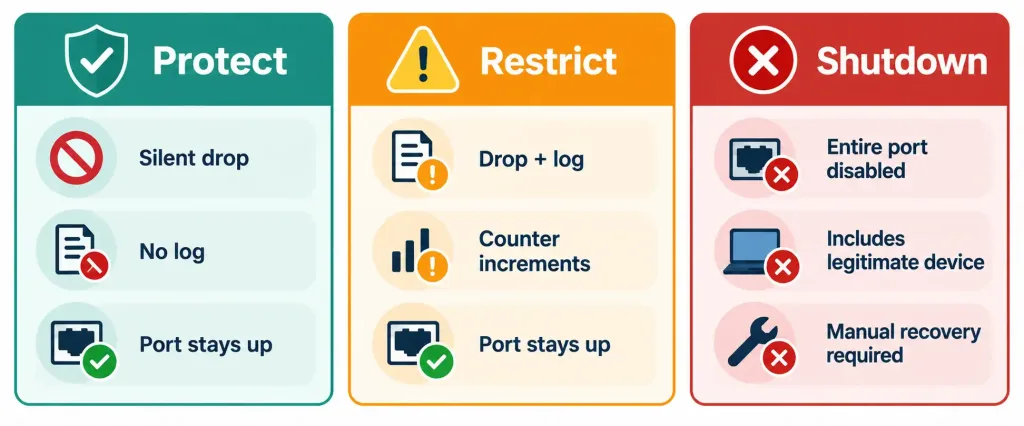
This severity difference matters enormously in practice. A port using shutdown mode that detects a violation doesn’t just block the unauthorized device — it takes the entire port offline, meaning the legitimate device that was already working also loses connectivity until someone manually recovers the port. This can turn a minor policy violation (an employee plugging in a personal device alongside their work laptop, for instance) into a full connectivity outage for that user, which is precisely why understanding the difference between these three modes — and choosing deliberately rather than accepting the default without consideration — matters for real deployments.
Recovering from an Err-Disabled Port
Since shutdown mode disables the entire port, recovering from it requires explicit action:
interface GigabitEthernet0/5
 shutdown
 no shutdown
Manually cycling the interface clears the err-disabled state. Alternatively, a global command can configure automatic recovery after a defined timeout, removing the need for manual intervention every single time a violation triggers a shutdown:
errdisable recovery cause psecure-violation
errdisable recovery interval 300
This automatically brings a port back up 300 seconds after a port-security-triggered err-disable, balancing security (still shutting the port down immediately when a violation occurs) against operational convenience (not requiring a network administrator to manually intervene every single time, particularly for infrequent, likely-accidental violations).
How These Three Features Work Together
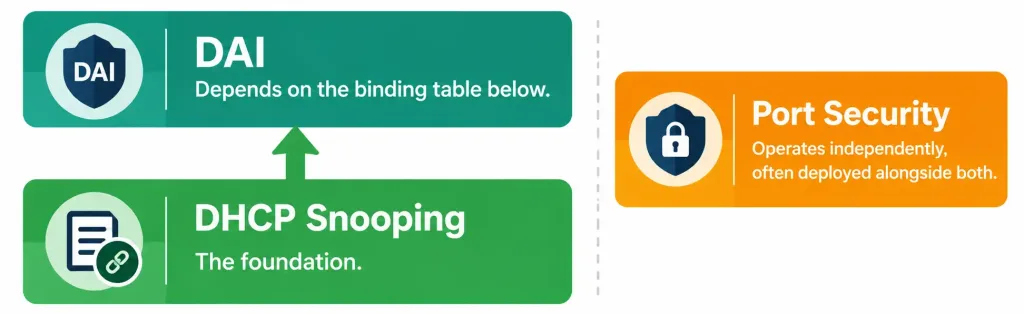
It’s worth being explicit about the relationship the source material for this lesson specifically calls out: DHCP snooping is the foundation the other two build on, though in different ways. DAI directly and structurally depends on DHCP snooping’s binding table — it cannot function correctly without it. Port security, by contrast, operates independently of both DHCP snooping and DAI — it doesn’t need either feature to function, since it’s making decisions based purely on MAC addresses connecting to a physical port, not on DHCP or ARP traffic content at all.
Despite this independence, port security is commonly deployed alongside both other features as a complete access-edge security posture, because each addresses a genuinely distinct threat: DHCP snooping stops rogue DHCP servers, DAI stops ARP spoofing, and port security stops unauthorized devices from connecting to a port at all in the first place. Layering all three reflects the same defense-in-depth principle introduced in objective 5.1 — three distinct mitigations, each closing a different vulnerability, deployed together rather than relying on any single one to cover every possible attack vector at the access edge.
Common Misconceptions
- “DHCP snooping blocks all DHCP traffic on untrusted ports.” It specifically blocks DHCP server responses (Offer, Acknowledge) on untrusted ports — legitimate client-originated Discover and Request messages from end-user devices on untrusted ports are still permitted, since clients are exactly who’s expected to be on those ports.
- “DAI can function independently of DHCP snooping.” DAI validates ARP packets against the DHCP snooping binding table specifically — without a functioning binding table, DAI has nothing legitimate to compare against.
- “All three port security violation modes produce the same practical outcome, just with different names.” They differ significantly: protect and restrict leave the port functional for the authorized device, while shutdown disables the entire port, including for the device that was already legitimately connected.
- “Sticky MAC addresses are lost if the switch reboots.” If the running configuration is saved to the startup configuration, sticky-learned MAC addresses persist across a reboot exactly like any other manually typed configuration line, since they were written into the configuration itself once learned.
- “Port security requires DHCP snooping or DAI to be configured first.” Port security operates entirely independently of both other features — it can be configured and function correctly on its own, even if DHCP snooping and DAI are never enabled at all.
Configure and Verify: Full Lab Walkthrough
Topology: SW1 is an access-layer switch with GigabitEthernet0/1 uplinked toward a legitimate DHCP server, and GigabitEthernet0/5 connected to a single end-user workstation. The goal: prevent a rogue DHCP server or ARP spoofing attempt on the access ports, and restrict Gi0/5 to exactly one learned MAC address with a shutdown response to any violation.
Step 1 — Enable DHCP snooping globally and for the relevant VLAN:
SW1(config)# ip dhcp snooping
SW1(config)# ip dhcp snooping vlan 10
Step 2 — Trust the uplink port facing the legitimate DHCP server:
SW1(config)# interface GigabitEthernet0/1
SW1(config-if)# ip dhcp snooping trust
Step 3 — Enable DAI for the same VLAN, trusting the same uplink port:
SW1(config)# ip arp inspection vlan 10
SW1(config)# interface GigabitEthernet0/1
SW1(config-if)# ip arp inspection trust
Step 4 — Configure port security on the end-user access port:
SW1(config)# interface GigabitEthernet0/5
SW1(config-if)# switchport mode access
SW1(config-if)# switchport port-security
SW1(config-if)# switchport port-security maximum 1
SW1(config-if)# switchport port-security mac-address sticky
SW1(config-if)# switchport port-security violation shutdown
Step 5 — Verify DHCP snooping status and the binding table:
SW1# show ip dhcp snooping
Switch DHCP snooping is enabled
DHCP snooping is configured on following VLANs:
10
Insertion of option 82 is enabled
Interface                  Trusted     Rate limit (pps)
GigabitEthernet0/1         yes         unlimited
GigabitEthernet0/5         no          unlimited

SW1# show ip dhcp snooping binding
MacAddress          IpAddress        Lease(sec)  Type           VLAN  Interface
00:1A:2B:3C:4D:5E   192.168.10.20    86400       dhcp-snooping  10    GigabitEthernet0/5
Step 6 — Verify DAI status:
SW1# show ip arp inspection vlan 10
Source Mac Validation      : Disabled
Destination Mac Validation : Disabled
IP Address Validation      : Disabled

Vlan     Configuration    Operation state
10       Enabled          Active
Step 7 — Verify port security status on the access port:
SW1# show port-security interface GigabitEthernet0/5
Port Security              : Enabled
Port Status                : Secure-up
Violation Mode              : Shutdown
Maximum MAC Addresses       : 1
Total MAC Addresses          : 1
Configured MAC Addresses    : 0
Sticky MAC Addresses         : 1
Last Source Address:Vlan     : 00:1A:2B:3C:4D:5E:10
Security Violation Count    : 0
This confirms the port is actively securing exactly one sticky-learned MAC address, currently in a healthy Secure-up state with zero violations recorded.
Packet Tracer Practice Activity
Scenario: Harden an access-layer switch against rogue DHCP servers, ARP spoofing, and unauthorized device connections on a specific access port.
Part 1: Enable DHCP snooping. Enable it globally and for the relevant VLAN, trusting only the uplink port toward the legitimate DHCP server.
Part 2: Enable DAI. Enable it for the same VLAN, trusting the same uplink port.
Part 3: Configure port security. On the access port connecting a single workstation, set a maximum of one MAC address, enable sticky learning, and set the violation mode to shutdown.
Part 4: Verify. Confirm the workstation successfully obtains a DHCP address and appears in the binding table. Simulate a second device connecting to the same access port (or changing the connected device’s MAC address) and confirm the port transitions to an err-disabled state. Recover the port using shutdown / no shutdown and confirm normal operation resumes.
Expected result: The legitimate workstation obtains an address normally and appears in show ip dhcp snooping binding. Introducing a second MAC address on the secured port triggers a shutdown violation, visible in show port-security interface, and the port remains down until manually recovered.
Troubleshooting Patterns
“Legitimate clients can no longer obtain DHCP addresses after enabling DHCP snooping.” Confirm the port facing the actual DHCP server is configured as trusted — if it’s left untrusted by mistake, legitimate DHCP server responses are blocked exactly as if the server were rogue.
“DAI is enabled, but legitimate ARP traffic from statically addressed devices is being dropped.” Statically configured devices never appear in the DHCP snooping binding table, since they never went through a DHCP transaction — a manually configured ARP access list is needed to explicitly permit their known IP-to-MAC mapping.
“A port security violation shut down a port, and the connected user lost all connectivity, not just the unauthorized device.” This is expected behavior for shutdown mode specifically — it disables the entire port, not just the offending MAC address; restrict or protect would have left the legitimate device’s traffic unaffected.
“A port security violation isn’t generating any visible log entry.” Confirm the violation mode is restrict or shutdown, not protect — protect mode silently drops unauthorized traffic with no logging at all, by design.
“Sticky-learned MAC addresses disappeared after a switch reboot.” Confirm the running configuration was actually saved to the startup configuration (copy running-config startup-config) — sticky addresses are written into the running configuration when learned, but like any other running-config change, they’re lost on reboot if never saved.
Frequently Asked Questions
Does DHCP snooping need to be enabled on every VLAN, or just specific ones?
It’s enabled per VLAN specifically (ip dhcp snooping vlan <number>), so an administrator can choose to protect only the VLANs where it’s relevant rather than enabling it network-wide unconditionally.
Can port security limit more than one MAC address on a single port?
Yes — switchport port-security maximum accepts any reasonable number, useful for a port connecting to a small hub or an IP phone with a PC daisy-chained behind it, where more than one legitimate MAC address is expected on that single physical port.
Is DAI only relevant to preventing malicious attacks, or does it also help with accidental misconfigurations?
Both — while ARP spoofing is typically framed as a deliberate attack, DAI would also catch a misconfigured device accidentally claiming an incorrect IP-to-MAC mapping, providing a safety net against honest mistakes as well as malicious intent, echoing the threat classification distinctions from objective 5.1.
Why is shutdown the default violation mode if it’s the most disruptive option?
Its severity is arguably the point from a security-first perspective — a completely disabled port guarantees no further unauthorized traffic can pass, at the cost of also affecting the legitimate device, whereas the administrator can deliberately choose a less disruptive mode if operational continuity is prioritized over that maximum level of certainty.
Do DHCP snooping and DAI need to be configured on every switch in a network, or just access-layer switches?
They’re most critical at the access layer, where end-user devices (and any rogue devices) actually connect — but a network can extend these protections further into the distribution layer if a broader security posture is warranted, following the same trusted/untrusted logic through additional layers of the topology.
Layer 2 Security: Practice Quiz
DHCP Snooping, Dynamic ARP Inspection, and Port Security
Summary
- DHCP snooping classifies switch ports as trusted or untrusted, blocking rogue DHCP server responses (Offer, Acknowledge) on untrusted ports while building a binding table of legitimate IP-to-MAC-to-port associations.
- Dynamic ARP Inspection validates incoming ARP packets against that same DHCP snooping binding table, dropping mismatches to prevent ARP spoofing — and cannot function correctly without DHCP snooping already in place.
- Port security restricts which or how many MAC addresses may connect on a port, with three violation modes of increasing severity: protect (silent drop), restrict (drop plus logging), and shutdown (the entire port disabled, including the legitimate device).
- Port security operates independently of DHCP snooping and DAI, since it evaluates MAC addresses at the port level rather than DHCP or ARP traffic content — but all three are commonly deployed together as a complete, layered access-edge security posture.
show ip dhcp snooping,show ip dhcp snooping binding,show ip arp inspection, andshow port-security interfacetogether confirm whether each of these three features is correctly configured and actively functioning.



