
Domain 3.0 | Network Operations — 19% of exam
Learning Objectives
By the end of this lesson, you will be able to:
- Distinguish physical network diagrams from logical network diagrams and explain what each documents
- Explain the purpose of wiring diagrams and asset inventories
- Describe the role of standard operating procedures (SOPs) in consistent network operations
- Explain hardware and software lifecycle management, including end-of-life (EOL) and end-of-support (EOS)
- Recognize the operational consequences of poor or outdated documentation
Key Terms
| Term | Definition |
|---|---|
| Physical Network Diagram | Documentation showing the actual physical placement of devices, racks, and cable runs |
| Logical Network Diagram | Documentation showing IP addressing, VLANs, and traffic flow, independent of physical location |
| Asset Inventory | A tracked record of hardware and software, including serial numbers, locations, and warranty/support status |
| End-of-Life (EOL) | The date a vendor stops manufacturing or selling a product |
| End-of-Support (EOS) | The date a vendor stops providing support and security patches for a product — generally the more operationally urgent date |
Explanation
From Building Networks to Operating Them
Module 2 was about implementation — configuring routing, switching, wireless, and physical installations. Module 3 shifts to something just as important but easy to neglect: the ongoing operational practices that keep a network running smoothly long after it’s initially built. Documentation is the natural place to start, because everything else in this module — monitoring, disaster recovery, change management — depends on accurate documentation to actually work.
Physical vs. Logical Network Diagrams
Two different diagram types answer two genuinely different questions about the same network:
- A physical network diagram shows where things actually are — which rack a switch sits in, which port a cable runs to, which floor an access point is mounted on. This is the diagram you’d want in hand while physically walking a building tracing a cable or locating a specific device.
- A logical network diagram shows how the network actually works — IP addressing, VLAN assignments, routing relationships, and traffic flow — independent of physical location entirely. Two devices shown right next to each other on a logical diagram might be in completely different rooms or even buildings.
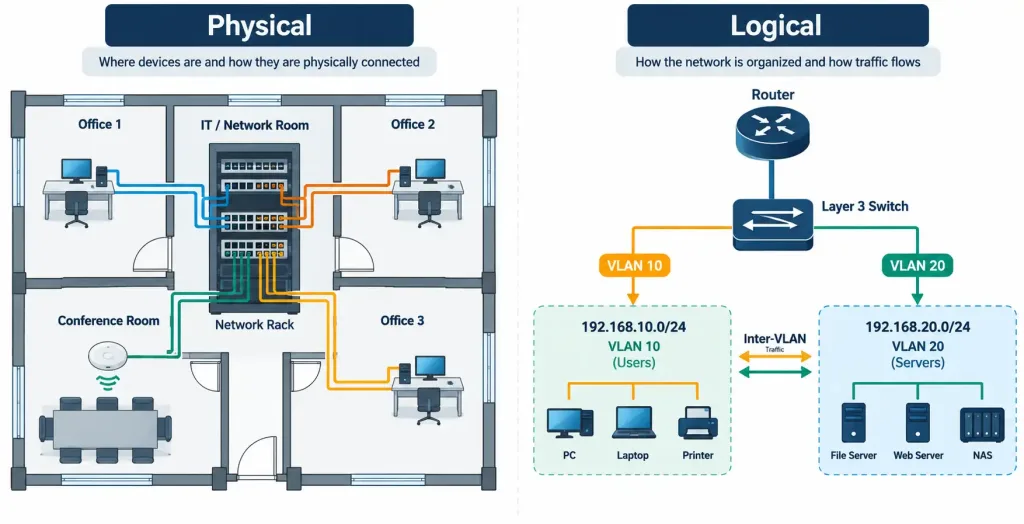
Both diagram types matter, and they answer different troubleshooting questions: “where is this device physically located” needs a physical diagram; “why can’t this subnet reach that one” needs a logical diagram. Relying on only one type leaves a real gap in an administrator’s ability to quickly diagnose a problem.
Wiring Diagrams and Asset Inventory
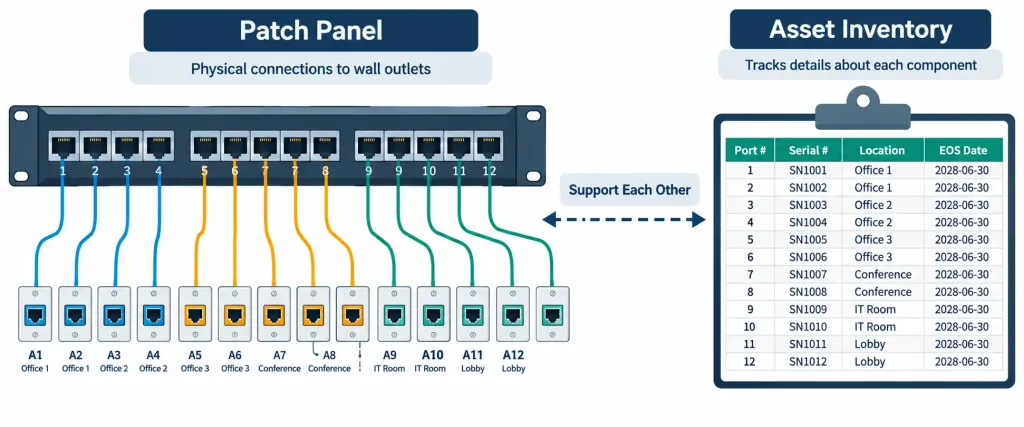
A wiring diagram goes a level more granular than a physical network diagram, documenting the specific cable-level, port-to-port connections — which patch panel port connects to which wall outlet, which connects to which switch port. This is exactly the kind of detail that makes the patch panel cross-connect covered in Module 2 actually usable months or years later — without a wiring diagram, tracing a specific connection means physically following a cable, which is far slower and more error-prone than checking documentation first.An asset inventory tracks every piece of hardware and software in the environment: model numbers, serial numbers, physical location, assigned owner, purchase date, and warranty or support status. This isn’t just administrative record-keeping — a current asset inventory is what makes lifecycle management (covered next) possible in the first place, since you can’t proactively plan around a support deadline for equipment nobody has accurately tracked.
Standard Operating Procedures
A standard operating procedure (SOP) is a documented, step-by-step process for a routine task — provisioning a new switch port, adding a VLAN, onboarding a new employee’s account. SOPs exist to make routine work consistent regardless of who performs it, reducing the chance that a step gets skipped or done differently depending on who’s on shift that day. They’re also a genuine time-saver for onboarding new team members, who can follow a documented procedure rather than needing someone to walk them through every routine task individually.
Lifecycle Management: EOL and EOS
Every piece of hardware and software eventually reaches the end of its supported life, and two specific dates matter here, even though they’re easy to confuse:
- End-of-Life (EOL) is the date a vendor stops manufacturing or selling a product. After EOL, you simply can’t buy new units of that exact model anymore.
- End-of-Support (EOS) is the date a vendor stops providing support and, critically, security patches for a product. EOS is generally the more operationally urgent date of the two — a device can keep running fine after EOL as long as it’s still supported, but once a device passes EOS, any newly discovered vulnerability in it will never be patched, no matter how serious.
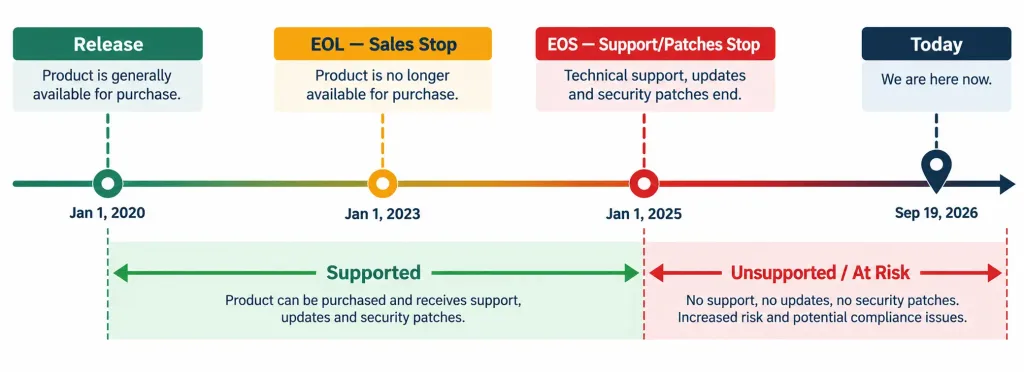
Lifecycle management means proactively tracking these dates across the environment — using that asset inventory — so replacements can be planned and budgeted before a device becomes an unsupported security liability, rather than discovering the problem only after EOS has already passed.
Why Documentation Accuracy Matters
Documentation that’s technically present but years out of date is often worse than no documentation at all, because it actively misleads whoever relies on it during a stressful moment — a wiring diagram showing a connection that was quietly changed eighteen months ago sends someone chasing the wrong cable during an actual outage. Keeping documentation genuinely current, updated as part of every change rather than as an occasional cleanup project, is what makes it trustworthy enough to actually rely on later. This connects directly to change management, covered in the next lesson — the discipline of updating documentation alongside every change, not after the fact, is what keeps documentation from quietly drifting out of sync with reality.
Recognition-Level Verification Concepts
A few patterns are worth recognizing on sight:
- A diagram showing rack positions and cable paths is physical; a diagram showing IP subnets and VLAN relationships is logical — the same network can (and should) have both.
- A document mapping specific patch panel ports to specific wall outlets is a wiring diagram, more granular than a general physical diagram.
- A device still functioning normally past its EOL date, but still receiving security patches, has not yet reached the more operationally critical EOS milestone.
- A step-by-step checklist for a routine task like adding a VLAN is an SOP, meant to standardize execution rather than document network state.
Common Exam Traps
- EOL and EOS are not the same date, and EOS is usually the more urgent one. A device can be past EOL and still perfectly supportable; once it’s past EOS, no future security patches will ever come.
- Physical and logical diagrams answer different questions and aren’t interchangeable. Don’t assume one diagram type covers what the other is meant to show.
- A wiring diagram is more granular than a general physical network diagram — port-to-port cable mapping, not just device placement.
- Outdated documentation can be actively harmful, not just unhelpful. Treat stale documentation as a real risk, not a minor inconvenience, especially during time-pressured troubleshooting.
- An asset inventory is a prerequisite for lifecycle management, not a separate, optional exercise. Without accurate tracking of what exists and its support status, planning replacements before EOS becomes guesswork.
Lesson 3.1.1 Practice Quiz — Documentation & Lifecycle Management
17 questions covering physical vs. logical diagrams, wiring diagrams, asset inventory, SOPs, and EOL/EOS.
N10-009 · Domain 3.1Summary
Physical network diagrams document where devices and cabling actually sit; logical network diagrams document IP addressing, VLANs, and traffic flow — both are needed for different troubleshooting questions.
Wiring diagrams document specific port-to-port cable connections, more granular than a general physical diagram, while asset inventories track hardware and software details including support status.
Standard operating procedures (SOPs) document routine tasks step-by-step, ensuring consistent execution regardless of who performs the work.
End-of-Life (EOL) marks when a vendor stops selling a product; End-of-Support (EOS) marks when a vendor stops providing security patches — EOS is generally the more operationally urgent milestone.
Lifecycle management uses accurate asset inventory data to proactively plan replacements before EOS, rather than reacting after support has already ended.
Documentation that's out of date can actively mislead troubleshooting efforts, making ongoing accuracy — updated with every change — essential rather than optional.



