
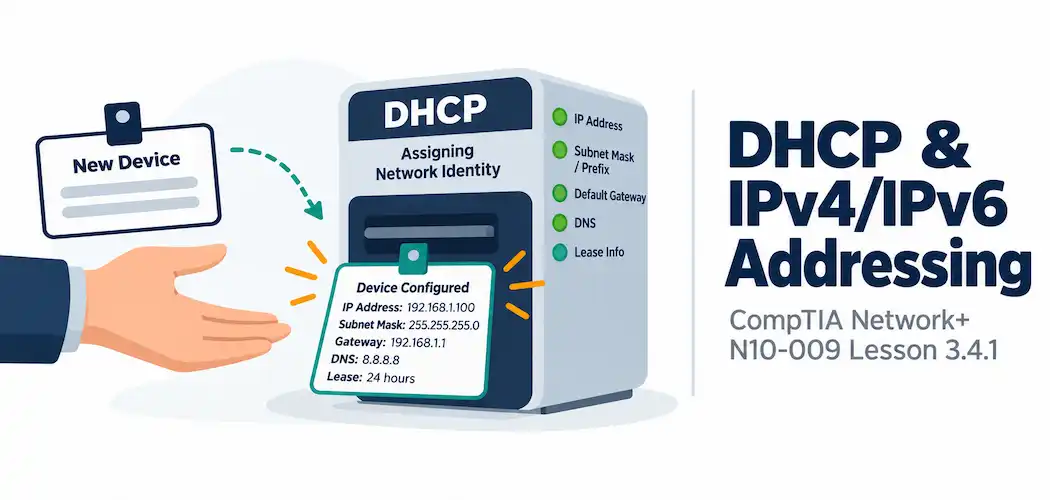
Domain 3.0 | Network Operations — 19% of exam
Learning Objectives
By the end of this lesson, you will be able to:
- Explain the DHCP DORA process and what information a DHCP server provides to a client
- Describe DHCP scopes, reservations, and exclusions
- Explain why DHCP relay is needed for clients and servers on different subnets
- Compare SLAAC and DHCPv6 as IPv6 address assignment methods
- Recognize common DHCP and address assignment troubleshooting scenarios
Key Terms
| Term | Definition |
|---|---|
| DHCP (Dynamic Host Configuration Protocol) | A protocol that automatically assigns IP addresses and other network settings to clients |
| DORA | The four-step DHCP process: Discover, Offer, Request, Acknowledge |
| DHCP Relay | A function (often called an IP helper) that forwards DHCP broadcasts across subnet boundaries to a remote DHCP server |
| DHCP Reservation | A specific IP address permanently assigned to a specific device’s MAC address within a DHCP scope |
| SLAAC (Stateless Address Autoconfiguration) | An IPv6 method where a host generates its own address using a router-advertised prefix, without a central server tracking assignments |
Explanation
From Disaster Recovery to Everyday Address Assignment
This lesson shifts from planning for rare, severe events back to something that happens constantly on every network: getting an IP address onto a device in the first place. Every device relying on the IPv4 addressing and IPv6 addressing covered back in Module 1 needs to actually receive an address somehow — and for the overwhelming majority of devices, that “somehow” is DHCP.DHCP and the DORA Process
DHCP (Dynamic Host Configuration Protocol) automatically assigns an IP address, subnet mask, default gateway, DNS servers, and other settings to a client, without an administrator manually configuring each device. The process a client goes through to obtain this information is commonly remembered as DORA:- Discover — the client, having no IP address yet, broadcasts a request asking if any DHCP server is available.
- Offer — a DHCP server responds with a proposed IP address and configuration.
- Request — the client formally requests that specific offered address (this step also allows a client to reject an offer if it’s already accepted a different one).
- Acknowledge — the server confirms the assignment, and the client begins using that address.
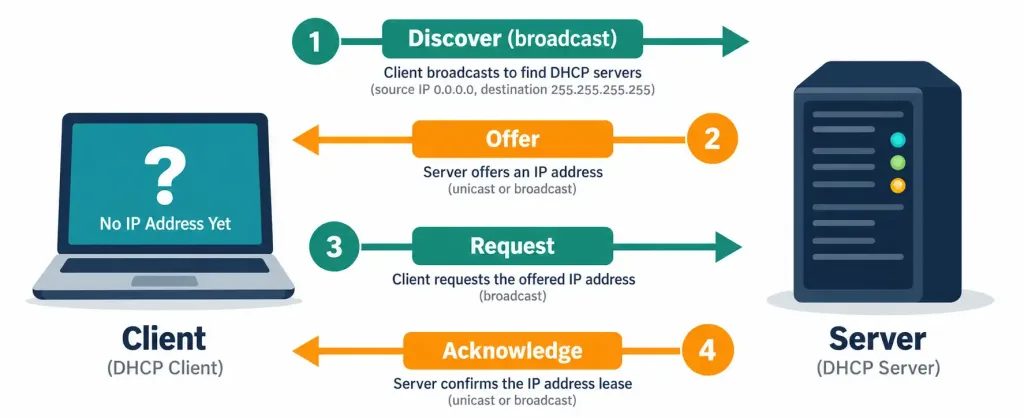
Because the client has no IP address at all when this process starts, the entire exchange happens via broadcast — there’s no unicast address to send a request to yet.
DHCP Scope, Reservations, and Exclusions
A DHCP server manages address assignment through a few key configuration concepts:
A scope defines the overall range of addresses the DHCP server is allowed to hand out on a given subnet — for example, 192.168.1.100 through 192.168.1.200.A reservation permanently ties a specific IP address to a specific device’s MAC address within that scope, so the same device always receives the same address even though it’s technically still using DHCP rather than static configuration.
An exclusion removes specific addresses from the scope entirely, preventing DHCP from ever handing them out — typically used to protect addresses already assigned statically to other devices, like servers or network infrastructure, from being accidentally leased to something else.
Reservations and exclusions solve related but distinct problems: a reservation guarantees a specific device always gets the same DHCP-assigned address, while an exclusion simply keeps DHCP away from addresses that are managed outside the DHCP system entirely. Like any other production configuration, scope changes are worth running through the change management process and reflecting in the site’s documentation and asset inventory, since a scope that’s quietly drifted from what’s documented is exactly the kind of gap that turns a five-minute DHCP troubleshooting session into a much longer one.DHCP Relay: Crossing Subnet Boundaries
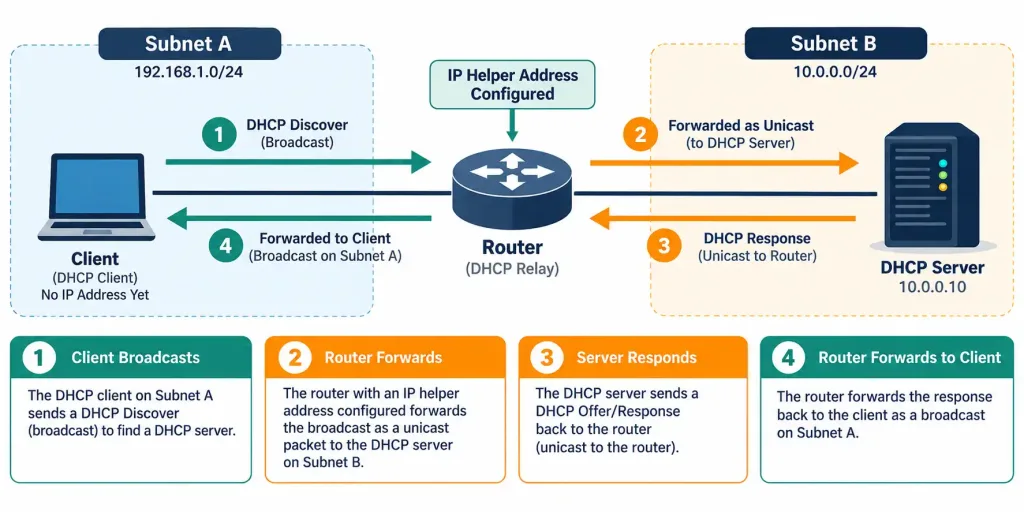
DHCP’s broadcast-based Discover message has a real limitation: routers don’t forward broadcast traffic between subnets by default, which means a DHCP client on one subnet can’t directly reach a DHCP server sitting on a different subnet. Rather than deploying a dedicated DHCP server on every single subnet, most networks use DHCP relay (often configured as an IP helper address on the router interface) to solve this.
IPv6 Address Assignment: SLAAC vs. DHCPv6
IPv6 introduces an address assignment method that doesn’t really have an IPv4 equivalent: SLAAC (Stateless Address Autoconfiguration). Instead of requesting an address from a central server, a host using SLAAC listens for Router Advertisement messages containing a network prefix, then generates its own full address by combining that prefix with an interface identifier it derives itself (often based on its own MAC address or a randomly generated value). Because no central server tracks which address was handed to which device, this approach is called “stateless.”
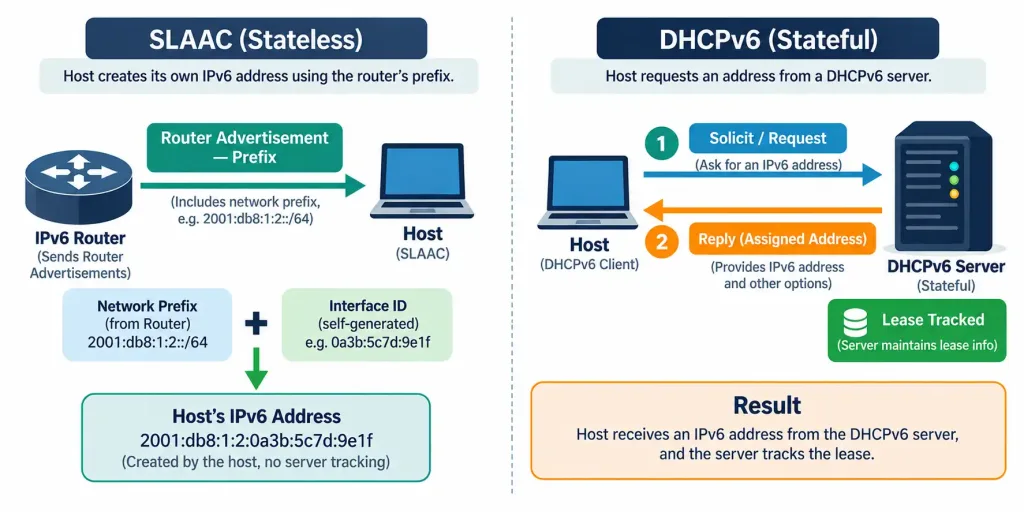
DHCPv6, by contrast, works much more like traditional DHCP for IPv4 — a central server hands out specific addresses and tracks which client has which one, making it “stateful.” Real IPv6 deployments often use SLAAC and DHCPv6 together: SLAAC handles the address itself, while DHCPv6 (in a mode sometimes called “stateless DHCPv6”) supplies additional configuration details, like DNS server addresses, that SLAAC alone doesn’t provide.
Recognition-Level Verification Concepts
A few patterns are worth recognizing on sight:
- A four-message exchange labeled Discover, Offer, Request, Acknowledge is the DHCP DORA process, always starting with a broadcast since the client has no address yet.
- The same device always receiving the identical IP address from DHCP points to a reservation tied to that device’s MAC address.
- An address within the configured scope range that DHCP never actually assigns points to an exclusion.
- A router interface configured with an IP helper address pointing to a DHCP server on a different subnet is DHCP relay in action.
- A host generating its own IPv6 address from a router-advertised prefix, with no central server tracking the assignment, is using SLAAC.
Common Exam Traps
- DHCP relay doesn’t replace the DHCP server — it forwards requests to one that already exists elsewhere. Don’t confuse the relay agent (the router interface) with the actual DHCP server providing addresses.
- A reservation and a static IP configuration on the device itself are not the same thing. A reservation still relies on the DHCP process (DORA) each time the device requests an address — it just guarantees a consistent result.
- SLAAC is stateless; DHCPv6 is stateful. This exact terminology pairing is frequently tested, and it’s the reverse of a common assumption that “stateless” sounds less capable.
- DHCP’s broadcast nature is exactly why DHCP relay exists. Without relay, every subnet would need its own dedicated DHCP server, which is rarely practical at scale.
- An exclusion prevents DHCP from assigning specific addresses; it doesn’t remove those addresses from the network entirely. Excluded addresses are typically still in active use — just assigned statically rather than through DHCP.
Summary
DHCP automatically assigns IP configuration through the DORA process: Discover, Offer, Request, Acknowledge — necessarily starting with a broadcast since the client has no address yet.
A scope defines the overall address range DHCP manages; a reservation ties a specific address to a specific device permanently; an exclusion removes specific addresses from ever being leased.
DHCP relay (IP helper) forwards broadcast DHCP requests as unicast to a remote DHCP server, avoiding the need for a dedicated server on every subnet.
SLAAC lets an IPv6 host generate its own address from a router-advertised prefix without central tracking (stateless); DHCPv6 centrally assigns and tracks addresses much like traditional DHCP (stateful).
Real IPv6 deployments often combine SLAAC for addressing with stateless DHCPv6 for supplemental configuration details like DNS servers.



