
Domain 3.0 | Network Operations — 19% of exam
Learning Objectives
By the end of this lesson, you will be able to:
- Compare site-to-site VPN and client-to-site VPN and identify appropriate use cases for each
- Describe common device connection and management methods: SSH, console, API, and GUI
- Explain the purpose of a jump box in controlling access to sensitive systems
- Distinguish in-band management from out-of-band management
- Identify the appropriate remote access method for a given operational scenario
Key Terms
| Term | Definition |
|---|---|
| Site-to-Site VPN | A continuous, always-on encrypted tunnel connecting two entire networks, transparent to end users on either side |
| Client-to-Site VPN | An on-demand encrypted tunnel connecting an individual user’s device to a corporate network |
| Jump Box (Jump Server) | A hardened intermediary system administrators must connect through before reaching sensitive internal devices |
| In-Band Management | Managing a device using the same network path that carries regular production traffic |
| Out-of-Band Management (OOB) | Managing a device using a separate, dedicated path independent of the production network |
Explanation
Closing Out Module 3: Actually Reaching and Managing Devices
Every topic in this module has quietly assumed something: that an administrator can actually reach a device to apply the documented configuration, review its monitoring data, or execute a disaster recovery plan. This final lesson covers that access layer directly — the methods and models used to connect to and manage network devices in the first place.
Site-to-Site vs. Client-to-Site VPN
Both VPN types create encrypted tunnels, but they connect fundamentally different things:
A site-to-site VPN connects two entire networks together continuously — typically a branch office to headquarters, or two data centers. Once established, it’s essentially transparent: users on either side simply see resources on the other network as if they were local, with the encrypted tunnel doing its work invisibly in the background. This is commonly built using the WAN and cloud connectivity concepts covered back in Module 1. A client-to-site VPN (also called a remote access VPN) connects a single user’s individual device to a corporate network, established on demand whenever that specific user needs access — a remote employee’s laptop connecting in for the workday, for instance, rather than an always-on link between two fixed locations.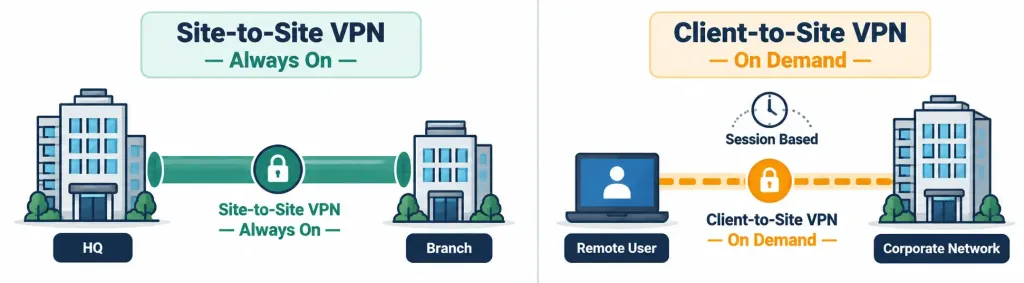
The choice comes down to what’s actually being connected: two fixed locations that always need to talk to each other call for site-to-site; individual, variable users needing occasional access call for client-to-site.
Device Connection Methods: SSH, Console, API, and GUI
Administrators actually reach and configure devices through several distinct methods, each suited to a different situation:
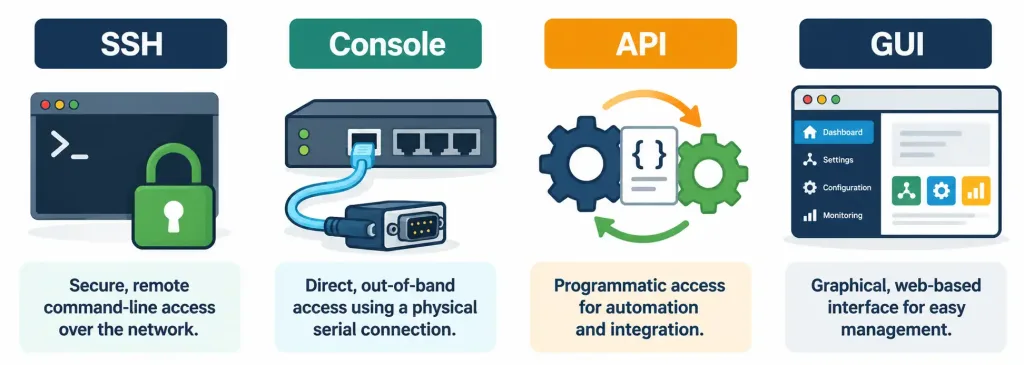
SSH (Secure Shell) provides encrypted command-line access to a device over the network, using well-known port 22. It’s the standard way to remotely configure most network devices via CLI.A console connection is a direct, typically physical connection to a device — often via a serial cable — used specifically when a device has no network configuration yet (initial setup) or has become unreachable over the network entirely, making it the fallback of last resort for a device that’s otherwise inaccessible.
API (Application Programming Interface) access, covered in more depth in the advanced monitoring lesson, lets software interact with a device or platform programmatically, which is increasingly how automation tools and orchestration platforms manage infrastructure at scale.A GUI (Graphical User Interface) — whether a web-based dashboard or a dedicated management application — provides visual, point-and-click device management, generally more approachable for routine tasks than a command-line interface, at the cost of being less scriptable for repetitive or bulk operations.
Jump Box: A Controlled Gateway to Sensitive Systems
A jump box (or jump server) is a hardened, tightly monitored system that sits between administrators and the sensitive devices they need to manage — rather than connecting directly to a critical server or core switch, an administrator first connects to the jump box, and only from there connects onward to the actual target system.
This design serves a genuinely important security purpose: it centralizes access control and logging in one place, meaning every administrative session touching sensitive systems passes through a single, closely watched checkpoint, rather than sensitive systems each being directly reachable (and therefore directly attackable) from anywhere on the network. If a jump box is compromised, it’s also a much smaller, more contained problem to investigate and remediate than if every sensitive device had been directly exposed all along.
In-Band vs. Out-of-Band Management
Where management traffic actually travels matters as much as how an administrator connects:
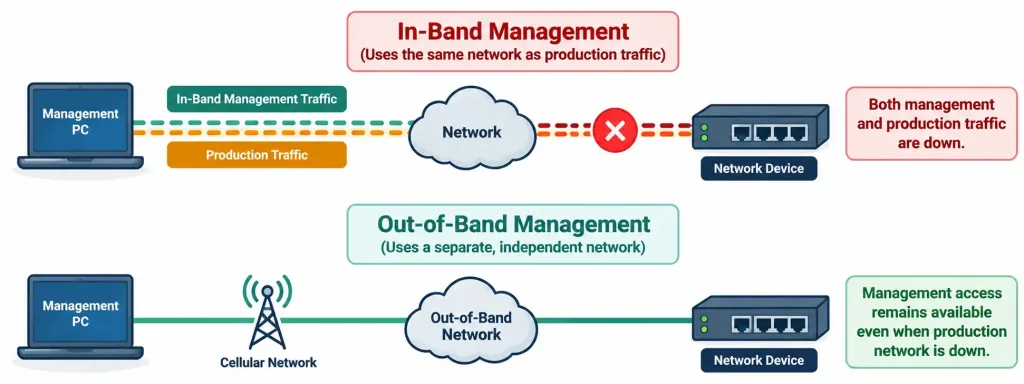
- In-band management sends management traffic over the same network path that carries regular production traffic. It’s convenient and requires no separate infrastructure, but it has an obvious weakness: if that production path itself is the thing that’s down, in-band management traffic can’t get through either — right when an administrator most needs to reach the device.
- Out-of-band (OOB) management uses a genuinely separate path — sometimes a dedicated physical management network, sometimes a console server reachable via a completely independent connection (like a cellular modem) — that remains available even when the production network has failed entirely.
Recognition-Level Verification Concepts
A few patterns are worth recognizing on sight:
- A continuous, always-on encrypted tunnel between two fixed networks is a site-to-site VPN; an on-demand tunnel for one user’s device is a client-to-site VPN.
- A direct serial cable connection to a device, used because it’s otherwise unreachable over the network, is a console connection.
- Requiring administrators to connect to an intermediary system before reaching a sensitive server describes a jump box architecture.
- Management traffic that stops working at the exact same time as the production network itself points to in-band management with no OOB fallback in place.
Common Exam Traps
- Site-to-site and client-to-site VPNs serve different connection models, not different security levels. The distinction is what’s being connected (two networks vs. one device), not which one is “more secure.”
- A console connection is not the same as a remote SSH session, even though both provide CLI access. Console is typically local/physical and used specifically when network access isn’t available at all.
- A jump box’s value comes from centralizing and logging access, not from being an ordinary hop in a longer path. It’s a deliberate security control, not an incidental routing detail.
- In-band management’s core weakness is that it shares fate with the production network it manages. If that network fails, in-band management fails right along with it, at exactly the wrong moment.
- Out-of-band management requires genuinely independent infrastructure, not just a separate VLAN on the same physical network. A separate VLAN riding the same physical links and switches doesn’t provide real OOB resilience if that underlying hardware fails.
Lesson 3.5.1 Practice Quiz — Remote Access & Management Methods
17 questions covering site-to-site vs. client-to-site VPN, SSH/console/API/GUI, jump boxes, and in-band vs. out-of-band management.
N10-009 · Domain 3.5Summary
A site-to-site VPN continuously connects two entire networks; a client-to-site VPN connects an individual user's device on demand.
SSH provides encrypted CLI access over the network; console provides direct/local access for initial setup or when network access is unavailable; API enables programmatic automation; GUI provides visual, point-and-click management.
A jump box centralizes and logs administrative access to sensitive systems, requiring connections to pass through a single hardened checkpoint rather than reaching sensitive devices directly.
In-band management shares the same path as production traffic and fails along with it; out-of-band management uses genuinely independent infrastructure that remains reachable during a production outage.
Out-of-band management directly supports disaster recovery planning, since a DR plan is only useful if administrators can actually reach and manage devices during the outage it's meant to address.
This lesson completes Module 3 (Network Operations); Module 4, Network Security, comes next.



