Muhammad Khattak
Routing and switching specialist, CCNA certified, with extensive experience in network configuration and troubleshooting. Covers OSPF, EIGRP, VLAN management, and advanced routing concepts.
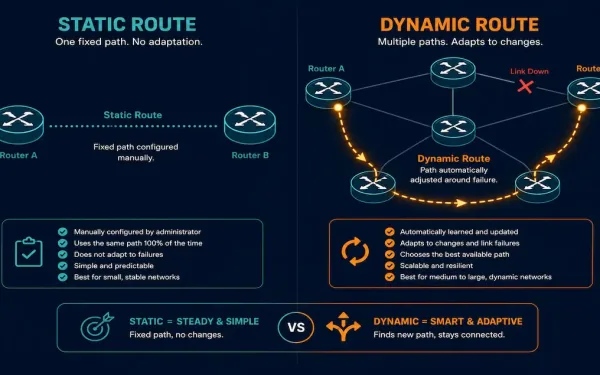
Static Routing vs Dynamic Routing: Complete Explanation
Routing is the process of selecting paths in a network along which to send traffic. It’s the backbone of all data communication in IP networks, enabling devices to exchange data across different networks. Routers forward packets based on the destination IP address, and they learn about remote networks through two primary methods: static routing and...
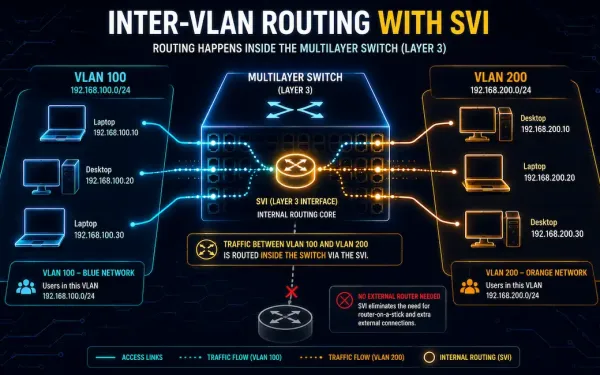
Switch Virtual Interface (SVI): Configuration, Verification, and Troubleshooting
Switch Virtual Interfaces, or SVIs, are a cornerstone of modern enterprise networking. They enable efficient inter-VLAN routing directly on a multilayer switch, no separate router required. This guide covers SVI configuration, verification, troubleshooting, and real-world tradeoffs, for CCNA and CCNP study alike. Evolution of Layer 2 and Layer 3 Switching In early networking, Layer 2...
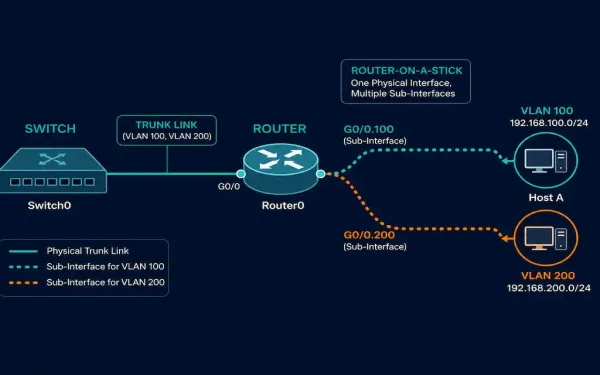
Router-on-a-Stick Inter-VLAN Routing: Configuration, Verification, and Troubleshooting
Legacy inter-VLAN routing needs one physical router interface for every VLAN. That works for a two- or three-VLAN network, but it runs out of interfaces fast. Router-on-a-stick solves this problem. It uses a single physical interface, split into multiple logical sub-interfaces, to route traffic for many VLANs at once. This guide walks through the full...
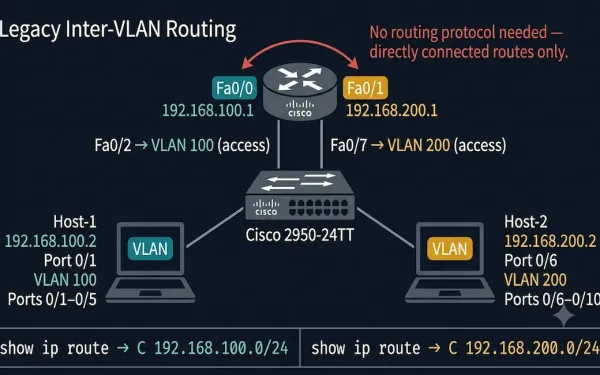
Legacy Inter-VLAN Routing: Configuration, Verification, and Troubleshooting
As we learned, each VLAN usually works on its own subnet. Network switches mainly work at Layer 2 of the OSI model and do not examine logical addresses. Therefore, for traffic between VLANs, inter-VLAN routing is required. Legacy Inter-VLAN routing is the original solution for routing traffic between different VLANs. It relies on routers with...
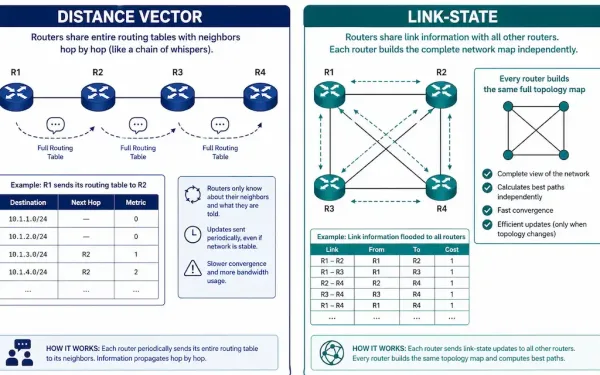
Dynamic Routing Algorithms: Distance Vector vs. Link-State
Every dynamic routing protocol has to solve the same underlying problem: how does a router, knowing only about its own directly connected networks, learn about everything else and figure out the best path to reach it? The answer comes down to one of two fundamentally different approaches — distance vector or link-state — and understanding...
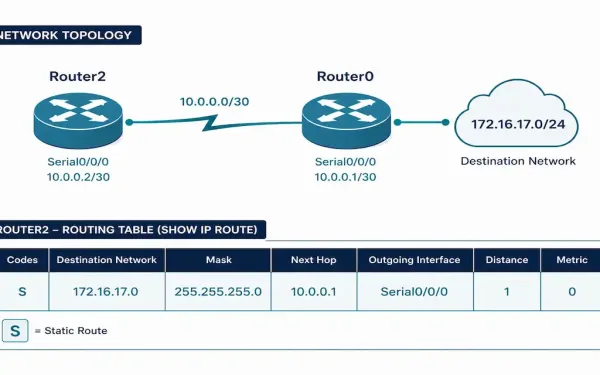
Static Route Configuration: IPv4 and IPv6
Static routes are the simplest routing tool a network administrator has: manually tell the router exactly how to reach a specific network, with no protocol overhead and no automatic recalculation if something changes. That simplicity is both the appeal and the limitation, and knowing exactly when a static route is the right choice — versus...
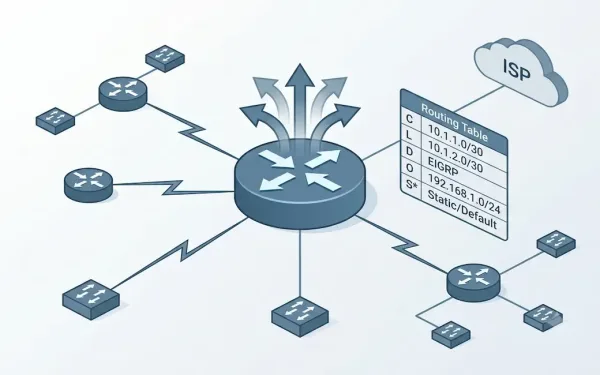
What is a Routing Table – Explained
Routing tables are the backbone of IP networking, guiding routers in forwarding data packets to their intended destinations efficiently. For CCNA and CCNP students, mastering routing tables is essential, as they form a core component of Cisco certification exams and real-world network administration. A routing table contains critical information about network paths, including directly connected...
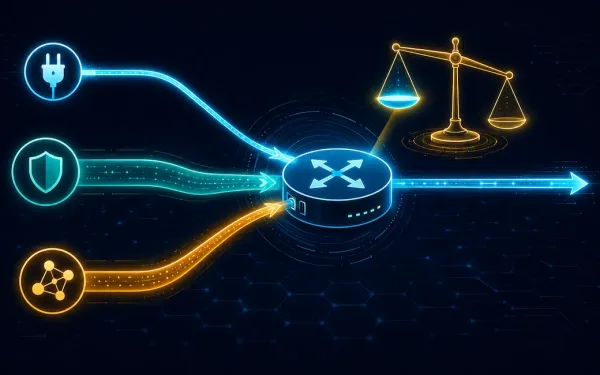
Administrative Distance: How Cisco Routers Choose Between Route Sources
In network environments, routers often receive multiple routes to the same destination from different sources — routing protocols (OSPF, EIGRP, RIP), static routes, or directly connected networks. To select the most trustworthy route among them, Cisco routers use Administrative Distance (AD), a foundational concept in the CCNA curriculum. This article covers AD’s purpose, default values,...
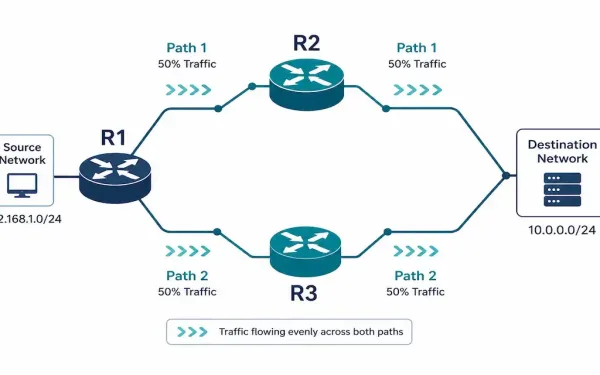
Network Load Balancing: Equal-Cost and EIGRP Unequal-Cost Routing
When a router has more than one valid path to the same destination, it needs a way to decide what to do with all of them — use only the best one, or spread traffic across several. That decision is network load balancing, and understanding exactly how routers make it, right down to which paths...
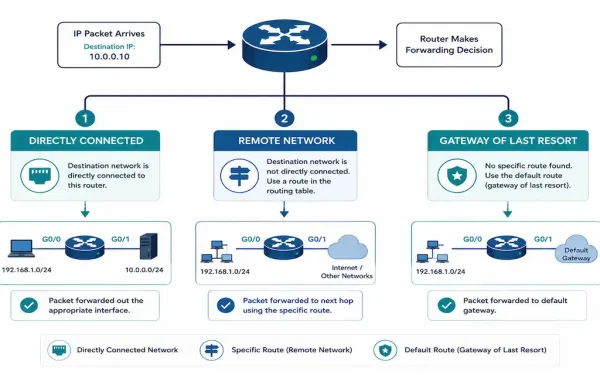
Router Path Selection: How Routers Determine the Best Path
Every time a router receives a packet, it runs through the same basic decision sequence: is the destination directly connected, is it a remote network reachable through a known route, or is there no known route at all? Understanding this sequence — and exactly how a router picks between multiple valid paths when more than...