
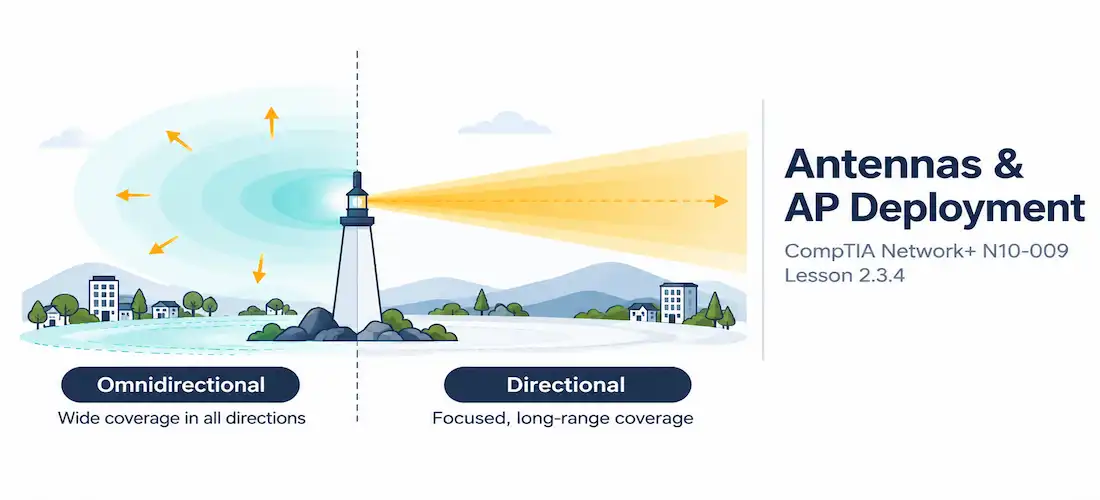
Domain 2.0 | Network Implementation — 20% of exam
Learning Objectives
By the end of this lesson, you will be able to:
- Compare omnidirectional and directional antenna radiation patterns
- Explain when to choose an omnidirectional versus a directional antenna for a given deployment
- Describe key access point placement considerations, including coverage overlap and physical obstacles
- Explain the purpose of a wireless site survey and heat map
- Recognize common antenna and placement mistakes in wireless deployments
Key Terms
| Term | Definition |
|---|---|
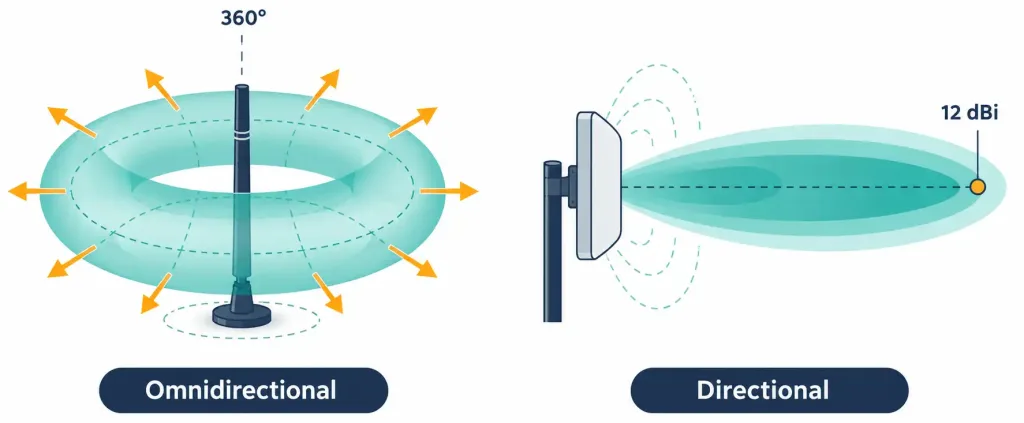
| Omnidirectional Antenna | An antenna that radiates signal roughly equally in all horizontal directions, forming a donut-shaped coverage pattern |
| Directional Antenna | An antenna that focuses signal into a narrower beam in one direction, trading coverage width for greater range and gain in that direction |
| Antenna Gain | A measure (in dBi) of how much an antenna concentrates signal in a particular direction compared to a theoretical reference antenna |
| Site Survey | A physical assessment of a location’s RF environment, used to determine optimal access point placement and count before or after deployment |
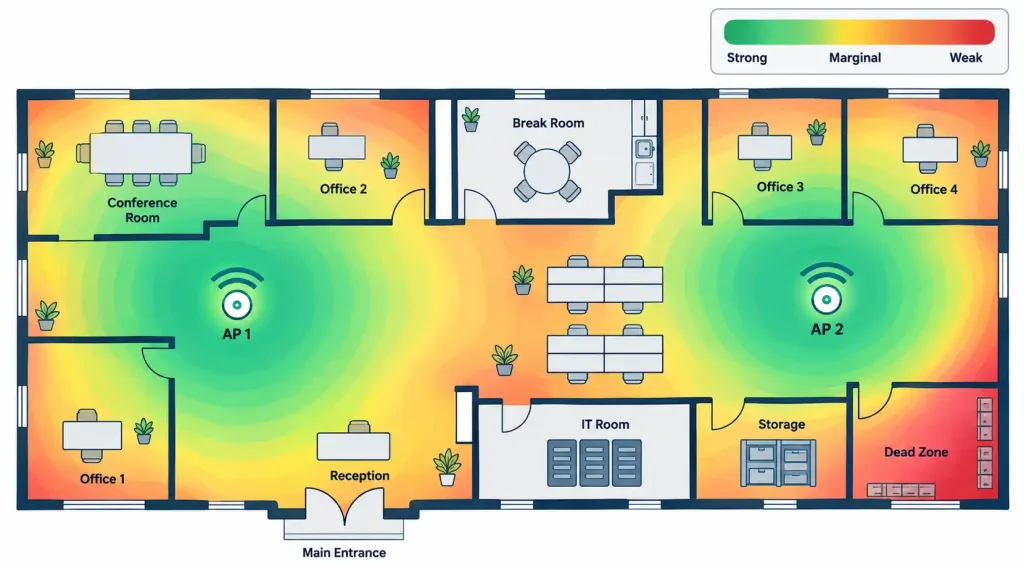
| Heat Map | A visual representation of measured wireless signal strength across a floor plan |
Explanation
Closing Out Wireless Deployment Fundamentals
The previous three lessons covered frequency bands and channels, how wireless networks are named and structured, and wireless encryption and authentication. This final lesson in the objective covers the physical side of the equation: how the choice of antenna and the physical placement of access points shape the coverage a wireless network actually delivers.Omnidirectional vs. Directional Antennas
An access point’s antenna determines the shape of its coverage, and that shape matters as much as raw signal strength.
- An omnidirectional antenna radiates signal roughly equally in every horizontal direction, producing a coverage pattern often described as donut-shaped — strong in a ring around the antenna, weaker directly above and below it. This is the default antenna type built into most consumer and enterprise access points, and it’s the right choice whenever a single AP needs to serve devices scattered in every direction around it — a typical open office, a living room, a classroom.
- A directional antenna — common types include Yagi, panel, and parabolic dish antennas — concentrates signal into a narrower beam pointed in one direction. What it gives up in coverage width, it gains in range and signal strength along that specific direction. This makes directional antennas the right tool for point-to-point bridge links between two buildings, for covering a long narrow space like a warehouse aisle or hallway, or for extending outdoor coverage in one specific direction without wasting signal everywhere else.
Antenna Gain and Coverage Tradeoffs
Antenna gain, measured in dBi, describes how much an antenna concentrates energy in a particular direction relative to a theoretical baseline antenna that radiates equally in all directions (including vertically, which no real antenna does). Higher gain doesn’t mean “more powerful” in an absolute sense — it means more tightly focused. A high-gain directional antenna can achieve impressive range along its narrow beam precisely because it isn’t wasting energy spreading signal in directions nobody needs it. An omnidirectional antenna, by contrast, generally has lower gain because that same energy is deliberately spread across a full 360-degree horizontal pattern instead of concentrated into one direction.
This is why swapping in a higher-gain omnidirectional antenna isn’t automatically an upgrade — it typically flattens the coverage pattern (extending horizontal range slightly while reducing vertical coverage), which can actually hurt performance in a multi-floor building where some coverage above and below the AP is genuinely needed.
Access Point Placement Considerations
Antenna choice only matters in combination with smart physical placement. A few placement principles come up constantly in real deployments:
Physical obstacles matter more than distance alone. Concrete, metal, and water (including full water pipes or aquariums) all attenuate Wi-Fi signal significantly more than open air or drywall. An access point placed a shorter distance away but behind a concrete wall can perform worse than one placed farther away with a clear line of sighMounting height and position affect
omnidirectional coverage evenly. Since omnidirectional antennas radiate weakly straight up and down, mounting them too high or too low relative to the devices they’re meant to serve can leave gaps directly beneath or around them.
Coverage overlap between neighboring access points needs to be deliberate, not accidental. Some overlap is necessary for seamless roaming as devices move between APs, but too much overlap on the same or overlapping channels reintroduces the channel interference problem covered earlier in this objective — a classic case of good intentions (redundant coverage) creating a new problem (co-channel interference) if channel planning isn’t coordinated alongside placement.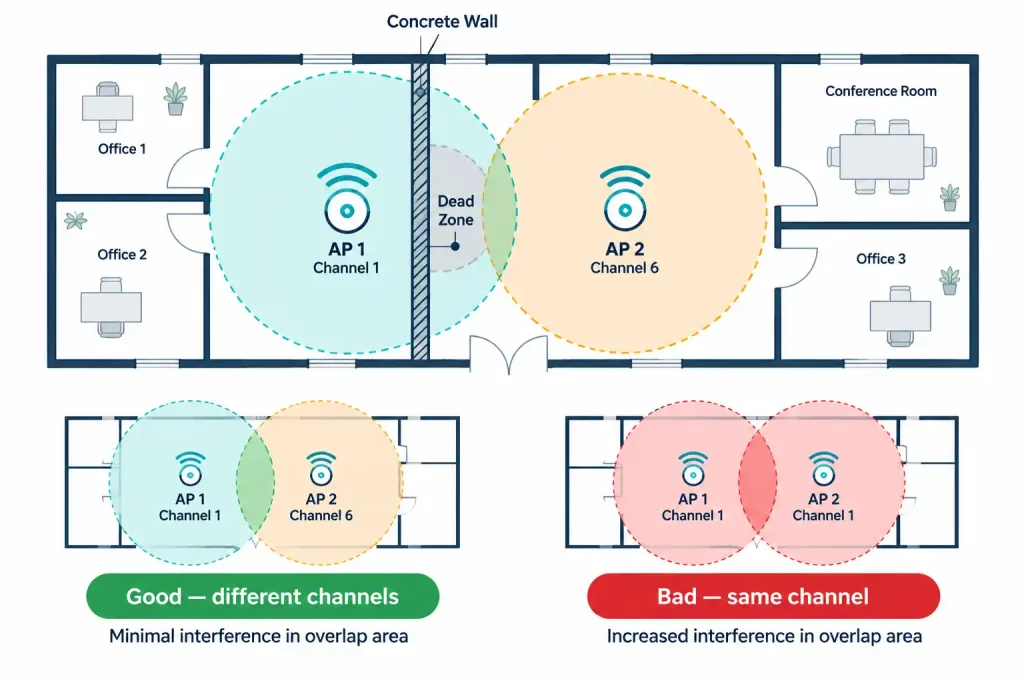
Wireless Site Surveys and Heat Maps
A site survey is a physical, empirical assessment of a location’s actual RF environment — measuring real signal strength, noise, and interference throughout a space rather than relying on floor plans and theoretical calculations alone. A predictive survey happens before any hardware is installed, using software modeling based on building materials and layout to estimate where access points should go. A post-deployment survey happens after installation, physically walking the site with measurement tools to verify the actual coverage matches what was planned — and to catch problems the predictive model couldn’t have anticipated, like a filing cabinet or shelving unit that wasn’t accounted for.
The output of a site survey is often visualized as a heat map: a color-coded overlay on the building’s floor plan showing measured signal strength throughout the space, making it immediately obvious where coverage is strong, where it’s marginal, and where dead zones exist that need an additional access point or a repositioned one.
Recognition-Level Verification Concepts
A few patterns are worth recognizing on sight:
- A coverage pattern described as a ring or donut shape around the access point points to an omnidirectional antenna; a narrow, elongated beam in one direction points to a directional antenna.
- A point-to-point bridge or a long narrow space needing focused coverage calls for a directional antenna, not an omnidirectional one.
- A heat map showing a red or dark “dead zone” in one section of a floor plan, despite an access point being physically nearby, often points to an obstruction (like a concrete wall or elevator shaft) rather than simple distance.
- A predictive site survey happens before installation using software modeling; a post-deployment survey happens after installation using physical measurement.
Common Exam Traps
- Higher antenna gain doesn’t mean “stronger signal everywhere.” It means more tightly focused signal — a gain increase on an omnidirectional antenna typically trades vertical coverage for extended horizontal range, not a uniform boost in all directions.
- Directional antennas are not simply “more powerful” omnidirectional antennas. They serve a fundamentally different coverage shape, suited to point-to-point links and long narrow spaces, not general-purpose multi-device coverage.
- Distance alone doesn’t determine signal quality — obstacles do. A nearby access point behind concrete or metal can perform worse than a farther one with a clear line of sight.
- Coverage overlap is desirable for roaming but must be paired with careful channel planning. Overlapping coverage on the same or adjacent channels reintroduces the interference problem non-overlapping channel selection is meant to solve.
- A predictive survey and a post-deployment survey serve different purposes — one estimates placement before installation, the other verifies actual real-world performance afterward. Don’t treat them as interchangeable steps.
Lesson 2.3.4 Practice Quiz — Antennas & Access Point Deployment
17 questions covering omnidirectional vs. directional antennas, antenna gain, AP placement, and site surveys/heat maps.
N10-009 · Domain 2.3Summary
Omnidirectional antennas radiate in a donut-shaped pattern around the access point, suited to serving devices scattered in all directions; directional antennas focus signal into a narrower beam, suited to point-to-point links and long narrow spaces.
Antenna gain (in dBi) measures how tightly an antenna focuses signal in a given direction, not raw signal power — higher gain trades coverage width for range in a specific direction.
Physical obstacles like concrete, metal, and water attenuate signal more than distance alone, making obstruction-aware placement more important than simply measuring feet from the access point.
Coverage overlap between access points supports seamless roaming but must be paired with careful channel planning to avoid reintroducing co-channel interference.
A site survey — predictive before installation, or physically walked after deployment — produces a heat map showing real measured signal strength, identifying dead zones and guiding access point placement decisions.
This lesson completes N10-009 objective 2.3 (wireless devices and technologies); the next lessons move into objective 2.4, physical installations.



