Domain 1.13 | Network Fundamentals — 20% of exam
Learning Objectives
By the end of this lesson, you will be able to:
- Describe how a switch dynamically learns MAC addresses from incoming frames
- Explain why and how MAC address table entries age out
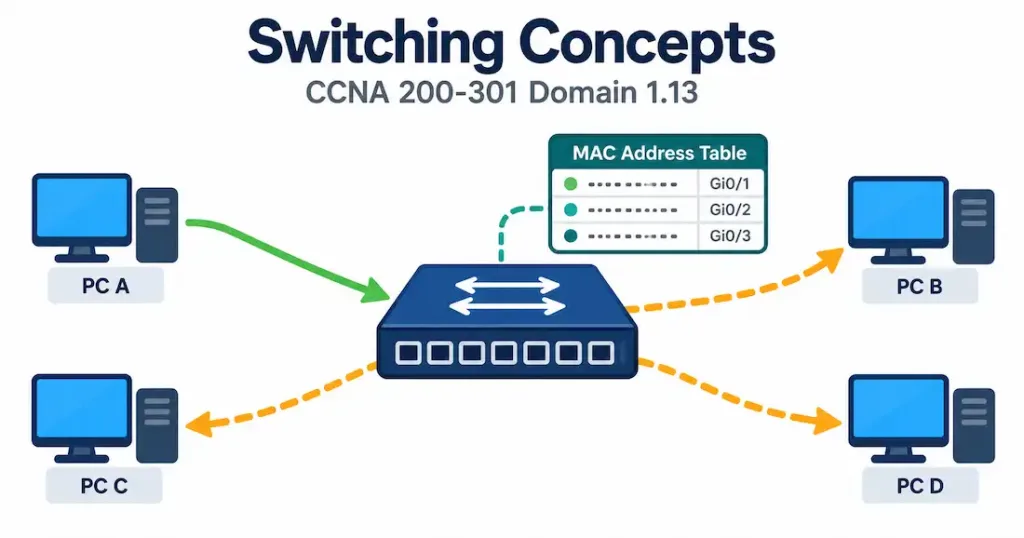
- Distinguish frame switching from frame flooding, and identify what triggers each
- Verify a switch’s MAC address table using Cisco IOS commands
Key Terms
| Term | Definition |
|---|---|
| MAC address table | The data structure a switch uses to map MAC addresses to physical ports |
| CAM table | Content Addressable Memory table; another name for the MAC address table |
| MAC learning | The process of building the MAC address table from incoming frames’ source addresses |
| Aging | The process of removing inactive entries from the MAC address table after a timeout |
| Frame switching | Forwarding a frame out only the specific port associated with its known destination |
| Frame flooding | Forwarding a frame out every port except the one it arrived on |
| Unknown unicast | A frame whose destination MAC address isn’t yet present in the MAC address table |
Explanation
Bringing Domain 1 Full Circle
This lesson closes out Network Fundamentals by returning to a concept first introduced back in network components: the distinction between Layer 2 and Layer 3 switches, and the MAC address table that makes Layer 2 switching possible in the first place. That earlier lesson described what a switch does at a high level. This one covers exactly how — the specific mechanical process behind MAC learning, aging, switching, and flooding that runs continuously, automatically, on every Ethernet switch in operation.
MAC Learning: Building the Table From Scratch
A switch’s MAC address table starts genuinely empty the moment it powers on — it has no pre-loaded knowledge of which devices sit on which ports at all. Everything it eventually knows, it learns entirely through observation of actual traffic passing through it.
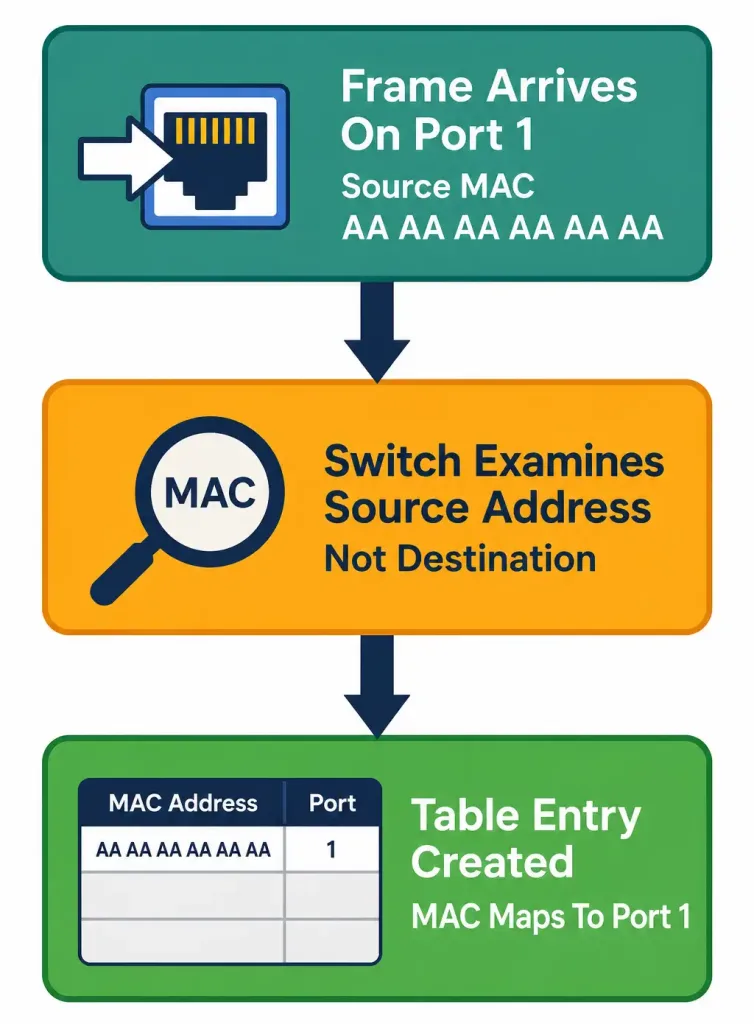
The learning process, mechanically: for every single frame arriving on any port, the switch examines that frame’s source MAC address — not the destination, a distinction worth being precise about, since it’s a common point of confusion — and records an entry associating that source MAC address with the physical port the frame arrived on. This happens continuously, automatically, for every frame, with no administrator configuration required to make basic learning function.
Worked example, walking through a switch’s very first moments after power-on: imagine a fresh switch with four devices connected: a PC on port 1, a printer on port 2, a server on port 3, and a second PC on port 4. The moment the PC on port 1 sends its first frame — for any reason, addressed to any destination — the switch examines that frame’s source MAC address and immediately records “this MAC address lives on port 1” in its table.
It does this regardless of what the frame’s actual destination is or whether that destination is even reachable yet. The table fills in gradually, one learned source address at a time, purely as a byproduct of normal traffic already flowing through the switch for entirely separate reasons.
Why source address specifically, not destination: the switch can only learn something genuinely true and current from a source address — “this frame definitely originated from this MAC, arriving on this specific port” is a directly observable fact. A destination address, by contrast, tells the switch nothing about where that destination device actually sits; it’s simply where the sender wants the frame to go, not evidence of where it currently exists on the topology. This is exactly why learning happens from the source field, and why a completely different mechanism — flooding, covered below — is needed to actually handle frames whose destination isn’t yet known.
Aging: Why Learned Entries Don’t Stay Forever
A MAC address table that only ever added entries and never removed any would eventually grow indefinitely, accumulating stale, inaccurate information about devices that have since moved, been disconnected, or been replaced — a genuine, practical problem worth solving, not just a theoretical tidiness concern.
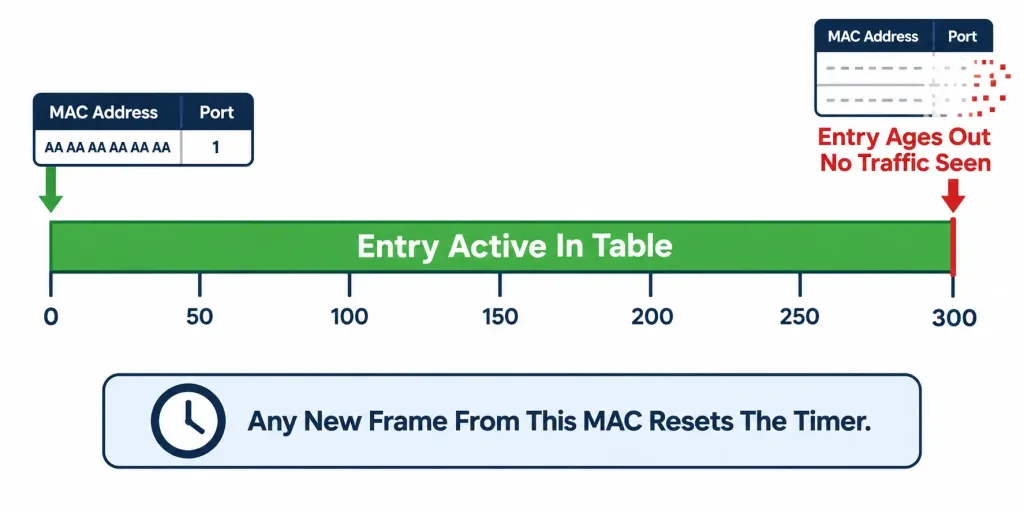
The aging mechanism: each entry in the MAC address table carries an aging timer, and if no further frames are seen from that specific MAC address within the aging period — 300 seconds (5 minutes) by default on Cisco switches — the entry is removed from the table entirely. Any subsequent frame arriving for that now-removed MAC address is treated as an unknown destination again, triggering flooding (covered below) until the switch relearns that address’s current location from a new frame.
Why 300 seconds specifically, and why this default matters practically: it’s a deliberate balance between two competing concerns. Too short an aging timer causes unnecessary flooding for devices that are still genuinely present but simply weren’t actively transmitting for a brief period — a device that’s idle for a minute or two shouldn’t force the switch to re-learn its location from scratch unnecessarily.
Too long an aging timer risks holding onto genuinely stale information for an extended period after a device has actually moved, disconnected, or been replaced — during which time frames destined for that now-outdated table entry would be forwarded to the wrong port, or to a port where that device no longer exists at all. 300 seconds represents Cisco’s chosen default balance point between these two failure modes, though this value can be adjusted through configuration in scenarios where a network’s specific traffic patterns and topology stability genuinely warrant a different setting.
Worked example illustrating why aging matters in a real, concrete scenario: a laptop is disconnected from port 4 and physically moved to a different switch entirely, elsewhere in the building. Without aging, the original switch would retain its old, now-inaccurate “this MAC lives on port 4” entry indefinitely, and any frame arriving at that original switch destined for the laptop would continue being forwarded to port 4 — now empty — rather than correctly recognizing this destination is no longer reachable there at all.
Aging ensures that stale entry eventually clears, and once it does, the network naturally falls back to flooding (which will simply fail to find the laptop out that particular switch’s ports at all, since it genuinely isn’t there anymore) — a self-correcting behavior that wouldn’t be possible if old entries persisted forever.
Common misconception: it’s easy to conflate MAC address table aging with DHCP lease expiration, since both involve a timer-based “cleanup” concept in networking — but these are entirely separate mechanisms, operating at different layers, for different purposes. MAC aging manages a switch’s own local Layer 2 forwarding table; DHCP leases manage IP address assignment duration to a client. There’s no direct relationship or shared timer between the two, and a coincidental similarity in “both involve a timeout” shouldn’t be mistaken for any actual technical connection.
Frame Switching: The Efficient, Targeted Path
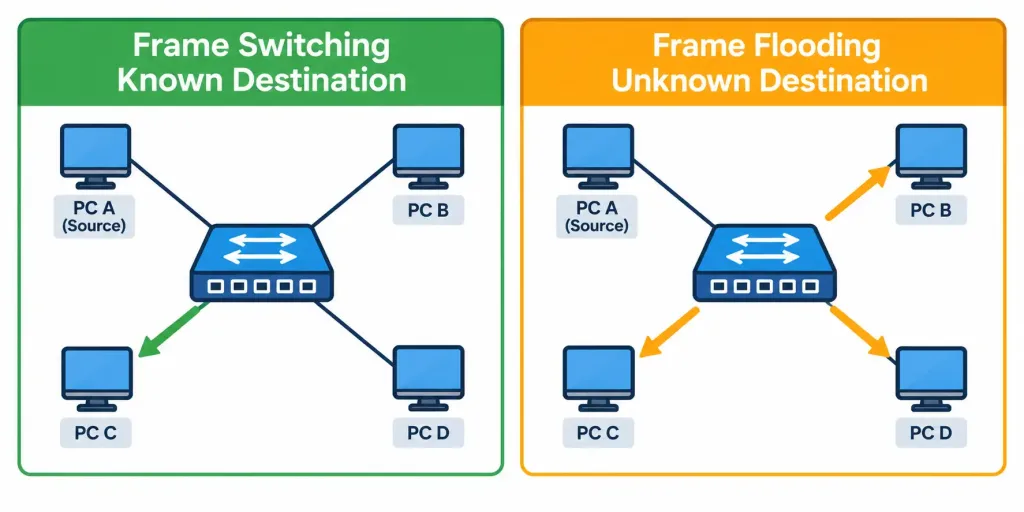
Once a destination MAC address is present in the table — meaning the switch has, at some prior point, learned which port that address lives on — forwarding becomes genuinely efficient. The switch examines the frame’s destination MAC address (a different field than the source address examined for learning purposes), looks it up in the table, and forwards the frame out that one specific port only — not out every port, and not out any other port where that destination definitely doesn’t exist.
Worked example: the PC on port 1 (from the earlier learning example) sends a frame destined for the printer on port 2. Since the switch already learned “printer’s MAC lives on port 2” from the printer’s own earlier traffic, it forwards this frame directly and exclusively out port 2 — ports 3 and 4 never see this frame at all, since the switch has no need to send it anywhere the actual destination doesn’t exist.
This targeted delivery is precisely what makes switched networks so much more efficient than the legacy shared-media Ethernet covered earlier in this course — traffic between two specific devices doesn’t consume bandwidth or processing time on every other port sharing that switch, unlike the flooding behavior every frame would have received on old hub-based shared media.
Frame Flooding: When the Switch Doesn’t Yet Know Where to Send It
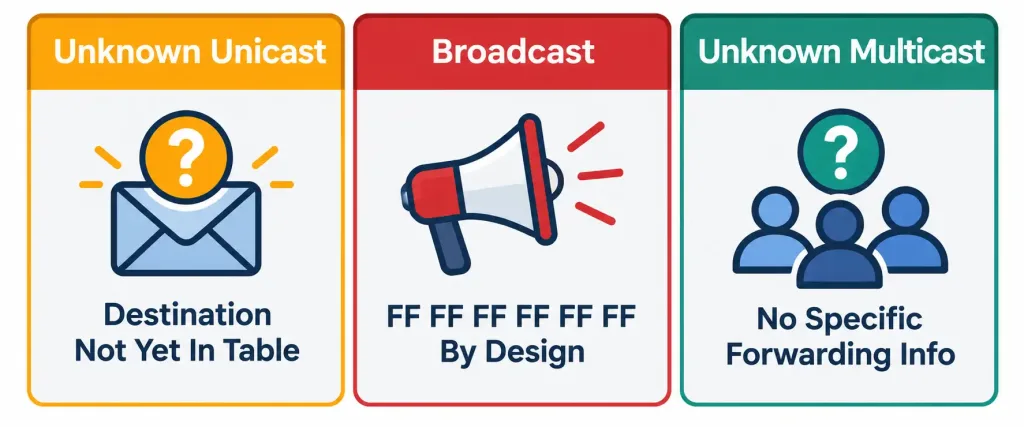
Flooding is the switch’s necessary fallback whenever it genuinely can’t make a targeted forwarding decision — and it’s worth being precise about the three specific, distinct situations that trigger it, since each represents a slightly different underlying reason.
Trigger one: unknown unicast. The destination MAC address simply isn’t yet present in the table — perhaps because that device hasn’t transmitted any traffic yet since the switch last cleared or aged out its entry, so the switch has never had the opportunity to learn where it sits. Rather than simply dropping the frame and hoping the destination doesn’t matter, the switch floods it out every port except the one it arrived on, specifically so it has the best chance of actually reaching its intended destination despite the switch’s current lack of specific knowledge about where that destination lives.
Trigger two: broadcast frames. A frame addressed to the broadcast MAC address (FF:FF:FF:FF:FF:FF) is, by definition and by design, meant to reach every device on the local network segment — flooding is genuinely the correct, intended behavior here, not merely a fallback for missing information. DHCP discovery messages (referenced in an earlier lesson on client OS verification) are a common real-world example of legitimate broadcast traffic that specifically depends on this flooding behavior to function at all, since a client device broadcasting a DHCP request has no way of yet knowing which specific device on the network is the DHCP server.
Trigger three: unknown multicast. Multicast traffic destined for a group the switch hasn’t specifically learned to direct toward specific ports (through mechanisms like IGMP snooping, which sits beyond this specific objective’s scope) is also flooded by default, for essentially the same underlying reason as unknown unicast — without more specific information about exactly which ports actually have interested multicast group members, flooding is the switch’s safest default to ensure the traffic has a chance of reaching whichever devices actually need it.
Worked example distinguishing all three triggers side by side: a PC on port 1 sends three different frames in quick succession. The first, addressed to a specific server’s MAC address the switch hasn’t yet learned, gets flooded because it’s an unknown unicast — the switch genuinely doesn’t know where that server sits yet.
The second, a DHCP discovery broadcast, gets flooded because broadcast frames are always flooded by design, regardless of whether the switch has learned anything about any other device on the network at all. The third, addressed to a multicast group the switch has no specific forwarding information for, gets flooded for reasons distinct from either of the first two, even though the practical result — flooding out every port except the source — looks identical across all three triggers.
Why flooding isn’t a malfunction or a problem to fix, despite sounding inefficient compared to targeted switching. It’s tempting to view flooding as something a “properly working” network should minimize or eliminate entirely, but this framing misunderstands its actual role. Flooding is a necessary, correct, and entirely expected part of normal switch operation — it’s specifically how a switch handles the genuine information gaps that inevitably exist (a device that hasn’t transmitted recently enough to stay in the table, a broadcast that’s supposed to reach everyone by design, multicast traffic without specific forwarding information).
A well-functioning network exhibits flooding regularly and expectedly, not as a symptom of misconfiguration; the goal isn’t zero flooding, it’s flooding only when genuinely necessary rather than for every single frame, the way legacy shared-media Ethernet effectively did for all traffic regardless of whether targeted delivery was actually possible.
The CAM Table: Why It’s Called That, Not Just What It’s Called
The MAC address table is also frequently called the CAM table, and the reason behind that alternate name is worth understanding rather than just memorizing as a synonym — it reflects a genuine, specific hardware architecture underlying how switches achieve their characteristic speed.
CAM stands for Content Addressable Memory, a specialized type of memory that works fundamentally differently from the ordinary memory used in most general-purpose computing. Ordinary memory is looked up by address — you provide a specific memory address, and the hardware returns whatever data happens to be stored there. Content Addressable Memory works in reverse: you provide the actual content you’re searching for (in this case, a specific MAC address), and the hardware directly returns the matching entry’s associated information (which port that MAC address is associated with) — without needing to sequentially search through every single table entry one at a time the way a simple linear search through ordinary memory would require.
Why this hardware distinction matters practically, not just as an interesting technical aside: this is precisely what allows switches to make forwarding decisions at genuinely very high speed, even as the MAC address table grows to contain thousands of entries in a busy network. A purely software-based, sequential search through a large table for every single incoming frame would introduce real, measurable latency at scale — CAM-based hardware lookup avoids this bottleneck entirely, checking for a match essentially all at once rather than working through entries one by one, which is exactly why dedicated switching hardware consistently outperforms general-purpose computing hardware attempting to replicate the same MAC-address-based forwarding logic in software alone.
Verifying the MAC Address Table on Cisco IOS
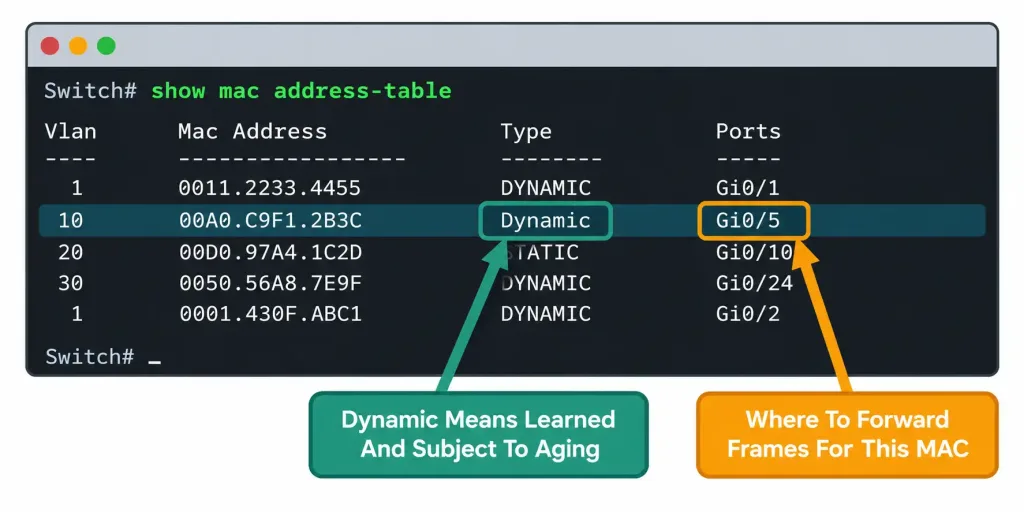
Everything covered conceptually in this lesson is directly observable on a real device through a single, straightforward command:
Switch# show mac address-table

          Mac Address Table
-------------------------------------------

Vlan    Mac Address       Type        Ports
----    -----------       --------    -----
 1      001a.2b3c.4d5e    DYNAMIC     Gi0/1
 1      001a.2b3c.4d5f    DYNAMIC     Gi0/2
 10     58bf.ea9c.4421    DYNAMIC     Gi0/3
 1      0050.5698.7a3c    STATIC      Gi0/24
Reading this output field by field:
- Vlan — which VLAN this MAC address entry belongs to; switches maintain separate MAC address tables per VLAN, since the same MAC address could theoretically appear in different VLANs on a trunk-connected switch, and each needs to be tracked distinctly.
- Mac Address — the specific learned (or manually configured) MAC address itself.
- Type — whether this entry was learned dynamically through the normal MAC learning process covered throughout this lesson, or configured statically by an administrator (a static entry never ages out, remaining in the table permanently regardless of how long it goes without seeing matching traffic, unlike the default dynamic aging behavior this lesson has focused on).
- Ports — the specific physical port this MAC address is currently associated with, exactly the information the switch uses to make its forwarding-versus-flooding decision for every subsequent frame addressed to that MAC.
Worked example connecting this output directly back to earlier concepts in this lesson: the entry showing MAC address 001a.2b3c.4d5e on Gi0/1 as DYNAMIC means this address was learned through ordinary frame observation (not manually configured) and remains subject to the standard 300-second aging timer covered earlier — if no further frames from that specific MAC arrive within that window, this exact entry will be removed from the table, and the next frame destined for it will trigger flooding until it’s relearned.
The Complete Lifecycle, From Power-On to Ongoing Operation
Bringing every piece covered in this lesson together into one continuous picture: a switch powers on with a genuinely empty table. As frames begin arriving, the switch learns source MAC addresses one by one, associating each with its arrival port. Frames addressed to not-yet-learned destinations, broadcasts, and unknown multicast all get flooded, ensuring delivery despite incomplete table knowledge at this early stage.
As more devices transmit, the table fills in further, and an increasing share of traffic transitions from flooding to efficient, targeted switching as destinations become known. Entries that stop seeing matching traffic eventually age out after 300 seconds by default, and if a frame later arrives for a now-aged-out destination, the cycle repeats — flooding resumes for that specific address until it’s relearned from fresh traffic. This entire cycle runs continuously and automatically for the switch’s entire operational lifetime, with no administrator intervention required for this baseline behavior to function correctly.
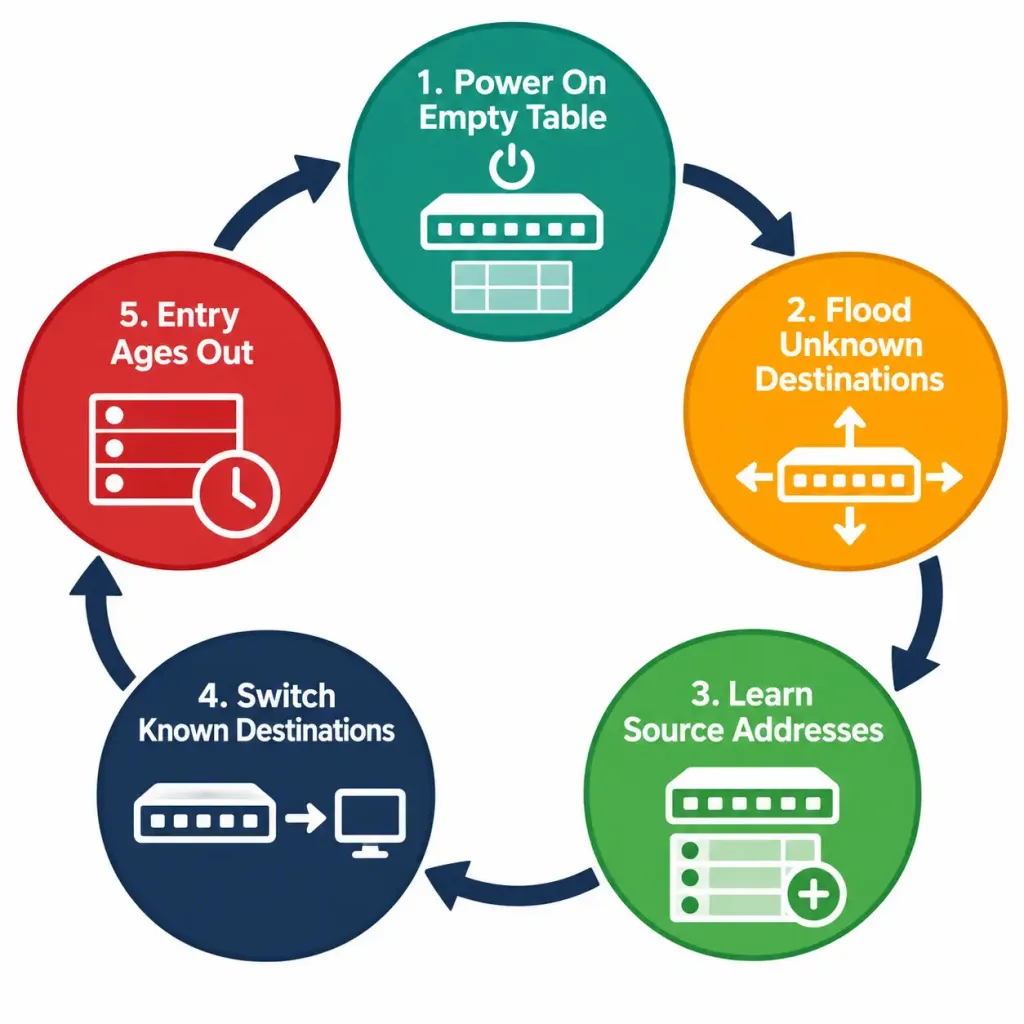
[See Diagram: The Complete Switch Learning Lifecycle]
Common Misconceptions Worth Correcting Directly
“Switches learn destination MAC addresses.” This is backwards, and it’s one of the most common points of confusion on this specific objective. Switches learn source MAC addresses from incoming frames; the destination address is used for the separate lookup-and-forward (or flood) decision, but it’s never the field the switch is learning from.
“Flooding indicates something is wrong with the network.” As covered directly above, this isn’t accurate — flooding is normal, expected, necessary behavior under specific, well-understood conditions (unknown unicast, broadcast, unknown multicast), not a sign of malfunction or misconfiguration.
“Broadcast frames get added to the MAC address table.” They don’t — the destination address FF:FF:FF:FF:FF:FF is never a legitimate source address any real device would ever transmit from, so it never appears as something to learn from in the first place. Only genuine device source addresses get learned; the broadcast destination is simply a trigger for flooding, not a table entry.
“A longer aging timer is always better, since it reduces flooding.” This oversimplifies a genuine trade-off covered above. A longer timer does reduce flooding for devices that go temporarily idle, but it also risks retaining stale, inaccurate entries for longer after a device genuinely moves or disconnects — during which time frames get misdirected to a port where that device no longer actually exists. The 300-second default reflects a deliberate balance, not an arbitrarily conservative minimum that should simply be extended for its own sake.
Frequently Asked Questions
Does every switch use exactly 300 seconds as its aging timer, with no exceptions?
300 seconds is Cisco’s default, but it’s a configurable value — network administrators can adjust it for specific scenarios where a network’s actual traffic patterns and topology stability genuinely justify a different setting, though 300 seconds remains the standard, unmodified default in the overwhelming majority of real deployments.
What happens if two different devices somehow end up with the same MAC address on a network?
This would create a genuine, confusing problem — the switch would potentially see frames from that MAC address arriving on different ports at different times, repeatedly overwriting its own table entry with conflicting information, causing frames intended for one device to sometimes reach the other instead. This scenario is rare in practice given how MAC addresses are assigned, but it is a real, documented category of network fault when it does occur, typically from a manufacturing defect or a deliberately spoofed address.
Do static MAC address table entries ever age out the way dynamic ones do?
No — a static entry, manually configured by an administrator, persists indefinitely regardless of whether matching traffic is seen, unlike the default dynamic behavior this lesson has focused on throughout. Static entries are typically used in specific scenarios where an administrator wants guaranteed, unchanging forwarding behavior for a particular MAC address, independent of the normal automatic learning and aging process.
Is flooding the same thing as a broadcast storm?
No, and conflating the two is a genuine mistake worth avoiding. Flooding is normal, routine switch behavior triggered by the specific, well-defined conditions covered in this lesson. A broadcast storm is a distinct, genuinely problematic network condition where broadcast traffic circulates and multiplies uncontrollably, typically due to a Layer 2 loop in the topology (a problem Spanning Tree Protocol, covered in a later module, specifically exists to prevent) — a broadcast storm is a fault condition; ordinary flooding is not.
Can the MAC address table be cleared manually, and why would someone want to do that?
Yes, through a command like clear mac address-table dynamic — this forces the switch to relearn its entire table from scratch through fresh traffic observation, which can be a useful troubleshooting step when there’s reason to suspect the table currently holds stale or incorrect information that hasn’t yet aged out naturally on its own.
MAC Address Learning, Aging & Frame Flooding: Practice Quiz
Test your knowledge of MAC learning, CAM tables, aging timers, frame forwarding, flooding, broadcast storms, and VLAN-specific MAC tables.
Summary
- A switch learns MAC addresses by examining the source address of every incoming frame, associating it with the port it arrived on — never from the destination address.
- Dynamic entries age out after 300 seconds by default without matching traffic, keeping the table accurate and preventing indefinite growth of stale information.
- Frame switching forwards a frame out only the specific port associated with a known destination; frame flooding sends it out every port except the source, used when the destination isn’t known.
- Flooding has three specific triggers — unknown unicast, broadcast frames, and unknown multicast — and is normal, expected behavior, not a sign of malfunction.
- The MAC address table is also called the CAM (Content Addressable Memory) table, reflecting the hardware architecture that enables its fast, lookup-by-content performance at scale.
show mac address-tableverifies the table directly, showing VLAN, MAC address, entry type (dynamic or static), and the associated port for every learned entry.
This lesson completes Domain 1 (Network Fundamentals) of the CCNA 200-301 blueprint. Together, these thirteen objectives — from network components through switching concepts here — form the foundational vocabulary and mechanics that every subsequent domain builds directly on top of, from Domain 2’s deeper dive into VLANs and trunking to Domain 3’s routing concepts and beyond.