Domain 1.12 | Network Fundamentals — 20% of exam
Learning Objectives
By the end of this lesson, you will be able to:
- Describe how virtual machines and hypervisors work together to share physical hardware
- Compare Type 1 and Type 2 hypervisors and explain when each is used
- Describe how containers differ architecturally from virtual machines
- Explain why the VM-vs-container distinction matters for modern network automation
Key Terms
| Term | Definition |
|---|---|
| Virtual machine (VM) | A complete, independent guest operating system running on virtualized hardware |
| Hypervisor | Software that creates and manages virtual machines, allocating physical hardware among them |
| Type 1 hypervisor | A hypervisor running directly on physical hardware, with no underlying host OS |
| Type 2 hypervisor | A hypervisor running as an application on top of an existing host OS |
| Container | A lightweight, isolated application package sharing the host machine’s OS kernel |
| Guest OS | The operating system running inside a virtual machine |
| Kernel | The core part of an operating system managing hardware resources directly |
Explanation
The Problem Virtualization Actually Solves
Before getting into VMs and containers specifically, it’s worth understanding the actual problem both technologies exist to solve, since that context makes the rest of this lesson click into place rather than feeling like arbitrary technical trivia.
A single physical server running a single application typically uses only a small fraction of its available CPU, memory, and storage capacity most of the time. Buying, powering, cooling, and maintaining a separate physical server for every individual application or service an organization needs is enormously wasteful — most of that expensive hardware simply sits idle, doing nothing useful, most of the time. Virtualization, in both of the forms covered in this lesson, exists specifically to solve this waste: running multiple logically separate systems on one shared piece of physical hardware, dramatically improving how much actual use that hardware gets, without needing to buy a separate physical machine for every workload.
Virtual Machines: A Complete Computer, Virtualized
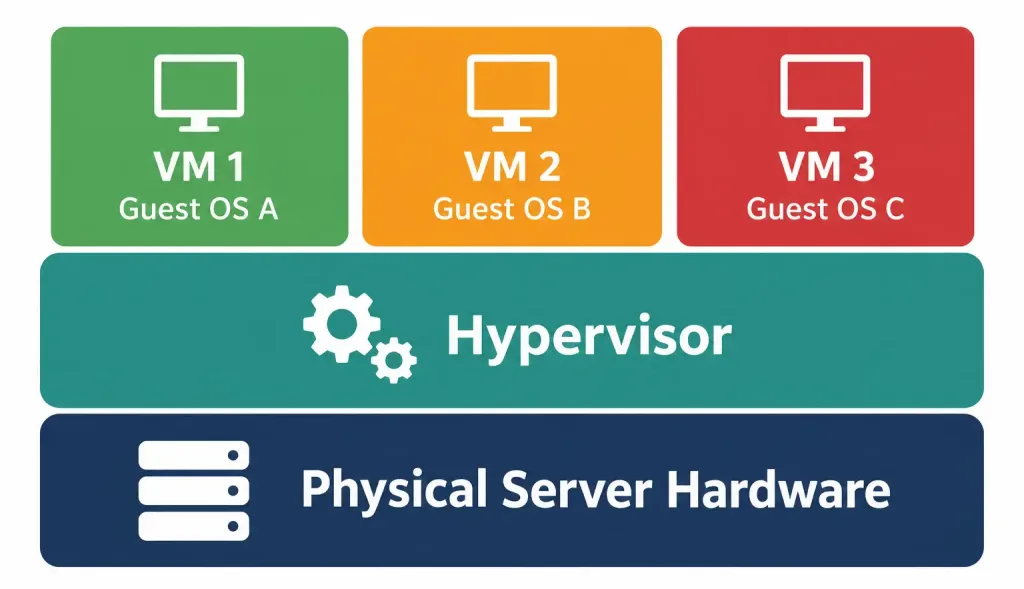
A virtual machine (VM) runs a complete, independent guest operating system — its own kernel, its own drivers, its own full software stack — as if it were running on dedicated physical hardware, even though it’s actually sharing that physical hardware with other VMs running simultaneously on the same physical host.
The software making this possible is called a hypervisor, and its job is specifically to abstract the underlying physical hardware (CPU, memory, storage, network interfaces) and allocate slices of it to each VM running on top of it. From inside a given VM, the guest operating system genuinely believes it has direct access to real, dedicated hardware — the hypervisor handles the actual translation between what the VM believes it’s accessing and what physical resources are truly being used underneath, transparently to the guest OS itself.
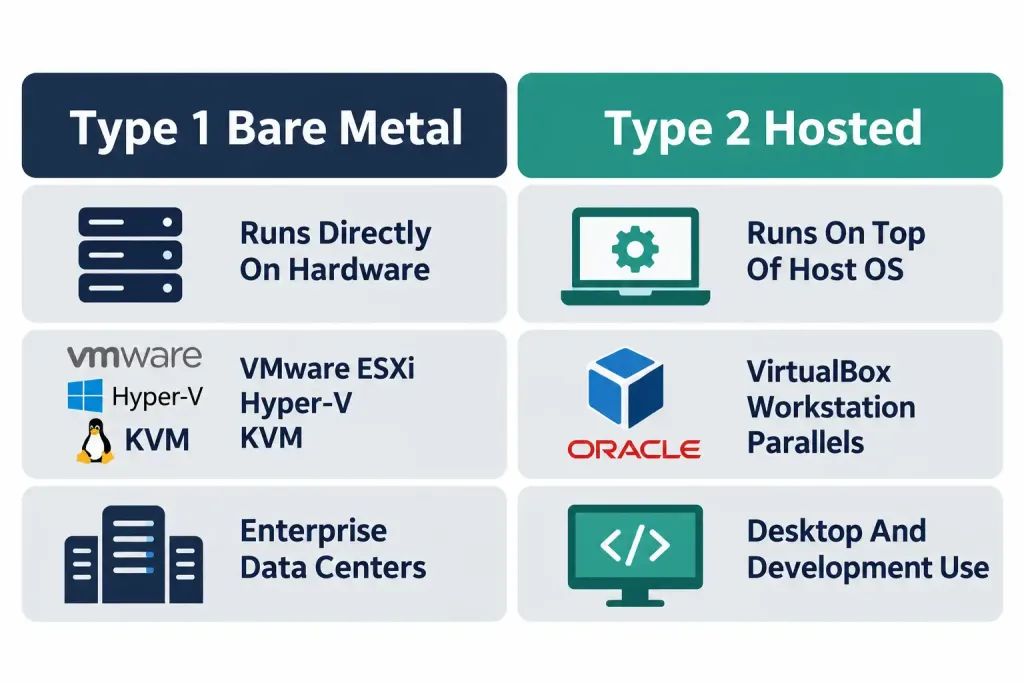
Hypervisors split into two distinct types, and the difference matters practically, not just definitionally:
Type 1 hypervisors (sometimes called “bare-metal” hypervisors) run directly on the physical hardware itself, with no separate host operating system underneath them at all — the hypervisor is effectively the lowest software layer, sitting directly on top of the hardware. VMware ESXi, Microsoft Hyper-V (in its full server deployment), and KVM are common real-world examples. This architecture is generally more efficient, since there’s no separate host OS consuming resources and adding a layer of overhead between the hardware and the hypervisor itself — which is exactly why Type 1 hypervisors dominate enterprise data center and cloud infrastructure deployments, where maximizing efficient use of expensive server hardware genuinely matters at scale.
Type 2 hypervisors (sometimes called “hosted” hypervisors) run as an ordinary application on top of an existing, already-installed host operating system — you install it the same way you’d install any other software on your existing Windows, macOS, or Linux desktop. VMware Workstation, Oracle VirtualBox, and Parallels Desktop are common examples. This is less efficient than Type 1 (there’s a full host OS underneath consuming its own resources, plus the hypervisor application itself running on top of that host OS), but it’s dramatically easier to set up and use for individual desktop or laptop use — installing a Type 2 hypervisor is no different from installing any other application, requiring no dedicated server hardware or specialized deployment process at all.
Worked example illustrating the practical difference: a network engineer wanting to practice Cisco IOS configuration on their personal laptop would typically use a Type 2 hypervisor (VirtualBox, for instance) to run a virtual router or switch image alongside their normal desktop applications, with zero dedicated hardware required beyond their existing laptop. A data center running hundreds of production VMs supporting an organization’s actual business applications would use a Type 1 hypervisor (VMware ESXi or similar) installed directly on dedicated physical servers specifically built and purchased for this purpose, since the efficiency and performance difference at that scale is genuinely significant.
Containers: Virtualizing the Application, Not the Whole Computer
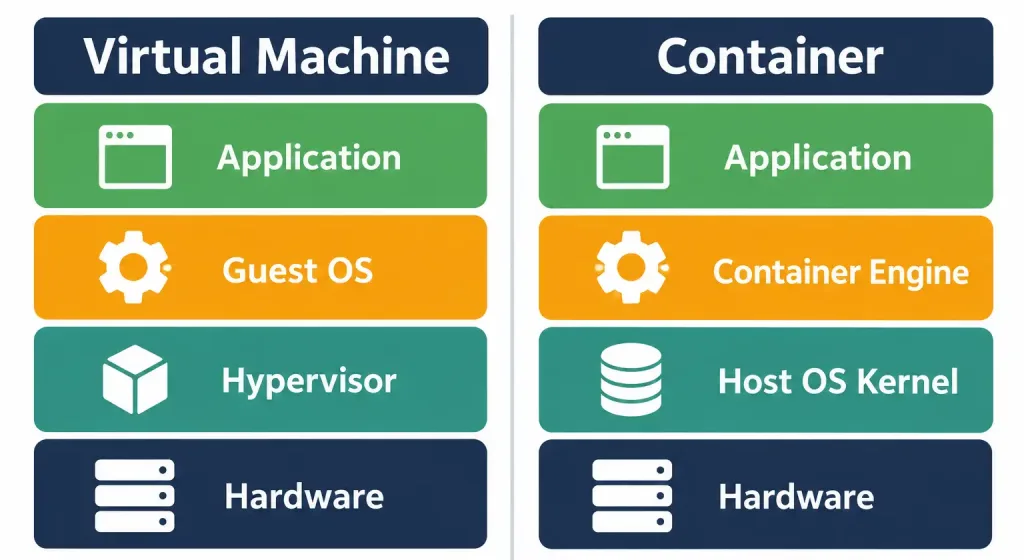
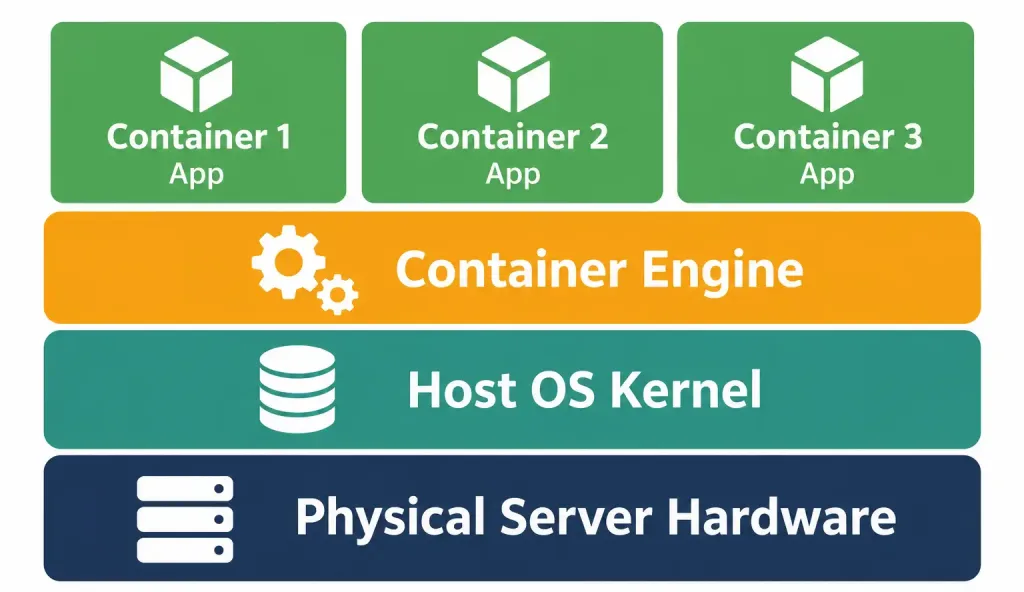
Containers take a fundamentally different architectural approach to the same underlying resource-sharing goal. Rather than each isolated unit running its own complete guest operating system on top of a hypervisor, containers share the host machine’s OS kernel directly, packaging only the application itself and its specific dependencies — libraries, runtime environments, configuration files — into a single, portable, isolated unit.
Docker is the dominant real-world example most people encounter first, having popularized container technology broadly enough that “Docker” and “containers” are sometimes used almost interchangeably in casual conversation, even though Docker is specifically one particular container platform among others (containerd and Podman being two other notable examples) rather than the only implementation of the underlying concept.
The conceptual distinction worth memorizing precisely, since it’s the single most important takeaway from this entire lesson: a virtual machine virtualizes hardware, with a complete guest operating system running on top of that virtualized hardware. A container virtualizes the operating system itself, with just the application and its dependencies running on top of that shared OS kernel. This is a genuinely different architectural layer being virtualized in each case, not merely a difference in size or “how much” is virtualized.
Why This Architectural Difference Actually Matters in Practice
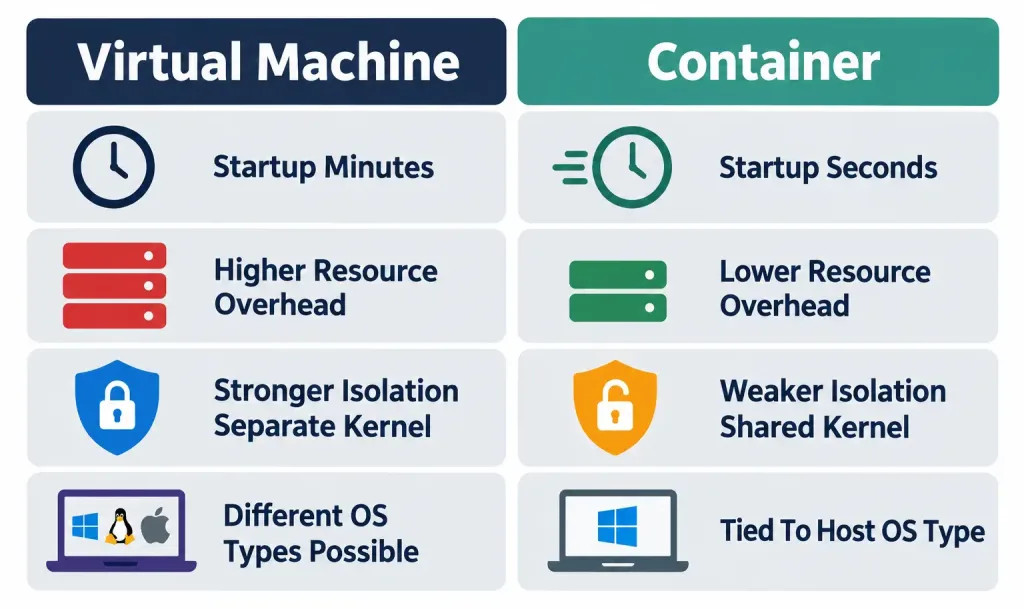
The shared-kernel architecture is precisely why containers are dramatically lighter-weight and faster to start than virtual machines — a difference measured in a genuinely different order of magnitude, not just a modest improvement.
Startup time: a VM must boot an entire guest operating system from scratch every time it starts — loading a kernel, initializing drivers, starting system services — a process that typically takes anywhere from tens of seconds to several minutes, similar to how long it takes any full computer to boot up from being powered off. A container, having no separate OS or kernel of its own to boot at all, starts by simply launching its packaged application directly against the already-running host kernel — a process typically completing in well under a second to a few seconds, since there’s fundamentally no OS boot sequence involved at all.
Resource overhead: a VM’s guest OS itself consumes a meaningful, fixed baseline of memory, storage, and CPU simply to exist and run its own system processes, entirely independent of whatever actual application workload it’s hosting. A container carries no such separate OS overhead at all, since it shares the host’s already-running kernel rather than running a redundant copy of its own — meaning a physical host can typically run substantially more containers than it could VMs, for equivalent application workloads, purely because containers aren’t each paying that same fixed OS overhead cost individually.
Isolation strength — a genuine, important trade-off worth being honest about, not just a one-sided list of container advantages. VMs provide stronger isolation between workloads specifically because each one runs its own completely separate kernel — a security vulnerability or crash affecting one VM’s guest OS generally can’t directly affect another VM running alongside it on the same physical host, since they don’t share that core kernel layer at all. Containers, by sharing the host’s kernel across every container running on that host, carry a genuine, real architectural trade-off: a sufficiently severe vulnerability at the shared kernel level could, in principle, potentially affect every container sharing that kernel simultaneously — a security consideration that doesn’t exist in the same way for VMs, precisely because VMs don’t share that same kernel layer with each other in the first place.
Choosing Between VMs and Containers: Real-World Use Cases
Neither technology is universally “better” — each fits genuinely different scenarios, and real production environments very commonly use both simultaneously, for different specific purposes, rather than treating this as an either-or organizational choice.
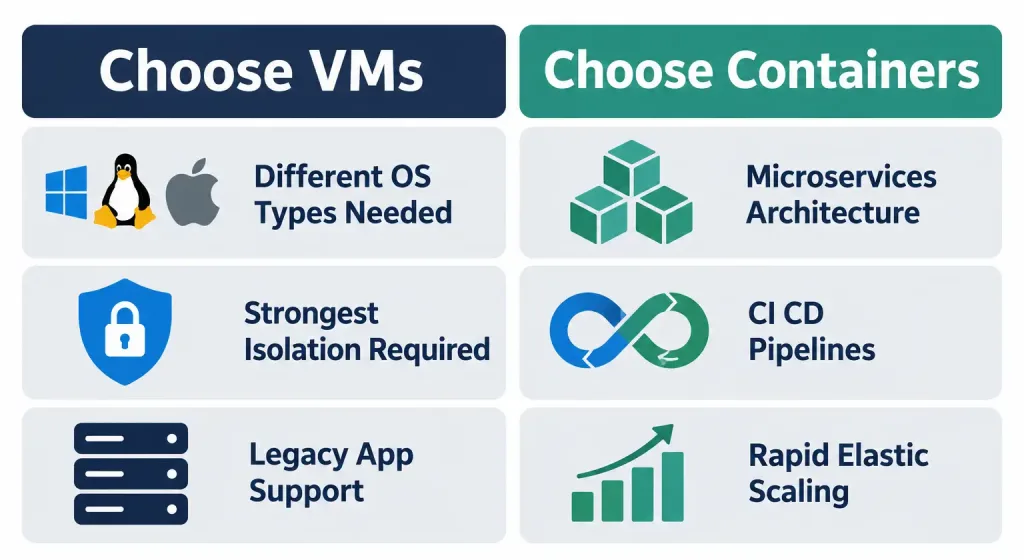
When VMs are the right fit: running genuinely different operating systems on the same physical hardware — a Windows VM and a Linux VM coexisting on one physical server, something containers fundamentally cannot do, since every container on a given host necessarily shares that same host’s single kernel and therefore its underlying OS type. VMs also fit scenarios needing the strongest possible isolation between workloads, particularly when running untrusted or security-sensitive applications where the stronger separate-kernel isolation genuinely matters, and scenarios specifically requiring legacy application support that depends on a complete, specific, older operating system environment that can’t be easily adapted to a shared-kernel container model.
When containers are the right fit: microservices architectures, where an application is deliberately broken into many small, independently deployable services, each benefiting enormously from containers’ fast startup time and low resource overhead when scaling up or down frequently in response to actual demand. CI/CD (continuous integration/continuous deployment) pipelines, where automated systems need to rapidly spin up clean, consistent, disposable environments to build and test code repeatedly throughout the day, benefit enormously from containers’ near-instant startup compared to waiting minutes for a fresh VM to boot for every single test run. And any scenario prioritizing rapid, elastic scaling — adding or removing capacity in direct, fast response to changing real-time demand — favors containers specifically because of how much faster they can be started and stopped compared to full VMs.
Worked example tying this together: a company running a large web application might deploy its core, security-sensitive database on a dedicated VM specifically for the stronger isolation guarantee that workload’s sensitivity justifies, while simultaneously running dozens of small, independently scaling containerized microservices — handling user authentication, image processing, notification delivery, and similar discrete functions — that scale up and down rapidly throughout the day in direct response to actual traffic patterns, each container spinning up in a couple of seconds rather than waiting minutes for a full VM boot every time additional capacity is needed.
Why This Distinction Matters for Network Automation Specifically
This lesson’s content isn’t purely a standalone virtualization topic — it’s deliberately foundational context for Domain 6 (Automation and Programmability), where containerized and virtualized infrastructure sits at the center of how modern network automation actually gets built and deployed in practice.
Network Functions Virtualization (NFV) — worth naming here even though its full depth belongs to more advanced study beyond CCNA scope — is the broader industry trend of running network functions that traditionally required dedicated physical hardware (routers, firewalls, load balancers) as virtualized software instances instead, running on standard server hardware via the same VM and container technologies covered in this lesson, rather than requiring specialized, dedicated physical network appliances for every single function.
Network automation tooling itself is frequently deployed in containers today — Ansible, a configuration management tool referenced elsewhere in this course’s automation content, is commonly run inside a container specifically to ensure a consistent, portable, easily-reproducible environment across different systems and team members, avoiding the “it works on my machine” inconsistency problem that comes from relying on each individual engineer’s own differently-configured local environment. This is a direct, practical, current-day application of exactly the container concepts covered in this lesson, not an abstract or hypothetical use case.
Cisco’s own networking platforms increasingly incorporate containerized components directly — modern network operating systems and management platforms are progressively adopting containerized architectures internally for many of their own functions, reflecting the same efficiency and deployment-speed advantages covered above, applied specifically within networking infrastructure itself rather than only in general application hosting.
Common Misconceptions Worth Correcting Directly
“Containers are just smaller, lighter VMs.” This understates a genuine architectural difference, not merely a size difference. A container isn’t a shrunk-down VM — it’s a fundamentally different approach that shares the host kernel entirely rather than running any guest kernel of its own at all. Describing a container as “a small VM” obscures the actual reason containers start so much faster and use so much less overhead, which is architectural, not simply a matter of scale.
“Virtualization only applies to servers in a data center.” Client-side virtualization is genuinely common too — developers regularly run Type 2 hypervisors on personal laptops and desktops for testing, development, or running software requiring a different operating system than their primary one, and this lesson’s Cisco IOS practice example is exactly this kind of everyday, individual-user virtualization use case, not an enterprise-only concept.
“Containers provide the same security isolation guarantees as VMs.” As covered directly above, this isn’t accurate — the shared-kernel architecture that makes containers so efficient also means container isolation is architecturally weaker than VM isolation in a specific, genuine way, since a severe enough kernel-level vulnerability could theoretically impact every container sharing that same kernel, a risk that simply doesn’t apply the same way across separate VMs running separate kernels.
“You have to choose either VMs or containers for your entire infrastructure.” As the worked example above illustrates directly, real production environments very commonly mix both technologies deliberately, choosing whichever fits each specific workload’s actual requirements — this isn’t an all-or-nothing organizational decision.
Frequently Asked Questions
Can a container run inside a virtual machine?
Yes, and this is an extremely common real-world deployment pattern, not an edge case — a VM provides a complete guest OS environment, and containers can then run on top of that guest OS exactly as they would on any other host, combining a VM’s stronger isolation boundary around the whole environment with containers’ efficiency for the individual applications running inside it.
Do containers require a hypervisor at all?
No — this is a genuinely important distinction from VMs. Containers run directly on the host machine’s existing OS kernel through a container engine (Docker being the most common example) rather than through a hypervisor; hypervisors are specifically a VM concept, not something containers inherently require to function.
Is Docker the same thing as “containers” generally?
No, though the terms are often used loosely together in casual conversation. Docker is one specific, extremely popular container platform; the broader concept of containerization is implemented by several distinct technologies, including containerd and Podman, following largely similar underlying architectural principles.
Which technology, VMs or containers, is actually “better” overall?
Neither is universally better — as covered in the use-cases section above, the right choice depends entirely on the specific workload’s actual requirements: isolation needs, whether different operating systems need to coexist, and how quickly capacity needs to scale up or down in response to demand.
Does virtualization slow down application performance compared to running directly on physical hardware?
There’s generally some overhead compared to truly “bare-metal” performance with no virtualization layer involved at all, though modern hypervisors and container engines have both become highly optimized, and for the overwhelming majority of real-world workloads, this overhead is genuinely small enough to be worth the substantial flexibility, efficiency, and hardware-utilization benefits virtualization provides in return.
Virtualization, Hypervisors & Containers: Practice Quiz
Test your knowledge of virtualization, hypervisors, virtual machines, containers, NFV, and network automation.
Summary
- Virtualization exists to solve hardware underutilization, letting multiple logically separate systems efficiently share one physical machine.
- Virtual machines run a complete guest OS on top of a hypervisor, which abstracts and allocates physical hardware among multiple VMs.
- Type 1 (bare-metal) hypervisors run directly on hardware and dominate enterprise deployments; Type 2 (hosted) hypervisors run atop an existing OS and suit individual desktop use.
- Containers share the host’s OS kernel directly, packaging only the application and its dependencies — a fundamentally different architecture from VMs, not just a smaller version of one.
- Containers start dramatically faster and carry less overhead than VMs, but provide architecturally weaker isolation, since they share a kernel that VMs don’t.
- Neither technology is universally better — VMs suit multi-OS and high-isolation needs; containers suit microservices, CI/CD, and rapid elastic scaling; real environments commonly use both together.
- This distinction directly underpins modern network automation, from NFV to containerized automation tooling like Ansible to Cisco’s own increasingly containerized platform components.