
Domain 1.0 | Networking Concepts — 23% of exam
Learning Objectives
By the end of this lesson, you will be able to:
- Identify IPv4 address classes A through E and their default ranges
- Identify the RFC 1918 private address ranges and explain why they’re not routable on the public internet
- Explain APIPA and what an APIPA address tells you when troubleshooting
- Explain the loopback address and what it’s used for
- Recognize other special-use IPv4 addresses you’ll run into
Key Terms
| Term | Definition |
|---|---|
| Class A | IPv4 addresses from 1–126 in the first octet, originally meant for very large networks |
| Class B | IPv4 addresses from 128–191 in the first octet, originally meant for medium-sized networks |
| Class C | IPv4 addresses from 192–223 in the first octet, originally meant for small networks |
| Class D | IPv4 addresses from 224–239, reserved for multicast |
| Class E | IPv4 addresses from 240–255, reserved for experimental use |
| RFC 1918 | The standard defining private IPv4 address ranges, not routable on the public internet |
| APIPA | Automatic Private IP Addressing — a self-assigned address in the 169.254.0.0/16 range, used when DHCP fails |
| Loopback | The 127.0.0.0/8 range, used by a device to refer to itself, most commonly as 127.0.0.1 |
Explanation
Where This Fits
Lesson 1.1 introduced IP addressing as the Network layer’s job. This lesson gets specific. IPv4 addresses aren’t just random 32-bit numbers — they’re organized into classes, and certain ranges are reserved for special jobs. Know these, and a lot of exam questions about addressing get a lot easier.
The Five Classes
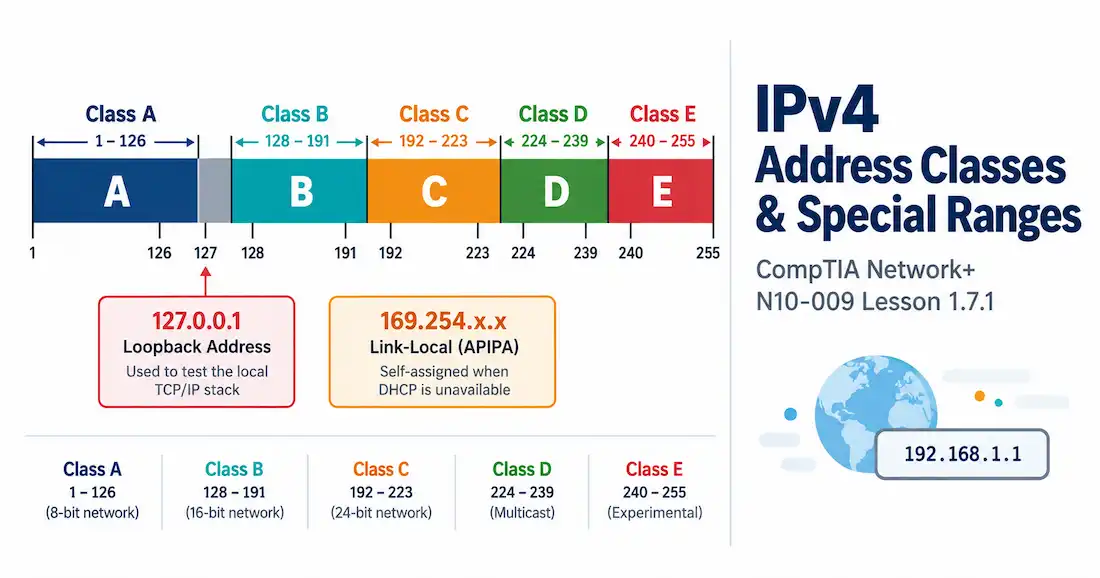
IPv4 addressing was originally split into five classes, based on the first octet of the address.
| Class | First Octet Range | Default Subnet Mask | Original Purpose |
|---|---|---|---|
| A | 1–126 | /8 (255.0.0.0) | Huge networks — think entire large organizations |
| B | 128–191 | /16 (255.255.0.0) | Medium-sized networks |
| C | 192–223 | /24 (255.255.255.0) | Small networks |
| D | 224–239 | N/A | Multicast |
| E | 240–255 | N/A | Experimental, reserved |
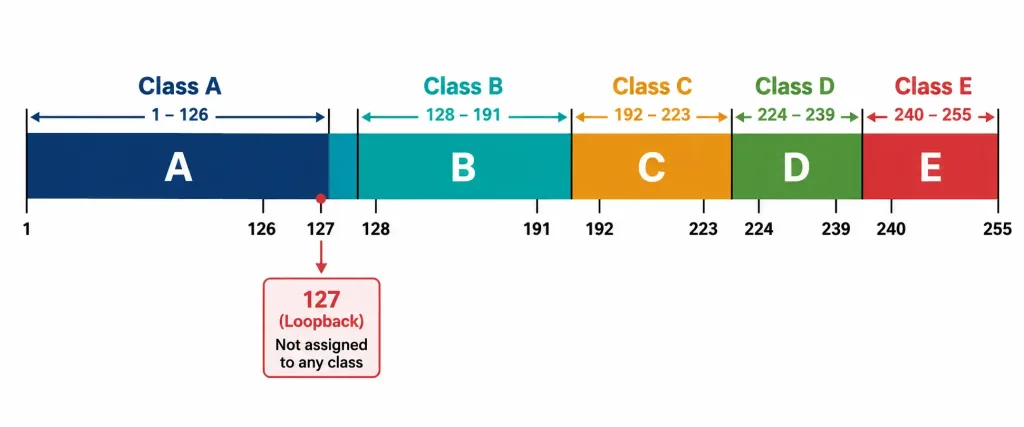
Notice something missing? 127 isn’t listed under any class range above, even though it falls right between A and B numerically. That’s not an oversight — 127 is set aside entirely for loopback, covered below. It never got assigned to Class A at all, despite technically sitting in that numeric neighborhood.
Classful addressing is mostly historical at this point. Real networks today use CIDR notation and subnet however they actually need to, not according to rigid class boundaries — that’s Lesson 1.7.2’s territory. But the exam still expects you to know these ranges cold, since plenty of legacy documentation, default configurations, and exam questions still reference them directly.
Why did classful addressing fall out of favor in the first place? Waste, mostly. A Class A network gave out over 16 million addresses in one block, even to organizations that only needed a few thousand. A Class C network, on the other hand, capped out at 254 usable addresses — too small for a mid-sized company, forcing them up to a Class B they’d barely use a fraction of. IPv4’s total address space is finite, and handing it out in these rigid, oversized chunks burned through it far faster than necessary. CIDR came along specifically to fix that, letting networks get exactly the address block size they actually need instead of whatever class happened to be closest.
Classes D and E deserve a quick note, since they’re a little different from A, B, and C. Class D isn’t for host addressing at all — it’s the multicast range from Lesson 1.4.3, 224.0.0.0 through 239.255.255.255. Class E is reserved for experimental use and essentially never shows up in production networks. Neither one gets a “default subnet mask” the way A, B, and C do, because neither one was ever meant to be assigned to ordinary hosts in the first place.
Private Address Ranges: RFC 1918
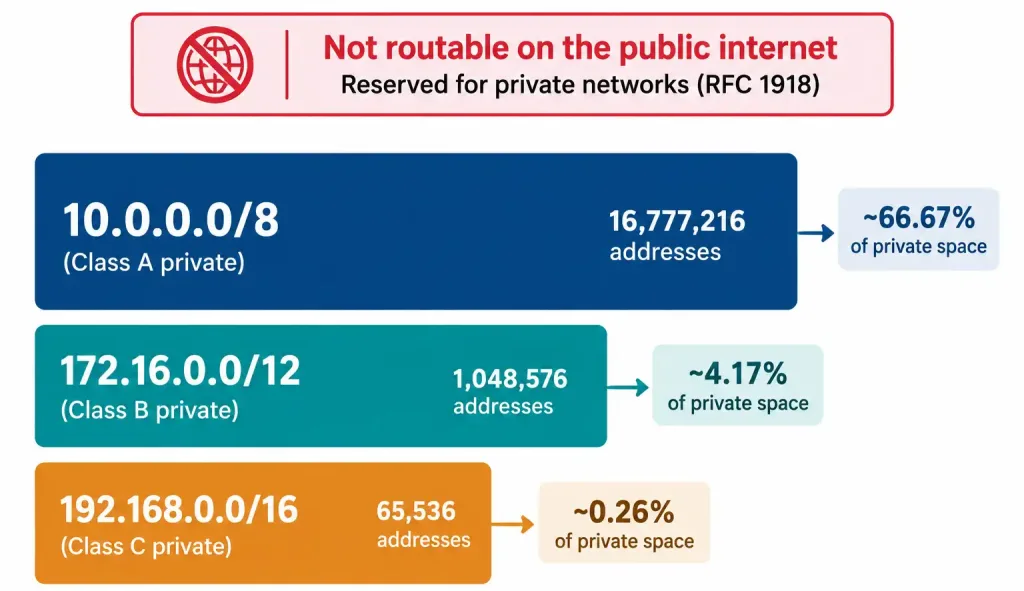
Not every IP address is meant to be reachable from the public internet. RFC 1918 carves out three ranges specifically for private, internal use:
- 10.0.0.0/8 — a huge range, common in large enterprise networks
- 172.16.0.0/12 — a mid-sized range, often used by medium organizations
- 192.168.0.0/16 — the smallest of the three, and the one you’ll recognize instantly from home routers
None of these ranges get routed on the public internet. Every ISP and internet router is configured to simply drop traffic addressed to them. That’s deliberate, not a limitation — it’s what lets millions of separate private networks all reuse the exact same address ranges internally without any conflict, since none of them ever need to be globally unique.
The three ranges roughly mirror the old class sizes, for good reason — they were designed to cover the same range of organization sizes classful addressing originally targeted. A massive enterprise with tens of thousands of internal devices reaches for 10.0.0.0/8, since it offers by far the most address space of the three. A mid-sized company might use a slice of 172.16.0.0/12. A small office or home network almost always ends up on 192.168.0.0/16, since that’s what nearly every consumer router ships with by default. None of these choices are mandatory — an organization can technically use any of the three regardless of size — but this pattern shows up constantly in real deployments and is worth recognizing.
Of course, devices on a private network still need to reach the internet eventually. That’s exactly what the NAT gateway from Lesson 1.3.2 handles — translating a private address into a public one for outbound traffic, then routing the response back to the right internal device. Private addressing and NAT are really two halves of the same story: one half keeps internal addressing simple and conflict-free, the other half bridges that private world out to the public internet when needed.
APIPA: When DHCP Doesn’t Show Up
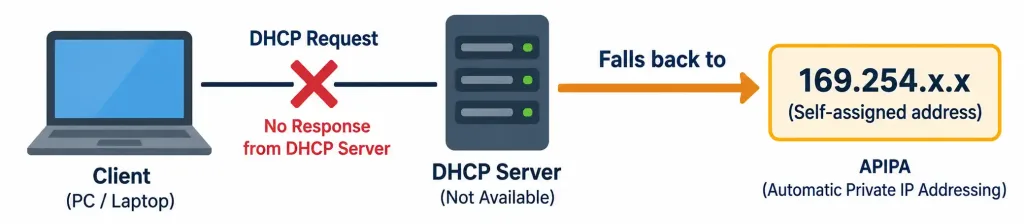
Here’s a genuinely useful one for real troubleshooting, not just exam trivia. APIPA (Automatic Private IP Addressing) kicks in when a device is configured for DHCP but can’t reach a DHCP server. Rather than sitting with no address at all, the device assigns itself an address from the 169.254.0.0/16 range.
An APIPA address tells you something specific: this device has no working connection to a DHCP server, but its own network interface is functioning. That’s a genuinely useful diagnostic signal. See a 169.254.x.x address on a machine, and you immediately know where to start looking — DHCP reachability, not a dead network card or cable.
One thing worth being precise about: an APIPA address lets a device talk to other APIPA-addressed devices on the same local segment, since they’re all in the same self-assigned range. It does not get that device onto the rest of the network, and it definitely doesn’t reach the internet. APIPA is a fallback for local link communication only, nothing more.
Loopback: Talking to Yourself
The 127.0.0.0/8 range is reserved for loopback — a way for a device to send traffic to itself, without that traffic ever actually touching a physical network interface or cable. In practice, you’ll almost always see this as 127.0.0.1 specifically, sometimes nicknamed “localhost.”
Why would anything need to talk to itself? Testing, mostly. Pinging 127.0.0.1 confirms a device’s own TCP/IP stack is installed and functioning correctly — no network, no cabling, no other device involved at all. If that ping fails, the problem is local to the machine itself, not anywhere else on the network. It’s one of the very first things worth checking whenever a device can’t seem to reach anything at all, since it isolates whether the problem is even network-related in the first place.
Loopback also gets used constantly by developers and local services — a web server running on the same machine as the browser testing it, for instance, often gets addressed at 127.0.0.1 rather than the machine’s actual network-facing IP.
Putting It Together: A Troubleshooting Walkthrough
Here’s how these pieces actually come up together in practice. A user calls in — their laptop can’t reach anything on the network.
First check: ping 127.0.0.1. It succeeds. Good — the machine’s own network stack is intact, so the problem lives somewhere between this laptop and the rest of the network, not inside the laptop’s own software.
Next check: look at the laptop’s assigned IP address. It’s 169.254.34.12. There’s the answer. That’s an APIPA address — this machine never got a response from a DHCP server, so it fell back to self-assigning one. It’s not a dead network card, and it’s not a routing problem out on the network somewhere. It’s specifically a DHCP reachability issue, right at the point where the laptop should have picked up a real address.
Once DHCP gets sorted out, the laptop picks up a proper address instead — something like 192.168.1.47, sitting inside the private RFC 1918 range this particular office uses internally. From there, NAT at the network edge handles translating that private address for anything the laptop needs to reach out on the public internet.
Three concepts from this lesson, one five-minute troubleshooting conversation. That’s exactly how this material tends to show up on the exam, too — not as isolated facts, but as pieces of a single diagnostic story.
Other Special Addresses Worth Knowing
A couple more addresses show up often enough to be worth memorizing on their own:
- 0.0.0.0 — represents “this network” or, in a routing table, an unspecified default destination. You’ll see it constantly as the destination in a default route entry.
- 255.255.255.255 — the limited broadcast address, covered back in Lesson 1.4.3. Reaches every device on the local segment, never forwarded by any router.
Recognition-Level Verification Concepts
This is a recognition-heavy objective. A few things worth being able to spot immediately:
- A device’s IP configuration showing an address starting with 169.254 — that’s APIPA, and it means DHCP isn’t reachable.
- A ping to 127.0.0.1 that succeeds confirms the local TCP/IP stack works, independent of any actual network connectivity.
- An address starting with 10, 172.16 through 172.31, or 192.168 — that’s private, RFC 1918 space, not directly reachable from the internet.
Common Exam Traps
- 127 isn’t part of Class A, even though it sits right in that numeric range. It’s set aside entirely for loopback.
- APIPA means “no DHCP,” not “no network at all.” Devices with APIPA addresses can still talk to each other locally — they just can’t reach anything beyond their own segment.
- 172.16.0.0/12 covers 172.16.0.0 through 172.31.255.255 — not the whole 172.x.x.x range. It’s easy to assume “172” alone means private; only that specific /12 block does.
- Class D and E don’t have a “default mask” the way A, B, and C do, since they were never meant for ordinary host addressing in the first place.
- Private addresses need NAT to reach the internet. They aren’t broken or unusable — they’re just never supposed to travel past your own network’s edge on their own.
- 0.0.0.0 and 255.255.255.255 sit at opposite ends of the address space and mean opposite things. One represents an unspecified or default destination; the other represents everyone on the local segment at once. Don’t mix them up just because they’re both “special” addresses.
Lesson 1.7.1 Practice Questions
IPv4 Address Classes & Special Ranges · 17 questions · Network+ N10-009, Domain 1.0
Which IPv4 class covers first-octet values 192 through 223?
Based on this ipconfig output, what does this tell you about the device?
What does successfully pinging 127.0.0.1 confirm?
Which two of the following are RFC 1918 private address ranges?
A company's internal network uses 172.20.5.0/24 for one of its subnets. Is this address range private, according to RFC 1918?
A technician says a laptop with an APIPA address "has no network connection at all." Is this accurate?
Why isn't 127 included in the Class A range, even though it's numerically between Class A and Class B?
Which two of the following correctly describe why classful addressing (A, B, C by rigid size) fell out of favor?
Based on this route table entry, what does the destination 0.0.0.0/0 represent?
What is the default subnet mask for a Class B address?
A help desk technician needs to translate a private internal address so a laptop can reach a public website. Which concept, covered in an earlier lesson, actually performs this?
Which class range is reserved for multicast?
Which two statements about loopback are correct?
A user pings 127.0.0.1 and it fails entirely. What does this suggest?
A device shows this configuration. What best describes its addressing?
Which of the following best distinguishes 0.0.0.0 from 255.255.255.255?
A laptop can ping 127.0.0.1 successfully, but shows an address of 169.254.10.5 and cannot reach any other device. What is the most likely next troubleshooting step?
Summary
IPv4 addresses were originally split into five classes based on the first octet — A, B, and C for host addressing at different network sizes, D for multicast, E reserved for experimental use.
RFC 1918 reserves three private ranges (10.0.0.0/8, 172.16.0.0/12, 192.168.0.0/16) that aren't routable on the public internet, relying on NAT to reach it when needed.
APIPA (169.254.0.0/16) is a self-assigned fallback address a device uses when DHCP is unreachable — a strong diagnostic clue pointing straight at DHCP as the problem.
Loopback (127.0.0.0/8, especially 127.0.0.1) lets a device talk to itself, mainly for testing whether its own network stack is working.
A handful of other special addresses — 0.0.0.0 for default routes, 255.255.255.255 for limited broadcast — round out the special-use ranges worth knowing cold.



