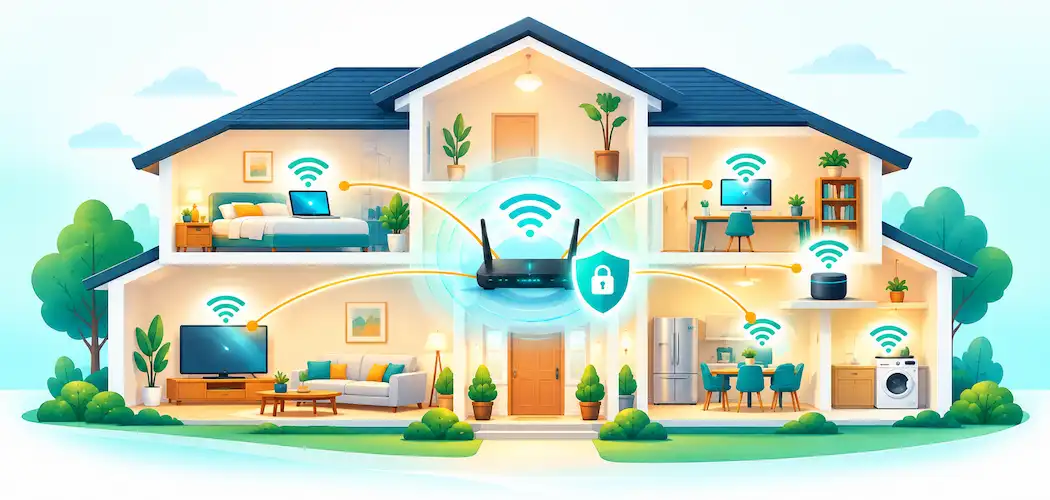
Domain 2.0 | Infrastructure — 24% of exam
Learning Objectives
By the end of this lesson, you will be able to:
- Identify common Wi-Fi standards and describe how they’ve evolved over time.
- Compare the 2.4 GHz, 5 GHz, and 6 GHz frequency bands used by Wi-Fi.
- Explain what an SSID is and describe basic wireless network configuration options.
- Compare wireless security protocols, including WEP, WPA, WPA2, and WPA3.
- Identify common factors that affect wireless range and interference.
- Describe the purpose of a guest network and a mesh Wi-Fi system.
Key Terms
| Term | Definition |
|---|---|
| Wi-Fi | A family of wireless networking standards, based on the IEEE 802.11 specification, used to connect devices to a LAN without cables. |
| SSID (Service Set Identifier) | The public name of a wireless network, displayed to users choosing which network to join. |
| 2.4 GHz band | A Wi-Fi frequency band offering longer range and better wall penetration, at lower maximum speeds. |
| 5 GHz band | A Wi-Fi frequency band offering higher maximum speeds and less congestion, at shorter range. |
| WEP (Wired Equivalent Privacy) | An outdated, easily broken wireless security protocol, no longer considered safe to use. |
| WPA2 (Wi-Fi Protected Access 2) | A wireless security protocol that was the long-standing standard, offering strong encryption. |
| WPA3 (Wi-Fi Protected Access 3) | The current wireless security standard, offering stronger encryption and protection than WPA2. |
| Guest network | A separate, isolated wireless network offered to visitors, keeping them off the main network. |
| Mesh network | A Wi-Fi system using multiple coordinated access points to extend coverage seamlessly across a larger area. |
| Interference | Any signal or physical obstruction that degrades wireless network performance. |
Explanation
Wi-Fi: A Family of Standards, Not One Technology
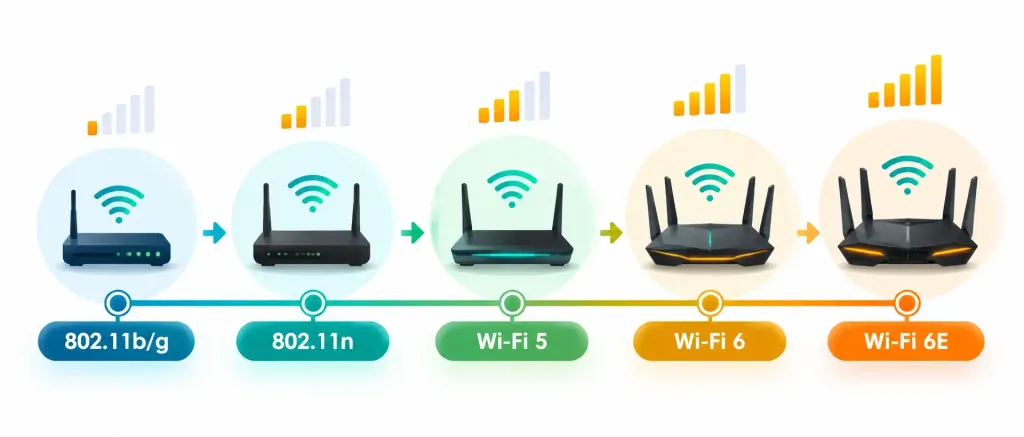
Wi-Fi is the everyday name for a family of wireless networking standards based on the IEEE 802.11 specification, and it’s worth understanding upfront that “Wi-Fi” isn’t a single unchanging technology — it’s been through many generations, each one faster and more capable than the last. Older standards carried names like 802.11b, 802.11g, and 802.11n; more recent generations have been rebranded with simpler consumer-facing names — Wi-Fi 5 (based on 802.11ac) and Wi-Fi 6 (based on 802.11ax) being the two most relevant generations in common use today, with Wi-Fi 6E extending Wi-Fi 6 into an additional frequency band covered below.
Each successive generation has generally improved maximum speed, efficiency with many connected devices, and overall reliability, which is exactly why a genuinely old router can become a real bottleneck even when a home’s internet plan itself, covered back in Lesson 2.7, is fast and modern — the wireless standard a router supports puts its own ceiling on performance, entirely separate from the ISP connection feeding into it.
It’s worth being able to picture concretely why this matters: a household with a fiber connection capable of several hundred megabits per second, but still using a decade-old router built around an older Wi-Fi standard, will never actually experience that full speed over Wi-Fi, no matter how fast the underlying internet plan is — the router itself becomes the bottleneck, silently capping performance well below what the rest of the connection could otherwise deliver. This is a genuinely common, easily overlooked cause of “slow internet” complaints that actually have nothing to do with the ISP or the internet plan at all.
Frequency Bands: 2.4 GHz, 5 GHz, and 6 GHz
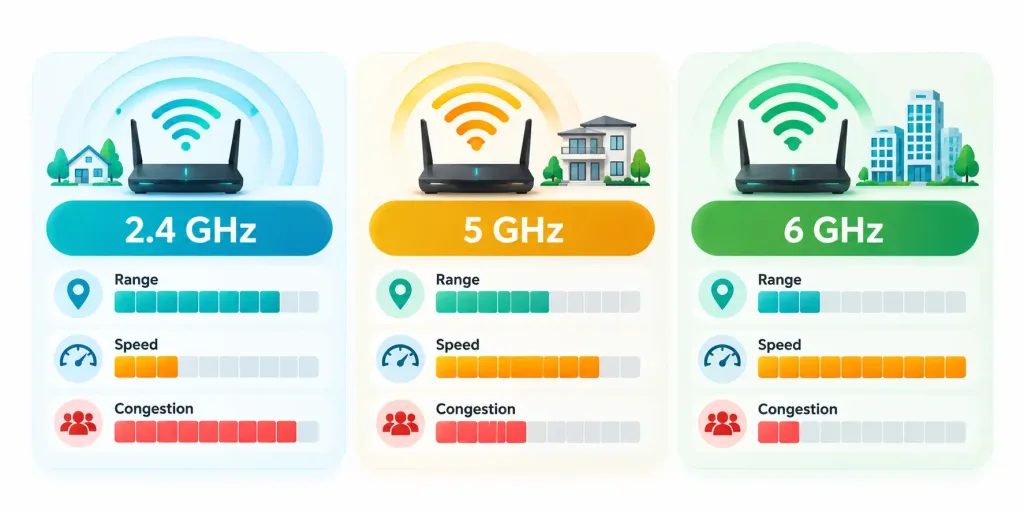
Modern Wi-Fi routers broadcast on multiple frequency bands simultaneously, and understanding the practical trade-off between them is genuinely useful, not just exam trivia. The 2.4 GHz band offers longer range and better penetration through walls and floors, but at lower maximum speeds, and it’s also more crowded — shared not just with neighboring Wi-Fi networks but with other common household devices like microwaves, cordless phones, and some Bluetooth devices, all of which can cause interference.
The 5 GHz band offers considerably higher maximum speeds and, since it’s a newer and less commonly used band overall, generally less congestion — but this comes at the cost of shorter effective range and weaker wall penetration, since higher-frequency signals lose strength more quickly over distance and struggle more to pass through solid obstacles. Newer routers supporting Wi-Fi 6E also add a 6 GHz band, offering even more available channels and even less congestion than 5 GHz, at the cost of even shorter range still.
This three-way trade-off is precisely why most modern routers broadcast all available bands simultaneously and let a connecting device automatically choose the best one for its specific location and needs — a laptop sitting right next to the router might automatically connect on 5 GHz or 6 GHz for maximum speed, while a smart thermostat two floors away connects on 2.4 GHz specifically because that band’s longer range and better wall penetration are what actually gets a usable signal to it at all.
SSID: The Network’s Public Name
The SSID (Service Set Identifier) is simply the public name of a wireless network — the name that appears in the list of available networks when a device searches for Wi-Fi. An SSID can be customized to anything the network owner chooses, and while it’s mostly a matter of personal preference, a few practical considerations are worth knowing. An SSID can be configured to be hidden, meaning it won’t appear automatically in a nearby device’s list of available networks, requiring anyone connecting to type the exact name manually — a setting that offers only a very thin layer of obscurity rather than genuine security, since the network is still fully detectable using basic wireless scanning tools.
A more genuinely useful SSID-related practice is running a separate guest network — a distinct SSID, typically isolated from the main home or office network, offered to visitors so they can access the internet without ever touching the primary network’s other connected devices, shared files, or smart home equipment. This isolation is a meaningful security practice: a visitor’s device that happens to carry malware, or simply an unfamiliar device the network owner would rather not fully trust, stays contained on the guest network rather than having open access to everything else.
Wireless Security: WEP, WPA, WPA2, and WPA3
Wireless security protocols exist to encrypt the data traveling over a Wi-Fi network and to control who can join it in the first place, and this area has a clear, important evolution worth knowing in order.
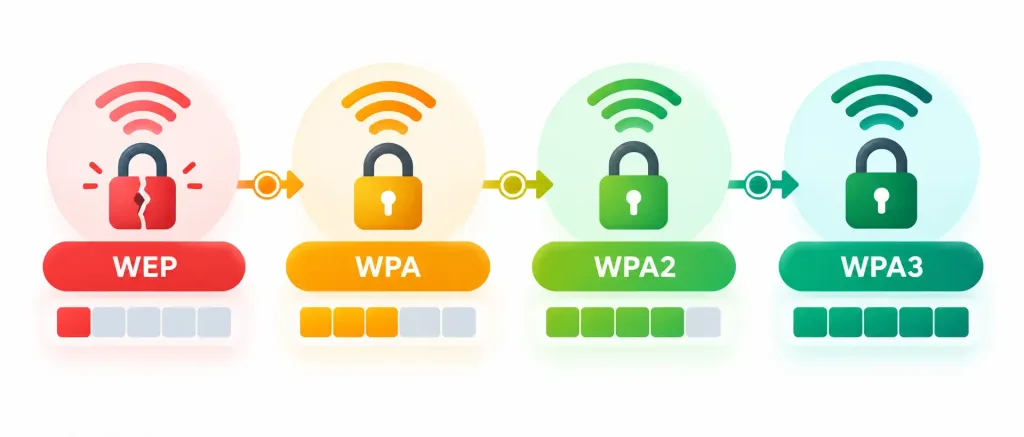
WEP (Wired Equivalent Privacy) was the original Wi-Fi security standard, but it has serious, well-documented cryptographic weaknesses that make it genuinely easy to break with widely available tools — WEP should never be used today under any circumstances, and its continued presence on any device or router is itself a real security red flag. WPA (Wi-Fi Protected Access) followed as an improvement, but was itself a relatively short-lived stepping stone toward something stronger.
WPA2 became the long-standing standard for well over a decade, offering genuinely strong encryption that, when configured with a solid password, remains reasonably secure even today — though it does carry some known vulnerabilities that more sophisticated attacks can exploit under certain conditions. WPA3, the current standard, improves on WPA2 with stronger encryption, better protection against password-guessing attacks even when a weaker password is chosen, and improved security for open, password-free public networks specifically. The clear, testable takeaway: WPA3 is the current best practice, WPA2 remains acceptable when WPA3 isn’t available, and WEP should never be used.
Beyond simply picking the strongest available protocol, the password itself matters just as much as the protocol securing it. A genuinely strong, unique Wi-Fi password paired with WPA3 offers meaningfully better protection than a weak, easily guessed password on the exact same protocol — encryption strength and password strength work together, and a technician troubleshooting a wireless security concern should check both, not just confirm which protocol is enabled and stop there.
Factors Affecting Wireless Range and Interference
Real-world Wi-Fi performance depends heavily on physical factors well beyond the router’s own specifications, and recognizing these is genuinely useful troubleshooting knowledge. Distance from the router is the most obvious factor — signal strength naturally weakens the farther a device is from the access point, in both the 2.4 GHz and 5 GHz bands, though 5 GHz weakens noticeably faster. Physical obstructions — walls, floors, large metal appliances, even densely packed bookshelves — absorb or reflect wireless signals, with dense materials like concrete and metal causing considerably more signal loss than a simple drywall interior wall.
Interference from other wireless devices and networks is a further, often underappreciated factor — in a densely populated apartment building, dozens of neighboring Wi-Fi networks broadcasting on overlapping channels within the same crowded 2.4 GHz band can meaningfully degrade everyone’s performance, even when each individual network’s own hardware and configuration are working perfectly. Many routers offer a setting to manually select a specific Wi-Fi channel within a band, and choosing a genuinely less congested channel — determined using a simple wireless scanning app — can meaningfully improve performance in exactly this kind of crowded environment, a practical technique worth knowing beyond just the exam.
Most consumer routers today default to automatically selecting the best available channel, periodically re-evaluating and switching as conditions change, which handles this problem adequately for the average household without any manual intervention. Manual channel selection remains most valuable in specifically dense environments — apartment buildings, office parks with many overlapping business networks — where automatic selection sometimes settles on a channel that’s merely “good enough” rather than genuinely optimal, and where a quick manual scan and adjustment can meaningfully outperform the router’s own automatic choice.
Wi-Fi Direct: Connecting Devices Without a Router
Not every wireless connection between two Wi-Fi-capable devices needs to pass through a router at all. Wi-Fi Direct allows two devices to connect to each other directly over Wi-Fi, without either one needing to join an existing wireless network first — commonly used for tasks like streaming video directly from a phone to a smart TV, or printing directly from a laptop to a Wi-Fi-capable printer with no router involved in the connection at all.
This is conceptually similar to the Bluetooth pairing process covered back in Lesson 2.4, just using Wi-Fi’s radio technology instead of Bluetooth’s, generally offering considerably higher bandwidth as a result — a genuinely practical advantage for a task like streaming high-resolution video that would strain Bluetooth’s more limited throughput.
Mesh Networks: Extending Coverage Seamlessly
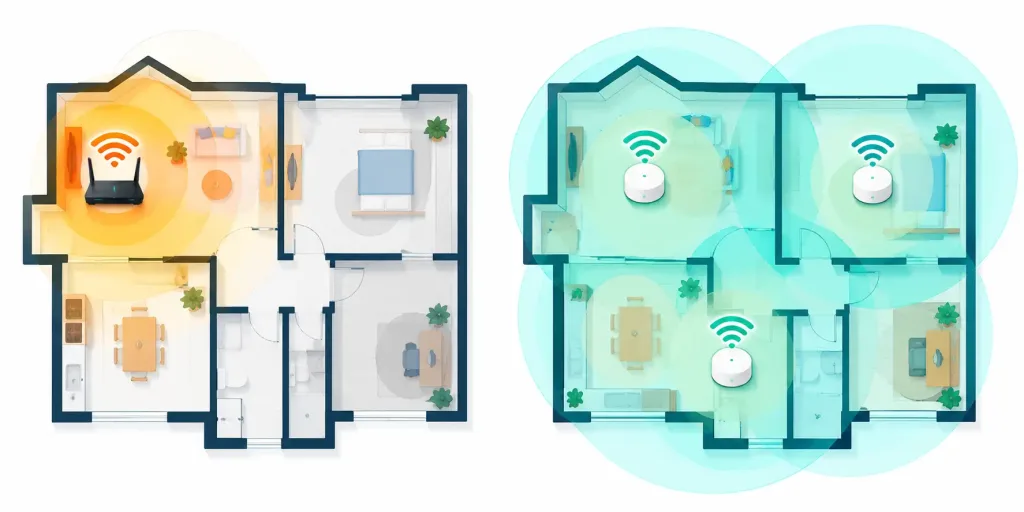
A single router’s wireless coverage has real physical limits, and simply adding a second, separate access point with a different SSID creates a clumsy experience — a device has to manually disconnect from one network and reconnect to the other as a person walks from one coverage area into another. A mesh network solves this specific problem by using multiple coordinated access points (called nodes) that all share the same single SSID and password, working together to hand a connected device off seamlessly from one node to another as it moves through a space, without the user ever needing to notice or intervene.
Mesh systems have become an increasingly popular, straightforward solution for larger homes, multi-story buildings, or spaces with unusual layouts and thick walls that a single router alone would struggle to cover reliably — trading a modest additional cost and a little more setup complexity for meaningfully better, more consistent coverage throughout a genuinely large or oddly shaped space.
A Worked Example: Diagnosing Weak Wi-Fi in a Back Bedroom
Applying several of this lesson’s concepts together helps make them concrete. A household reports that Wi-Fi barely works in a back bedroom, despite the router sitting in the living room at the front of the house showing full strength.
Working through the likely factors in order: distance is the first, most obvious culprit — the back bedroom sits at the far end of the house from the router. Physical obstructions compound the problem further, since the signal has to pass through several interior walls and possibly a kitchen with large metal appliances along the way, both of which meaningfully weaken a wireless signal, especially on the shorter-range 5 GHz band. Checking which band the bedroom device is connected to reveals it’s defaulting to 5 GHz, which explains why the signal degrades so sharply over that particular distance and obstruction path, even though the router itself is functioning perfectly.
Two reasonable fixes emerge directly from this diagnosis: manually connecting the bedroom device to the router’s 2.4 GHz band instead, trading some maximum speed for meaningfully better range and wall penetration, or — for a more permanent, higher-performing solution — adding a mesh node partway between the living room and the back bedroom, extending genuinely strong coverage the rest of the way rather than asking a single distant router to reach further than its physical signal realistically allows.
Bringing Wireless Configuration Together
A well-configured small wireless network draws on every concept covered in this lesson at once: choosing a modern Wi-Fi standard-capable router, understanding which frequency band suits which device and location, setting a clear SSID and a genuinely separate guest network for visitors, securing the network with WPA3 (or WPA2 as a fallback, and never WEP), and considering a mesh system when a single router’s coverage genuinely can’t reach every corner of the space. This same layered thinking — physical layer, configuration layer, security layer — mirrors the troubleshooting approach introduced back in Lesson 1.4 and reinforced throughout this entire module: complex systems are best understood, configured, and diagnosed one layer at a time.
Recognition-Level Verification Concepts
- Recognize that Wi-Fi is a family of evolving standards (802.11b/g/n, Wi-Fi 5, Wi-Fi 6, Wi-Fi 6E), each generation improving on the last.
- Recognize the trade-off between 2.4 GHz (longer range, lower speed, more congestion) and 5 GHz (shorter range, higher speed, less congestion), with 6 GHz pushing that trade-off further in the same direction.
- Recognize an SSID as a network’s public name, and a hidden SSID as offering only minimal obscurity, not real security.
- Recognize the security progression WEP → WPA → WPA2 → WPA3, with WEP never acceptable and WPA3 as current best practice.
- Recognize a guest network as a separate, isolated SSID that keeps visitor devices off the main network.
- Recognize distance, physical obstructions, and interference from other devices/networks as the main factors affecting wireless range and performance.
- Recognize a mesh network as multiple coordinated access points sharing one SSID for seamless coverage, distinct from simply adding a second separate access point.
- Recognize Wi-Fi Direct as a direct device-to-device Wi-Fi connection that requires no router, distinct from Bluetooth pairing despite serving a similar purpose.
Common Exam Traps
- Assuming a hidden SSID provides meaningful security. It only prevents casual discovery; the network remains fully detectable with basic scanning tools — encryption (WPA3/WPA2) is what actually secures it.
- Assuming 5 GHz is always the better choice. 5 GHz offers higher speed but shorter range and weaker wall penetration — 2.4 GHz is often the better fit for distant or obstructed devices.
- Treating WEP as an acceptable fallback option. WEP’s weaknesses are severe and well-documented; it should never be used, unlike WPA2, which remains an acceptable fallback when WPA3 isn’t available.
- Confusing a guest network with simply sharing the main Wi-Fi password. A proper guest network is a separate, isolated SSID — sharing the main password gives a visitor’s device full access to the primary network.
- Assuming interference only comes from other Wi-Fi networks. Household devices like microwaves and cordless phones can also interfere, particularly on the 2.4 GHz band.
- Confusing a mesh network with simply adding a second separate router/SSID. A mesh system shares one SSID and hands devices off seamlessly between nodes; two separate networks require manual reconnection as a device moves between them.
- Assuming Wi-Fi Direct requires a router. Wi-Fi Direct connects two devices to each other directly, with no router or existing network involved at all.
Lesson 2.9 Practice Questions: Small Wireless Network Capabilities
Summary
Wi-Fi is a continuously evolving family of standards, with Wi-Fi 5, Wi-Fi 6, and Wi-Fi 6E representing the most relevant recent generations.
The 2.4 GHz, 5 GHz, and 6 GHz bands each trade range for speed and congestion differently, and modern routers broadcast all available bands so devices can automatically choose the best fit.
An SSID is a network's public name, and while it can be hidden, doing so offers only minimal obscurity rather than real security.
Wireless security has progressed from the now-unsafe WEP, through WPA and WPA2, to the current standard, WPA3 — WEP should never be used, and WPA3 is the best available choice today.
A guest network keeps visitor devices isolated from the main network, and wireless performance is shaped heavily by distance, physical obstructions, and interference from other devices and networks.
A mesh network uses multiple coordinated access points sharing one SSID to provide seamless coverage across a larger or more complex space than a single router can reliably cover alone.
With this lesson, Domain 2.0 (Infrastructure) is now complete — all 9 planned lessons (10 published files, counting the 2.5 split) are done. The next domain shifts focus to applications and software, starting with the components that make up an operating system.