Domain 2.0 | Infrastructure — 24% of exam
Learning Objectives
By the end of this lesson, you will be able to:
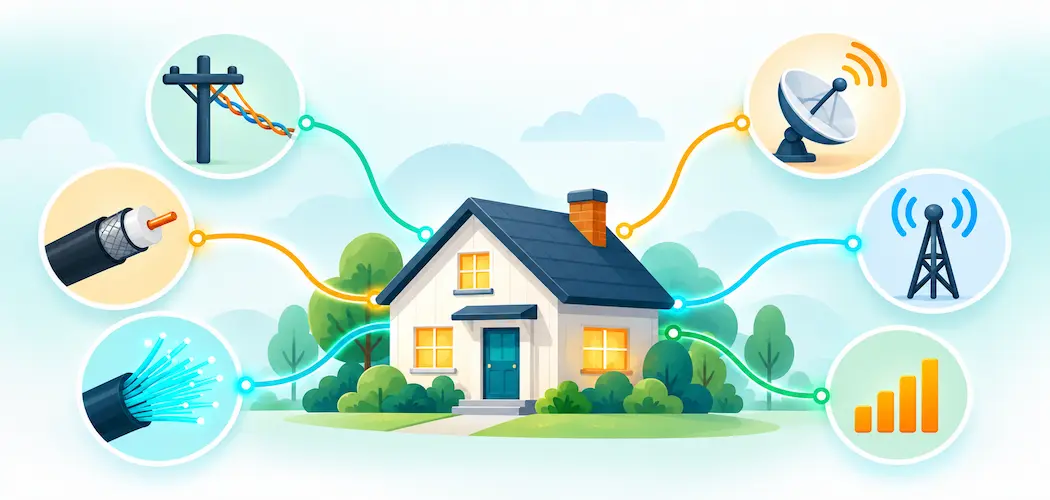
- Identify the major internet service types — DSL, cable, fiber, satellite, fixed wireless, and cellular — and describe how each delivers a connection.
- Compare these service types across bandwidth, latency, and reliability.
- Explain the difference between symmetric and asymmetric connections.
- Describe the role of an ISP and basic terms like bandwidth, latency, and data caps.
- Apply a basic framework for choosing the right internet service type for a given scenario.
Key Terms
| Term | Definition |
|---|---|
| ISP (Internet Service Provider) | A company that provides internet access to homes and businesses. |
| Bandwidth | The maximum amount of data a connection can transfer in a given amount of time, usually measured in Mbps or Gbps. |
| Latency | The delay between sending a request and receiving a response, usually measured in milliseconds (ms). |
| DSL (Digital Subscriber Line) | An internet service delivered over existing copper telephone lines. |
| Cable internet | An internet service delivered over the same coaxial cable infrastructure used for cable television. |
| Fiber internet | An internet service delivered using fiber-optic cable, transmitting data as pulses of light. |
| Satellite internet | An internet service delivered via signals relayed through an orbiting satellite. |
| Fixed wireless | An internet service delivered via radio signals from a fixed ground-based tower to a receiver at the customer’s location. |
| Cellular/mobile hotspot | An internet connection delivered over a cellular network, the same network mobile phones use for data. |
| Symmetric connection | A connection where upload and download speeds are the same or very close. |
| Asymmetric connection | A connection where download speed is significantly faster than upload speed. |
Explanation
The ISP: The Gateway to Everything Else
Every device covered throughout this module — the NIC in Lesson 2.2, the cloud services in Lesson 2.6 — ultimately depends on one thing to reach the wider internet: a working connection provided by an ISP (Internet Service Provider). An ISP is the company that physically connects a home or business to the broader internet, and the specific technology it uses to deliver that connection varies significantly depending on geography, infrastructure investment, and what’s practically available in a given area.
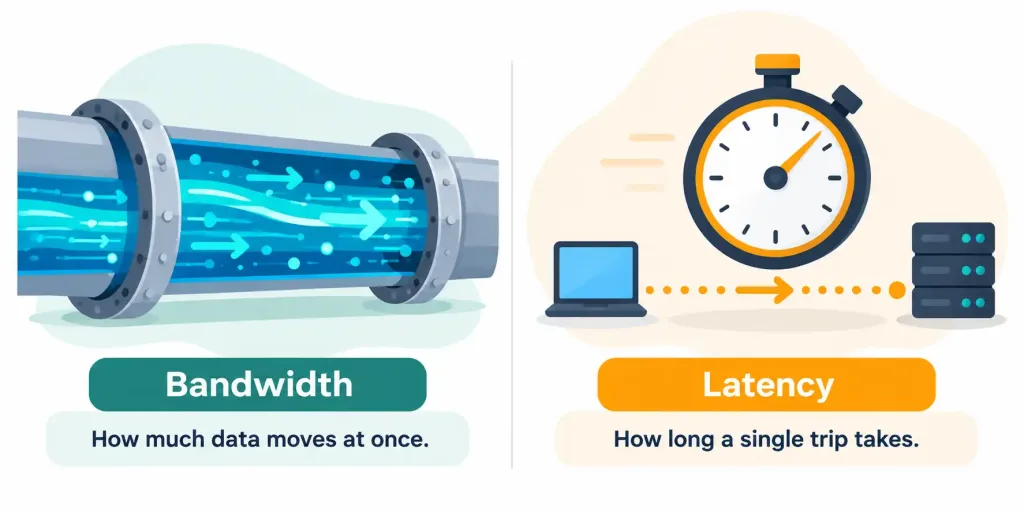
Two measurements matter enormously when comparing internet service types, and both come up constantly in real-world decisions and on this exam. Bandwidth describes the maximum amount of data a connection can move in a given period of time, usually expressed in Mbps (megabits per second) or Gbps (gigabits per second) — a relationship worth connecting back to the same units of measure covered in Lesson 1.3, remembering that bandwidth is measured in bits, not bytes, which is why an advertised “100 Mbps” connection transfers roughly 12.5 megabytes per second, not 100.
Latency, by contrast, describes the delay between sending a request and receiving a response, measured in milliseconds (ms) — low latency matters enormously for anything requiring real-time responsiveness, like video calls or online gaming, even when bandwidth itself is more than sufficient.
A useful mental model for keeping these two concepts distinct: bandwidth is like the number of lanes on a highway, determining how many cars can travel at once, while latency is like the actual travel time for a single car to get from one end of that highway to the other. A highway with many lanes but a very long distance to travel still has high latency even though its bandwidth (lane count) is excellent, and a short highway with few lanes has low latency but limited total bandwidth — the two measurements are genuinely independent of each other, and a connection can score well on one while scoring poorly on the other.
DSL: Riding the Telephone Line
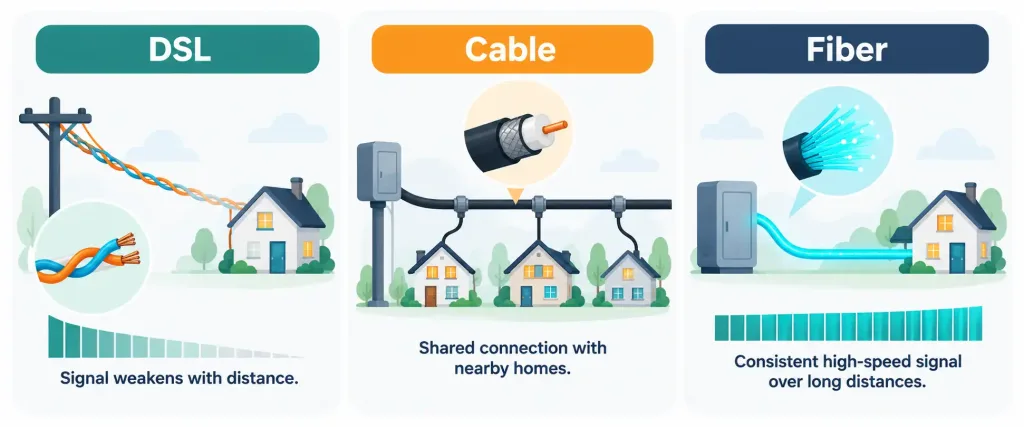
DSL (Digital Subscriber Line) delivers internet service over the same copper telephone wiring already installed in most homes for decades — the same copper cabling terminated with the RJ11 connector covered back in Lesson 2.5.1. DSL’s major practical advantage is reach: because it uses existing telephone infrastructure, it’s available in many areas where newer technologies haven’t been built out yet, particularly in rural and older suburban areas.
DSL’s main limitation is distance-dependent performance: signal quality and available bandwidth degrade the farther a customer’s home is from the telephone company’s central switching office, meaning two DSL customers in the same general area can experience meaningfully different speeds depending on their specific distance from that infrastructure. DSL speeds are also generally asymmetric — meaning download speed is significantly faster than upload speed — since DSL was originally designed around typical home usage patterns where downloading (web pages, videos, files) vastly outweighs uploading.
A useful diagnostic habit worth internalizing here: if a customer’s DSL speed seems unexpectedly low compared to their neighbor’s, distance from the central office (or from a smaller local distribution point, in more modern DSL deployments) is one of the first, most likely explanations worth checking — not necessarily a fault with the customer’s own equipment or account.
Cable: Sharing the TV Line
Cable internet delivers service over the same coaxial cable infrastructure originally built for cable television, an infrastructure that has since been widely upgraded to carry internet data alongside TV signals. Cable generally offers considerably higher bandwidth than DSL and doesn’t suffer from the same distance-based degradation, since cable infrastructure is engineered differently than DSL’s telephone-line approach.
Cable’s characteristic limitation is that bandwidth in a given neighborhood is typically shared among all the customers connected to the same local cable segment — meaning that during peak usage hours, when many neighbors are all online simultaneously, an individual customer’s actual available bandwidth can drop noticeably below its advertised maximum, even though nothing about their own connection has changed. Cable, like DSL, is also generally asymmetric, offering considerably faster download speeds than upload speeds.
Fiber: The Modern Standard
Fiber internet transmits data as pulses of light through thin strands of glass or plastic fiber-optic cable, the same fiber technology briefly introduced alongside copper cabling in the Network+ series. Fiber offers dramatically higher bandwidth than either DSL or cable, extremely low latency, and — critically — it is far less susceptible to the distance-based degradation that limits DSL and to the neighborhood-level congestion that affects cable, since fiber’s light-based signal travels with far less loss over distance than an electrical signal does.
Fiber is also frequently symmetric, offering upload speeds that match or come close to its download speeds — a genuinely significant advantage for anyone regularly uploading large files, hosting content, or making heavy use of video conferencing, cloud backup, or other upload-intensive tasks. Fiber’s main practical limitation isn’t technical but logistical: running new fiber-optic cable to a home or business requires significant physical infrastructure investment, which is exactly why fiber availability remains considerably more limited geographically than DSL or cable, concentrated mostly in urban and newly developed areas where that infrastructure investment has already been made.
It’s also worth understanding, at least at a conceptual level, why fiber outperforms copper-based options so dramatically. Copper-based connections like DSL and cable transmit data as electrical signals, which naturally degrade and pick up interference the farther they travel — the same physical limitation that gave DSL its distance sensitivity in the first place. Light traveling through a fiber-optic strand experiences dramatically less of this kind of signal loss over distance, which is exactly why fiber-optic cable is also the backbone technology connecting cities, countries, and continents together across the wider internet, not just the “last mile” connection running into an individual home or business.
Satellite: Coverage Without Ground Infrastructure
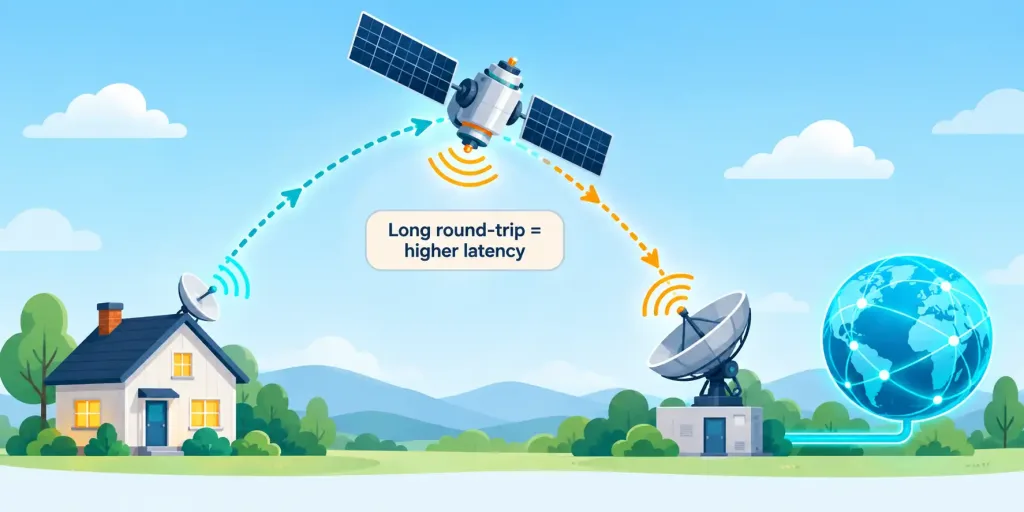
Satellite internet takes an entirely different approach, relaying a signal between a customer’s dish and an orbiting satellite rather than relying on any ground-based cabling at all. This makes satellite internet’s single greatest advantage genuinely unmatched: availability in extremely remote or rural locations where no cable, DSL, or fiber infrastructure exists and likely never will, due to the prohibitive cost of running physical cabling to sparsely populated areas.
Satellite internet’s traditional limitation has been latency: a signal traveling to a satellite in geostationary orbit and back covers an enormous physical distance, introducing a noticeable delay that makes satellite internet historically poorly suited to latency-sensitive activities like video calls or online gaming, even when bandwidth itself is reasonably good. Newer low-Earth-orbit satellite constellations have meaningfully reduced this latency compared to older geostationary satellite services, though satellite internet as a category still generally trails fiber and cable on latency, and remains genuinely weather-sensitive, since heavy rain, snow, or storms can noticeably degrade the signal between dish and satellite.
Fixed Wireless and Cellular: Radio-Based Alternatives
Fixed wireless internet delivers a connection via radio signals transmitted from a fixed ground-based tower directly to a receiver antenna mounted at the customer’s location, requiring a clear line of sight between the two. Fixed wireless offers a middle ground between fully wired options and satellite: it can reach areas without existing cable or fiber infrastructure considerably more easily than trenching new cable would require, while generally offering meaningfully lower latency than satellite, since the signal only needs to travel to a nearby tower rather than to orbit and back.
Cellular internet, delivered over the same cellular network mobile phones use for data, offers a genuinely different value proposition: portability. A cellular connection, accessed either directly through a phone’s own data plan or through a dedicated mobile hotspot device, works essentially anywhere within cellular coverage, making it valuable as a primary connection in areas with good cellular coverage but poor wired infrastructure, and as a reliable backup connection everywhere else when a primary wired connection goes down.
Cellular internet’s practical limitations are usage-based: cellular data plans commonly enforce data caps — a maximum amount of data usable per billing period before speeds are reduced or additional charges apply — a constraint far less common on wired home internet plans, and cellular bandwidth can also vary considerably based on network congestion and signal strength at any given moment.
Data caps deserve a bit more attention since they show up as a genuinely practical consideration well beyond cellular alone. Some wired ISPs, particularly certain cable providers, also enforce monthly data caps on home internet plans, after which speeds may throttle or additional fees apply — a detail worth checking specifically for any household with especially heavy usage patterns, like frequent large downloads, extensive video streaming across multiple devices, or hosting a home server. Fiber providers, by contrast, have historically been considerably less likely to impose data caps at all, one more practical advantage layered on top of fiber’s raw performance benefits.
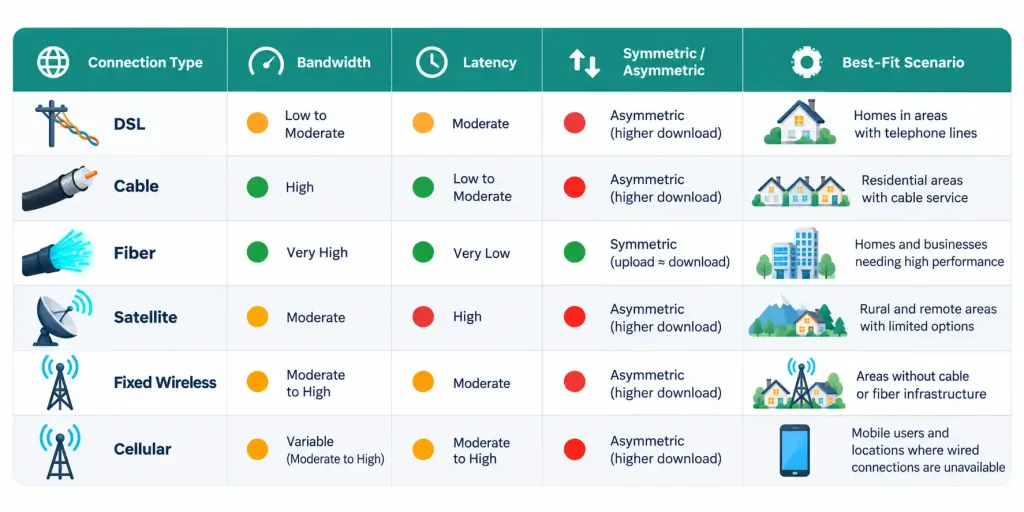
Symmetric vs. Asymmetric Connections
The distinction between symmetric and asymmetric connections deserves its own clear explanation, since it cuts across every service type discussed above rather than being tied to just one of them. A symmetric connection offers upload and download speeds that are the same or very close to each other, while an asymmetric connection offers meaningfully faster download speeds than upload speeds.
This distinction matters because most everyday home internet usage — streaming video, browsing the web, downloading files — is naturally download-heavy, which is exactly why DSL and cable providers historically optimized their networks around asymmetric performance, prioritizing the download side where the vast majority of typical demand actually sits. But usage patterns have shifted considerably as video conferencing, cloud backup, content creation, and live streaming have all become far more common — activities that depend heavily on strong upload performance — which is precisely why fiber’s typically symmetric performance has become an increasingly significant selling point rather than a minor technical footnote.
Choosing the Right Internet Service Type
Bringing this lesson’s comparisons together into a practical decision framework: when fiber is available and within budget, it’s generally the strongest all-around choice thanks to its high bandwidth, low latency, and symmetric performance. When fiber isn’t available, cable is usually the next-best option for typical home use, offering solid bandwidth at a reasonable cost, with DSL serving as a fallback in areas cable hasn’t reached.
For genuinely remote locations with no wired infrastructure at all, satellite or fixed wireless become the practical options, with fixed wireless generally preferable when both are available due to its lower latency. And cellular serves best as either a primary connection for a highly mobile user or as a reliable backup connection for anyone who can’t afford their primary wired service going down.
This same evaluative pattern — matching a technology’s specific strengths and weaknesses to the actual demands of a given scenario — has now appeared repeatedly across this module, from storage types in Lesson 2.3 through peripheral connectors and now internet service types, and it’s worth recognizing as a general exam-taking strategy in its own right: the “best” option in any scenario question is rarely universal, it’s whichever option best matches the specific priorities the scenario actually describes.
A Worked Example: Picking the Right Service for Three Households
Applying this framework concretely helps cement it. Consider three different households, each needing internet service under different constraints.
The first household lives in a dense city neighborhood where fiber has recently been installed, and works primarily from home doing frequent video calls and uploading large design files. Fiber is the clear choice here: its symmetric speeds directly address the upload-heavy workload, and its low latency keeps video calls smooth.
The second household lives in a small town where only DSL and satellite are available, and mainly uses the internet for web browsing, streaming, and occasional video calls. DSL is the better fit despite satellite’s wider theoretical bandwidth in some plans, because DSL’s meaningfully lower latency will make the occasional video calls noticeably more usable, and typical browsing/streaming demand fits comfortably within DSL’s asymmetric, download-favoring design.
The third household lives on a remote rural property with no telephone or cable infrastructure nearby at all, well outside any fixed wireless tower’s range, and needs a connection primarily for email and basic browsing. Satellite is the only genuinely available option here, and despite its latency drawback, it fully satisfies a workload that isn’t latency-sensitive in the first place.
Notice that in each case, the “right” answer depended entirely on matching the household’s actual usage pattern and geographic constraints to each technology’s specific strengths — never on picking whichever option sounds most advanced or expensive.
Recognition-Level Verification Concepts
- Recognize bandwidth (how much data moves) and latency (how long a single trip takes) as two distinct measurements, both relevant to internet performance.
- Recognize DSL (copper telephone line, distance-limited, asymmetric) and cable (coaxial cable, neighborhood-shared, asymmetric) as widely available but generally slower than fiber.
- Recognize fiber (light through glass/plastic strands) as offering the highest bandwidth, lowest latency, and often symmetric speeds, limited mainly by infrastructure availability.
- Recognize satellite internet’s strength (availability anywhere) and weakness (high latency, weather sensitivity).
- Recognize fixed wireless (ground tower, line of sight) as a middle ground between wired options and satellite.
- Recognize cellular/mobile hotspot internet’s strength (portability) and weakness (data caps, variable bandwidth).
- Recognize the difference between symmetric (equal upload/download) and asymmetric (faster download than upload) connections.
Common Exam Traps
- Confusing bandwidth and latency. Bandwidth measures capacity (how much data); latency measures delay (how long one round trip takes) — a high-bandwidth connection can still have high latency, and vice versa.
- Assuming all wired connections perform identically. DSL, cable, and fiber differ significantly in bandwidth, distance sensitivity, and symmetric/asymmetric performance — don’t treat “wired” as one uniform category.
- Overlooking satellite’s latency weakness. A scenario emphasizing real-time responsiveness (video calls, gaming) rules out traditional satellite even if its bandwidth looks adequate on paper.
- Assuming cellular internet has no practical limitations. Data caps and variable congestion make cellular a poor primary choice for heavy, sustained usage despite its portability advantage.
- Confusing fixed wireless with satellite. Fixed wireless uses a nearby ground tower (lower latency); satellite relays through orbit (higher latency) — they are not interchangeable despite both being “wireless.”
- Treating asymmetric speeds as a defect rather than a deliberate design choice. DSL and cable are asymmetric because most historical home usage was download-heavy, not because the technology is inherently inferior.
- Assuming data caps only apply to cellular connections. Some wired ISPs, particularly certain cable providers, also enforce data caps — always check the specific plan rather than assuming by connection type alone.
Lesson 2.7 Practice Questions: Internet Service Types
Summary
An ISP provides the internet connection every other technology in this module ultimately depends on, and bandwidth and latency are the two core measurements used to compare service quality.
DSL and cable deliver internet over existing telephone and TV cabling respectively, both generally asymmetric, with DSL limited by distance and cable limited by neighborhood-level shared bandwidth.
Fiber offers the highest bandwidth, lowest latency, and often symmetric speeds, limited mainly by how far its physical infrastructure has been built out.
Satellite internet reaches locations no other technology can, at the cost of higher latency and weather sensitivity, while fixed wireless offers a middle ground with lower latency than satellite.
Cellular internet and mobile hotspots offer genuine portability, constrained by data caps and variable network congestion.
A symmetric connection offers matched upload and download speeds, while an asymmetric connection favors download speed — a distinction that matters more as upload-heavy activities like video conferencing and cloud backup become increasingly common.
The next lesson turns from how a device connects to the internet to the fundamentals of how devices communicate with each other once that connection exists, covering basic networking concepts like IP addressing and network types.