
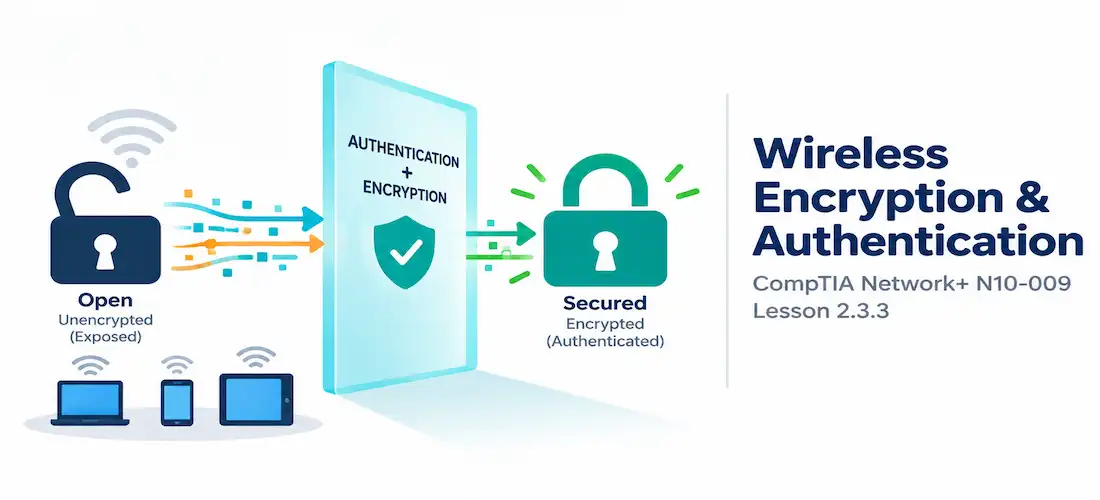
Domain 2.0 | Network Implementation — 20% of exam
Learning Objectives
By the end of this lesson, you will be able to:
- Explain why wireless encryption is essential and compare WPA2 and WPA3
- Distinguish PSK authentication from Enterprise (802.1X) authentication
- Explain the purpose of guest networks and captive portals
- Identify the key security improvements WPA3 introduces over WPA2
- Recognize common wireless encryption and authentication misconfigurations
Key Terms
| Term | Definition |
|---|---|
| WPA2 (Wi-Fi Protected Access 2) | A wireless security standard using AES-CCMP encryption, the long-standing baseline for secure Wi-Fi |
| WPA3 (Wi-Fi Protected Access 3) | The successor to WPA2, adding SAE for stronger key exchange and mandatory management frame protection |
| PSK (Pre-Shared Key) | An authentication method where every device on the network uses the same shared passphrase |
| Enterprise Authentication | An authentication method (802.1X) where each user or device authenticates individually against a RADIUS server with unique credentials |
| Captive Portal | A web page that intercepts a guest’s browser, requiring login or acceptance of terms before granting internet access |
Explanation
Why Wireless Encryption Matters
The previous lesson covered how wireless networks are named and structured. None of that structure means much without encryption, though — a wired connection at least requires physical access to a cable or a switch port, but a wireless signal broadcasts into open air, reachable by anyone within range holding an ordinary laptop or phone. Without encryption, every wireless transmission could be captured and read by anyone nearby — a very different threat model from the firewalls and security appliances that guard a wired network’s perimeter, since there’s no perimeter to speak of over the air. Wireless encryption exists specifically to close that gap.WPA2 and WPA3: Evolving Wireless Security
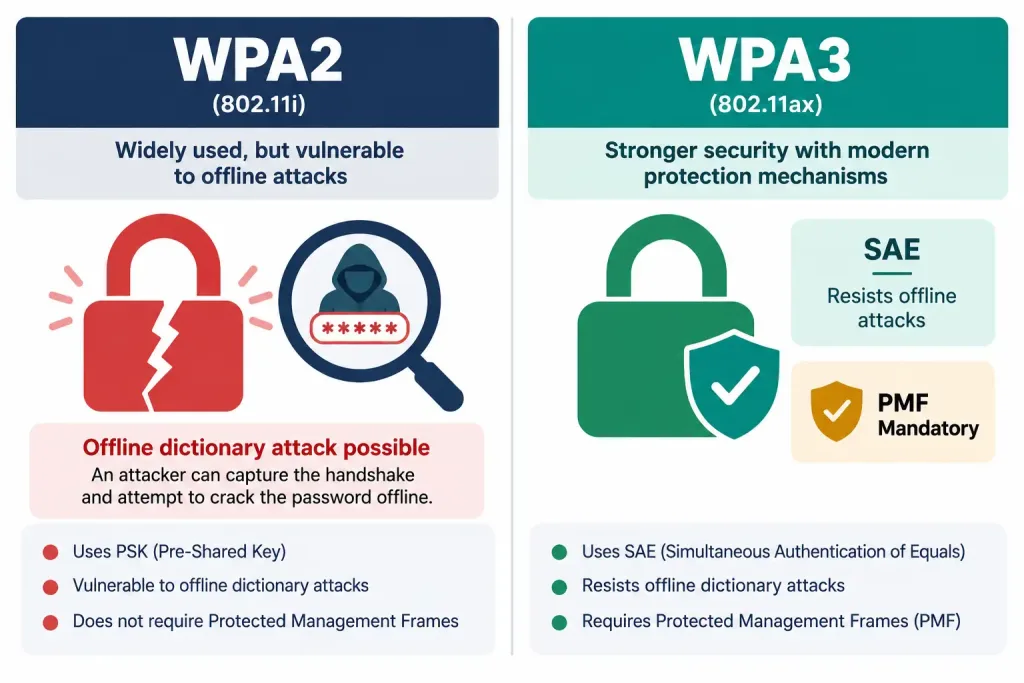
WPA2 has been the dominant wireless security standard for two decades, using AES-CCMP encryption to protect traffic. It replaced the older, badly broken WEP and original WPA standards, and for most of its life, properly configured WPA2 has been considered solidly secure. Its weak point has always been the human element: WPA2’s four-way handshake, when paired with a short or common passphrase, is vulnerable to offline dictionary and brute-force attacks — an attacker can capture the handshake and then try passwords against it without even being connected to the network.
WPA3 addresses this directly. Its headline improvement is SAE (Simultaneous Authentication of Equals), which replaces WPA2’s four-way handshake with a exchange that resists exactly the offline dictionary attack WPA2 was vulnerable to — even if an attacker captures the entire exchange, they can’t productively guess passwords against it offline. WPA3 also makes Protected Management Frames (PMF) mandatory, encrypting the management traffic between clients and access points that WPA2 left unprotected, closing off certain deauthentication and spoofing attacks that relied on that gap.
PSK vs. Enterprise Authentication
Beyond the encryption standard itself, there’s a separate and equally important decision: how individual users and devices actually authenticate to the network.
- PSK (Pre-Shared Key) authentication uses one shared passphrase for every device connecting to the network. It’s simple to set up and is the standard choice for home networks and small offices, but it has a real accountability gap: everyone shares the same credential, so there’s no way to tell which specific device or person a given connection belongs to, and if the key needs to be revoked — an employee leaves, a device is lost — the passphrase has to be changed and redistributed to every legitimate device at once.
- Enterprise authentication, based on the 802.1X framework, has each individual user or device authenticate with its own unique credentials against a centralized RADIUS server. This gives real per-user accountability (the network knows exactly who or what device is connected) and makes revocation clean — disabling one compromised or departing user’s credentials doesn’t require touching anyone else’s access at all.
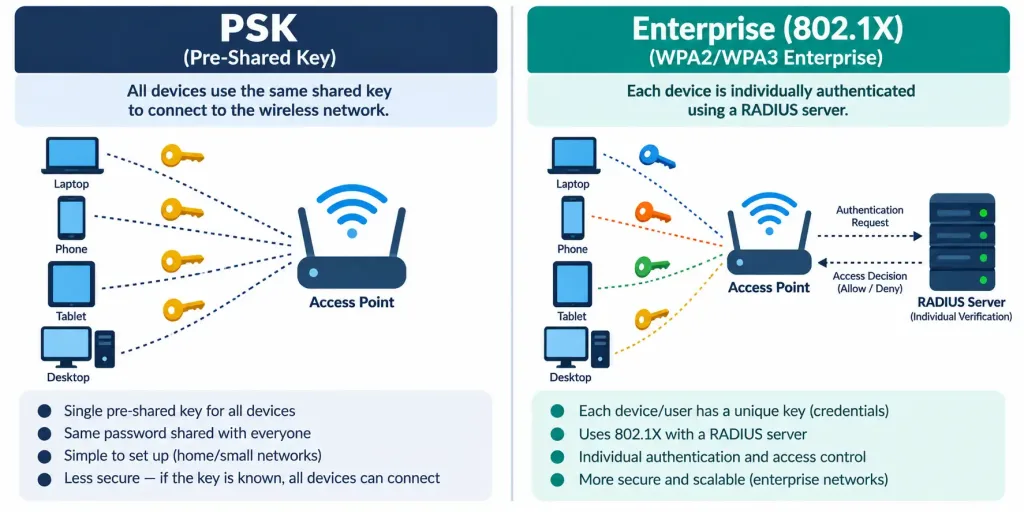
The tradeoff is complexity and cost: Enterprise authentication requires a RADIUS server and more involved client configuration, which is why PSK remains common for smaller deployments even though Enterprise offers meaningfully better security and accountability at scale.
Guest Networks and Captive Portals
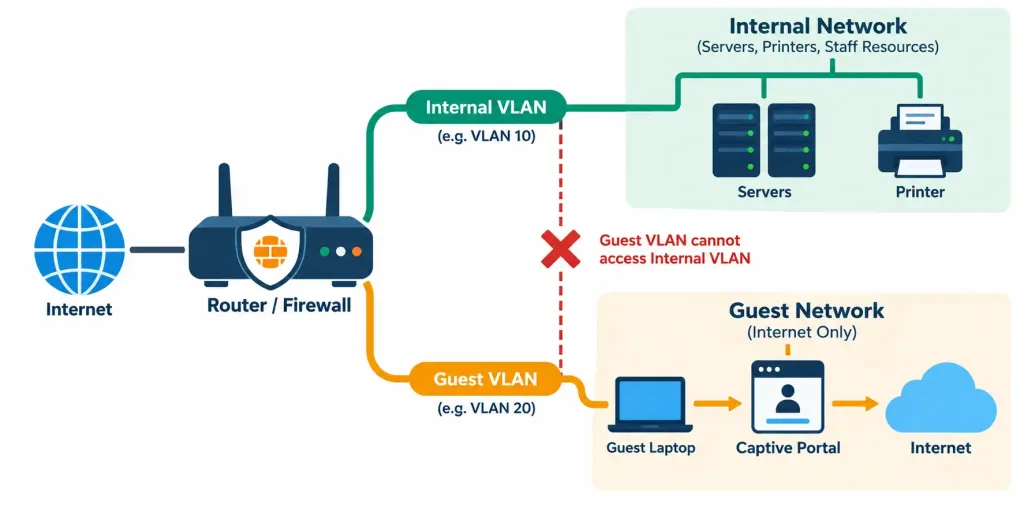
Most organizations need to offer wireless access to visitors without exposing internal network resources to them. A guest network solves this by putting visitor traffic on its own separate SSID — typically mapped to its own isolated VLAN — with no path to internal servers, printers, or other private resources, only outbound internet access.A captive portal is frequently layered on top of a guest network: instead of connecting straight to the internet, a guest’s first web request is intercepted and redirected to a landing page requiring them to accept terms of use, enter a room number or voucher code, or simply click through an acknowledgment before real internet access is granted. This serves both a legal purpose (documenting acceptance of an acceptable use policy) and a practical one (giving the organization a checkpoint to limit or monitor guest access).
Recognition-Level Verification Concepts
A few patterns are worth recognizing on sight:
- A wireless network where every device uses the identical passphrase to connect is running PSK authentication.
- A network requiring individual username/password (or certificate) login against a RADIUS server is running Enterprise (802.1X) authentication.
- A guest redirected to a terms-acceptance page before reaching the internet is going through a captive portal.
- A wireless client unable to reach internal file servers or printers, while still reaching the internet, on a distinctly named guest SSID, reflects correct guest network isolation, not a fault.
Common Exam Traps
- WPA3’s core improvement is SAE, not simply “a stronger password requirement.” SAE fundamentally changes the key exchange to resist offline dictionary attacks, regardless of how strong or weak the actual passphrase is.
- PSK and Enterprise are authentication methods, not encryption standards. Either can technically be paired with WPA2 or WPA3 — don’t conflate “which encryption version” with “how users log in.”
- PSK has no built-in per-user accountability. Every connected device looks identical from the perspective of the shared key itself; distinguishing users requires other means (like MAC tracking), not the PSK itself.
- A guest network’s isolation from internal resources is intentional, not a misconfiguration. Guests reaching the internet but nothing else on the internal network is the network working exactly as designed.
- A captive portal is a checkpoint, not an encryption mechanism. It controls initial access to the network; it doesn’t itself encrypt the guest’s ongoing wireless traffic — that’s still handled by whatever WPA standard the network uses.
Lesson 2.3.3 Practice Quiz — Wireless Encryption & Authentication
17 questions covering WPA2, WPA3, SAE, PSK vs. Enterprise authentication, guest networks, and captive portals.
N10-009 · Domain 2.3Summary
Wireless traffic broadcasts into open air, making encryption essential; WPA2 uses AES-CCMP, while WPA3 adds SAE and mandatory Protected Management Frames for stronger security.
WPA3's SAE specifically resists the offline dictionary attacks that WPA2's four-way handshake was vulnerable to, even against weaker passphrases.
PSK authentication uses one shared passphrase for all devices, offering simplicity but no per-user accountability; Enterprise (802.1X) authentication uses individual credentials against a RADIUS server for better accountability and clean revocation.
Guest networks isolate visitor traffic on a separate SSID and VLAN, restricting access to the internet only, with no path to internal resources.
Captive portals intercept a guest's first web request to require acceptance of terms or login before granting internet access, serving both legal and access-control purposes.



