
Domain 2.0 | Network Implementation — 20% of exam
Learning Objectives
By the end of this lesson, you will be able to:
- Explain what a static route is and configure one, including the default static route
- Describe why floating static routes exist and how they act as a backup path
- Explain the router’s route selection process: longest prefix match, administrative distance, and metric, in that order
- Recall the default administrative distance values for common routing sources
- Read a
show ip routeentry and identify its source, administrative distance, and metric
Key Terms
| Term | Definition |
|---|---|
| Static Route | A manually configured path to a destination network that does not change unless an administrator changes it |
| Default Route | The route matching 0.0.0.0/0 — used when no more specific route matches a destination |
| Floating Static Route | A static route configured with an artificially raised administrative distance so it only activates as a backup when a preferred route disappears |
| Administrative Distance (AD) | A value from 0–255 representing how trustworthy a routing source is; lower values are more trusted |
| Longest Prefix Match | The rule that a router always prefers the most specific (longest) matching subnet mask, regardless of source or AD |
| Metric | A protocol-specific value used to choose between multiple routes from the same source to the same destination; lower is preferred |
Explanation
Why Module 2 Starts With Routing
Everything in Module 1 was about understanding the pieces of a network — devices, addressing, topologies, cloud models. Module 2 is where those pieces start actually moving traffic, and nothing moves traffic without a router deciding, packet by packet, where it goes next. That decision is what this lesson is about.
Before moving into dynamic routing protocols in the next lesson, you need a solid grip on the fundamentals: what static routing actually is, and — more importantly — how a router decides which route to use when it has more than one option for the same destination. That second part trips up a surprising number of exam-takers, so we’re going to slow down and walk through it properly.
What a Static Route Actually Is
A static route is a path to a destination network that an administrator manually configures on a router. The router doesn’t learn it, doesn’t negotiate it, doesn’t adjust it if the network changes. It just sits in the routing table until someone edits or removes it.
On a Cisco IOS-style device, a static route looks like this:
HQ-RTR(config)# ip route 192.168.20.0 255.255.255.0 10.0.0.2Read that as: “to reach the 192.168.20.0/24 network, send traffic to the next-hop address 10.0.0.2.” You can also point a static route out an exit interface instead of a next-hop IP:
HQ-RTR(config)# ip route 192.168.20.0 255.255.255.0 GigabitEthernet0/1There’s also the default static route — the “if nothing else matches, send it here” route, almost always pointed toward the internet edge:
HQ-RTR(config)# ip route 0.0.0.0 0.0.0.0 203.0.113.1You’ll see 0.0.0.0/0 written that way constantly in real routing tables, and it’s worth memorizing on sight: it means “match everything.”
Why Bother With Static Routes At All?
Given that dynamic routing protocols exist and can adapt automatically, it’s fair to ask why static routing still matters in 2026. A few reasons keep it relevant:
- Small, stable networks. If you’ve got two or three routers and the topology never changes, static routes are simpler to configure, easier to audit, and use zero CPU cycles for route computation.
- Predictability and security. A static route can’t be hijacked by a rogue routing advertisement, because there’s no protocol exchanging routes in the first place.
- Backup paths. A floating static route is a static route configured with a deliberately high administrative distance so it only gets used if the primary (usually dynamic) route disappears. This is a genuinely common real-world pattern and a favorite exam scenario.
- Stub networks. A branch office with a single link to headquarters doesn’t need a routing protocol — a single default static route pointing toward HQ does the whole job.
The tradeoff is that static routes don’t self-heal. If that link goes down, traffic follows the configured route straight into a dead end unless someone’s built in a backup.
The Real Skill: Route Selection
A router’s routing table can easily contain multiple routes that could get a packet to the same destination — a static route, an OSPF route, and a directly connected route, for example. The router needs a deterministic way to pick exactly one. That process happens in a strict order, and the exam expects you to know that order cold.
Administrative Distance: Trust Between Sources
Administrative distance (AD) is a number from 0 to 255 that represents how trustworthy a routing source is. Lower always wins. If two different sources — say, a static route and an OSPF route — both offer a path to the exact same destination network, the router picks whichever source has the lower AD.
| Route Source | Default Administrative Distance |
|---|---|
| Directly connected | 0 |
| Static route | 1 |
| EIGRP (internal) | 90 |
| OSPF | 110 |
| RIP | 120 |
| EIGRP (external) | 170 |
| Unknown/unreachable | 255 |
Notice static routes sit at AD 1 — just one step above a directly connected interface, and better trusted than any dynamic protocol. That’s precisely why floating static routes work: configure a static route with an artificially bumped-up AD (say, 200), and it’ll sit dormant in the routing table, ignored in favor of OSPF or EIGRP, until those dynamic routes vanish. Then, and only then, does the floating static take over.
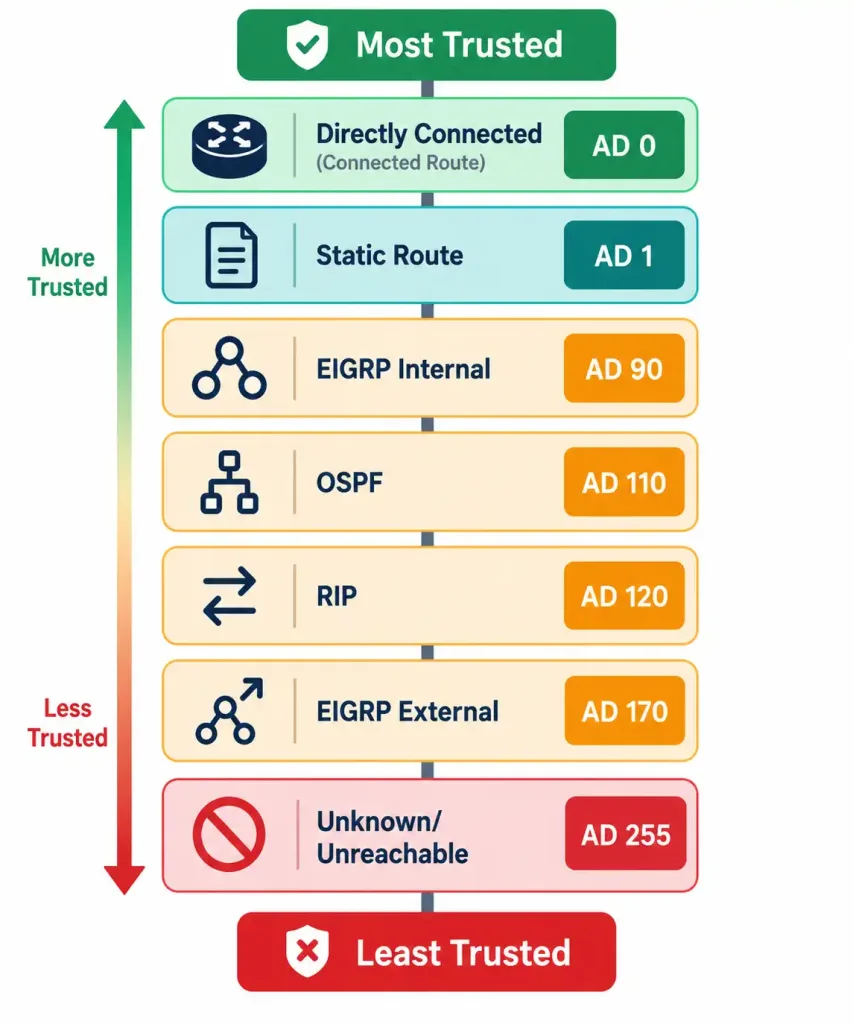
How Common Routing Sources Rank From Most to Least Trusted
Longest Prefix Match: The Rule That Comes First
AD only comes into play when two routes are competing for the exact same destination network. Far more often, a router has multiple routes that are technically different, but one is a more specific subnet of the other. In that situation, AD isn’t even part of the comparison — the router uses longest prefix match instead: it always prefers the route with the more specific (longer) subnet mask, regardless of which protocol or AD is attached to it.
Say the routing table contains both of these:
S    10.10.0.0/16 [1/0] via 10.0.0.2
O    10.10.5.0/24 [110/20] via 10.0.0.6
A packet destined for 10.10.5.15 matches both entries technically — but /24 is more specific than /16, so the OSPF route wins even though its AD (110) is worse than the static route’s AD (1). This is one of the single most commonly missed concepts on the exam: prefix length is evaluated first, and AD is only a tiebreaker between routes to the identical prefix.
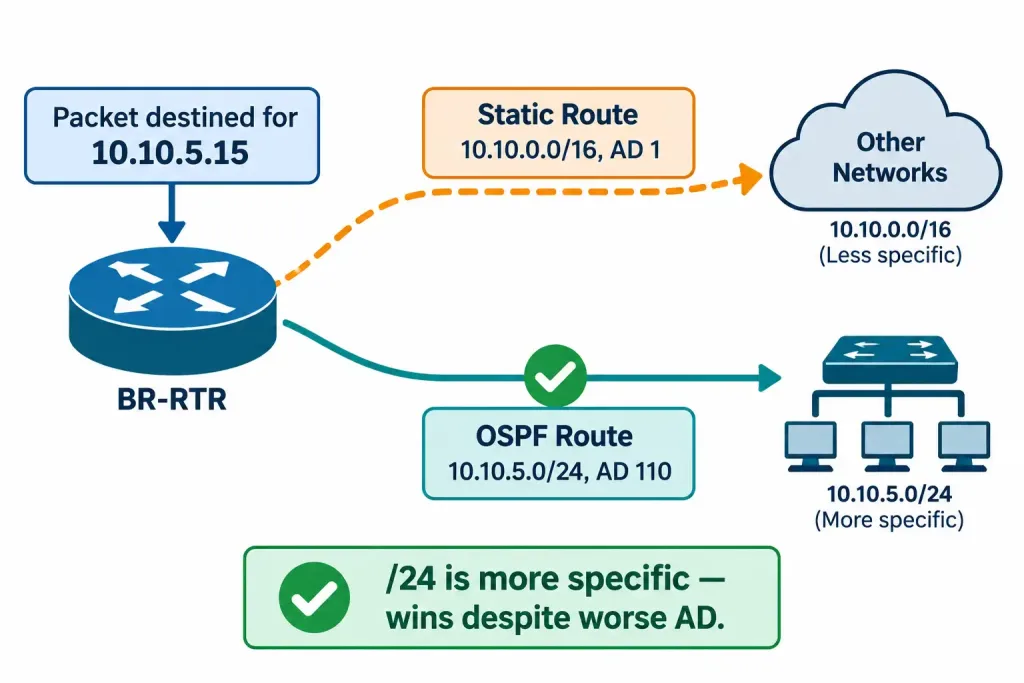
Why A More Specific /24 Route Wins Over A Less Specific /16 Route
Metric: The Tiebreaker Within the Same Protocol
If a router has two routes from the same protocol to the same prefix — say, two OSPF paths to 10.10.5.0/24 — AD is identical for both, so it can’t help. This is where metric comes in. Each protocol calculates its own metric differently:
- OSPF uses cost, based on cumulative interface bandwidth along the path (lower cost wins).
- EIGRP uses a composite metric factoring in bandwidth and delay by default.
- RIP simply counts hops (fewer hops wins, capped at 15).
Lower metric wins, and it’s purely an internal comparison — you’d never compare an OSPF metric to an EIGRP metric directly, because they’re calculated on completely different scales. Metric only matters once you’re already comparing apples to apples: same source, same prefix.
Putting the Three Steps in Order
To summarize the full decision process a router runs through:
- Prefix length — is one route to a more specific subnet? If so, it wins outright.
- Administrative distance — for routes to the identical prefix, which source is more trusted?
- Metric — for routes from the identical source to the identical prefix, which path is cheaper?
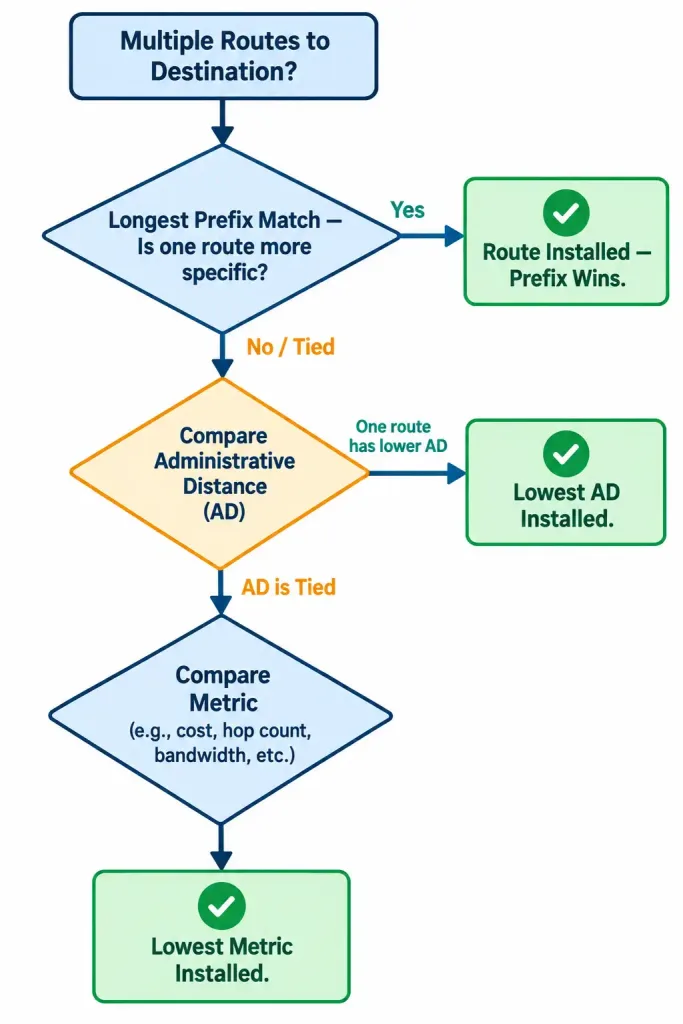
The Order A Router Follows When Multiple Routes Compete For The Same Destination
Get this order backwards and you’ll misread routing table output constantly — both on the exam and in real troubleshooting, which connects directly to the systematic approach you’ll formalize in Module 5’s troubleshooting methodology.
Reading It in the Routing Table
A real show ip route output encodes all of this. The letter code on the left tells you the source (which maps to an AD), and the bracketed numbers tell you the AD and metric directly:
BR-RTR# show ip route
Codes: C - connected, S - static, O - OSPF, D - EIGRP

C    192.168.1.0/24 is directly connected, GigabitEthernet0/0
S    192.168.20.0/24 [1/0] via 10.0.0.2
O    172.16.0.0/16 [110/65] via 10.0.0.6, 00:14:22, GigabitEthernet0/1
S*   0.0.0.0/0 [1/0] via 203.0.113.1
That [1/0] and [110/65] notation is always [administrative distance/metric]. Once you know that format, an entire routing table becomes readable at a glance. The S* marks the candidate default route.
This kind of table-reading skill is exactly what ties Module 1’s IPv4 addressing and CIDR notation directly into Module 2 — you can’t judge “longest prefix match” without being comfortable comparing subnet masks at a glance.
Where This Goes Next
Static routing and route selection are the foundation everything else in this objective builds on. The next lesson, 2.1.2, moves into the dynamic routing protocols themselves — OSPF, EIGRP, and BGP — and shows how routers using those protocols actually discover and advertise routes to each other automatically, rather than relying on a human typing them in one at a time.
Recognition-Level Verification Concepts
A few patterns are worth recognizing on sight, both on the exam and in real troubleshooting:
- A route entry with a longer subnet mask (e.g., /26) always beats a shorter one (e.g., /16) to an overlapping destination, no matter what protocol either comes from.
- Two static routes configured to the same next-hop-less destination with the same AD are commonly installed together for load balancing.
- An
S*entry inshow ip routeoutput is always the candidate default route. - A static route configured with a manually specified AD higher than the network’s dynamic protocol (e.g., 200 vs. OSPF’s 110) is a floating static, meant purely as backup.
Common Exam Traps
- Longest prefix match always beats administrative distance. A more specific route wins even if its source has a worse AD — this is the single most commonly missed concept in this objective.
- Administrative distance only matters when comparing routes to the identical prefix. It is never used to compare a /24 route against a /16 route.
- Metric only compares routes from the same source. Comparing OSPF cost to EIGRP’s composite metric directly is meaningless — they’re calculated on entirely different scales.
- A floating static route requires a manually configured, artificially high AD. Without that manual change, a static route defaults to AD 1 and would incorrectly outrank a dynamic route instead of backing it up.
- The default route (0.0.0.0/0) matches everything not matched more specifically — don’t mistake it for a route to a specific, narrow destination.
Lesson 2.1.1 Practice Quiz — Static Routing, Route Selection & Administrative Distance
17 questions covering static routes, floating statics, administrative distance, longest prefix match, and metric.
N10-009 · Domain 2.1Summary
A static route is a manually configured path that never changes unless an administrator changes it; a default static route (0.0.0.0/0) matches all otherwise-unmatched traffic.
Floating static routes use an artificially high administrative distance to act as a backup that only activates when a preferred dynamic route disappears.
Route selection follows a strict order: longest prefix match first, then administrative distance (for identical prefixes), then metric (for identical sources and prefixes).
Administrative distance ranks trust between different routing sources — lower is more trusted, and static routes default to AD 1.
Metric is only ever compared within the same protocol; it's never used to compare, say, an OSPF route against an EIGRP route.
The [AD/metric] notation in show ip route output tells you exactly why a router picked the route it picked.



