
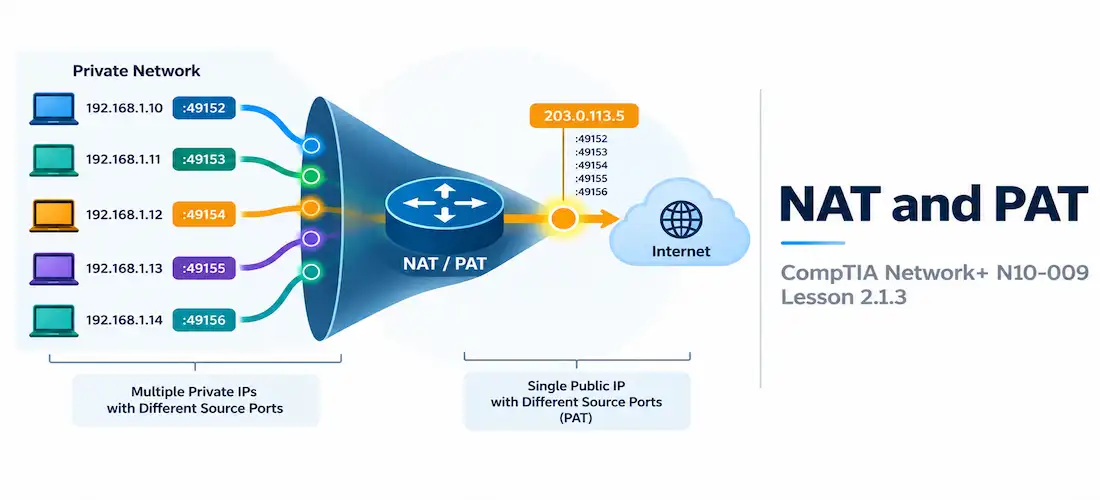
Domain 2.0 | Network Implementation — 20% of exam
Learning Objectives
By the end of this lesson, you will be able to:
- Explain the purpose of Network Address Translation (NAT) and why private networks rely on it
- Distinguish static NAT, dynamic NAT, and PAT (NAT overload)
- Identify the four NAT address types: inside local, inside global, outside local, and outside global
- Explain how PAT uses port numbers to let many private hosts share a single public IP address
- Recognize common NAT/PAT limitations and how they show up in troubleshooting
Key Terms
| Term | Definition |
|---|---|
| NAT (Network Address Translation) | The process of translating private IP addresses to public IP addresses (and back) as traffic crosses a network boundary |
| PAT (Port Address Translation) | A form of NAT, also called NAT overload, that maps many private addresses to one public address by tracking unique source port numbers |
| Static NAT | A permanent, one-to-one mapping between a single private address and a single public address |
| Dynamic NAT | A one-to-one mapping drawn from a pool of public addresses, assigned on a first-come basis rather than fixed per host |
| Inside Local Address | A private address as seen on the inside (private) network |
| Inside Global Address | The public address that an inside local address is translated to, as seen on the outside (public) network |
Explanation
Why Address Translation Exists
Lesson 1.7.1 covered the private IPv4 ranges — 10.0.0.0/8, 172.16.0.0/12, and 192.168.0.0/16 — and mentioned that these addresses aren’t routable on the public internet. That fact only matters because of NAT. Without address translation, a device using a private address would have no way to reach anything outside its own network, because internet routers simply discard packets sourced from or destined to private address space.
NAT solves this by translating a private address into a public one at the network boundary — typically a router or firewall sitting at the edge of the network — and translating the reply back on the way in. It’s the reason an entire household or an entire office building can share a single public IP address from an ISP, and it’s a big part of why IPv4 has survived as long as it has despite running out of new address blocks years ago.
Static NAT: One-to-One Mapping
Static NAT creates a permanent, fixed mapping between one private address and one public address. Every time that private host sends traffic out, it always gets translated to the same public address, and anyone on the internet wanting to reach that specific internal host always uses that same public address to get to it.
HQ-RTR(config)# ip nat inside source static 192.168.1.10 203.0.113.10Static NAT is the right tool when something on the inside needs to be consistently reachable from the outside — a mail server or a web server, for example — because the mapping never changes.
Dynamic NAT: Pool-Based Translation
Dynamic NAT also creates one-to-one mappings, but instead of a fixed pairing, it draws from a pool of available public addresses and assigns them as needed. If a company owns a small block of public addresses but has more internal hosts than public addresses to permanently assign, dynamic NAT lets those hosts share the pool — whichever public address is free gets handed out next.
The catch: if every address in the pool is already in use, the next host requesting translation simply can’t get out until one frees up. Dynamic NAT scales only as far as the pool does, which is exactly the limitation that made PAT so much more popular in practice.
PAT (NAT Overload): Many-to-One via Port Numbers
PAT (Port Address Translation), also called NAT overload, is what almost every home router and small office network actually runs. Instead of needing one public address per internal host, PAT lets an entire network share a single public address by tracking connections using port numbers.
Here’s the mechanism: every outbound connection gets assigned a unique source port on the shared public address. The router keeps a translation table mapping each internal host’s private address and original source port to a specific public source port. When a reply comes back addressed to that public port, the router checks its table and forwards the reply to the correct internal host.
BR-RTR# show ip nat translations
Pro  Inside global          Inside local           Outside local          Outside global
tcp  203.0.113.5:51422      192.168.1.10:52011     93.184.216.34:443      93.184.216.34:443
tcp  203.0.113.5:51423      192.168.1.11:49882     93.184.216.34:443      93.184.216.34:443
Notice both internal hosts (192.168.1.10 and 192.168.1.11) are sharing the exact same public address (203.0.113.5) — the router tells them apart purely by which port each connection was assigned. This is the same port-number concept covered back in Lesson 1.4.1, just applied to distinguishing internal hosts instead of identifying a destination service.
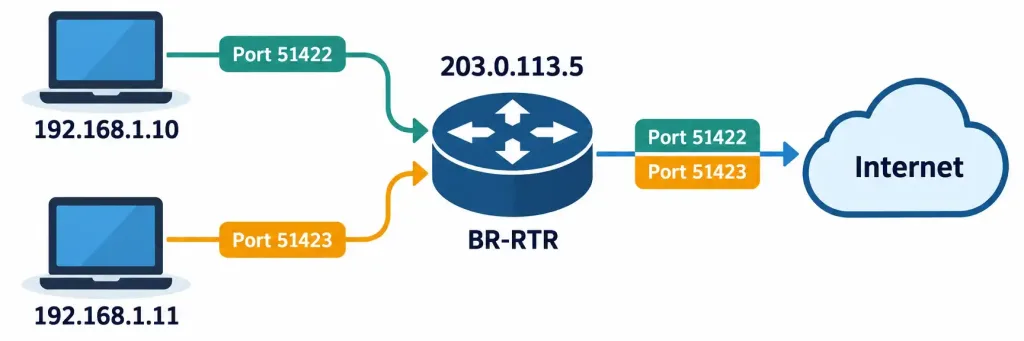
How PAT Uses Unique Port Numbers To Let Multiple Hosts Share One Public IP
Because a single public address has roughly 65,000 usable ports available, PAT can support tens of thousands of simultaneous connections from a single public IP — which is exactly why it’s the default NAT mode on virtually every consumer router and most enterprise edge devices.
NAT Terminology: The Four Address Types
The exam likes to test precise NAT terminology, and it trips people up because the names all sound similar. There are four categories, and the “local vs. global” distinction always means “as seen from inside the private network” vs. “as seen from outside on the public internet”:
| Term | Meaning |
|---|---|
| Inside Local | The private address of an inside host, as it appears on the inside network |
| Inside Global | The translated public address of that same inside host, as it appears to the outside world |
| Outside Local | The address of an outside (internet) host, as it appears from the inside network’s perspective |
| Outside Global | The actual, real public address of that outside host |
In the overwhelming majority of real deployments, outside local and outside global are identical — internet hosts almost never get translated themselves. It’s the inside local and inside global pairing that does virtually all the work in a typical NAT setup.
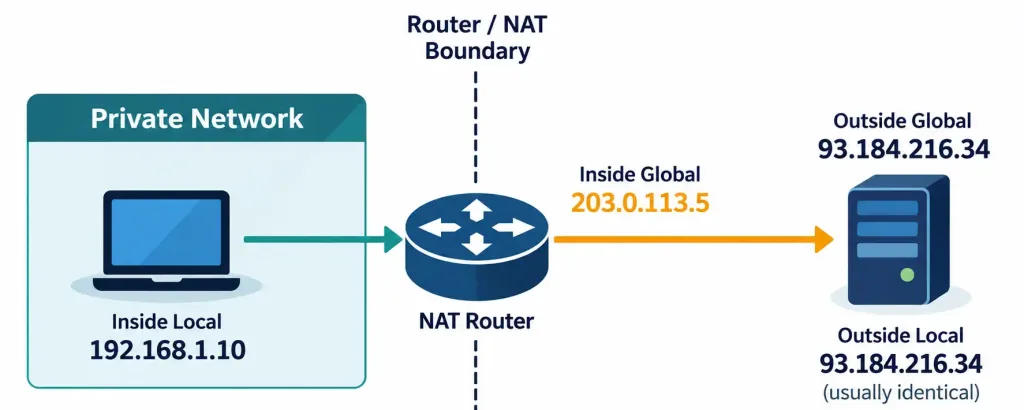
Where Each Of The Four NAT Address Types Sits Relative To The Private And Public Network
Where NAT Fits With Routing
NAT typically runs on the exact same edge router covered in the last two lessons. That router might be running OSPF or EIGRP internally to learn about all the private subnets in the organization, running BGP or a static default route to reach the internet, and performing PAT on every packet that crosses from the inside interface to the outside interface — three completely different jobs, running on one device, in sequence, for every single packet leaving the network.
That ordering matters conceptually: the router first has to know where to send a packet (routing), and separately has to decide what address to translate it to (NAT) as it crosses the inside-to-outside boundary. Getting the direction of translation backwards — translating on the wrong interface, or applying an inside NAT rule to outside-sourced traffic — is one of the most common real-world NAT misconfigurations.
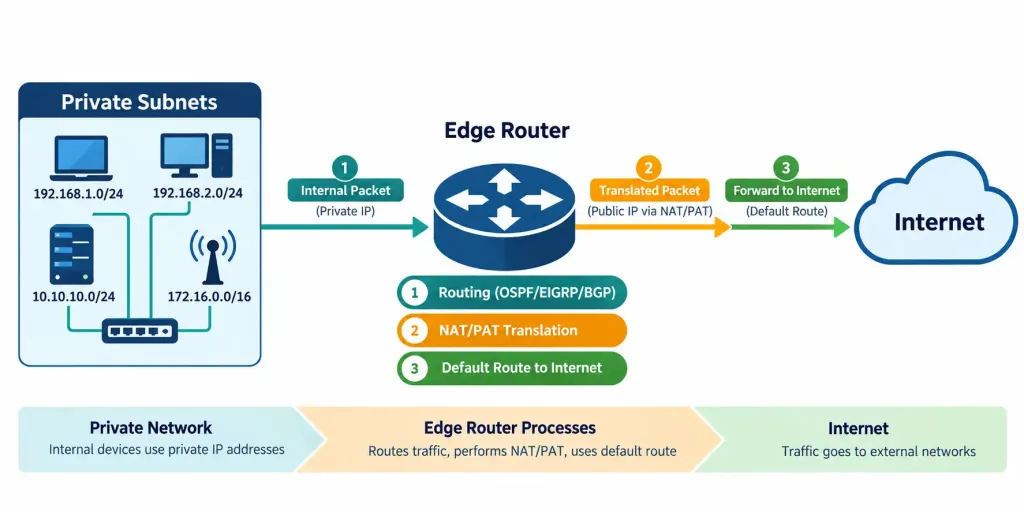
How Routing And NAT/PAT Work Together On A Single Edge Router
Limitations of NAT
NAT solves the address-exhaustion problem, but it isn’t free of downsides:
- Breaks end-to-end connectivity assumptions. Some protocols embed IP addresses inside their payload (not just the packet header), and NAT doesn’t know to rewrite those — this is part of why certain VoIP and VPN protocols need special NAT-aware handling.
- Complicates inbound connections. An outside host generally can’t initiate a connection to an inside host unless a static NAT mapping or port forward rule specifically allows it, since there’s no existing translation table entry for unsolicited inbound traffic.
- Adds a layer of state the router must track. Every active PAT translation consumes a small amount of router memory; a router under a denial-of-service style connection flood can exhaust its translation table.
None of this is a reason to avoid NAT — it remains essential in nearly every IPv4 network — but it’s exactly why IPv6, with its enormous address space, was designed without requiring NAT at all, even though NAT-like techniques do still show up in some IPv6 deployments for other reasons.
Recognition-Level Verification Concepts
A few patterns are worth recognizing on sight:
- A
show ip nat translationstable where multiple inside local addresses map to one inside global address, distinguished only by port number, is PAT/NAT overload in action. - A single, unchanging private-to-public address pairing is static NAT — typically applied to a server that needs to be consistently reachable from outside.
- Outside local and outside global addresses being identical in a translation table is the normal case, not an error.
- An inbound connection from the internet failing to reach an internal host, with no static NAT or port forward configured, is expected NAT behavior, not a bug.
Common Exam Traps
- NAT and PAT are not the same thing at the same scale. Static and dynamic NAT are one-to-one; PAT is many-to-one via port numbers. Don’t treat “NAT” as always meaning “one public IP for the whole network” — that specific behavior is PAT.
- “Local” always means the private-network perspective; “global” always means the public-network perspective. Applying this consistently resolves most inside/outside local/global confusion.
- Outside local and outside global are usually identical. The exam sometimes tests whether you know this pairing is the exception to “translation happens on both sides.”
- PAT relies on port numbers, not IP addresses, to distinguish hosts sharing one public address. Confusing this with dynamic NAT (which still assigns distinct IP addresses from a pool) is a frequent mistake.
- Unsolicited inbound connections don’t work through PAT without an explicit rule. This is expected behavior, not a misconfiguration, unless a specific service needs to be reachable from outside.
Lesson 2.1.3 Practice Quiz — NAT and PAT for Address Translation
17 questions covering static NAT, dynamic NAT, PAT/NAT overload, the four NAT address types, and NAT troubleshooting.
N10-009 · Domain 2.1Summary
NAT translates private, non-routable IP addresses to public addresses at the network boundary, allowing private networks to reach the internet.
Static NAT creates a permanent one-to-one mapping; dynamic NAT draws one-to-one mappings from a pool; PAT (NAT overload) lets many hosts share one public address using unique port numbers.
The four NAT address types are inside local, inside global, outside local, and outside global — "local" is the private-side view, "global" is the public-side view.
PAT is the default mode on almost all consumer and small-office routers because a single public address can support tens of thousands of simultaneous port-based translations.
NAT and routing typically run on the same edge device but perform distinct jobs: routing decides where a packet goes, NAT decides what address it wears when it gets there.
NAT's limitations — broken end-to-end addressing assumptions, blocked unsolicited inbound connections, and translation table state — are part of why IPv6 was designed without requiring it.



