
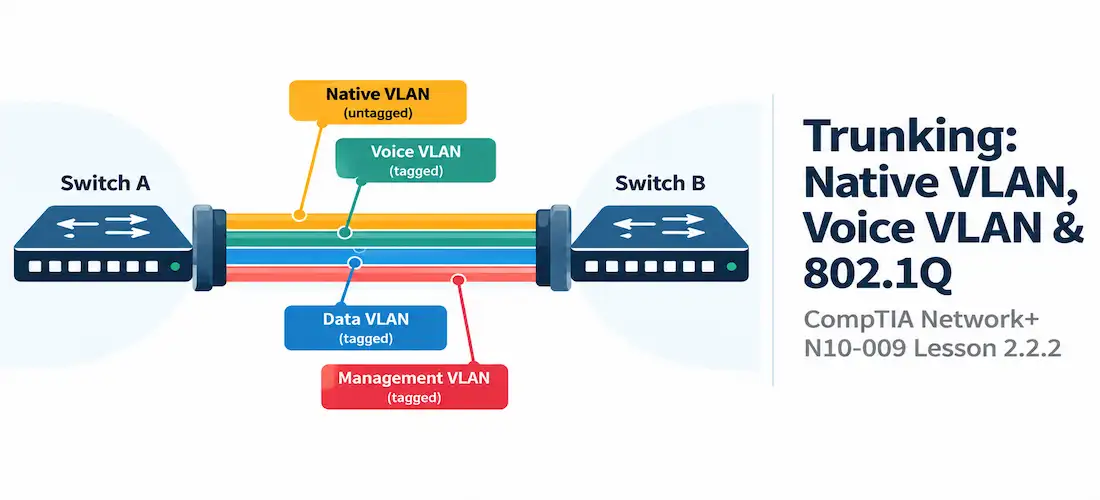
Domain 2.0 | Network Implementation — 20% of exam
Learning Objectives
By the end of this lesson, you will be able to:
- Explain how 802.1Q tagging identifies which VLAN a frame belongs to as it crosses a trunk link
- Configure and interpret a trunk port, including its allowed VLAN list and native VLAN setting
- Explain what the native VLAN is, why it exists, and the risks of a native VLAN mismatch
- Explain the purpose of a voice VLAN and how it lets a single switch port serve both a phone and a PC
- Identify common trunking misconfigurations and recognize their symptoms
Key Terms
| Term | Definition |
|---|---|
| 802.1Q Tagging | The standard that inserts a 4-byte tag into an Ethernet frame identifying which VLAN it belongs to as it crosses a trunk |
| Trunk Port | A switch port configured to carry traffic for multiple VLANs simultaneously, distinguishing them by tag |
| Native VLAN | The one VLAN on a trunk whose traffic is sent untagged, for backward compatibility with equipment that doesn’t understand 802.1Q |
| Voice VLAN | A separate VLAN carried on an access port alongside the regular data VLAN, used to give VoIP phone traffic its own logical network without a second cable |
| Allowed VLAN List | The explicit set of VLAN IDs permitted to cross a specific trunk port; VLANs not on the list are blocked from that trunk |
Explanation
Recap: Why Trunks Exist
The previous lesson established that VLANs separate switch ports into isolated logical networks, and that access ports carry exactly one VLAN’s traffic, untagged. But switches rarely operate alone — VLANs need to span multiple switches, and a router or Layer 3 switch often needs to see traffic from several VLANs over a single link, which is exactly the scenario router-on-a-stick relies on. That’s the job of a trunk: one physical link, carrying multiple VLANs at once, each frame tagged so every device along the way knows which VLAN it belongs to.
How 802.1Q Tagging Actually Works
802.1Q is the IEEE standard that defines how VLAN tagging works. When a frame needs to cross a trunk, the sending switch inserts a small 4-byte tag into the Ethernet frame header, containing (among other fields) a 12-bit VLAN ID field. That 12-bit field is why VLAN IDs range from 0 to 4094 usable values (4095 is reserved) — it’s simply the largest number that field can hold.
As the tagged frame travels across the trunk, every switch along the path reads that VLAN ID to know which VLAN’s rules and forwarding table to apply. When the frame finally reaches an access port on the destination VLAN, the switch strips the tag back off before delivering it to the end device — end hosts never see or need to understand 802.1Q tags themselves.
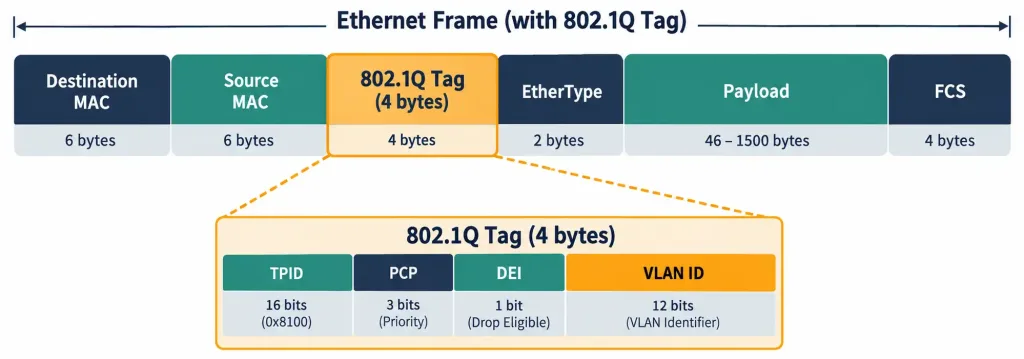
How An 802.1Q Tag Is Inserted Into A Frame To Identify Its VLAN Across A Trunk
Configuring a Trunk Port
A basic trunk configuration looks like this:
SW1(config)# interface GigabitEthernet0/1
SW1(config-if)# switchport mode trunk
SW1(config-if)# switchport trunk allowed vlan 10,20,30
SW1(config-if)# switchport trunk native vlan 99
The switchport trunk allowed vlan line is worth calling out specifically: by default, a trunk carries every VLAN configured on the switch, which is rarely what an administrator actually wants. Explicitly listing the allowed VLAN list restricts the trunk to only the VLANs that genuinely need to cross it — a basic but important security and traffic-management practice, since it prevents VLANs from unnecessarily leaking onto links (and switches) that have no legitimate reason to see them.
Native VLAN: Untagged by Design
As covered briefly in the router-on-a-stick lesson, exactly one VLAN on a trunk is the native VLAN, and its traffic is sent untagged. This exists for backward compatibility with older switches (and some non-802.1Q-aware devices) that don’t understand VLAN tags at all — untagged frames simply get treated as belonging to whatever VLAN the receiving port considers native.
That backward-compatibility feature comes with a real security tradeoff. If two switches disagree on which VLAN is native — one thinks it’s VLAN 1, the other thinks it’s VLAN 99 — untagged frames can land on the wrong VLAN entirely, silently crossing a boundary they were never supposed to cross. This mismatch also underlies a known attack technique called VLAN hopping via double tagging, where an attacker crafts a frame with two stacked 802.1Q tags; the first tag (matching the native VLAN) gets stripped by the first switch, exposing the second tag underneath and letting the frame slip onto a VLAN the attacker shouldn’t have access to.
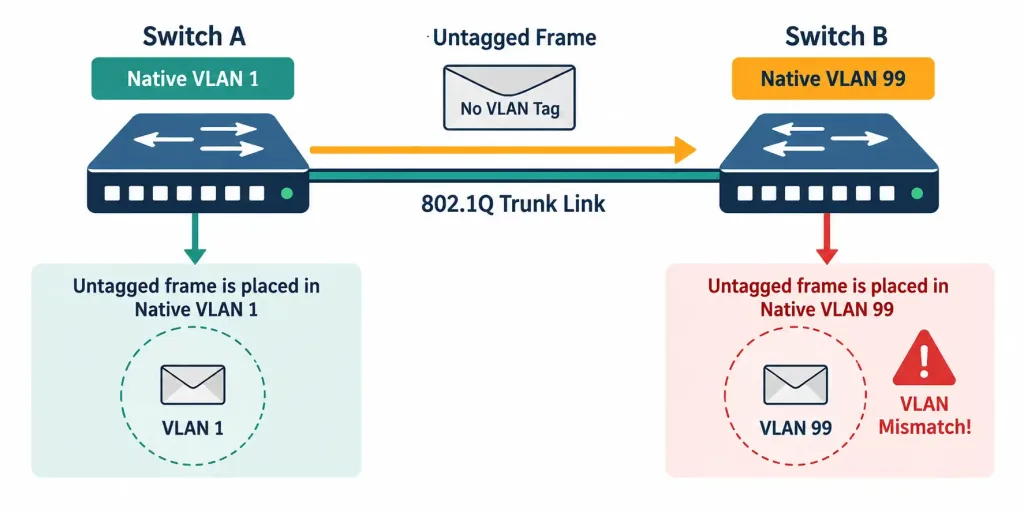
How A Native VLAN Disagreement Between Two Switches Can Misroute Untagged Traffic
Because of this, many security-conscious network designs deliberately set the native VLAN to an unused VLAN ID — one with no legitimate hosts on it at all — specifically so that even a successful mismatch or double-tagging attempt lands somewhere harmless.
Voice VLAN: Two VLANs, One Port
Most desk phones today are IP phones with a built-in switch port, letting a PC daisy-chain through the phone to the wall jack. That means a single cable and a single switch port need to carry traffic for two different devices — the phone and the PC — and ideally, those two devices should sit on two different VLANs: one for voice, one for regular data.
The voice VLAN feature makes this possible without needing a second cable or a trunk in the traditional sense. The port is still fundamentally an access port for the PC’s data VLAN, but it’s also told to expect a second, tagged VLAN specifically for voice traffic coming from the phone:
SW1(config)# interface GigabitEthernet0/8
SW1(config-if)# switchport mode access
SW1(config-if)# switchport access vlan 10
SW1(config-if)# switchport voice vlan 50
Here, VLAN 10 is the regular data VLAN for the PC (untagged, standard access port behavior), while VLAN 50 is the voice VLAN, and the phone tags its own traffic with that VLAN ID before passing the PC’s untagged traffic through separately. This is technically a form of limited trunking on what still functions as an access port for data purposes — enough tagging capability to separate voice from data, without the port needing the full multi-VLAN behavior of a true trunk.
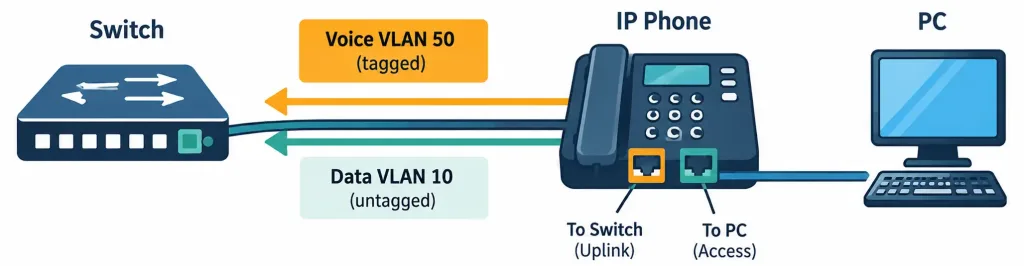
How One Switch Port Carries A Tagged Voice VLAN And An Untagged Data VLAN Simultaneously
Separating voice onto its own VLAN isn’t just organizational tidiness — voice traffic is latency-sensitive, and isolating it lets a network apply quality-of-service policies and prioritize it distinctly from regular data traffic sharing the same physical wire.
Verifying Trunk Configuration
Confirming a trunk is actually working as intended means checking a few specific things, not just that the port shows “connected”:
SW1# show interfaces trunk
Port      Mode    Encapsulation  Status      Native vlan
Gi0/1     on      802.1q         trunking    99

Port      Vlans allowed on trunk
Gi0/1     10,20,30
This output confirms three things at once: the port is actually trunking (not stuck negotiating or falling back to access mode), which VLAN is native, and exactly which VLANs are permitted to cross. All three of these need to agree with the configuration on the switch at the other end of the link, or the trunk won’t behave as expected even though it appears “up.”
Recognition-Level Verification Concepts
A few patterns are worth recognizing on sight:
- A frame carrying a 4-byte 802.1Q tag with a 12-bit VLAN ID field is trunk traffic; an access port never sees or needs that tag.
- A
switchport trunk allowed vlanlist that’s shorter than “every VLAN on the switch” indicates deliberate VLAN restriction on that trunk. - A port configured with both
switchport access vlanandswitchport voice vlanis serving a PC-plus-phone setup, not a full trunk. - Mismatched native VLAN values reported between two connected switches (often visible via CDP/LLDP warnings) point directly to a trunk misconfiguration risk.
Common Exam Traps
- 802.1Q tags are inserted only on trunk links, not access links. An access port’s frames are always untagged from the end device’s perspective.
- The native VLAN is untagged by design, not by mistake — but a native VLAN mismatch between two switches is a real misconfiguration and a security exposure, not a normal, harmless variation.
- A voice VLAN port is not the same as a full trunk port. It’s still fundamentally an access port for data, with just enough additional tagging capability to separate voice traffic.
- By default, a trunk permits every VLAN on the switch unless explicitly restricted with an allowed VLAN list — don’t assume a trunk is automatically limited to only the VLANs currently in active use.
- Double-tagging VLAN hopping specifically exploits native VLAN behavior — this is why moving the native VLAN off VLAN 1 (or off any VLAN with real hosts) is considered a security best practice, not just a cosmetic choice.
Lesson 2.2.2 Practice Quiz — Trunking: Native VLAN, Voice VLAN & 802.1Q Tagging
17 questions covering 802.1Q tagging, trunk configuration, native VLAN risks, and voice VLAN.
N10-009 · Domain 2.2Summary
802.1Q inserts a tag containing a 12-bit VLAN ID into frames crossing a trunk, letting every switch along the path know which VLAN each frame belongs to.
A trunk port's allowed VLAN list should be explicitly restricted to only the VLANs that genuinely need to cross it, rather than left at the default of allowing every VLAN.
The native VLAN carries untagged traffic for backward compatibility, but a native VLAN mismatch between switches can misroute traffic and underlies the double-tagging VLAN hopping attack technique.
A voice VLAN lets a single access port serve both an IP phone (tagged voice VLAN) and a PC (untagged data VLAN) over one cable, supporting separate QoS treatment for latency-sensitive voice traffic.
Verifying a trunk means checking its mode, native VLAN, and allowed VLAN list all agree with the switch on the other end — not just confirming the link is up.



