
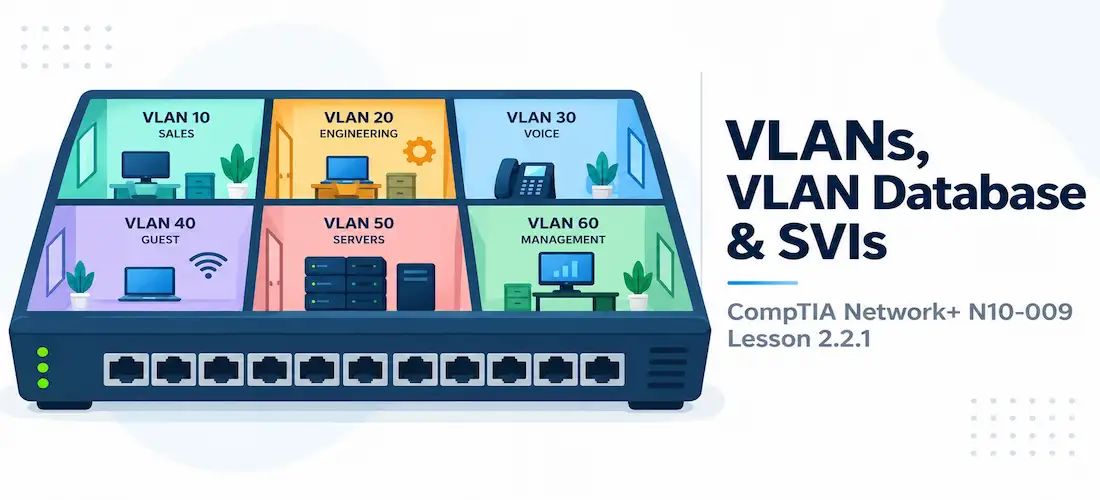
Domain 2.0 | Network Implementation — 20% of exam
Learning Objectives
By the end of this lesson, you will be able to:
- Explain what a VLAN is and why it creates a separate broadcast domain independent of physical wiring
- Describe how the VLAN database is used to create VLANs and assign switch ports to them
- Distinguish an access port from a trunk port in terms of VLAN membership
- Explain the purpose of a switched virtual interface (SVI) and how it enables inter-VLAN routing on a Layer 3 switch
- Identify the default VLAN and recognize common VLAN configuration mistakes
Key Terms
| Term | Definition |
|---|---|
| VLAN (Virtual LAN) | A logical grouping of switch ports into a separate broadcast domain, independent of physical location or wiring |
| VLAN Database | The switch’s internal table of created VLANs, each identified by a VLAN ID and optional name |
| Access Port | A switch port assigned to exactly one VLAN, used to connect end devices like PCs and printers |
| SVI (Switched Virtual Interface) | A virtual Layer 3 interface configured directly on a switch, representing a VLAN and enabling inter-VLAN routing |
| Broadcast Domain | The set of devices that receive a broadcast frame sent by any one device in that same domain |
| Default VLAN | VLAN 1, the VLAN every switch port belongs to out of the box before any manual VLAN configuration |
Explanation
What a VLAN Actually Is
The previous lesson introduced VLANs briefly to explain why subinterfaces and router-on-a-stick exist in the first place. This lesson is where VLANs actually get explained properly, since they’re the foundation for everything else in this objective.
A VLAN (Virtual LAN) groups switch ports into a logical network that behaves as its own separate broadcast domain, regardless of where those ports physically sit. Two devices plugged into the same physical switch can be on completely different VLANs, and two devices on opposite ends of a building, connected to different switches, can be on the exact same VLAN — the grouping is entirely logical, defined by configuration, not by cabling.
This is a meaningful upgrade over the traditional flat topologies covered in Module 1, where every device on a switch shared one single broadcast domain by default. On a large flat network, a single broadcast frame — an ARP request, for instance — gets flooded to every connected device, which wastes bandwidth and doesn’t scale as a network grows. VLANs solve this by letting an administrator carve one physical switch (or a whole stack of switches) into multiple, isolated logical networks.
Why VLANs Exist: Segmentation Without Rewiring
Before VLANs, separating departments or traffic types into different broadcast domains meant physically wiring them to entirely separate switches. VLANs remove that constraint. A single switch, or an entire campus of switches, can host VLAN 10 for the Sales department, VLAN 20 for Engineering, and VLAN 30 for Voice traffic, all sharing the same physical infrastructure but never seeing each other’s broadcast traffic — and, without a router involved, never able to communicate with each other at all, which is exactly the security and containment benefit VLANs are prized for.
This same logical-separation idea is why VLANs pair so naturally with the core infrastructure devices discussed back in Module 1 — a modern switch’s real value comes from this kind of software-defined segmentation, not just from moving frames between ports.
The VLAN Database: Where VLANs Live
Before any port can be assigned to a VLAN, the VLAN itself has to exist in the switch’s VLAN database — an internal table listing every VLAN ID configured on that switch, along with an optional descriptive name.
SW1(config)# vlan 10
SW1(config-vlan)# name SALES

SW1(config)# vlan 20
SW1(config-vlan)# name ENGINEERING
Once a VLAN exists in the database, it can be assigned to one or more switch ports. Creating the VLAN and assigning a port to it are two separate steps — a common early mistake is assigning a port to a VLAN number that was never actually created in the database, which leaves the port in a nonfunctional state even though the command appeared to succeed.
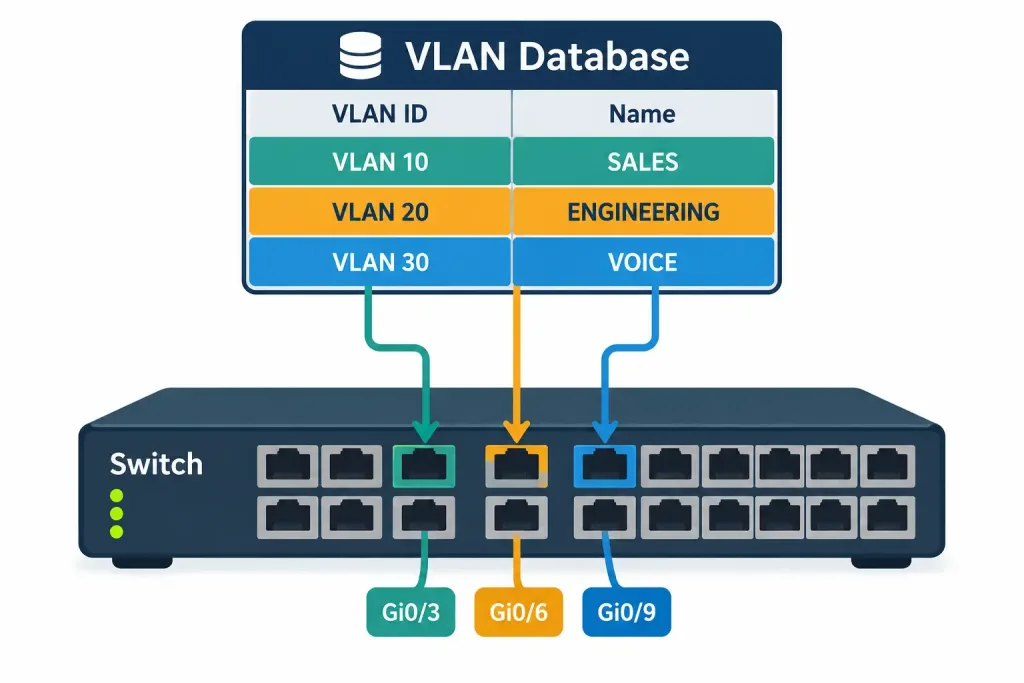
How VLANs Are Created In The Database Before Being Assigned To Individual Switch Ports
Access Ports: Assigning a Single VLAN to a Port
Most switch ports connecting to end devices — a PC, a printer, an access point — are configured as access ports, meaning each one belongs to exactly one VLAN. Frames arriving on an access port are untagged; the switch itself tracks which VLAN that port (and therefore that frame) belongs to internally.
SW1(config)# interface GigabitEthernet0/5
SW1(config-if)# switchport mode access
SW1(config-if)# switchport access vlan 10
This is different from the trunk ports covered in the previous lesson, which carry traffic for multiple VLANs simultaneously, with each frame tagged to identify its VLAN. An access port is single-VLAN and untagged; a trunk port is multi-VLAN and (mostly) tagged. Getting this distinction backwards — configuring an access port where a trunk is needed, or vice versa — is one of the most common real-world switch misconfigurations.
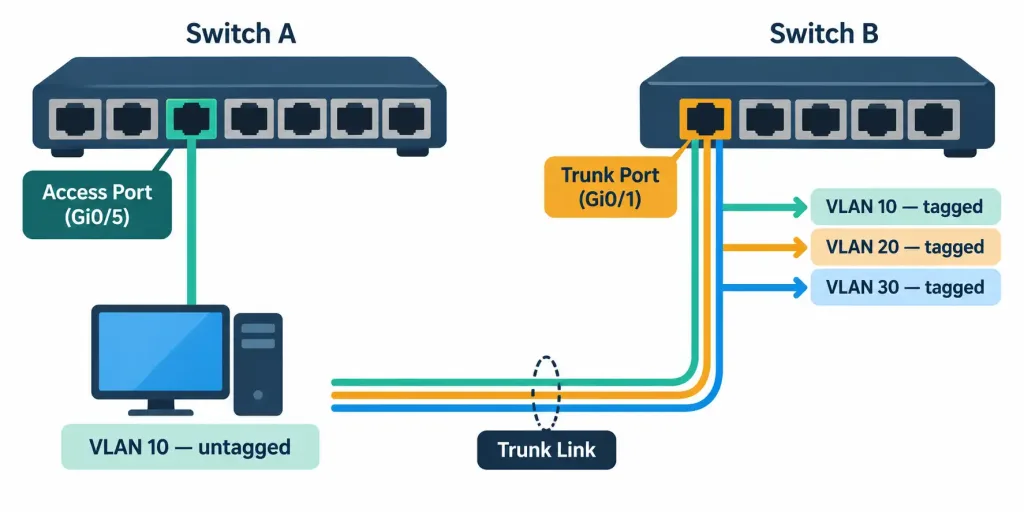
How Access Ports Carry One Untagged VLAN While Trunk Ports Carry Multiple Tagged VLANs
The Default VLAN and Why It Matters
Every switch port belongs to VLAN 1, the default VLAN, right out of the box — before any administrator has created or assigned anything. This is also, by default, the same VLAN typically used as the native VLAN on trunk links, which is exactly the concept discussed in the previous lesson’s native VLAN section.
Leaving every port on VLAN 1 defeats the entire purpose of segmentation, and it’s also a security consideration: VLAN 1 traffic is frequently targeted in VLAN-hopping attack techniques precisely because it’s the universal default. Most production network designs deliberately move end-device traffic off VLAN 1 and onto purpose-specific VLANs, sometimes leaving VLAN 1 unused entirely except as a required native VLAN placeholder.
SVIs: Routing Without Leaving the Switch
A switched virtual interface (SVI) is a virtual Layer 3 interface configured directly on a switch, representing one specific VLAN. Unlike a subinterface, which lives on a router and requires an external trunk link to reach the switch, an SVI lives inside the switch itself — no external cable, no dot1Q encapsulation statement, no separate router needed.
SW1(config)# interface Vlan10
SW1(config-if)# ip address 192.168.10.1 255.255.255.0
SW1(config-if)# no shutdown

SW1(config)# ip routing
That final ip routing command matters: creating SVIs alone doesn’t make a switch route between VLANs. The switch also needs Layer 3 routing explicitly enabled — without it, the SVIs exist and can be pinged, but the switch won’t forward traffic between them.
Because the routing happens internally, on switching hardware built for wire-speed forwarding, a Layer 3 switch using SVIs generally routes between VLANs with lower latency and higher throughput than sending everything out to a router-on-a-stick and back, which is exactly the tradeoff the previous lesson’s comparison covered.
Access Port vs. Trunk vs. SVI: Keeping the Roles Straight
It’s worth being precise about which of these three concepts does what, since the exam likes to test the distinction:
| Concept | Lives On | Purpose |
|---|---|---|
| Access Port | Switch | Connects one end device to exactly one VLAN |
| Trunk Port | Switch (or router-facing link) | Carries multiple VLANs, tagged, between switches or to a router |
| SVI | Switch | A Layer 3, routable interface representing one VLAN, enabling inter-VLAN routing on the switch itself |
An access port and an SVI for the same VLAN aren’t the same thing and don’t compete with each other — the access port is where end devices physically plug in on that VLAN, while the SVI is the Layer 3 gateway address for that VLAN as a whole.
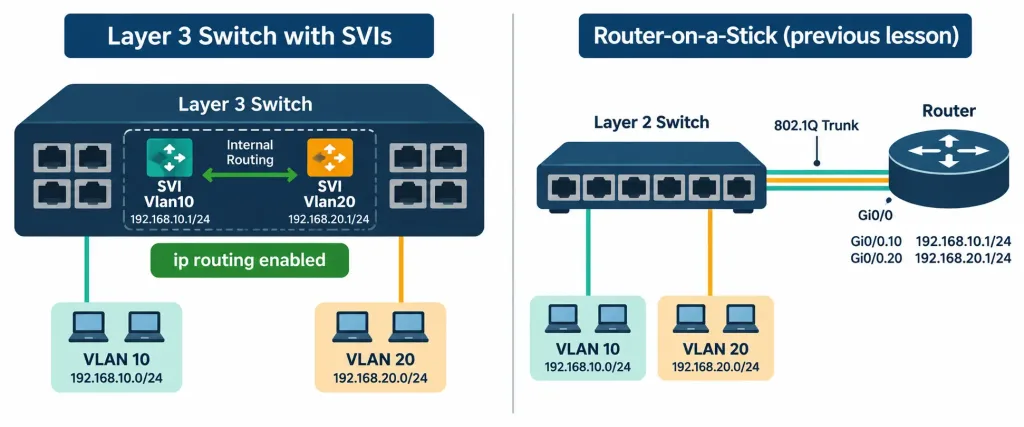
Recognition-Level Verification Concepts
A few patterns are worth recognizing on sight:
- A
switchport mode accessplusswitchport access vlan <ID>pairing identifies a port dedicated to a single VLAN. - An
interface Vlan<ID>configuration with an IP address, on a switch rather than a router, is an SVI. - A port left unconfigured, with no explicit VLAN assignment, defaults to VLAN 1.
- The presence (or absence) of
ip routingon a switch determines whether its SVIs can actually route between VLANs, not just respond to pings on their own subnet.
Common Exam Traps
- Creating a VLAN in the database and assigning a port to it are two separate steps. Assigning a port to a VLAN number that doesn’t yet exist in the VLAN database leaves that port nonfunctional.
- Access ports are single-VLAN and untagged; trunk ports are multi-VLAN and tagged. Mixing these up when reading a configuration or troubleshooting a connectivity issue is one of the most common mistakes in this topic.
- VLAN 1 is the default for every port and often the default native VLAN too — don’t assume a device is on a specific, deliberately chosen VLAN just because it’s working; it might simply never have been moved off VLAN 1.
- Creating an SVI does not automatically enable inter-VLAN routing. The switch also needs
ip routingenabled globally, or the SVIs will sit there without actually forwarding traffic between VLANs. - An SVI is not the same thing as an access port on that VLAN. One is the Layer 3 gateway for the VLAN; the other is where individual devices physically connect.
Lesson 2.2.1 Practice Quiz — VLANs, VLAN Database & SVIs
17 questions covering VLAN fundamentals, the VLAN database, access vs. trunk ports, the default VLAN, and SVIs.
N10-009 · Domain 2.2Summary
A VLAN logically groups switch ports into a separate broadcast domain, independent of physical wiring or location.
VLANs must be created in the switch's VLAN database before any port can be assigned to them.
Access ports belong to exactly one VLAN and carry untagged traffic; trunk ports carry multiple VLANs, each tagged with its VLAN ID.
VLAN 1 is the default VLAN every port belongs to out of the box, and it's typically also the default native VLAN on trunks — leaving traffic on VLAN 1 defeats the purpose of segmentation and carries security risks.
An SVI is a virtual Layer 3 interface configured directly on a switch, representing one VLAN and enabling inter-VLAN routing without an external router — but only once ip routing is enabled on the switch.
Access ports, trunk ports, and SVIs each play a distinct, non-overlapping role in how a VLAN-segmented network actually moves traffic.



