
Domain 1.0 | Networking Concepts — 23% of exam
Learning Objectives
By the end of this lesson, you will be able to:
- Identify the major 802.11 Wi-Fi standards and describe each one’s frequency band, maximum theoretical speed, and key defining feature
- Explain the trade-offs between the 2.4 GHz, 5 GHz, and 6 GHz frequency bands
- Describe the purpose of a pluggable transceiver (SFP, SFP+, QSFP) and why network equipment uses them instead of fixed physical ports
- Describe DAC (Direct Attach Copper) and twinax cabling and explain when they’re used instead of fiber with separate optical transceivers
Key Terms
| Term | Definition |
|---|---|
| 802.11 | The IEEE standard family defining Wi-Fi wireless LAN technology, with successive amendments (a, b, g, n, ac, ax) adding speed and capability |
| MIMO (Multiple Input, Multiple Output) | A technique using multiple antennas to send and receive multiple data streams simultaneously, increasing throughput |
| MU-MIMO (Multi-User MIMO) | An extension of MIMO allowing an access point to communicate with multiple client devices simultaneously rather than one at a time |
| OFDMA (Orthogonal Frequency-Division Multiple Access) | A technique that subdivides a wireless channel into smaller resource units, allowing an access point to serve multiple clients within a single transmission simultaneously |
| Transceiver | A modular, pluggable hardware component (SFP, SFP+, QSFP) inserted into a switch or router port to adapt it to a specific cabling type and speed |
| SFP / SFP+ / QSFP | Progressively higher-capacity pluggable transceiver form factors, used to connect switches and routers to fiber or copper cabling |
| DAC (Direct Attach Copper) | A cable assembly with integrated transceivers permanently attached at each end, used for very short, high-speed copper connections |
| Twinax | The specific type of copper cabling used inside a DAC cable assembly |
Explanation
Two Different Topics, One Lesson
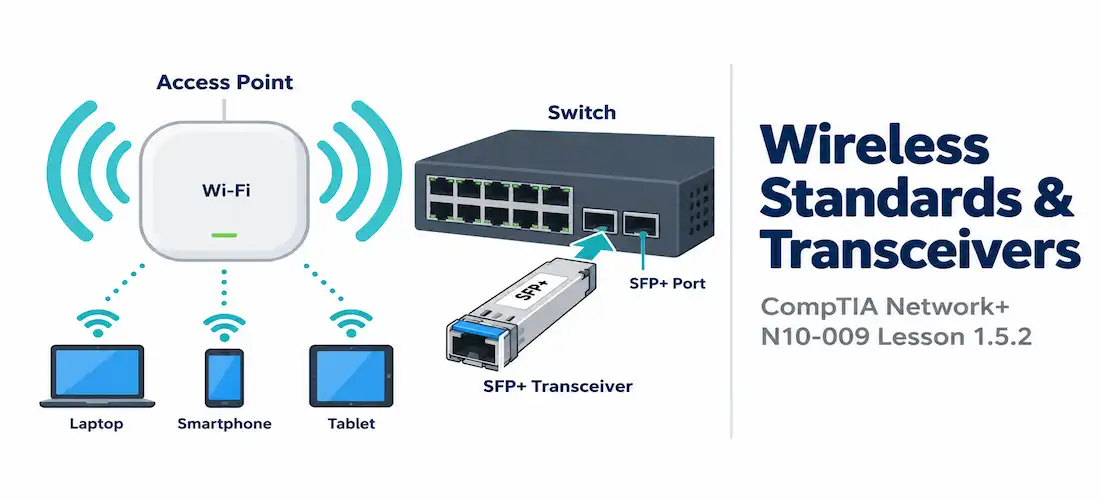
This lesson covers two things. They’re related, but not the same thing. First: wireless standards — the 802.11 family that governs Wi-Fi. Second: transceivers — the small pluggable modules that connect switches and routers to actual cabling.
Why group them together? Both are really about the same question: how does the signal get onto the medium? One answers that for radio waves. The other answers it for the fiber and copper cabling covered in Lesson 1.5.1. Different problems, same underlying theme. Keep that distinction clear as you go.
The 802.11 Wi-Fi Standards Family
Wi-Fi is standardized by the IEEE under the name 802.11. Each new version gets a trailing letter — a, b, g, n, ac, ax. More recently, marketing gave these simpler “Wi-Fi generation” numbers instead, since nobody outside networking wants to memorize a letter soup. Each new standard has generally pushed speed higher and added new tricks for handling more devices at once. But — and this matters for the exam — newer isn’t automatically better in every situation. More on that in a moment.
Every access point from Lesson 1.2.1, whether autonomous or lightweight and WLC-managed, ultimately runs one or more of these standards to talk to clients. That lesson covered how APs get deployed and managed. This one covers what actual standard governs the radio conversation itself.
| Standard | Marketing Name | Band(s) | Max Theoretical Speed | Key Feature |
|---|---|---|---|---|
| 802.11a | — | 5 GHz | 54 Mbps | Early standard; less interference-prone 5 GHz band, but shorter range and higher cost limited adoption |
| 802.11b | — | 2.4 GHz | 11 Mbps | Widely adopted early standard; longer range than 802.11a, but more prone to interference |
| 802.11g | — | 2.4 GHz | 54 Mbps | Backward-compatible with 802.11b while matching 802.11a’s speed on the more crowded 2.4 GHz band |
| 802.11n | Wi-Fi 4 | 2.4 GHz and 5 GHz | 600 Mbps | Introduced MIMO, using multiple antennas to significantly boost throughput |
| 802.11ac | Wi-Fi 5 | 5 GHz | ~3.5 Gbps | Introduced MU-MIMO and wider channels, enabling an access point to serve multiple clients more efficiently |
| 802.11ax | Wi-Fi 6 / Wi-Fi 6E | 2.4 GHz, 5 GHz, and 6 GHz (6E) | ~9.6 Gbps | Introduced OFDMA and Target Wake Time, improving efficiency in dense, high-device-count environments |
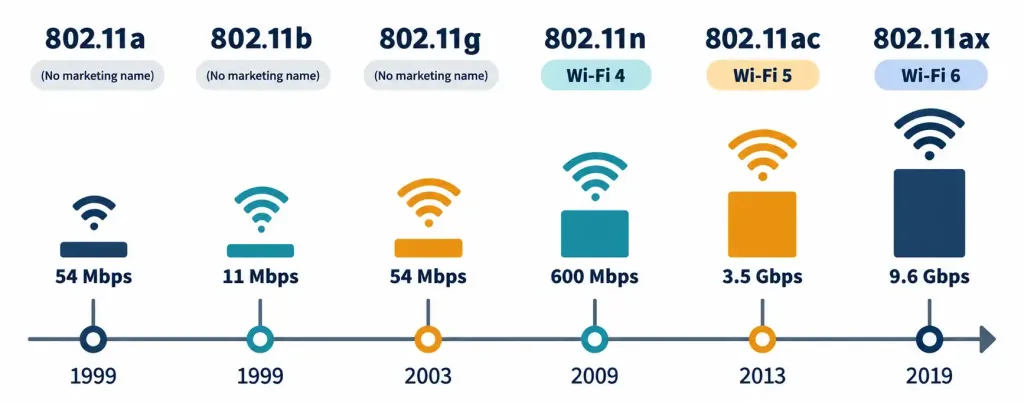
Two things in that table deserve a closer look. First: 802.11a and 802.11b came out the same year. Yet they made totally different bets. 802.11a went for speed — 5 GHz, less interference, but shorter range and pricier gear. 802.11b went the other way. Slower, more prone to interference, but it reached further and cost less. Guess which one won early adoption? 802.11b, easily. Range and price beat raw speed, at least at first.
802.11g then split the difference. Same speed as 802.11a, but backward-compatible with all those 802.11b devices already out in the wild. That combination is exactly why it spread so fast. Starting with 802.11n, marketing introduced the “Wi-Fi generation” numbers — 4, 5, 6 — specifically so regular people wouldn’t have to memorize letters. You need to know both names. The formal 802.11 designation, and its Wi-Fi generation nickname.
MIMO, MU-MIMO, and OFDMA: How Newer Standards Improved Efficiency
Three features explain most of the real capability jump in the later rows of that table. Know what each one actually does. Don’t just memorize which standard introduced it.
- MIMO (Multiple Input, Multiple Output) showed up with 802.11n. It uses multiple antennas to send and receive several distinct data streams at once, over the same channel. More throughput, no extra spectrum needed.
- MU-MIMO (Multi-User MIMO) arrived with 802.11ac. It takes MIMO a step further: now the access point can talk to several different client devices at the same time, instead of serving them one after another.
- OFDMA (Orthogonal Frequency-Division Multiple Access) came with 802.11ax. It slices a wireless channel into smaller resource units. Each unit can carry a different client’s traffic within the same transmission. Think of a single lane of traffic getting divided so multiple destinations get served at once, rather than one client hogging the whole channel before the next one gets a turn.
Notice the pattern. Each new feature cares less about raw speed for one device, and more about serving a crowd efficiently. That’s not an accident. Offices, stadiums, airports — modern Wi-Fi has to handle dozens or hundreds of devices in the same physical space, not just one laptop sitting alone in a room.
Here’s a concrete way to picture MU-MIMO versus OFDMA. Say an access point needs to send a small chunk of data to ten different clients. Without either feature, it talks to them one at a time — slow, but simple. MU-MIMO lets it use multiple antennas to reach several clients truly simultaneously, as long as each one gets its own distinct antenna path. OFDMA does something different: instead of needing separate antenna paths, it carves up a single transmission into smaller pieces, and packs several clients’ small data needs into that one transmission. That’s especially useful for IoT devices and phones that only need to send tiny bursts of data — giving one of them the whole channel would be wasteful.
Frequency Band Trade-offs: 2.4 GHz, 5 GHz, and 6 GHz
The standard is one variable. The frequency band is another, and it comes with its own trade-offs — ones that matter a lot once you get to the channel-planning content in Domain 2.
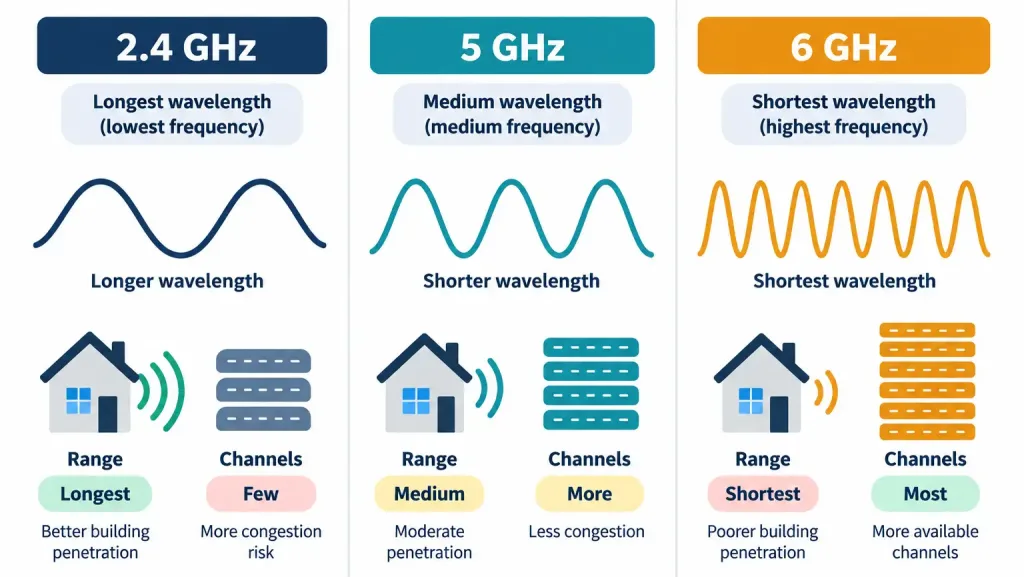
- 2.4 GHz travels farther and punches through walls better than the higher bands. The catch: fewer non-overlapping channels, and it’s shared with a lot of other stuff — old cordless phones, microwaves, Bluetooth gadgets. More range, more noise.
- 5 GHz flips that. More channels, less interference, but shorter range and worse penetration through walls. Higher frequencies just don’t travel as far or punch through solid objects as well. That’s physics, not a design flaw.
- 6 GHz, new with Wi-Fi 6E, is the cleanest of the three. Most available channels, least legacy congestion, since almost nothing has been using this spectrum until recently. Same range and penetration limits as 5 GHz apply here, though. And both ends of the connection — access point and client — need to explicitly support 6E, or none of this matters.
Range versus bandwidth. That trade-off shows up again and again in wireless design. It’s not unique to Wi-Fi, either — it’s the same physics trade-off you’ll see in any frequency-based technology.
Here’s what that trade-off looks like in practical terms. 2.4 GHz gives you only a small handful of channels that can run simultaneously in the same space without stepping on each other. That becomes a real bottleneck once you pack in a lot of nearby access points. 5 GHz gives you dramatically more room to work with. 6 GHz gives you more still. This is exactly why dense deployments push as much traffic as they can onto the higher bands whenever client devices support it. It’s not that higher frequency is magically “faster” — it’s that there’s simply more usable space to spread traffic across, which cuts down the contention that would otherwise choke a busy network.
Transceivers: Making Switch and Router Ports Flexible
Now, the second half of this lesson. Most enterprise switches and routers don’t build their ports as fixed, permanent hardware. Instead, they use modular, pluggable transceivers — small modules you insert into a standardized port slot. The transceiver adapts the switch’s internal electrical signal into whatever the cable actually needs, whether that’s a specific fiber optic signal or a specific copper signal.
That modularity pays off. The same physical switch can run single-mode fiber out of one port, multi-mode fiber out of another, and copper Ethernet out of a third — no need for separate hardware per cabling type. And when it’s time to go faster, you often just swap the transceiver. No need to rip out and replace the whole switch.
Transceivers are usually hot-swappable too. Pull one out, plug a new one in, no need to power down the device. That matters operationally — you don’t want to take down every other port on a switch just to fix one bad transceiver or reconfigure one link. One caveat worth knowing: transceivers from one vendor don’t always play nicely with another vendor’s switch, even when both claim the same form factor and speed. Some vendors deliberately lock their gear to recognize only their own branded (or certified) transceivers. That’s a commercial decision, not a technical limitation of SFP, SFP+, or QSFP as standards — but it’s worth knowing before you go shopping.
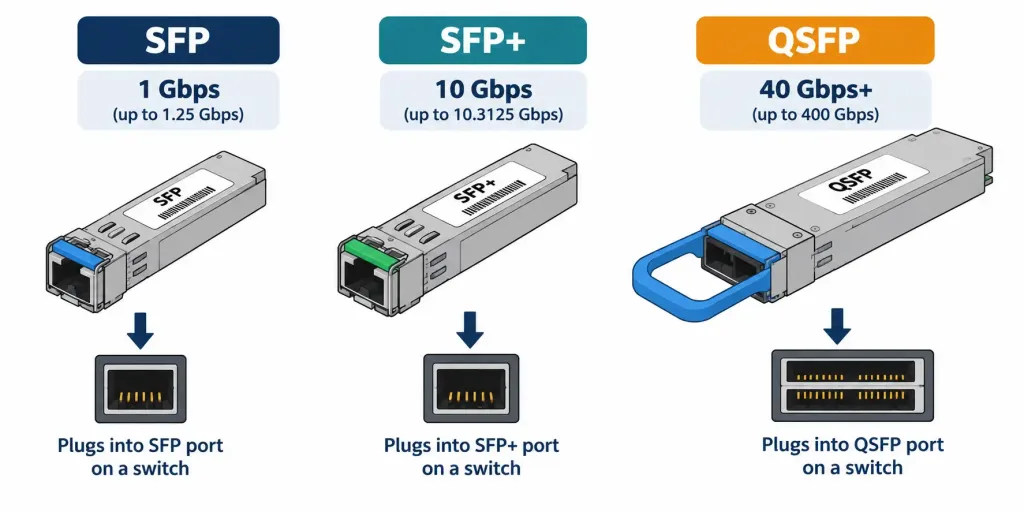
Common transceiver types, from smallest capacity to largest:
- SFP (Small Form-Factor Pluggable) — up to 1 Gbps.
- SFP+ — an upgraded version, up to 10 Gbps.
- QSFP (Quad Small Form-Factor Pluggable) — 40 Gbps and up, by combining four channels in one module. Variants like QSFP+ and QSFP28 push that even higher.
DAC and Twinax: Copper for Short, High-Speed Runs
Not every high-speed link needs fiber and a matching pair of optical transceivers. Sometimes copper does the job better. DAC (Direct Attach Copper) cables come with transceivers permanently built into each end. Inside, they use twinax copper cabling rather than separate pluggable transceivers connected by ordinary patch cable.
DAC/twinax is built for short distances — think a few meters, not more. The classic case: a server connecting directly to a top-of-rack switch in the same data center rack. At that distance, DAC genuinely beats fiber on a few fronts. Cheaper, since you skip the optical transceivers and fiber patch cables. Lower power draw. Lower latency, too — converting a signal to light and back at each end of a fiber run adds a tiny bit of overhead that a straight copper connection just doesn’t have. The trade-off is exactly what you’d expect: distance. DAC can’t come close to what fiber can do over range. So it stays a short-run, high-density data center tool — not a general substitute for fiber.
There are two flavors worth knowing. Passive DAC has no active electronics inside — it’s limited to the shortest distances of the two. Active DAC adds some signal boosting inside the cable itself, stretching its usable range a bit further than passive, though still nowhere near fiber territory. Either way, DAC stays firmly in the intra-rack, intra-row category. It was never meant to compete with fiber over any real distance.
Choosing a Band and Standard in Practice
Exam scenarios in this domain love to describe an environment and ask you to pick the right band or standard — not just recite a definition. So think it through like this.
A big warehouse, wide open space, relatively few connected devices per square meter? Lean on 2.4 GHz’s range. You’ll accept less available bandwidth, but you’ll need fewer access points to cover the space. A packed office floor — dozens of laptops, phones, IoT gadgets crammed into a small area? Go with 5 GHz or 6 GHz instead. More channels, less interference. Sure, you’ll need more access points for the same physical coverage, but the real problem in that environment isn’t distance — it’s contention between too many devices.
Building something brand new, buying all-new client hardware? Standardize on 802.11ax (Wi-Fi 6). OFDMA’s efficiency gains are exactly what a dense, modern deployment needs. Got a big installed base of older devices instead? You may need to prioritize backward compatibility — the same logic that drove 802.11g’s fast adoption decades ago.
A Complete Example: Wireless and Transceivers in One Deployment
Let’s put it all together. A company builds a new office next to a small data center.
In the office, a dense open floor plan calls for 802.11ax (Wi-Fi 6) access points running mostly on 5 GHz. OFDMA handles the crowd of simultaneously connected laptops and phones well. 2.4 GHz stays available too, mostly for older gear and IoT devices that can’t do the newer bands at all. Each access point connects back to its wiring closet switch over Cat 6a copper — that’s Lesson 1.5.1 territory — powered over PoE.
Over in the data center, the wiring closet switch links up to the core switch using a single-mode fiber uplink, with matched SFP+ transceivers on each end. That run is too long for copper. Inside a single server rack, though, a database server connects to its top-of-rack switch with a short DAC/twinax cable instead of fiber. Why? The distance is only a meter or two. DAC’s lower cost and lower latency win outright at that range. No reason to pay fiber’s premium when fiber’s actual advantages — distance, EMI immunity over long hauls — don’t even apply here.
Every choice in that design got made for a reason specific to that link. Nothing here is one-size-fits-all. That’s exactly the kind of reasoning these exam scenarios are built to test.
Recognition-Level Verification Concepts
This objective is descriptive, not hands-on. You won’t be configuring a wireless controller or swapping a transceiver on the exam. Still, a few things are worth being able to recognize on sight:
- Devices often list both notations together — “802.11ax (Wi-Fi 6),” for instance. Get comfortable translating between the two.
- A switch’s interface status will usually show which transceiver is installed in a given port, plus the link speed it’s currently negotiating. Handy for quickly confirming the right transceiver is in place for the cabling and speed you expect.
- DAC cables look different from ordinary fiber patch cables. The transceiver ends are molded permanently onto the cable — you can’t separate a DAC into “transceiver plus generic cable” the way you can with pluggable fiber optics.
Common Exam Traps
- A later letter in the alphabet doesn’t mean “always better.” 802.11a proved that. Faster, but slower to catch on, because range and cost mattered more to early buyers.
- MIMO, MU-MIMO, and OFDMA are not the same thing wearing different names. MIMO boosts one device’s throughput with multiple antennas. MU-MIMO stretches that to multiple devices at once. OFDMA slices up a single transmission to serve several clients within it. Three different mechanisms, three different standards.
- Lower frequency = longer range, more congestion. Higher frequency = shorter range, more clean bandwidth. That pattern holds across 2.4, 5, and 6 GHz. Learn the pattern, not three disconnected facts.
- Form factor (SFP, SFP+, QSFP) tells you speed and size — not what’s on the other end of the cable. The same form factor ships in fiber and copper variants both. Don’t assume one from the other.
- DAC/twinax is short-range only. It’s not a cheaper fiber replacement in general. It’s a specific tool for specific, very short, high-density connections — server-to-switch within a rack, nothing longer.
Lesson 1.5.2 Practice Questions
Wireless Standards & Transceivers · 17 questions · Network+ N10-009, Domain 1.0
Which 802.11 standard is also marketed as Wi-Fi 6?
802.11a and 802.11b were released the same year, yet 802.11b saw much faster initial adoption despite being slower. What best explains this?
Which feature, introduced with 802.11ac, allows an access point to communicate with multiple client devices simultaneously?
Which two of the following are true about the 2.4 GHz band compared to 5 GHz?
Based on this switch interface status, what can be concluded?
A database server needs to connect to its top-of-rack switch just one meter away, and the network team wants the lowest possible cost and latency for this specific link. Which solution fits best?
What does OFDMA allow an access point to do?
Which two of the following are true about pluggable transceivers like SFP and SFP+?
A dense open-plan office with dozens of laptops and phones per floor is experiencing poor Wi-Fi performance due to contention between devices, even though signal strength is strong everywhere. Which change would most directly address this?
Which transceiver form factor typically supports 40 Gbps and higher by combining four channels?
Based on this device spec sheet, which Wi-Fi standard and generation name apply?
A network engineer wants to upgrade a switch's uplink speed from 1 Gbps to 10 Gbps without replacing the switch itself. What is the most direct way to accomplish this?
Which statement correctly distinguishes passive DAC from active DAC?
Which two of the following are true about MIMO?
A warehouse needs wireless coverage across a very large physical area with relatively few connected devices at any given time. Which band would most directly reduce the number of access points needed?
Why can't a transceiver's form factor (SFP, SFP+, QSFP) alone tell you what type of cabling is connected to it?
Based on this cable label, what is this cable, and where would it most appropriately be used?
Summary
The 802.11 family (a, b, g, n/Wi-Fi 4, ac/Wi-Fi 5, ax/Wi-Fi 6) kept pushing speed higher and adding efficiency features. Real-world adoption depended on range, cost, and compatibility just as much as raw speed.
MIMO, MU-MIMO, and OFDMA are three distinct features from three different standards. Each tackles a different piece of "serve more devices efficiently" — they're not interchangeable.
2.4 GHz, 5 GHz, and 6 GHz trade range and wall penetration against available bandwidth and interference. Same pattern, every time.
Pluggable transceivers (SFP, SFP+, QSFP) let one piece of hardware adapt to different cabling and speeds — just swap the module.
DAC/twinax bakes transceivers into a short copper cable. Cheaper, lower power, lower latency than fiber — but only over very short distances, like server-to-switch links inside a single rack.



