
Domain 1.0 | Networking Concepts — 23% of exam
Learning Objectives
By the end of this lesson, you will be able to:
- Describe the primary function of network-attached storage (NAS) and identify the protocols it typically uses
- Describe the primary function of a storage area network (SAN) and identify the protocols it typically uses
- Distinguish file-level storage access from block-level storage access
- Compare NAS and SAN in terms of network dependency, complexity, cost, and typical use case
- Explain how RAID contributes to fault tolerance in both NAS and SAN environments
Key Terms
| Term | Definition |
|---|---|
| DAS (Direct-Attached Storage) | Storage hardware connected directly to a single server or computer, with no network in between |
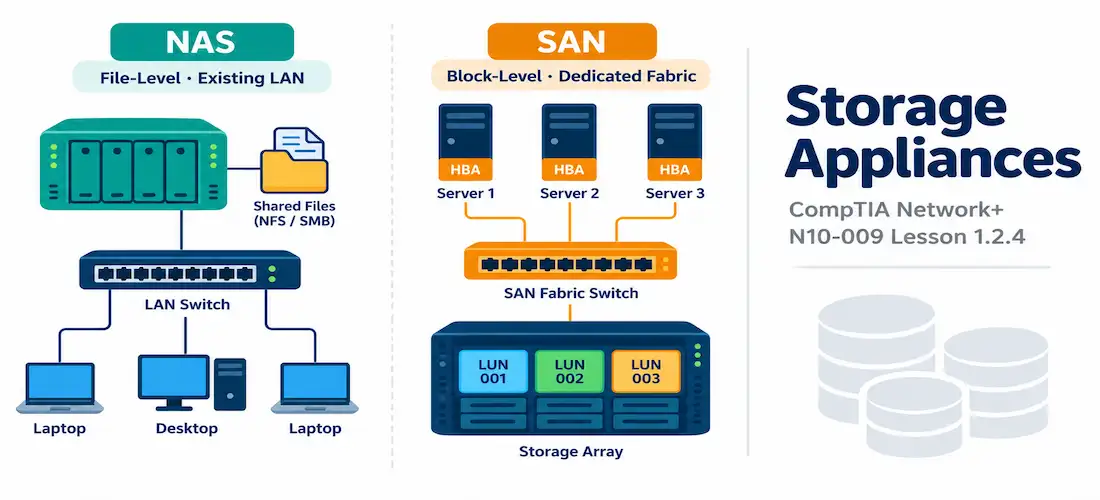
| NAS (Network-Attached Storage) | A dedicated storage device connected to an existing LAN that provides file-level storage accessible to multiple users and devices over the network |
| SAN (Storage Area Network) | A dedicated, high-speed network that connects servers to pooled storage resources at the block level, typically appearing to servers as locally attached storage |
| File-Level Storage | A storage access method where data is organized and requested as complete files within a directory structure, as used by NAS |
| Block-Level Storage | A storage access method where data is organized and requested as raw blocks, with the requesting server’s operating system managing the file system itself, as used by SAN |
| NFS (Network File System) | A file-level protocol, common on Unix/Linux systems, used by NAS devices to share files over a network |
| SMB/CIFS (Server Message Block / Common Internet File System) | A file-level protocol, common on Windows systems, used by NAS devices to share files over a network |
| Fibre Channel | A high-speed networking technology traditionally used to build dedicated SAN fabrics, offering low latency and high throughput |
| iSCSI (Internet Small Computer System Interface) | A protocol that encapsulates SCSI block-level storage commands within standard IP/Ethernet traffic, allowing a SAN to run over ordinary Ethernet networks instead of dedicated Fibre Channel hardware |
| HBA (Host Bus Adapter) | A specialized network adapter installed in a server that connects it to a SAN fabric, analogous to a NIC but for storage networking |
| LUN (Logical Unit Number) | An identifier representing a specific, addressable slice of storage capacity within a SAN, presented to a server as if it were a local disk |
| Zoning | A SAN security/management practice that restricts which HBAs can communicate with which storage devices within the fabric |
| RAID (Redundant Array of Independent Disks) | A technique for combining multiple physical disks into a logical unit for fault tolerance, performance, or both |
Explanation
Rounding Out the Core Infrastructure Categories
This lesson completes the set of core infrastructure device categories introduced across Lessons 1.2.1 through 1.2.4: basic connectivity (routers, switches, APs, WLCs), security (firewalls, IDS/IPS), traffic management (load balancers, proxies, CDNs), and now storage. Every organization of meaningful size needs a way to centralize data storage so it can be shared, backed up, and managed efficiently rather than scattered across individual computers’ local drives. The two dominant approaches to network-based storage are NAS and SAN, and Network+ expects you to know how they differ — a distinction that trips up a surprising number of otherwise well-prepared candidates because the acronyms are, confusingly, near-mirror images of each other.
Before comparing the two, it’s worth briefly placing them against a simpler baseline: direct-attached storage (DAS) — a hard drive or storage array connected directly to a single server or computer with no network involved at all. DAS is simple and fast, but it has an obvious limitation: that storage is only accessible to the one device it’s physically attached to, and if that device fails, so does access to its data. NAS and SAN both exist to solve this by making storage accessible over a network to multiple servers or users at once — they just take very different approaches to how.
NAS: File-Level Storage Over the Existing Network
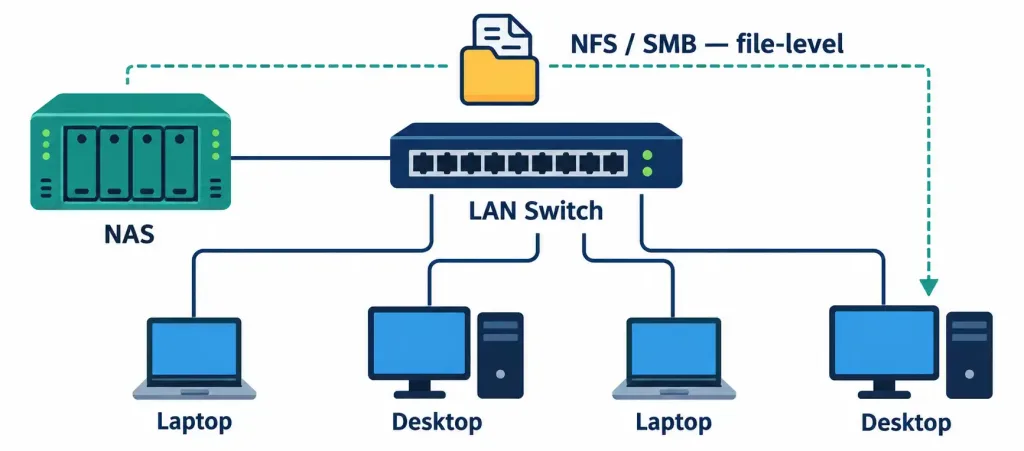
Network-attached storage (NAS) is a dedicated storage device that connects to an organization’s existing LAN — typically over standard Ethernet — and provides file-level storage access to multiple users and devices across that network. When a user or application accesses a file on a NAS device, they’re requesting a specific file by name and path, much as they would from a local hard drive; the NAS device’s own operating system manages the underlying file system and simply serves up files upon request.
NAS devices commonly use these file-sharing protocols:
- NFS (Network File System) — the traditional choice on Unix/Linux systems.
- SMB/CIFS (Server Message Block / Common Internet File System) — the traditional choice on Windows systems, and also widely supported cross-platform today.
Because a NAS device rides on the organization’s existing LAN, it’s relatively simple and inexpensive to deploy — plug it into an existing switch, assign it an IP address, and it’s immediately reachable by any device on that network with the right permissions and protocol support.
This simplicity is exactly why NAS is popular for small businesses, departmental file sharing, and home use. The trade-off is equally direct: a NAS device’s availability and performance are tied to the health of the LAN it depends on. If the LAN segment carrying NAS traffic becomes congested or goes down, NAS access degrades or fails right along with it, and NAS traffic itself competes for bandwidth with all of the organization’s other ordinary network traffic.
SAN: Block-Level Storage on a Dedicated Fabric
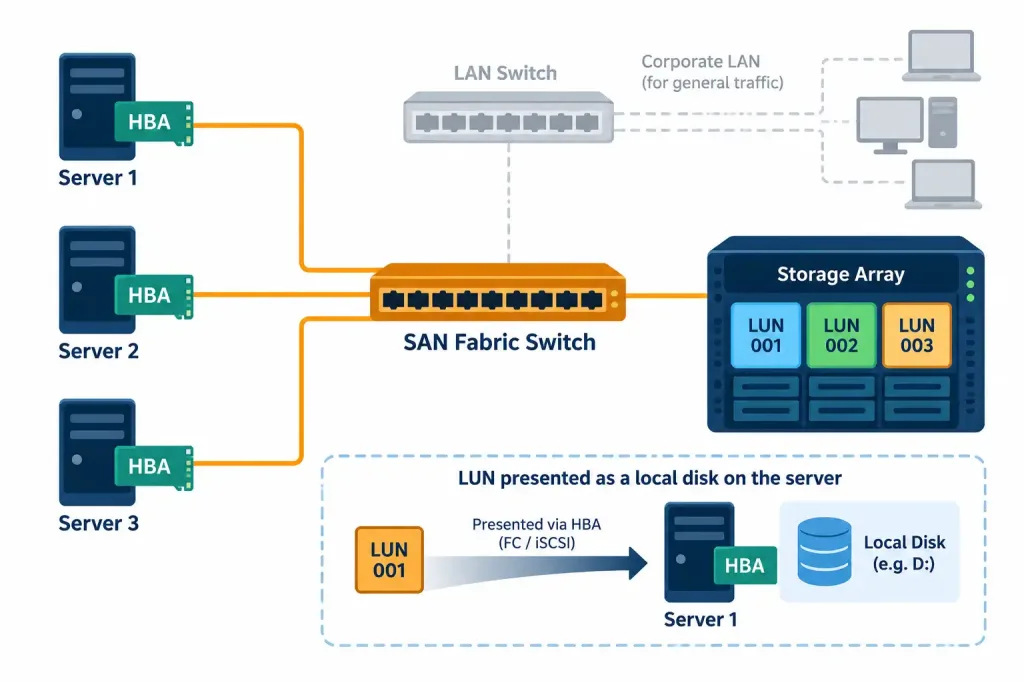
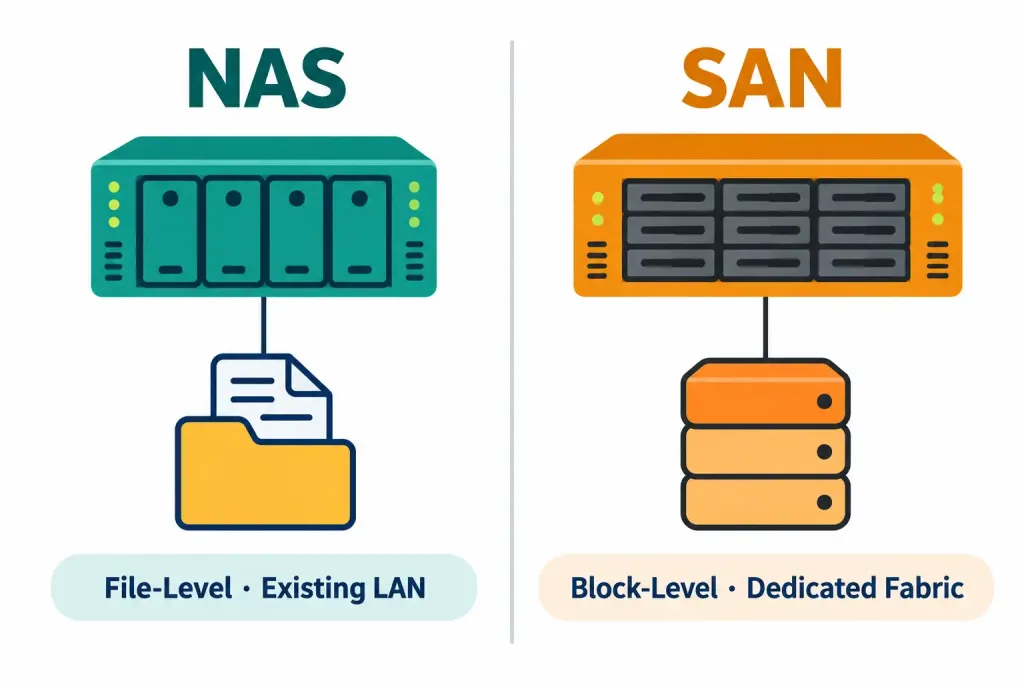
A storage area network (SAN) takes a fundamentally different approach. Rather than serving complete files over the existing LAN, a SAN provides block-level storage access over its own dedicated, typically high-speed network — often called a fabric — that exists separately from the organization’s regular LAN traffic. To a connected server, SAN storage doesn’t look like a shared network file location at all; it appears as if it were a local disk, because the server’s own operating system is the one managing the file system on top of the raw storage blocks the SAN provides. This is the single most important distinction to internalize: NAS hands out files; SAN hands out raw block storage that looks locally attached.
Servers connect to a SAN fabric using a host bus adapter (HBA) — the storage-networking equivalent of a network interface card. Within the fabric, storage capacity is divided into addressable units called LUNs (Logical Unit Numbers), each of which a server can be granted access to, again appearing to that server as a distinct local disk. SAN administrators use zoning to control which HBAs are permitted to see and communicate with which storage resources — a security and organizational practice roughly analogous to VLANs on a traditional LAN, restricting visibility rather than allowing every connected server to see every LUN in the fabric.
SANs traditionally run over Fibre Channel, a purpose-built, high-speed networking technology designed specifically for storage traffic, offering very low latency and high throughput. However, a widely deployed alternative called iSCSI encapsulates the same underlying SCSI block-level storage commands inside ordinary IP/Ethernet traffic — meaning a SAN can be built using standard Ethernet switches and NICs rather than requiring dedicated Fibre Channel hardware, at some potential cost to raw performance, but at meaningfully lower expense and complexity. This is a frequently tested nuance: a SAN is not defined by using Fibre Channel specifically — it’s defined by providing block-level storage over a dedicated network, whether that network happens to be Fibre Channel or iSCSI-over-Ethernet.
Because a SAN operates as its own independent network — dedicated purely to storage traffic rather than sharing the general-purpose LAN — it isn’t subject to the same congestion or availability dependency that affects NAS, and it delivers markedly higher performance for demanding workloads. This makes SANs the standard choice for mission-critical, performance-sensitive applications: large databases, virtualization platforms (where dozens or hundreds of virtual machines all need fast, reliable shared storage), and enterprise resource planning systems.
Side-by-Side Comparison
| Characteristic | NAS | SAN |
|---|---|---|
| Storage access type | File-level | Block-level |
| Network used | Existing LAN (standard Ethernet) | Dedicated fabric (Fibre Channel or iSCSI over Ethernet) |
| Appears to the server as | A shared network file location | A local disk |
| Common protocols | NFS, SMB/CIFS | Fibre Channel Protocol (FCP), iSCSI |
| Complexity/cost | Lower — simple to deploy and manage | Higher — requires dedicated hardware/fabric and more administration |
| Dependency | Availability tied to the health of the LAN | Independent of general LAN traffic and congestion |
| Typical use case | File sharing, departmental storage, small business/home use | Databases, virtualization, mission-critical enterprise workloads |
RAID: A Shared Fault-Tolerance Foundation
Regardless of whether an organization deploys NAS, SAN, or plain DAS, the underlying physical disks are commonly protected using RAID (Redundant Array of Independent Disks) — a technique for combining multiple physical drives into a single logical unit to achieve fault tolerance, improved performance, or both, depending on the specific RAID level implemented. A single failed physical drive within a properly configured RAID array typically doesn’t mean lost data or even downtime; the array continues operating (often at reduced performance) while the failed drive is replaced and the array rebuilds.
RAID is a storage-level technology that applies underneath NAS and SAN alike — it’s not a feature unique to either one, but rather a foundation both are commonly built on top of. (Specific RAID levels and their trade-offs are typically covered in dedicated storage or server-hardware content beyond Network+’s scope, but recognizing RAID’s role here is worth knowing.)
While Network+ does not require memorizing the mechanics of every RAID level, recognizing a few common ones helps when a scenario question mentions RAID by name: RAID 1 mirrors data across two drives for redundancy with no capacity gain; RAID 5 stripes data across three or more drives with distributed parity, tolerating a single drive failure while using less total capacity for redundancy than mirroring;
RAID 6 extends this with dual parity, tolerating two simultaneous drive failures; and RAID 10 combines mirroring and striping for both redundancy and performance, at the cost of using half the total raw capacity for redundancy.
None of these levels are exclusive to NAS or SAN — either type of storage appliance is commonly built on top of a RAID array of one of these levels, chosen based on the balance of capacity, performance, and fault tolerance the organization needs.
Where NAS and SAN Fit Alongside Cloud and Converged Storage
It’s worth briefly noting that NAS and SAN aren’t the only network storage models in modern use. Cloud storage services increasingly offer both file-level and block-level storage as a managed service, removing the need to own and maintain the physical NAS or SAN hardware at all, while still relying on the same underlying access-model distinction covered in this lesson. Similarly, hyperconverged infrastructure (HCI) combines compute, storage, and networking into a single integrated platform, often blurring the traditionally sharp line between NAS-style and SAN-style access underneath a unified management layer.
For Network+ purposes, the important takeaway is that the fundamental distinction between file-level and block-level access persists across all of these deployment models — cloud, on-premises, or hyperconverged — even as the specific hardware and management approach evolves.
Recognition-Level Verification Concepts
This objective is descriptive/comparative, so there’s no hands-on storage configuration expected on the exam. It’s worth recognizing, conceptually, how each storage type typically shows up from a connected server’s point of view:
- A NAS share typically appears as a mounted network location — for example, a mapped network drive on Windows, or a mount point created via an NFS/SMB mount command on Linux — clearly distinct from the server’s own local disks.
- SAN storage, once connected via an HBA (or an iSCSI initiator, for IP-based SANs) and granted access to a LUN, typically appears in the operating system’s disk management tools as an ordinary local disk, indistinguishable at a glance from directly attached hardware.
Common Exam Traps
- NAS = file-level; SAN = block-level. This is the single most tested fact in this entire lesson, and the acronyms offer zero help in remembering it — memorize it directly.
- Don’t assume SAN always means Fibre Channel. iSCSI-based SANs run over ordinary Ethernet and are extremely common, especially outside the largest enterprise environments; the defining trait of a SAN is block-level access over a dedicated storage network, not any single underlying transport technology.
- NAS depends on the general LAN; a SAN typically does not. A question describing storage performance degrading whenever general network traffic spikes points toward NAS; a question describing storage traffic isolated from general network congestion points toward SAN.
- To the connected server, NAS looks like a network share; SAN looks like a local disk. This “how does it appear to the OS” framing is a common way exam scenarios test the distinction without using the words “file-level” or “block-level” directly.
- RAID is not exclusive to either NAS or SAN — don’t treat it as a distinguishing feature between the two; it’s an underlying fault-tolerance technique that both commonly rely on.
Lesson 1.2.4 Practice Questions
Storage Appliances · 17 questions · Network+ N10-009, Domain 1.0
Which type of storage access does a NAS device provide?
A server's operating system displays a newly connected storage volume as an ordinary local disk, and the OS itself manages the file system on that volume. What type of storage is most likely in use?
Which of the following protocols is commonly used by NAS devices for file sharing?
Which two of the following are true about a SAN?
Based on this output, what type of storage is being accessed?
A company is deploying a large virtualization platform that will host hundreds of virtual machines, all requiring fast, reliable, shared storage independent of the general office network's traffic load. Which storage solution is the better fit?
What is the primary purpose of a host bus adapter (HBA)?
Which two of the following are true about iSCSI?
An IT administrator notices that access to a shared file server slows down significantly whenever general office network traffic spikes during business hours. Which type of storage is most likely in use, given this dependency?
What is the purpose of zoning in a SAN environment?
Based on this output, which storage technology is most likely being managed here?
Which statement correctly distinguishes file-level storage from block-level storage?
A small business wants an affordable, easy-to-set-up shared storage solution for a dozen employees to store and access documents from their existing office network. Which solution best fits this need?
Which two of the following are true about RAID?
A network engineer needs to build a SAN for a mid-sized business but wants to avoid the cost and complexity of dedicated Fibre Channel hardware, instead reusing existing Ethernet switches. Which technology allows this?
Which of the following best describes a key advantage of SAN over NAS for performance-sensitive workloads?
Based on this output, how does Disk 1 appear to this server's operating system, despite being backed by networked storage?
Summary
NAS provides file-level storage over an organization's existing LAN using protocols like NFS and SMB/CIFS, making it simple and inexpensive but dependent on that LAN's health and bandwidth
SAN provides block-level storage over a dedicated fabric (Fibre Channel or iSCSI-over-Ethernet), appearing to connected servers as local disks and delivering consistent, high performance independent of general network traffic
HBAs connect servers to a SAN fabric, LUNs represent addressable slices of SAN storage capacity, and zoning restricts which hosts can see which storage resources
RAID is a fault-tolerance technique applied underneath NAS, SAN, or DAS alike — not a distinguishing feature between them
NAS suits simple file-sharing needs at lower cost and complexity; SAN suits performance-critical, mission-critical enterprise workloads like databases and virtualization at higher cost and complexity



