
Domain 1.0 | Networking Concepts — 23% of exam
Learning Objectives
By the end of this lesson, you will be able to:
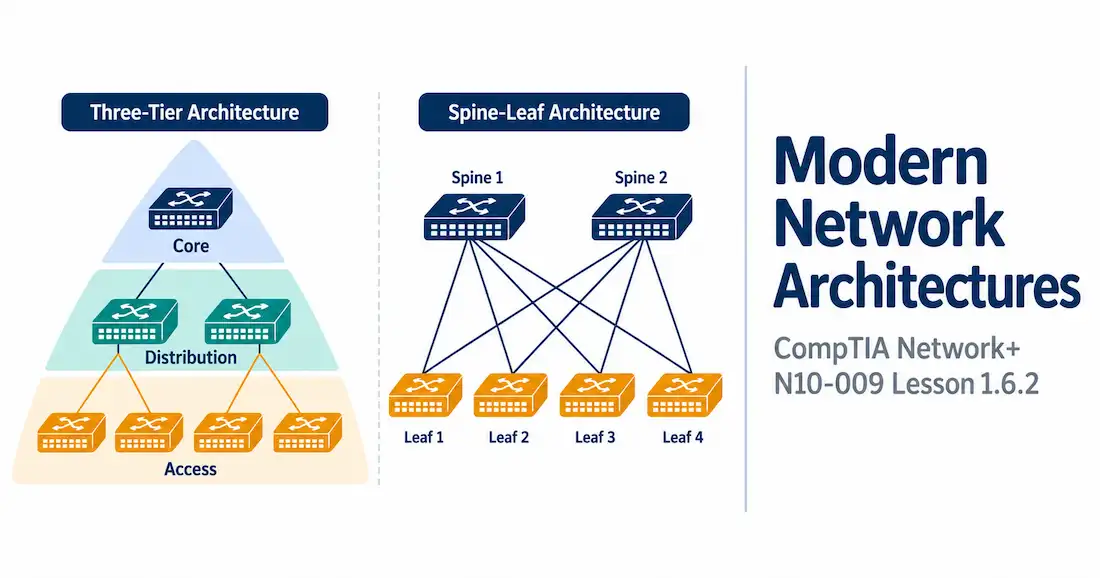
- Describe the three-tier hierarchical model: access, distribution, and core
- Explain collapsed core design and why smaller networks use it
- Describe spine-leaf architecture and why data centers have adopted it
- Explain the difference between north-south and east-west traffic, and why that distinction drives modern architecture choices
Key Terms
| Term | Definition |
|---|---|
| Access Layer | The layer where end devices connect to the network — desks, printers, phones, access points |
| Distribution Layer | The layer that aggregates traffic from access switches, applies policy, and routes between VLANs |
| Core Layer | The high-speed backbone that connects distribution layers together, focused purely on fast forwarding |
| Three-Tier Architecture | A hierarchical design with separate access, distribution, and core layers |
| Collapsed Core | A two-tier design that merges the distribution and core layers into one |
| Spine-Leaf | A data center architecture where every leaf switch connects to every spine switch, and nothing else connects to anything else |
| North-South Traffic | Traffic flowing between clients and servers, in or out of the data center |
| East-West Traffic | Traffic flowing between servers within the data center itself |
Explanation
Topologies Grow Up
Lesson 1.6.1 covered the basic shapes — star, mesh, hub-and-spoke, point-to-point. Real networks don’t pick just one shape and stop there. They build structured, layered architectures out of those basic shapes, applied at scale. This lesson covers three of them: three-tier, collapsed core, and spine-leaf.
Three-Tier: The Classic Campus Design
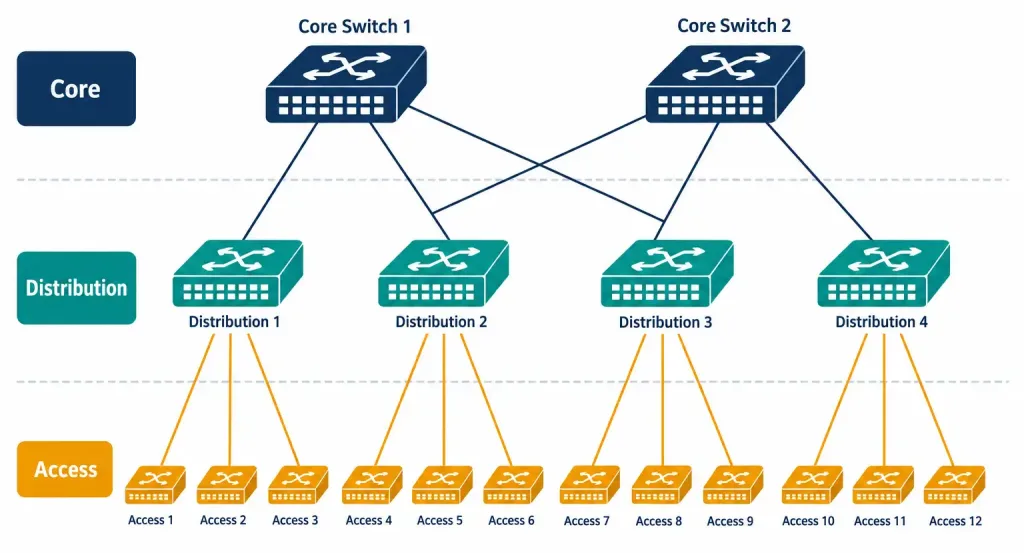
The three-tier architecture splits a network into three layers, each with one clear job.
Access layer is where end devices plug in. Desktops, phones, printers, the switches from Lesson 1.2.1 — this is that same layer, just given a formal name in a bigger design. Access switches don’t make big decisions. They just get traffic onto the network.
Distribution layer sits above access. It aggregates traffic from a bunch of access switches, applies policy — think ACLs, routing between VLANs — and generally does the heavier lifting that access switches are kept simple enough to avoid.
Core layer sits at the top. Its only job is speed. Move traffic between distribution layers, as fast as possible, with as little processing overhead as possible. No policy enforcement here. No filtering. Just forwarding, fast.
Think of it like a company’s org chart, except backwards from what you’d expect. Access is the front line, dealing with individual devices directly. Distribution is middle management, applying rules and making decisions. Core is the highway — built for one thing, moving volume quickly, no stops along the way.
Redundancy usually gets built in at every layer, too. Access switches often uplink to two distribution switches instead of one. Distribution switches often connect to two core switches. Lose one device anywhere in the stack, and traffic just reroutes through the surviving path. This layered redundancy is part of why three-tier scales so well for large campuses — you’re not just adding capacity when you grow, you’re adding resilience at the same time.
Collapsed Core: When Three Layers Is Overkill
Not every network needs three separate layers. A smaller campus, or a single building, often doesn’t generate enough traffic to justify a dedicated core layer sitting on top of everything else.
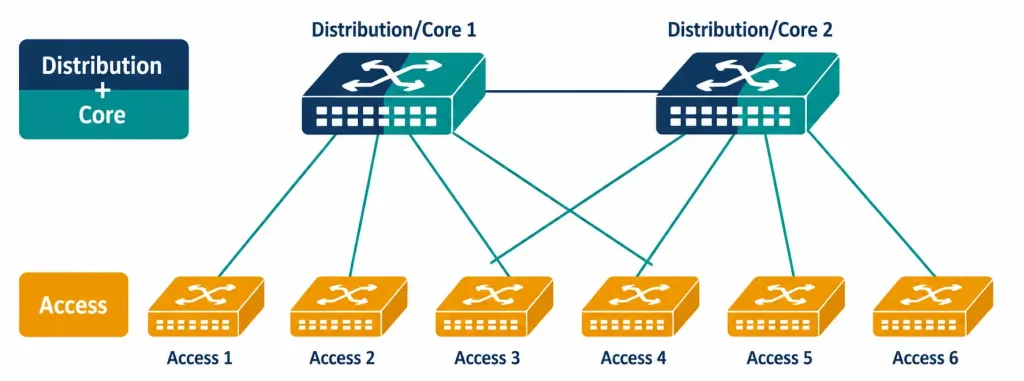
Collapsed core merges distribution and core into one layer. Two tiers instead of three. Cheaper — fewer devices to buy, fewer devices to manage. Simpler, too. For a lot of small and mid-sized networks, this is genuinely the right call, not a compromise.
The trade-off is scalability. A three-tier design can grow by adding more distribution blocks under the same core, without redesigning anything. Collapsed core doesn’t scale quite as cleanly — eventually, a growing network outgrows its collapsed design and needs to split back into three tiers. Most organizations don’t hit that ceiling, though. Collapsed core remains the more common real-world choice outside of large enterprises.
There’s a growth path here worth knowing, too. Plenty of networks start collapsed and later split into full three-tier once they outgrow it — a branch office network expanding into a full campus, say. That transition isn’t free. It usually means new hardware, new cabling, and some downtime to restructure. Planning ahead for that possibility, even in a small network, is exactly the kind of forward-thinking design decision a network architect gets paid to make.
Spine-Leaf: Built for the Data Center
Data centers don’t look like campus networks, and their traffic doesn’t behave the same way either. That’s why spine-leaf exists as its own architecture, distinct from three-tier and collapsed core.
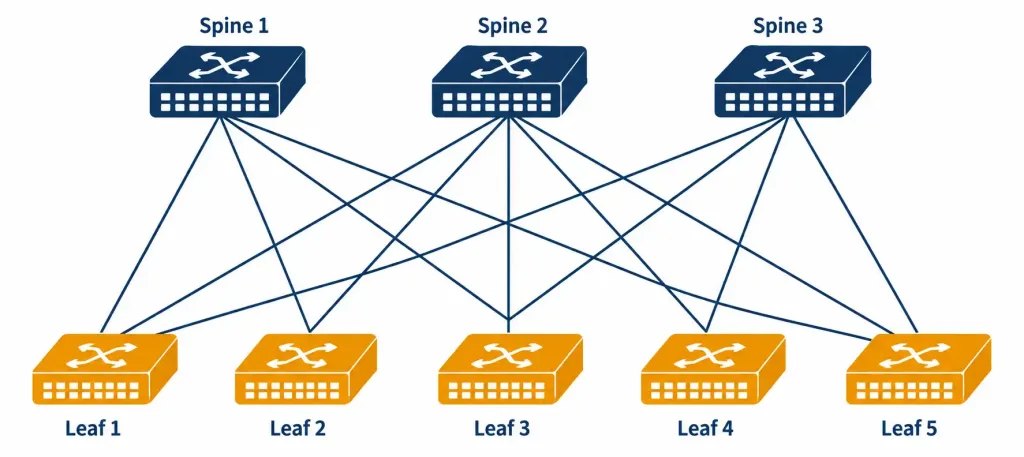
The rule is simple. Every leaf switch connects to every spine switch. Leaf switches never connect to each other. Spine switches never connect to each other either. Just leaf-to-spine, every combination, nothing else.
Servers plug into leaf switches. Leaf switches all connect up to every spine switch. That’s it — that’s the whole architecture. If you squint, this is really just a full mesh from Lesson 1.6.1, applied specifically between two distinct groups of devices rather than mixed together in one flat pool.
Why build it this way? Because of how traffic actually moves in a modern data center. Any server might need to talk to any other server, constantly — a shift driven by virtualization, microservices, distributed applications splitting work across many machines instead of one. Spine-leaf handles that beautifully. Traffic between any two leaf switches always crosses exactly one spine switch. Same hop count, every single time, no matter which two servers are talking. Predictable, consistent, and it scales by just adding more spine switches as demand grows.
Scaling out is refreshingly simple, too. Need more bandwidth between leaf and spine? Add another spine switch, connect every leaf to it, done. No redesign, no renumbering, no rethinking the whole topology — just bolt on more spine capacity. Compare that to a three-tier design, where adding significant new capacity to the core sometimes means rethinking how distribution blocks connect to it. Spine-leaf’s uniform structure is exactly what makes it grow so cleanly.
North-South vs. East-West: Why This Distinction Matters
Two terms explain why spine-leaf caught on. North-south traffic is what you’d traditionally picture: a client outside the data center talking to a server inside it. Old three-tier designs were built around this pattern — traffic mostly flowed up and down through the layers, client to server and back.
East-west traffic is server-to-server, inside the data center. A web server calling a database. One microservice calling another. This kind of traffic barely existed at scale in older designs. It dominates now.
A traditional three-tier design handles east-west traffic badly. Server-to-server traffic has to climb up through distribution, sometimes all the way to the core, then back down — even when the two servers involved sit in neighboring racks. Spine-leaf skips that entirely. Every leaf connects directly to every spine, so server-to-server traffic takes a short, direct, predictable path no matter where the two servers physically sit.
This is really the whole story behind spine-leaf’s rise. It’s not that three-tier design got worse. It’s that the traffic pattern it was built for stopped matching how modern data centers actually work.
Picture two servers sitting in neighboring racks, running parts of the same application, needing to exchange data constantly. In an old three-tier data center design, that traffic might climb from access up to distribution, sometimes all the way to core, then back down the other side — four or five hops for what should be a short trip. In spine-leaf, that same conversation crosses exactly one spine switch. Same servers, same conversation, dramatically shorter path. Multiply that difference by thousands of server pairs talking simultaneously, and the gap in performance and predictability becomes impossible to ignore.
Comparing the Three
| Architecture | Layers | Best For | Traffic Pattern It Handles Well |
|---|---|---|---|
| Three-Tier | Access, Distribution, Core | Large campus networks | North-south, traditional client-server |
| Collapsed Core | Access, Distribution+Core combined | Small to mid-sized networks | North-south, lower overall volume |
| Spine-Leaf | Leaf, Spine | Data centers | East-west, server-to-server at scale |
Putting It Together: One Organization, Two Architectures
A company runs a five-floor office building and a separate data center a few miles away.
The office building uses collapsed core. Not much east-west traffic here — just employees reaching file shares, printers, and the internet. Two tiers is plenty, and it saves money on hardware the company doesn’t actually need.
The data center is a different animal. Dozens of virtual machines, constantly talking to each other, running a web application split across many services. Spine-leaf fits perfectly here — consistent latency between any two servers, and room to add more spine switches later without redesigning anything, tying directly back to the storage and virtualization workloads a modern data center actually runs.
Same company, two totally different architectures, each picked because it matches what that specific location actually needs to do. That’s the real lesson here — architecture isn’t about picking a “best” design in the abstract. It’s about matching the design to the traffic pattern.
Recognition-Level Verification Concepts
This objective is about recognizing structure, not configuring anything. A few things worth spotting on sight:
- Three distinct layers, each with a different job description, is three-tier.
- Two layers, with the top one clearly doing double duty (routing and high-speed forwarding both), is collapsed core.
- A diagram where one set of switches (leaf) all connect to a separate set of switches (spine), and nothing within either set connects internally, is spine-leaf. That “two separate groups, fully cross-connected” shape is the giveaway.
Common Exam Traps
- The core layer doesn’t do policy enforcement. That’s distribution’s job. Core exists purely for speed — mixing this up is one of the most common mistakes on three-tier questions.
- Collapsed core isn’t a “worse” three-tier. It’s a deliberate design choice for smaller networks, trading some scalability for lower cost and simpler management.
- Leaf switches never connect to each other in spine-leaf. Neither do spine switches. Only leaf-to-spine links exist. A diagram showing leaf-to-leaf links isn’t really spine-leaf.
- Hop count between any two leaf switches is always the same in spine-leaf — always exactly one spine switch away. That consistency is the entire point of the design, not an incidental detail.
- East-west traffic growth, not north-south traffic, is what drove spine-leaf’s adoption. Don’t reverse this — it’s specifically server-to-server traffic inside the data center that traditional three-tier designs struggled with.
- Redundant uplinks at every layer of three-tier aren’t optional extras — they’re part of the standard design. Access-to-distribution and distribution-to-core links are typically doubled up specifically so a single failed device or link doesn’t take down that whole section of the network.
- Spine-leaf scales by adding spine switches, not by adding more layers. Unlike three-tier, which can grow taller (more layers) as well as wider, spine-leaf stays flat — it only ever grows wider, by adding more spines or more leaves.
Lesson 1.6.2 Practice Questions
Modern Network Architectures · 16 questions · Network+ N10-009, Domain 1.0
In the three-tier architecture, which layer is responsible for applying policy and routing between VLANs?
A small business with one building and modest traffic wants to save on hardware costs. Which architecture fits best?
In spine-leaf architecture, which connections are allowed?
Which two of the following describe east-west traffic?
Based on this diagram description, what architecture is shown?
A data center needs more bandwidth between its leaf and spine switches as traffic grows. What's the typical way to scale spine-leaf?
What is the primary job of the core layer in a three-tier design?
Which two of the following are true about collapsed core?
Two virtual machines in neighboring racks exchange data constantly as part of the same application. In an old three-tier data center design, why might this be slower than expected?
How many spine switches does traffic cross when moving between any two leaf switches in a spine-leaf design?
Based on this diagram description, what architecture is shown?
A company runs collapsed core in its office and spine-leaf in its data center. Why might it use two different architectures instead of just one everywhere?
Which statement correctly describes redundancy in a typical three-tier design?
Which two of the following correctly describe north-south traffic?
A network architect sees a diagram with leaf switches directly connected to each other, in addition to their spine connections. What should this tell them?
Why does spine-leaf scale more predictably than three-tier as a data center grows?
Summary
Three-tier splits a network into access, distribution, and core layers, each with a distinct job — access connects devices, distribution applies policy, core moves traffic fast.
Collapsed core merges distribution and core into two tiers instead of three, a common and reasonable choice for smaller networks.
Spine-leaf connects every leaf switch to every spine switch, with no leaf-to-leaf or spine-to-spine links, giving consistent, predictable latency between any two servers.
North-south traffic (client-to-server) suited traditional three-tier design. East-west traffic (server-to-server) is what pushed data centers toward spine-leaf instead.
Real organizations often run different architectures in different places — collapsed core for the office, spine-leaf for the data center — matched to what each location's traffic actually looks like.



