
Domain 1.0 | Networking Concepts — 23% of exam
Learning Objectives
By the end of this lesson, you will be able to:
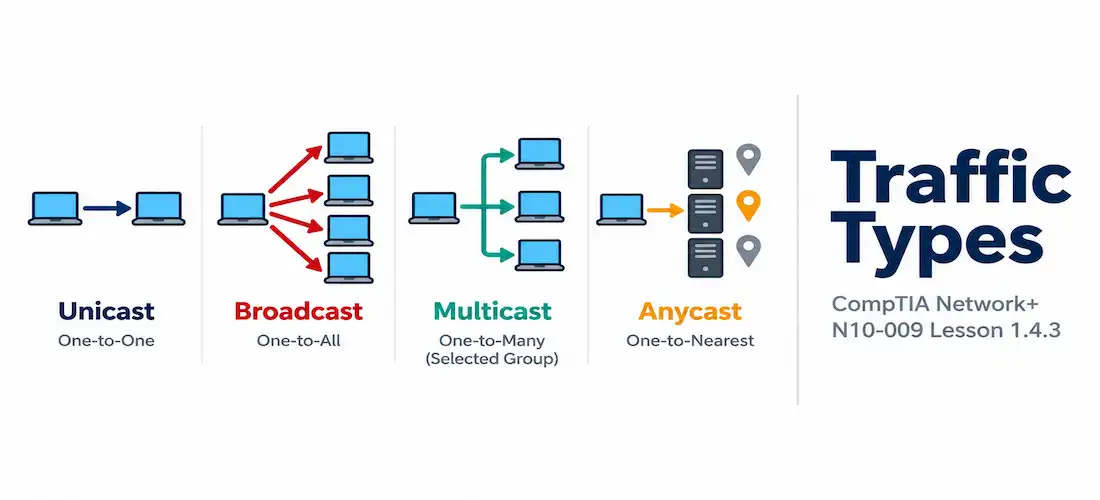
- Define unicast, broadcast, multicast, and anycast traffic and identify a real-world example of each
- Explain why broadcast traffic is confined to a single broadcast domain while other traffic types are not
- Describe how multicast group membership works at a conceptual level
- Explain how anycast allows multiple servers to share a single IP address, and why this is useful for services like DNS and CDNs
- Recognize each traffic type based on its destination address pattern in captured traffic
Key Terms
| Term | Definition |
|---|---|
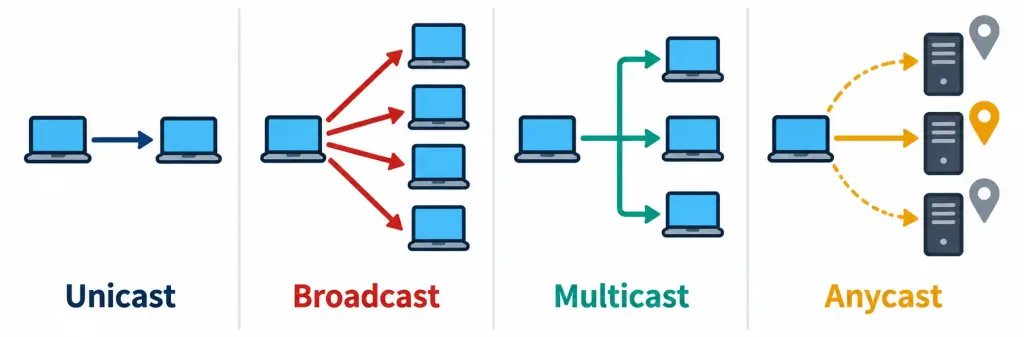
| Unicast | Traffic sent from one source to exactly one specific destination |
| Broadcast | Traffic sent from one source to every device within a broadcast domain, whether or not each device wants it |
| Multicast | Traffic sent from one source to a specific group of interested receivers who have joined that group, without reaching uninterested devices |
| Anycast | Traffic sent to a single IP address that is simultaneously advertised by multiple physical servers, with the network delivering it to the nearest (topologically closest) instance |
| Multicast Group | A set of devices that have explicitly joined a particular multicast address to receive traffic sent to it |
| IGMP (Internet Group Management Protocol) | The protocol hosts use to inform local routers/switches which multicast groups they want to receive traffic for |
Explanation
Four Ways to Address a Destination
Every packet on a network needs a destination, but “destination” doesn’t always mean a single specific device. Lesson 1.2.1 introduced the concept of a broadcast domain when explaining that routers, unlike switches, stop broadcast traffic from propagating beyond the local network — but it didn’t fully explain what broadcast traffic actually is, or how it fits alongside the other ways a single packet can be addressed. This lesson covers all four traffic types Network+ expects you to distinguish: unicast, broadcast, multicast, and anycast — each representing a fundamentally different answer to the question “who should receive this?”
Unicast: One Sender, One Receiver
Unicast is by far the most common traffic type on any network, and it’s the default assumption unless a scenario specifically indicates otherwise: one source sends data to exactly one specific destination, identified by that destination’s own unique IP address. Loading a web page, sending an email, establishing an SSH session, and the vast majority of the TCP and UDP traffic covered in the previous two lessons are all unicast — a single client talking to a single server, or a single server responding to a single client. There’s nothing exotic about unicast conceptually; it’s worth defining clearly here mainly because the other three traffic types are best understood by contrast against this default, one-to-one baseline.
Because unicast is the default, exam scenarios rarely describe it explicitly by name the way they do for the other three traffic types — instead, a scenario simply describes an ordinary client-server interaction, and correctly identifying it as unicast is often more about recognizing the absence of any broadcast, multicast, or anycast characteristics than about spotting a specific unicast-defining detail. If a scenario doesn’t mention a broadcast address, group membership, or multiple servers sharing an address, it’s almost certainly describing unicast traffic.
Broadcast: One Sender, Everyone in the Domain
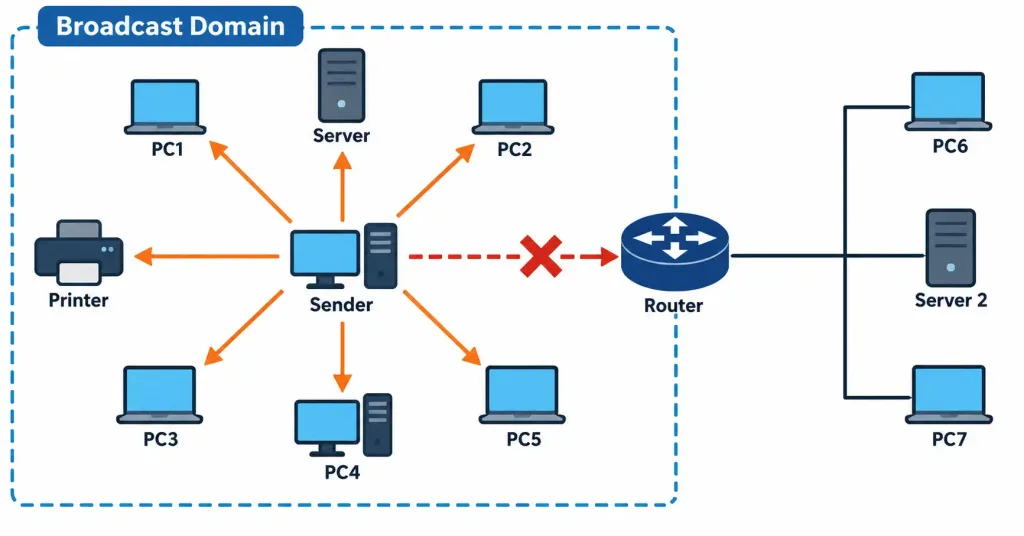
Broadcast traffic is sent from one source to every device within a broadcast domain, regardless of whether each individual device actually wants or needs that data. The destination address for an IPv4 broadcast is typically 255.255.255.255 (or a subnet’s specific broadcast address, such as 192.168.1.255 for the 192.168.1.0/24 network), and every device on that local network segment receives and processes the broadcast, whether it’s relevant to them or not.
Two protocols already covered in this course rely directly on broadcast traffic:
- DHCP clients broadcast a discovery message when first requesting an IP address, since a new client has no way of knowing a DHCP server’s specific address yet — broadcasting ensures the message reaches any DHCP server present on the local segment, without needing to know its address in advance.
- ARP (Address Resolution Protocol) requests are broadcast to ask “who has this IP address?” across the local network, since the sender doesn’t yet know which specific device’s MAC address corresponds to the IP address it’s trying to reach.
Recall directly from Lesson 1.2.1 that routers stop broadcast traffic from crossing into other networks — this is precisely why broadcast domains are bounded by routers rather than switches, and it’s also exactly why the DHCP and ARP examples above only work within a single local network segment; a device on a different network entirely, on the other side of a router, would never see that broadcast at all.
It’s worth distinguishing two flavors of IPv4 broadcast that are easy to conflate: a limited broadcast uses the address 255.255.255.255 and is never forwarded by any router under any circumstances, regardless of configuration — this is the address DHCP discovery messages typically use, since the sending device doesn’t even have an IP address yet and can’t calculate its own subnet’s specific broadcast address.
A directed broadcast, by contrast, targets a specific subnet’s broadcast address (such as 192.168.1.255 for the 192.168.1.0/24 network) from outside that subnet; most modern routers are configured by default to drop directed broadcasts as well, largely as a security measure, since directed broadcasts have historically been abused in certain denial-of-service attack techniques. For Network+ purposes, the practical takeaway is the same either way: broadcast traffic, in virtually all normal production network configurations, does not cross router boundaries.
Multicast: One Sender, an Interested Group
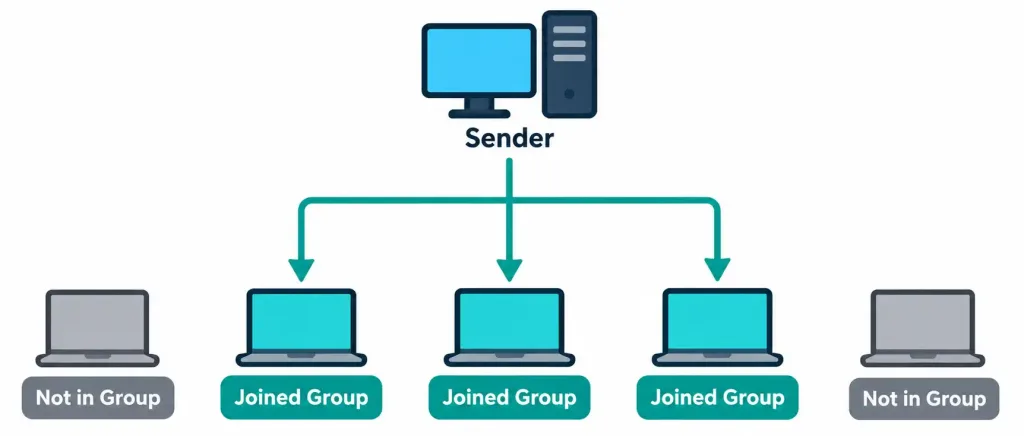
Multicast occupies a useful middle ground between unicast’s one-to-one model and broadcast’s one-to-everyone model: traffic is sent to a specific multicast group, and only devices that have explicitly joined that group receive it — uninterested devices on the same network segment never see the traffic at all, unlike with broadcast. IPv4 multicast addresses are drawn from a dedicated reserved range, 224.0.0.0 through 239.255.255.255, immediately distinguishing multicast traffic from ordinary unicast addresses in a packet capture.
Devices join and leave multicast groups using IGMP (Internet Group Management Protocol), which lets a host inform its local router or switch “I want to receive traffic sent to this specific multicast address,” and lets that same infrastructure know when a host is no longer interested, so multicast traffic isn’t needlessly forwarded to segments with no interested receivers.
Common real-world multicast use cases include:
- Video conferencing and IPTV-style streaming to a live audience, where sending one copy of the stream to a multicast address is far more efficient than the source establishing a separate unicast stream to every single viewer individually.
- Routing protocol updates, where protocols like OSPF use dedicated multicast addresses (rather than broadcast) to communicate with other routers running the same protocol, without needlessly involving every device on the segment that has no interest in routing updates at all.
- Financial market data distribution, where trading platforms need to deliver the same real-time price feed simultaneously to hundreds or thousands of subscribing systems with minimal latency — a scenario where multicast’s single-copy efficiency and low overhead make a meaningful difference at the scale and speed these systems operate at.
The efficiency argument behind multicast is worth internalizing directly: if a source needs to send the same data to 500 interested recipients on a shared network, unicast would require 500 separate copies of that data traversing the network, while multicast requires only one copy, which network infrastructure replicates only at the points where it’s actually needed to reach interested receivers. This makes multicast dramatically more efficient than unicast for any genuinely one-to-many distribution scenario, and dramatically more targeted than broadcast, since it doesn’t burden uninterested devices with irrelevant traffic at all.
The mechanism behind this efficiency is worth understanding conceptually: multicast-aware routers build what’s effectively a distribution tree rooted at the source, branching out only toward network segments that actually have at least one interested receiver (as reported via IGMP), and a single copy of the multicast stream is only duplicated at branch points in that tree where it needs to reach multiple downstream paths.
A segment with zero interested receivers never receives a copy at all, and a segment with a hundred interested receivers still only needs one copy delivered to that segment, since the local switch or router handles final delivery to each interested local host. This tree-based replication is precisely how multicast avoids both unicast’s redundant-copies problem and broadcast’s forward-to-everyone problem simultaneously.
It’s also worth knowing that multicast traffic can be deliberately scoped to limit how far it propagates, typically using a Time to Live (TTL) value on the multicast packets themselves — a low TTL confines the multicast stream to a small local area, while a higher TTL allows it to be forwarded further across a multicast-enabled network. This gives administrators fine-grained control over exactly how widely a given multicast stream is allowed to spread, a level of control that simply doesn’t exist for broadcast traffic, which is confined only by the broadcast domain boundary itself with no finer-grained option.
Anycast: One Address, Multiple Locations, Nearest Wins
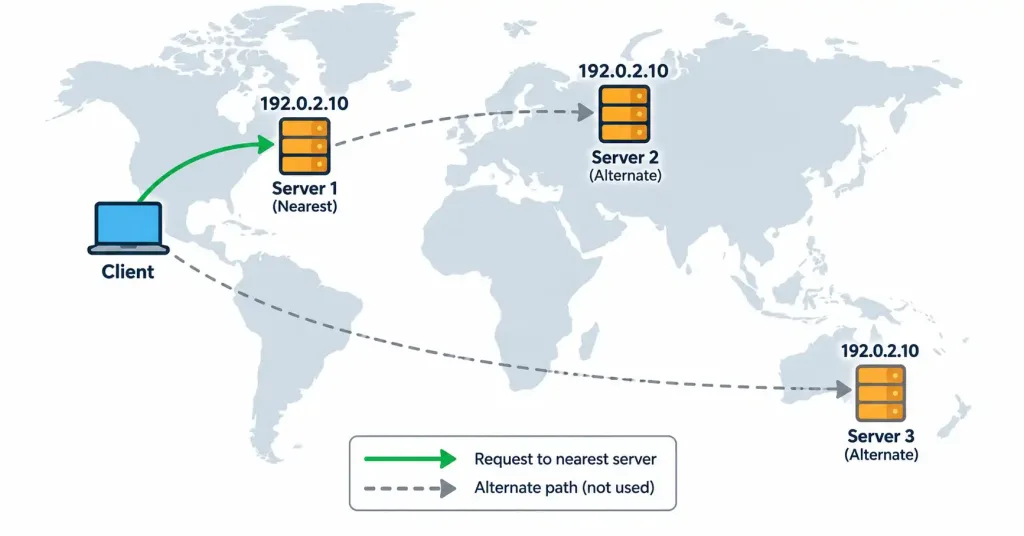
Anycast solves a different problem entirely: rather than describing how many receivers get a copy of the same data (which is what distinguishes unicast, broadcast, and multicast from each other), anycast describes a situation where the same IP address is simultaneously advertised by multiple, physically distributed servers, and the network’s own routing infrastructure delivers any given request to whichever advertised instance is topologically nearest to the sender — without the sender needing to know or care which physical server actually answered.
This is precisely the mechanism behind two services already covered in this course:
- DNS root and top-level servers are anycast — the same well-known IP addresses are advertised from dozens of physical locations worldwide, and a query from anywhere on the internet is automatically routed to a nearby instance, dramatically reducing lookup latency compared to every query worldwide traveling to a single physical server.
- CDN edge servers, covered in Lesson 1.2.3, commonly use anycast for exactly the same reason: a user’s request for cached content is automatically routed to a nearby edge server sharing the CDN’s advertised anycast address, rather than requiring the CDN to somehow direct different users to different explicit IP addresses based on their location.
A subtle but frequently tested point: from the perspective of a single packet capture, anycast traffic is indistinguishable from ordinary unicast traffic — it’s still one source sending to one destination IP address, using a completely ordinary-looking unicast packet. What makes it anycast isn’t anything visible in the packet itself; it’s the fact that the same destination address is being simultaneously advertised from multiple physical locations at the routing/topology level, a detail invisible from within any single packet.
The mechanism that actually makes anycast work sits at the routing layer, typically using BGP (the routing protocol introduced in Lesson 1.4.1’s port list, running on TCP port 179): multiple physically separate locations each advertise routes to the exact same IP address block via BGP, and ordinary internet routing — which is always trying to find the best, typically shortest, path to any given destination — naturally sends each request toward whichever advertised source is closest from that request’s point of origin, without any special anycast-specific mechanism required beyond normal route advertisement and path selection.
This is precisely why anycast requires no special handling anywhere in the path between a client and the server that ultimately answers — from routing’s perspective, it’s simply forwarding traffic toward the best available route to a given address, which happens to be a different physical destination depending on where the request originated.
Side-by-Side Comparison
| Traffic Type | Sender-to-Receiver Relationship | Crosses Router Boundaries? | Example |
|---|---|---|---|
| Unicast | One-to-one | Yes | Loading a web page |
| Broadcast | One-to-everyone in the local domain | No — stopped by routers | DHCP discovery, ARP requests |
| Multicast | One-to-an-interested-group | Yes, with proper multicast routing configuration | Video conferencing, OSPF updates |
| Anycast | One-to-nearest-instance-of-many | Yes | DNS root servers, CDN edge servers |
Choosing the Right Traffic Type
Exam scenarios in this domain typically describe a communication need and expect you to identify which traffic type actually fits, rather than asking for a bare definition. A few reliable questions help make that identification quickly:
- Does the sender know exactly which single device it’s trying to reach, and does only that one device need the data? If yes, it’s unicast — the default assumption for the overwhelming majority of ordinary network communication.
- Does the sender need to reach every device on the local segment because it doesn’t yet know a specific address, or because every device genuinely needs to see the message? If yes, it’s broadcast — but remember this only works within a single broadcast domain.
- Does the sender need to reach a specific, known set of interested subscribers, potentially spread across multiple network segments, without bothering anyone else? If yes, it’s multicast — and the presence of explicit “joining” or “subscribing” language in a scenario is a strong signal.
- Does the sender want a request answered by whichever of several identical, geographically distributed servers happens to be closest, without needing to know or care which one specifically responds? If yes, it’s anycast — and look for language about global distribution, redundancy, or minimizing latency for geographically dispersed users.
These four questions, asked in order, resolve the overwhelming majority of scenario-based traffic-type questions on the exam, precisely because each traffic type answers a genuinely different underlying need rather than being interchangeable options for the same problem. A well-written scenario question is really just describing one of these four underlying needs in narrative form — the skill being tested is translating that narrative back into the correct traffic-type label, not memorizing definitions in isolation from how they’re actually applied.
A Complete Example: One Network, All Four Traffic Types
Consider a single corporate network to see all four traffic types operating side by side, each solving a distinct problem. When an employee’s laptop first connects to the network, it sends a broadcast DHCP discovery message, since it doesn’t yet know a specific DHCP server’s address and needs to reach whichever server happens to be listening on the local segment.
Once configured, that same laptop loads the company’s internal HR portal — an entirely ordinary unicast exchange between the laptop and a specific internal web server. Later, the employee joins a company-wide town hall video stream broadcast (in the everyday, non-technical sense of the word) to every office location simultaneously; the network delivers this efficiently as multicast, with only offices that have employees actually watching receiving a copy of the stream, rather than needlessly sending it to networks with no interested viewers.
Finally, when that same laptop resolves a public domain name via DNS, the query is transparently routed via anycast to whichever DNS resolver happens to be topologically nearest to the company’s network at that moment — a detail entirely invisible to the employee and, at the packet level, indistinguishable from an ordinary unicast DNS query to a single fixed server.
This single scenario captures the practical reality of modern networking: these four traffic types aren’t competing alternatives an architect chooses between for an entire network — they coexist constantly, each handling the specific kind of communication it’s actually suited for, often within the same few minutes of a single user’s ordinary activity.
A Forward Look: IPv6 and the Disappearance of Broadcast
It’s worth flagging one detail that will matter more once this course reaches IPv6 addressing directly: IPv6 has no broadcast traffic type at all. Everything broadcast accomplishes in IPv4 — including functions like ARP’s address resolution role — is handled in IPv6 through multicast instead, using a reserved set of well-known multicast addresses for these local-network functions.
This isn’t just a minor implementation detail; it reflects a deliberate design philosophy in IPv6 that favors multicast’s targeted efficiency over broadcast’s blunt, send-to-everyone approach, even for the kinds of local housekeeping tasks that IPv4 has traditionally handled via broadcast. Keep this in mind as a preview — for now, in this lesson’s IPv4-focused context, broadcast remains a distinct, actively used traffic type, but it’s worth recognizing that this is not a universal, protocol-independent feature of networking in general.
Recognition-Level Verification Concepts
This objective is about recognizing traffic types from their addressing pattern rather than configuring anything by hand:
- A destination address of
255.255.255.255, or a subnet-specific broadcast address (all host bits set to 1), signals broadcast traffic. - A destination address in the
224.0.0.0–239.255.255.255range signals multicast traffic. - Any other ordinary-looking destination IP address could be either unicast or anycast — the packet itself provides no way to tell the difference, since the distinguishing factor (multiple advertised locations for the same address) exists only at the routing/topology level, not within the packet.
Common Exam Traps
- Broadcast traffic is confined to a single broadcast domain because routers stop it — this is the single most important fact connecting this lesson back to Lesson 1.2.1. Multicast and anycast, by contrast, can and do cross router boundaries under appropriate configuration.
- Multicast requires explicit group membership (via IGMP); broadcast does not. A device receives broadcast traffic automatically just by being on the segment, whereas multicast traffic only reaches devices that have actively joined the relevant group.
- Anycast is invisible at the packet level — don’t expect a special “anycast flag” or address range; the only IPv4 range reserved for a specific traffic type in this lesson is multicast’s 224.0.0.0/4. Anycast uses completely ordinary-looking unicast-style addresses, and its behavior only reveals itself as multiple physical servers all legitimately answering for the same address at different locations.
- Don’t confuse multicast’s efficiency benefit with broadcast’s simplicity. Multicast requires more infrastructure support (IGMP, multicast-aware routing) to function correctly, while broadcast works with zero additional configuration — but multicast’s targeting makes it dramatically more efficient and less disruptive at scale.
- DHCP and ARP are the two broadcast examples most likely to appear in exam scenarios — remember both specifically use broadcast because the sender doesn’t yet know the specific address it needs to reach.
- Anycast and load balancing solve related but distinct problems, and it’s easy to blur them together. Load balancing (covered in Lesson 1.2.3) distributes traffic across multiple servers within a single location using a device like a load balancer; anycast distributes traffic across multiple geographically separate locations using ordinary internet routing, with no dedicated load-balancing appliance required at all. A CDN or global DNS deployment commonly uses both together — anycast to route a user to the nearest region, and a load balancer within that region to distribute traffic across the servers actually present there.
- A limited broadcast (255.255.255.255) is never forwarded by any router, under any configuration — don’t assume a sufficiently permissive router configuration could somehow allow it through; this restriction isn’t a configurable firewall-style rule, it’s fundamental to how broadcast addressing works.
Lesson 1.4.3 Practice Questions
Traffic Types: Unicast, Multicast, Anycast, Broadcast · 17 questions · Network+ N10-009, Domain 1.0
Which traffic type describes one source sending data to exactly one specific destination?
A laptop that has just joined a network sends a DHCP discovery message without knowing any DHCP server's address in advance. Which traffic type is being used?
Based on this destination address, which traffic type is most likely being used?
Which two of the following are true about multicast traffic?
A global company advertises the same public DNS resolver IP address from data centers on three continents. A user's query is automatically routed to whichever data center is topologically nearest. Which traffic type is this?
Why can a single packet capture never conclusively prove that a given packet is anycast rather than ordinary unicast?
Based on this destination address, which traffic type is being used?
Which two of the following correctly describe why broadcast traffic does not cross router boundaries?
A trading platform needs to deliver the same real-time price feed to 2,000 subscribing systems simultaneously, with minimal network overhead. Which traffic type is the best fit?
What role does IGMP play in multicast traffic?
Based on this brief packet capture summary, which two traffic types are represented?
A network architect wants users worldwide to be routed to the nearest CDN edge server, then have that region's load balancer distribute traffic among the servers actually present there. Which two concepts are being combined?
Which statement about IPv6 and broadcast traffic is correct?
Which two statements correctly distinguish a limited broadcast from a directed broadcast?
A device sends an ARP request asking who has a specific IP address on the local network, since it doesn't yet know the corresponding MAC address. Which traffic type is this?
Why is multicast generally more efficient than unicast for one-to-many distribution to a large number of interested recipients?
A multicast stream is configured with a low TTL value. What is the most likely effect of this configuration?
Summary
Unicast (one-to-one) is the default, most common traffic type, against which the other three are best understood by contrast
Broadcast (one-to-everyone in a broadcast domain) is used by protocols like DHCP and ARP when a sender doesn't yet know a specific destination address, and is stopped by routers, confining it to a single local network segment
Multicast (one-to-an-interested-group) uses a dedicated IPv4 address range (224.0.0.0–239.255.255.255) and IGMP-based group membership to efficiently deliver the same data to many interested receivers without burdening uninterested devices
Anycast (one-address-many-locations, nearest wins) lets services like DNS root servers and CDN edge servers advertise the same IP address from multiple physical locations, with routing automatically delivering each request to the nearest instance
Anycast traffic is indistinguishable from ordinary unicast traffic at the packet level — its defining characteristic exists only at the routing/topology level, not within any single packet



